This thread has been locked.

If you have a related question, please click the "Ask a related question" button in the top right corner. The newly created question will be automatically linked to this question.

RTOS/CC2640R2F: RTOS Analyizer:Execution Graph does not work on simple peripheral example project

Part Number: CC2640R2F

Tool/software: TI-RTOS

Hello,

I have followed the guide here:  

I can get the hello project to show the execution graph and everything works as expected.  When I attempt the same .cfg file changes on the simple peripheral project I cannot get the execution graph to work, further the Live Session tab is always empty.  

I am using simplelink_cc2640r2_sdk_2_40_00_32 and xdctools_3_51_01_18_core with Code Composer Studio 9.0.1 on linux.

My current config file below.

0876.app_ble.cfg

Beyond changes in this file, The example project is unchanged.

  • Hi Chris,

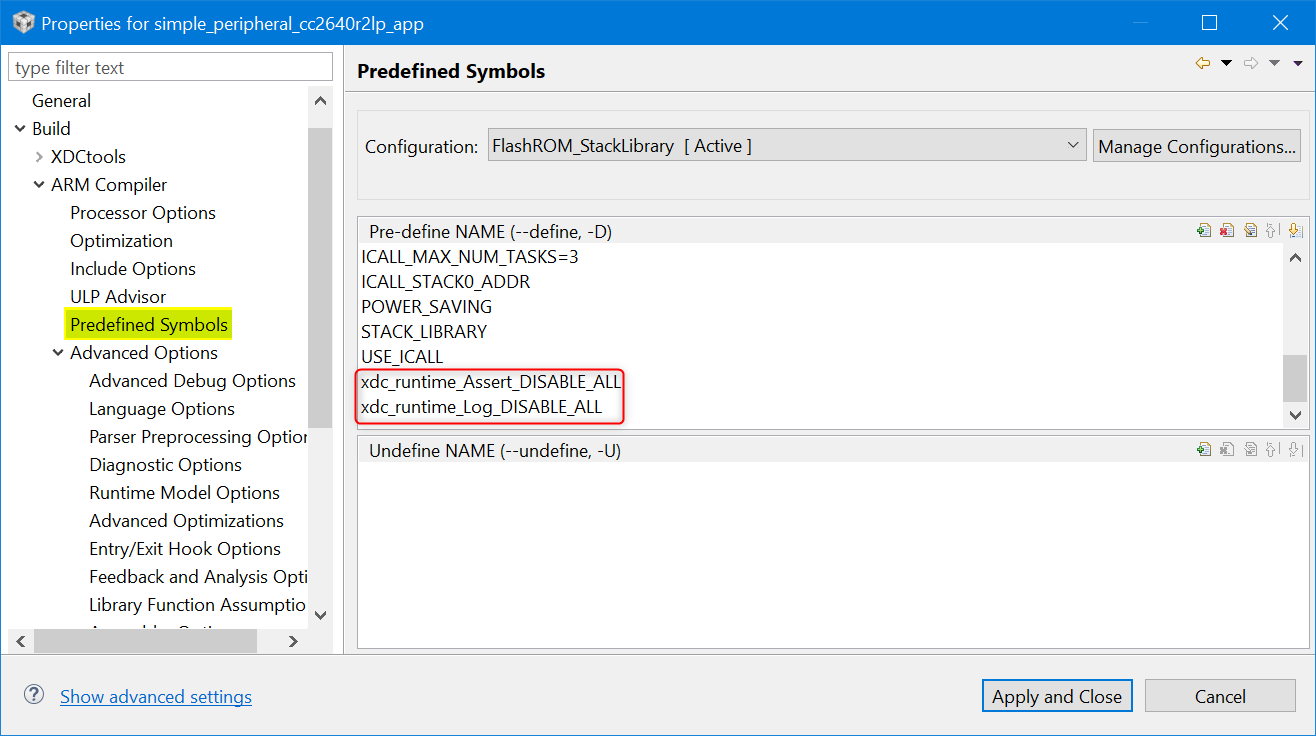
    The BLE examples are structured slightly differently and they include some compiler options that disable things. Can you remove the logs (and assert) defines from the project settings and rebuild and run. 

    If it does not work, are you at least getting Log records in ROV->LoggerStopMode->Records?

    Todd