This thread has been locked.

If you have a related question, please click the "Ask a related question" button in the top right corner. The newly created question will be automatically linked to this question.

CC2640R2F: iOS Starter App OAD

Part Number: CC2640R2F

Hi team,

I use CC2640R2 LP, CC2640R2 SDK 3.20, and iPhone 6S.

I trying to experiment with default on-chip OAD examaple. I tested OAD with BTool - all is OK.

Now I try to perform update with Starter app. To do this i sent simple_peripheral_cc2640r2lp_oad_onchip_app_FlashROM_oad.bin file to phone and copy/share the file with Starter app. Message that the file was copied appears.

But when I try to perform update I have this error:
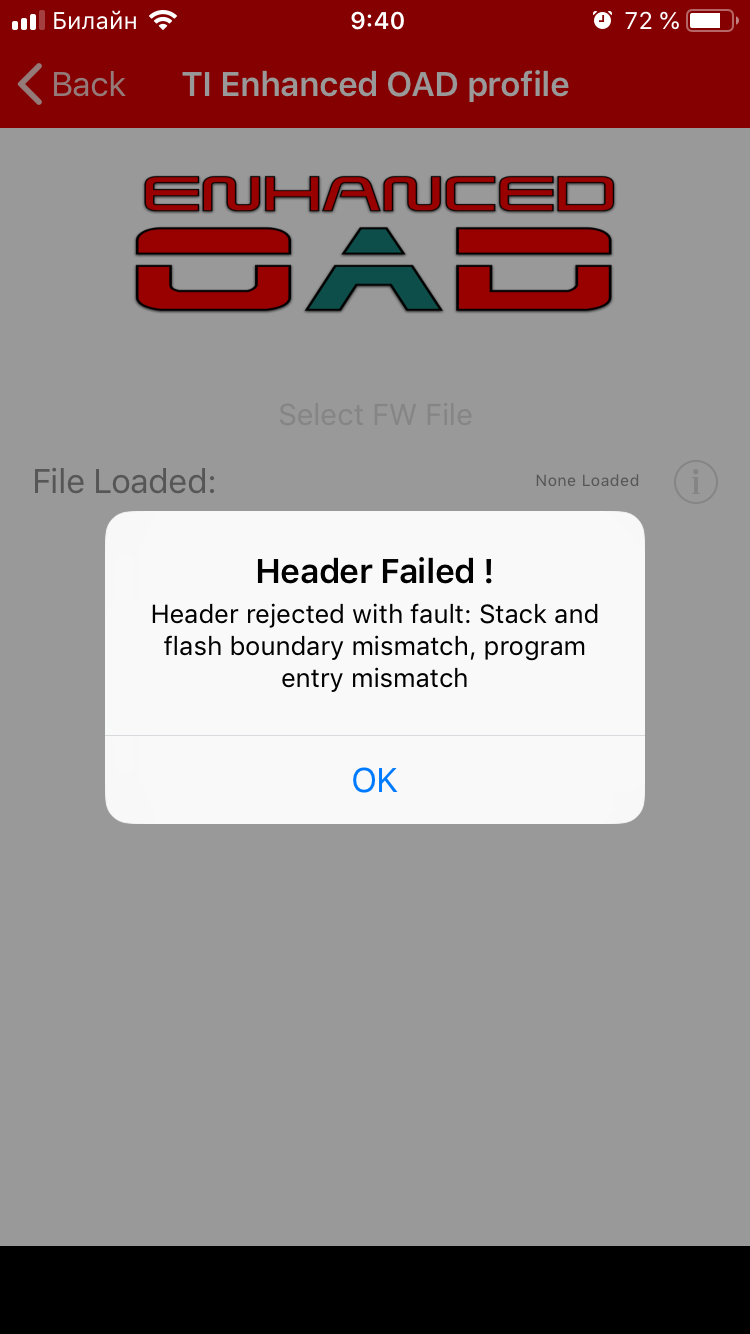
Also I cannot select exact file to download, because "Select FW file" is inactive. SensorTag app have the same issue. What I'm doing wrong?

  • Hi,

    There has been some problems on the iOS app, we are working on it. Will let you know once we have pushed the fix to the apple store.

  • Hi Christin,

    Thank you for the answer!

    Now I tried to use SimpleLink Starter App for Android but it have no option to perform OAD:

  • What's your android OS version? and what's the SimpleLink Starter App version on this android phone?

    Can you also try to do the following:

    Q: When switching sample applications on my board or LaunchPad, my iOS or Android device is not able to "see" new Characteristics or Services

    A: This condition occurs since the smart device caches GATT attribute handles in order to speed up the re-connection process. For example, when reprogramming the device with Project Zero after it was previously running SimplePeripheral will show the "old" Simple GATT Profile characteristics in a BLE app such as Light Blue or BLE Scanner. To force the phone to re-discover the attributes the phone's BT GATT cache must be cleared.  If the device was previously paired/bonded, tap the device name in the Bluetooth settings menu and select Forget this Device or Unpair depending on your phone OS version. Next, complete the following procedure based on iOS or Android:
    In iOS 10 and earlier, toggle Aeroplane mode ON then OFF in the Settings or Control Center menu (this also switches the Bluetooth radio off then on). For iOS 11 and later, you must toggle Bluetooth OFF then ON from the Settings > Bluetooth menu due to changes on how the Bluetooth radio is manged in these iOS versions
    On Android, the procedure can vary by make and model, but most recent versions can choose Settings > Apps > Scroll over to All > Choose Bluetooth Share and tap on Clear Cache. Just as with iOS, un-pair the device if it was previously bonded.

  • Christin,

    thank you for supporting me!

    I know about the GATT attribute cache, but this problem is not related to it. Is I go to Service Explorer I see OAD Reset service and it's characteristic.

    Also I can manually write "1" to it and the device will rebooted to Persistant App. And then, I can connect to the Persistant App and perform OAD.

    I think that there is bug in Android App: it does not show OAD Reset Service in Sensor View, even when this service is exist and Service Explorer show it.

  • Hi,

    Thanks for reporting, I will test it out and report it back to our app developer.

    Can you specify which android phone and OS version are you using?

  • Christin,

    iOS 12.3.1

    Android - 8.1

  • Hi, 

    The fix for iOS app will be pushed to the public within a week or two.

    We are still validating the android app bug/fix.

    If this is ok for you, I would like to close this thread.