This thread has been locked.

If you have a related question, please click the "Ask a related question" button in the top right corner. The newly created question will be automatically linked to this question.

CC2640R2F: How can I use RTLS Toolbox with rtls_master and rtls_slave projects without using Python script?

Part Number: CC2640R2F


Hello,

I'm trying to build a project involving Time Of Flight technique. I also use a sensor connected to the I2C Serial Port of the Launchpad, which has its own C Language API.

To do this, I need to get burst samples from slave node to master node using BLE and obtain the RSSI. I already read about this project in TI Documentation pages and they use a Python script to configure the ToF settings and to establish a connection between master and slave nodes in order to get information about RSSI and Tick values.

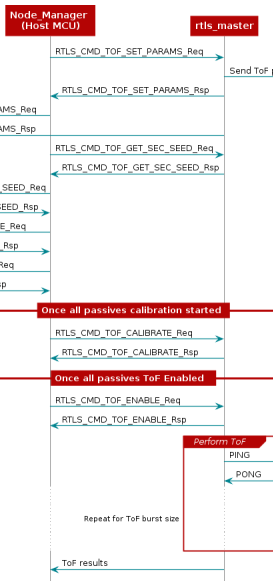
I tried to do it modifying the rtls_master project calling the Application functions shown in this sequence diagram below from the main.c file but it didn't work for me.

So, I would like to do all these things only using rtls_master and rtls_slave projects written in C and modifying them properly in order to be able to establish a connection between nodes and to be able to handle the burst stats.

Many thanks!   

  • Hi,

    Assigning a team member to look into your question.

  • Hi,

    To answer your question, I would need you to be more specific in what did not work for you. Anything in particular in the above sequence that didn't work?

    ----

    If you don't want to use the Python portion of the provided RTLS Toolbox, which implies that you are excluding the use of a passive node in your network, I would recommend that you have a look at the sequence diagram in Setup ToF using Python. The sequence diagram you are referring to above is a diagram of how the ToF solution is implemented as part of the toolbox, and in your (assumed) simplified master/slave use case you don't necessarily need to concern yourself with all of those details. What is more important is to have a look at how you replace the Python interface, and follow the sequence of events between the host side (Python portion) and the rtls_master. As illustrated in the following snippet:


    In this case you should have a look at the events between the host computer and the rtls_master, and how rtls_master.c implements the dispatcher functionality. This would at least require you to edit:

    1. Outgoing data, master -> slave:

    See how "RTLSMaster_processRtlsMsg(...)" is dispatching the events in question (the above snippet). Instead of these events being dispatched (connection, sync, sending data), you could move the functionality from rtls_ctrl.c and hard-code the sequence into your application. After the connection is established, you should be able to enable ToF.

    2. Incoming data, slave -> master:

    The RTLSHost_sendMsg(...), in rtls_ctrl_tof.c,  is used to send the slave data over uNPI. In your case you might want to make this function a callback, and have the data returned to your application instead (in the case of asynchronous communication, like calibration). 

    Best regards,

    Vetle