


Part Number: CC2564MODA
Hi,
My customer has troubles using HCITester with CC2564B.
Software environments:
HCITester version 3.0.0.37
ServicePack CC256XB_BT_SP v1.8
Customer refers below document:
http://www.ti.com/lit/ml/swru136b/swru136b.pdf
PC and the target is connected with FTDI cable.
Serial port is configured as Three Wire:

Customer also tried Hardware Flow control, but results are the same.
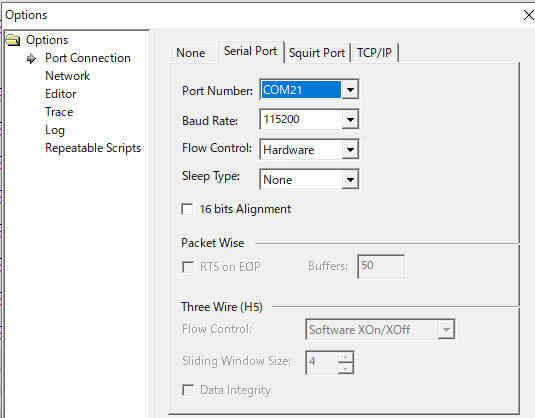
Here are some steps customer did:
1) Change XML file(command library) to TIInit_6.7.16.xml which comes with CC256XB_BT_SP.
2) Open BTS file(initscripts-TIInit_6.7.16_bt_spec_4.1.bts)
3) Copy BTS file and replace all “5000, 0x00” with “5000, any” (as described in section 3.2 in swru136.pdf)
4) Execute the script
Issues
1) As soon as the script is executed. Script parse error is generated at line#1.
#-------------------------------------------------------------------------------- <== here
It seems the ‘#’ is not recognized as “comment line”.
If another “#” is added at the beginning of the line, the error is gone. Why?
2) After the error 1) is removed, the 1st command (changing UART baudrate) always fails with timeout
|
14:58:20.430 ERROR - Timeout waiting for event HCI_Command_Complete_VS_Update_Uart_HCI_Baudrate_Event |
|
14:58:20.430 ERRORed Line (9): Wait_HCI_Command_Complete_VS_Update_Uart_HCI_Baudrate_Event 5000, any, 0xff36, 0x00 |
|
14:58:20.430 -- |
|
14:58:20.430 *** Script End *** |
|
14:58:20.430 -- |
Could you tell me what goes wrong?
Thanks and regards,
Koichiro Tashiro
