This thread has been locked.

If you have a related question, please click the "Ask a related question" button in the top right corner. The newly created question will be automatically linked to this question.

CCS/CC1352R: Where is RTC timer overflow callback in SimpleLink SDK with TI-RTOS?

Part Number: CC1352R
Other Parts Discussed in Thread: CC2652P

Tool/software: Code Composer Studio

Hi,

I use SimpleLink SDK v4.20, CC2652P, CCS v10.1.

This is my clock config.

This clock's tick period is 10us, and it works fine on TI-RTOS.

The clock is 32bit, so when the timer counts full from 0, it takes 0xFFFFFFFF * 10us, this is about 12 hours. After the timer goes to 0xFFFFFFFF, then it goes to 0.

My application software need to know when the timer overflows to 0 from 0xFFFFFFFF, and I can not find this "overflow callback".

So my question is how to know when the timer overflows?

  • Hi Yingtao,

    Assigning an expert to comment. 

    Thanks, 
    Elin 

  • Hi Yingtao,

    There is no overflow callback as the Clock module itself cannot overflow. The Clock module allows you to setup a timer with at most 0xFFFFFFFF - 1 ticks and nothing more. Once it reaches the number you have given it it gives you the callback and then it stops OR restart again, depending on how you configured it. This means that if you for example set a periodic "1000 ticks" clock, it would count to 1000, invoke CB, and start again from 0, not continue on until it overflows.

    May I ask why you need this in your application?

    Best regards,

    Max

  • I use this code to test.

    // clock callback

    void myClockA(UArg arg1)
    {
        Semaphore_post(gSem);
    }

    // a code block

    {

    Clock_Params_init(&clockParams);
    clockParams.period = 0; // 0 is the default, but added for completeness
    clockParams.startFlag = TRUE;
    clockParams.arg = 'A';

    clockHandle = Clock_create(myClockA, 2000*100, &clockParams, NULL);

    Semaphore_pend(gSem, BIOS_WAIT_FOREVER);

    debug_printf("Start Test\n");

    while (1)
    {

        now_time = Clock_getTicks();

        debug_printf("now time : %u\n", now_time);

        delay_ms(1000);
    }

    }

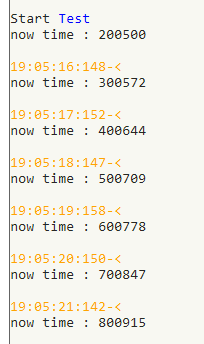
    I create ClockA, set interval 2s. After the callback is triggered, print "Start Test", and then read the clock count every 1s.

    The result is as below:

    So, according to the result, the clock is running continuously, it won't stop.

    And I guess it will keep running until its count reaches 0xFFFFFFFF, and, when this happens, there should be something like overflows callback.

  • Hi Yingtao,

    Clock_getTicks() has nothing to do with the clock object you create as such. Clock_getTicks() returns the current RAT time scaled to the Clock modules domain, it does not return an internal "Clock timer" value. When you create "myClockA", no timer is started (unless you set the "START NOW" flag that is). When you issue "Start myClockA", the current time (using Clock_getTime()) is captured and the RTC channel is configured to match the clock objects timeout value. 

    Basically, Clock is an RTC wrapper and it uses the forever running RTC and has no internal timers. If you are looking for the RTC tick, you could use the RTC DriverLib functions (note that you can only use the "GetValue" without care as the kernel expect to own the configuration of the RTC module):

    dev.ti.com/.../group__aonrtc__api.html