This thread has been locked.

If you have a related question, please click the "Ask a related question" button in the top right corner. The newly created question will be automatically linked to this question.

CCS/LAUNCHXL-CC26X2R1: LAUNCHXL-CC26X2R1 SPI not working with Accelerometer

Part Number: LAUNCHXL-CC26X2R1
Other Parts Discussed in Thread: SYSCONFIG

Tool/software: Code Composer Studio

Is there any sample code or an example to make SPI Acclerometer work with CC2652?

I tried to use SPIMaster in the SDK and modify it. But no luck.
I can't even read device ID (Who_am_I)?

My accelerometer (IIS3DHCC from ST Micro) has value of 0x11 at address 0x0F. But I read 0xFF instead of 0x11.

I need sample code just to read Who_am_I correctly. Then I know how to do the rest.

I got this working in Arduino environment in less than 2 hours. But I can't get it to work in Code Composer even after spending 2 days.

Please help.

Thanks

KM

  • Hi Kiran,

    Have you considered frame format and clock rates of the device in question? Could you share what you are doing in code?

  • Hi M-W;

    I am trying to read WHO_AM_I of IIS3HCC accelerometer from ST Micro. The REG address is 0x0F and value is 0x11 i.e. 17 decimal. But I get 536880248.

    I started with SPIMaster code and removed R89 from the LaunchXL-CC26X2R1, so there is no conflict with the CS pin.

    I changed the speed to 1000000 and I am not using Slave Ready signal (DIO21).

    I commented "sem_wait(&masterSem);". So there is no wait.

    I changed the TX and RX buffers from char to int.

    This what I get on my Terminal;

    Starting the SPI master example

    This example requires external wires to be connected to the header pins. Please see the Board.html for details.

    Master SPI initialized

    Master received: 536880248
    Master received: 536880248
    Master received: 536880248
    Master received: 536880248
    Master received: 536880248
    Master received: 536880248
    Master received: 536880248
    Master received: 536880248
    Master received: 536880248
    Master received: 536880248

    Done

    Please see attached code. I am also including my Arduino code which works and I am trying to implement that in Code Composer.

    Thanks

    KM

    // 3-axis Accelerometer
    // SMicroelectronics IIS3DHH 
    // Arduino Nano
    
    // IIS3DHH Initilization
    #include <SPI.h>
    
    #define SS 10 // Serial Select -> CS on IIS3DHH
    #define MOSI 11 // MasterOutSlaveIn -> SDI
    #define MISO 12 // MasterInSlaveOut -> SDO
    #define SCK 13 // Serial Clock -> SPC on IIS3DHH
    
    #define SCALE_I 0.076294;
    // scale factor: +/- 2.5G full range = 5000mG total range / 65536 counts (16 bit)
    int n = 25; // number of samples
    int x_I,y_I,z_I;  // the sensor values
    int i = 0;
    int j = 0;
    
    double xA_I, yA_I, zA_I;
    
    void setup() {
      
      pinMode(SS, OUTPUT);
      digitalWrite(SS,HIGH);
    // Serial.begin(9600);
      SPI.begin();
      Serial.begin(9600);
    // IIS3DHH Initilization
      Accelerometer_Setup();
      
    delay(1000);
    }
    
    void loop() {
    // IIS3DHH read values
      double zMin_I = 32767;  // minimum sensor value
      double zMax_I = -32767;     // maximum sensor value
      float zTotal_I = 0;
      float zAvg_I = 0;
    
      readValWho_Am_I();
      
      while (i<n) { 
      
      readVal(); // get acc values and put into global variables
      
    // Print ISS3DHH values    
      Serial.print("xA_I = ");
      Serial.print(xA_I, 2);
      Serial.print('\t');
      Serial.print("yA_I = ");
      Serial.print(yA_I, 2);
      Serial.print('\t');
      Serial.print("zA_I = ");
      Serial.println(zA_I, 2);
    
      delay(10); // Adjust for sampling rate (e.g. 10mS = 100Hz. 2mS = 500Hz etc.)
    
    // record the maximum sensor_I value
      if (zA_I > zMax_I) {
        zMax_I = zA_I;
        }
    // record the minimum sensor_I value
      if (zA_I < zMin_I) {
        zMin_I = zA_I;
        }
      zTotal_I = zTotal_I + zA_I;
    
      i++;
      }
    // Calculate Average
      zAvg_I = zTotal_I/i;
      
    // Print ISS3DHH values       
      Serial.println("zAMax_I = " + String(zMax_I)+" mg");
      Serial.println("zAMin_I = " + String(zMin_I)+" mg");
      Serial.println("zA(Max-Min)_I = " + String(zMax_I-zMin_I)+" mg");
      Serial.println("zAAvg_I = " + String(zAvg_I)+" mg");
      
      delay(2000);
      i = 0;
    }
    
    //=========== READ IIS3DHHC REGISTERS ==========
    void readVal()
    {
    byte xAddressByteL = 0x28; // Low Byte of X value (the first data register)
    byte readBit = B10000000; // bit 0 (MSB) HIGH means read register, 
    byte dataByte = xAddressByteL | readBit;
    byte b0 = 0x0; // an empty byte to initiate read register
    //Serial.println("read request:");
    //Serial.println(dataByte);
    
    SPI.beginTransaction(SPISettings(1000000, MSBFIRST, SPI_MODE3));
    digitalWrite(SS, LOW); // SS must be LOW to communicate
    //delay(10);
    SPI.transfer(dataByte); // request a read, starting at X low byte
    byte xL = SPI.transfer(b0); // get the low byte of X data
    byte xH = SPI.transfer(b0); // get the high byte of X data
    byte yL = SPI.transfer(b0); // get the low byte of Y data
    byte yH = SPI.transfer(b0); // get the high byte of Y data
    byte zL = SPI.transfer(b0); // get the low byte of Z data
    byte zH = SPI.transfer(b0); // get the high byte of Z data
    //delay(10);
    digitalWrite(SS, HIGH);
    SPI.endTransaction();
    
    // shift the high byte left 8 bits and merge the high and low
    int xVal = (xL | (xH << 8));
    int yVal = (yL | (yH << 8));
    int zVal = (zL | (zH << 8));
    
    // scale the values into mG
    xA_I = xVal * SCALE_I;
    yA_I = yVal * SCALE_I;
    zA_I = zVal * SCALE_I;
    }
    
    //=========== SETUP IIS3DHHC ==========
    void Accelerometer_Setup()
    {
    
    // write to Control register 1: address 20h
    byte addressByte = 0x20;
    byte ctrlRegByte = 0xC0; // 0xC0 = 1100 0000 : normal mode, incremented addressing // 0x80 = normal mode, do not increment
    
    SPI.beginTransaction(SPISettings(1000000, MSBFIRST, SPI_MODE3));
    digitalWrite(SS, LOW);
    delay(10);
    SPI.transfer(addressByte);
    SPI.transfer(ctrlRegByte);
    delay(10);
    digitalWrite(SS, HIGH);
    SPI.endTransaction();
    
    delay(100);
    
    // write to Control Register 4: address 23h
    addressByte = 0x23;
    // This register configures filter and bandwidth
    ctrlRegByte = 0x00; // FIR Linear Phase, 440Hz
    
    SPI.beginTransaction(SPISettings(1000000, MSBFIRST, SPI_MODE3));
    digitalWrite(SS, LOW);
    delay(10);
    SPI.transfer(addressByte);
    SPI.transfer(ctrlRegByte);
    delay(10);
    digitalWrite(SS, HIGH);
    SPI.endTransaction();
    
    delay(1000);
    }
    
    //=========== READ Who_Am_I REGISTER ==========
    void readValWho_Am_I()
    {
    byte xAddressByteL = 0x0F; // Address of Who_Am_I register
    byte readBit = B10000000; // bit 0 (MSB) HIGH means read register, 
    byte dataByte = xAddressByteL | readBit;
    byte b0 = 0x0; // an empty byte to initiate read register
    //Serial.println("read request:");
    //Serial.println(dataByte);
    
    SPI.beginTransaction(SPISettings(1000000, MSBFIRST, SPI_MODE3));
    digitalWrite(SS, LOW); // SS must be LOW to communicate
    //delay(10);
    SPI.transfer(dataByte); // request a read, starting at X low byte
    byte xL = SPI.transfer(b0); // get the low byte of X data
    
    //delay(10);
    digitalWrite(SS, HIGH);
    SPI.endTransaction();
    
    Serial.print("Who_Am_I = ");
    Serial.println(xL);
    }
    /*
     * Copyright (c) 2018-2019, Texas Instruments Incorporated
     * All rights reserved.
     *
     * Redistribution and use in source and binary forms, with or without
     * modification, are permitted provided that the following conditions
     * are met:
     *
     * *  Redistributions of source code must retain the above copyright
     *     notice, this list of conditions and the following disclaimer.
     *
     * *  Redistributions in binary form must reproduce the above copyright
     *     notice, this list of conditions and the following disclaimer in the
     *     documentation and/or other materials provided with the distribution.
     *
     * *  Neither the name of Texas Instruments Incorporated nor the names of
     *     its contributors may be used to endorse or promote products derived
     *     from this software without specific prior written permission.
     *
     * THIS SOFTWARE IS PROVIDED BY THE COPYRIGHT HOLDERS AND CONTRIBUTORS "AS IS"
     * AND ANY EXPRESS OR IMPLIED WARRANTIES, INCLUDING, BUT NOT LIMITED TO,
     * THE IMPLIED WARRANTIES OF MERCHANTABILITY AND FITNESS FOR A PARTICULAR
     * PURPOSE ARE DISCLAIMED. IN NO EVENT SHALL THE COPYRIGHT OWNER OR
     * CONTRIBUTORS BE LIABLE FOR ANY DIRECT, INDIRECT, INCIDENTAL, SPECIAL,
     * EXEMPLARY, OR CONSEQUENTIAL DAMAGES (INCLUDING, BUT NOT LIMITED TO,
     * PROCUREMENT OF SUBSTITUTE GOODS OR SERVICES; LOSS OF USE, DATA, OR PROFITS;
     * OR BUSINESS INTERRUPTION) HOWEVER CAUSED AND ON ANY THEORY OF LIABILITY,
     * WHETHER IN CONTRACT, STRICT LIABILITY, OR TORT (INCLUDING NEGLIGENCE OR
     * OTHERWISE) ARISING IN ANY WAY OUT OF THE USE OF THIS SOFTWARE,
     * EVEN IF ADVISED OF THE POSSIBILITY OF SUCH DAMAGE.
     */
    
    /*
     *  ======== spimaster.c ========
     */
    #include <stddef.h>
    #include <stdint.h>
    #include <string.h>
    
    /* POSIX Header files */
    #include <pthread.h>
    #include <semaphore.h>
    #include <unistd.h>
    
    /* Driver Header files */
    #include <ti/drivers/GPIO.h>
    #include <ti/drivers/SPI.h>
    #include <ti/display/Display.h>
    
    /* Driver configuration */
    #include "ti_drivers_config.h"
    
    #define THREADSTACKSIZE (1024)
    
    #define SPI_MSG_LENGTH  (30)
    #define MASTER_MSG      ("Hello from master, msg#: ")
    
    #define MAX_LOOP        (10)
    
    static Display_Handle display;
    
    // unsigned char masterRxBuffer[SPI_MSG_LENGTH];
    // unsigned char masterTxBuffer[SPI_MSG_LENGTH];
    
    int masterRxBuffer[SPI_MSG_LENGTH];
    int masterTxBuffer[SPI_MSG_LENGTH];
    
    /* Semaphore to block master until slave is ready for transfer */
    sem_t masterSem;
    
    /*
     *  ======== slaveReadyFxn ========
     *  Callback function for the GPIO interrupt on CONFIG_SPI_SLAVE_READY.
     */
    void slaveReadyFxn(uint_least8_t index)
    {
        sem_post(&masterSem);
    }
    
    /*
     *  ======== masterThread ========
     *  Master SPI sends a message to slave while simultaneously receiving a
     *  message from the slave.
     */
    void *masterThread(void *arg0)
    {
        SPI_Handle      masterSpi;
        SPI_Params      spiParams;
        SPI_Transaction transaction;
        uint32_t        i;
        bool            transferOK;
        int32_t         status;
    
        /*
         * CONFIG_SPI_MASTER_READY & CONFIG_SPI_SLAVE_READY are GPIO pins connected
         * between the master & slave.  These pins are used to synchronize
         * the master & slave applications via a small 'handshake'.  The pins
         * are later used to synchronize transfers & ensure the master will not
         * start a transfer until the slave is ready.  These pins behave
         * differently between spimaster & spislave examples:
         *
         * spimaster example:
         *     * CONFIG_SPI_MASTER_READY is configured as an output pin.  During the
         *       'handshake' this pin is changed from low to high output.  This
         *       notifies the slave the master is ready to run the application.
         *       Afterwards, the pin is used by the master to notify the slave it
         *       has opened CONFIG_SPI_MASTER.  When CONFIG_SPI_MASTER is opened, this
         *       pin will be pulled low.
         *
         *     * CONFIG_SPI_SLAVE_READY is configured as an input pin. During the
         *       'handshake' this pin is read & a high value will indicate the slave
         *       ready to run the application.  Afterwards, a falling edge interrupt
         *       will be configured on this pin.  When the slave is ready to perform
         *       a transfer, it will pull this pin low.
         *
         * Below we set CONFIG_SPI_MASTER_READY & CONFIG_SPI_SLAVE_READY initial
         * conditions for the 'handshake'.
         */
        GPIO_setConfig(CONFIG_SPI_MASTER_READY, GPIO_CFG_OUTPUT | GPIO_CFG_OUT_LOW);
        GPIO_setConfig(CONFIG_SPI_SLAVE_READY, GPIO_CFG_INPUT);
    
        /*
         * Handshake - Set CONFIG_SPI_MASTER_READY high to indicate master is ready
         * to run.  Wait CONFIG_SPI_SLAVE_READY to be high.
         */
        GPIO_write(CONFIG_SPI_MASTER_READY, 1);
        while (GPIO_read(CONFIG_SPI_SLAVE_READY) == 0) {}
    
        /* Handshake complete; now configure interrupt on CONFIG_SPI_SLAVE_READY */
        GPIO_setConfig(CONFIG_SPI_SLAVE_READY, GPIO_CFG_IN_PU | GPIO_CFG_IN_INT_FALLING);
        GPIO_setCallback(CONFIG_SPI_SLAVE_READY, slaveReadyFxn);
        GPIO_enableInt(CONFIG_SPI_SLAVE_READY);
    
        /*
         * Create synchronization semaphore; the master will wait on this semaphore
         * until the slave is ready.
         */
        status = sem_init(&masterSem, 0, 0);
        if (status != 0) {
            Display_printf(display, 0, 0, "Error creating masterSem\n");
    
            while(1);
        }
    
        /* Open SPI as master (default) */
        SPI_Params_init(&spiParams);
        spiParams.frameFormat = SPI_POL0_PHA1;
    //    spiParams.bitRate = 4000000;
        spiParams.bitRate = 1000000; // My change
        masterSpi = SPI_open(CONFIG_SPI_MASTER, &spiParams);
        if (masterSpi == NULL) {
            Display_printf(display, 0, 0, "Error initializing master SPI\n");
            while (1);
        }
        else {
            Display_printf(display, 0, 0, "Master SPI initialized\n");
        }
    
        /*
         * Master has opened CONFIG_SPI_MASTER; set CONFIG_SPI_MASTER_READY high to
         * inform the slave.
         */
        GPIO_write(CONFIG_SPI_MASTER_READY, 0);
    
        /* Copy message to transmit buffer */
        strncpy((char *) masterTxBuffer, MASTER_MSG, SPI_MSG_LENGTH);
    
        for (i = 0; i < MAX_LOOP; i++) {
            /*
             * Wait until slave is ready for transfer; slave will pull
             * CONFIG_SPI_SLAVE_READY low.
             */
         //   sem_wait(&masterSem); // My change
    
            /* Initialize master SPI transaction structure */
         //   masterTxBuffer[sizeof(MASTER_MSG) - 1] = (i % 10) + '0';
            masterTxBuffer[0] = 0x0F;
            memset((void *) masterRxBuffer, 0, SPI_MSG_LENGTH);
        //    transaction.count = SPI_MSG_LENGTH;
            transaction.count = 2;
            transaction.txBuf = (void *) masterTxBuffer;
            transaction.rxBuf = (void *) masterRxBuffer;
    
            /* Toggle user LED, indicating a SPI transfer is in progress */
            GPIO_toggle(CONFIG_GPIO_LED_1);
    
            /* Perform SPI transfer */
            transferOK = SPI_transfer(masterSpi, &transaction);
            if (transferOK) {
              //  Display_printf(display, 0, 0, "Master received: %s", masterRxBuffer);
                Display_printf(display, 0, 0, "Master received: %d", masterRxBuffer);
            }
            else {
                Display_printf(display, 0, 0, "Unsuccessful master SPI transfer");
            }
    
            /* Sleep for a bit before starting the next SPI transfer  */
            sleep(3);
        }
    
        SPI_close(masterSpi);
    
        /* Example complete - set pins to a known state */
        GPIO_disableInt(CONFIG_SPI_SLAVE_READY);
        GPIO_setConfig(CONFIG_SPI_SLAVE_READY, GPIO_CFG_OUTPUT | GPIO_CFG_OUT_LOW);
        GPIO_write(CONFIG_SPI_MASTER_READY, 0);
    
        Display_printf(display, 0, 0, "\nDone");
    
        return (NULL);
    }
    
    /*
     *  ======== mainThread ========
     */
    void *mainThread(void *arg0)
    {
        pthread_t           thread0;
        pthread_attr_t      attrs;
        struct sched_param  priParam;
        int                 retc;
        int                 detachState;
    
        /* Call driver init functions. */
        Display_init();
        GPIO_init();
        SPI_init();
    
        /* Configure the LED pins */
        GPIO_setConfig(CONFIG_GPIO_LED_0, GPIO_CFG_OUT_STD | GPIO_CFG_OUT_LOW);
        GPIO_setConfig(CONFIG_GPIO_LED_1, GPIO_CFG_OUT_STD | GPIO_CFG_OUT_LOW);
    
        /* Open the display for output */
        display = Display_open(Display_Type_UART, NULL);
        if (display == NULL) {
            /* Failed to open display driver */
            while (1);
        }
    
        /* Turn on user LED */
        GPIO_write(CONFIG_GPIO_LED_0, CONFIG_GPIO_LED_ON);
    
        Display_printf(display, 0, 0, "Starting the SPI master example");
        Display_printf(display, 0, 0, "This example requires external wires to be "
            "connected to the header pins. Please see the Board.html for details.\n");
    
        /* Create application threads */
        pthread_attr_init(&attrs);
    
        detachState = PTHREAD_CREATE_DETACHED;
        /* Set priority and stack size attributes */
        retc = pthread_attr_setdetachstate(&attrs, detachState);
        if (retc != 0) {
            /* pthread_attr_setdetachstate() failed */
            while (1);
        }
    
        retc |= pthread_attr_setstacksize(&attrs, THREADSTACKSIZE);
        if (retc != 0) {
            /* pthread_attr_setstacksize() failed */
            while (1);
        }
    
        /* Create master thread */
        priParam.sched_priority = 1;
        pthread_attr_setschedparam(&attrs, &priParam);
    
        retc = pthread_create(&thread0, &attrs, masterThread, NULL);
        if (retc != 0) {
            /* pthread_create() failed */
            while (1);
        }
    
        return (NULL);
    }
    

  • So lets start with a few observations and considerations:

    1) Your Arduino code uses "SPI_MODE3", which is phase 1 polarity 1. In the CC26X2 code you use phase 1 and polarity 0.

    2) Your frame size is still 8-bytes, changing buffers to int from char is not valid. The driver operates on frame size, in this case it expects a byte array and the data offset will be wrong if you make it an int array. 

  • Hi M-W;

    I tried both the items you suggested, but I still get the same output as before.

    I am using ST Micro STEVAL-MKI186V1 board with IIS3DHCC Accelerometer and LaunchXL-CC26X2R1 Eval boards.

    This is how I am doing in Arduino with Nano board and STEVAL-MKI186V1 . It works perfectly.

    -------------------------------------------------------------------------------------------------------------------------------------------

    void readValWho_Am_I()

    {

    byte xAddressByteL = 0x0F; // Address of Who_Am_I register

    byte readBit = B10000000; // bit 0 (MSB) HIGH means read register,

    byte dataByte = xAddressByteL | readBit;

    byte b0 = 0x0; // an empty byte to initiate read register

    //Serial.println("read request:");

    //Serial.println(dataByte);


    SPI.beginTransaction(SPISettings(1000000, MSBFIRST, SPI_MODE3));

    digitalWrite(SS, LOW); // SS must be LOW to communicate

    //delay(10);

    SPI.transfer(dataByte); // request a read, starting at X low byte

    byte xL = SPI.transfer(b0); // get the low byte of X data


    //delay(10);

    digitalWrite(SS, HIGH);

    SPI.endTransaction();


    Serial.print("Who_Am_I = ");

    Serial.println(xL);

    }

     ---------------------------------------------------------------------------------------------------------------------------------------------------------------------------

    Could you please show me how to do the same in SPIMaster example of Code Composer?

    Once I can read Who_Am_I register (Address = 0x0F) with value of 0x11, I can do the rest.

    I just need to know how to set up the SPI transcation for reading Who_Am_I register (Address = 0x0F).

     Thank you very much.

    Regards,

    KM

  • Hi K,

    I would recommend you read the SSI chapter of the technical reference manual to better understand how POL and PHA settings impact the CS. Also I would recommend you to use a logic analyzer to compare the two different cases as this should give you a better overview of what is wrong in your case.

    Based on the accelerometer datasheet and the technical reference manual, you will find you likely want to do something like this:

        /* Open SPI as master (default) */
        SPI_Params_init(&spiParams);
        spiParams.frameFormat = SPI_POL1_PHA1;
        spiParams.bitRate = 1000000; 
        masterSpi = SPI_open(CONFIG_SPI_MASTER, &spiParams);
    
        masterTxBuffer[0] = 0x0F;
        masterTxBuffer[1] = 0x00;
    
        transaction.count = 2;
        transaction.txBuf = (void *) masterTxBuffer;
        transaction.rxBuf = (void *) masterRxBuffer;
    
        /* Toggle CS in SW to access the device*/
        GPIO_write(CONFIG_GPIO_CS, 0);
    
        /* Perform SPI transfer */
        transferOK = SPI_transfer(masterSpi, &transaction);
    
        /* Toggle CS back high */
        GPIO_write(CONFIG_GPIO_CS, 1);

    You can notice that I use a SW based CS instead of the HW one, this because when you operate in the following mode:

    spiParams.frameFormat = SPI_POL1_PHA1;

    The hardware will toggle the CS between every frame (which in your case means every byte) and that is not expected by the other side.

  • Hi M-W;

    I still read wrong WHO_AM_I as shown below;

    Starting the SPI master example
    This example requires external wires to be connected to the header pins. Please see the Board.html for details.

    Master SPI initialized

    Master SPI 2nd initialized

    WHO_AM_I 1st try: 200025e0

    I would like to change my CS from DIO20 to DIO11 as shown in the LaunchPad reference card and the schematic.

    I removed R89, so there is no power to the on board flash (U4). But I think there is some conflict between the on board flash and my STEVAL-MKI186V1 board with IIS3DHCC accelerometer.

    How do I change CS from DIO20 to DIO11? I changed it in ti_drivers_config.h file , but it dosen't let me do it.

    I tried to do it from spimaster.syscfg utility. But it doesn't give option to change CS it to DIO11.

    I am getting the logic analyzer from my office early next week and then I will continue to debug further.

    Thanks

    KM

  • Hi KM,

    The SPI example showcase a "handshake" driver SPI between master and slave. You do not need the extra GPIO signals they use to synchronize to use the SPI, it is just part of the example. You can change CS pin in the .sysconfig view by selecting SPI -> PinMux -> SS Pin. You cannot change it in the ti_drivers_config.c as this will be overwritten as it is generated during build.

    My recommendation is that you do not use CS at all. Which this I mean setting the SPI "Use Hardware" to "None" or "LaunchPad SPI Bus" and setting "mode" to "Three Pin" (no CS) in SysConfig . This allows you to control the CS as a normal GPIO (add it to the GPIO section in SysConfig instead) which allows you to match what the device you interface with expect (that CS is low for the full transfer even if you run POL = 1 PHA = 1). 

  • Hi M-W,

    I tried everything you suggested. But no luck. I still read the same as before;

    Master SPI initialized

    Master SPI 2nd initialized

    WHO_AM_I 1st try: 200025e0

    I completely disconnected my sensor board from LaunchXL-CC26X2R1 board and I still get the same output.

    Looks like SPI cycle is not getting set properly. I checked into the SPIMaster code and I don't see any address for Slave. Looks like everything is done via MasterReady and SlaveReady handshake signals.

    BYW, I found an old MSP32 launch board. I set that as SPISlave and set my LaunchXL-CC26X2R1 as SPIMaster. I connected all the 6 signals and GND as shown in two config files. And every thing works very well.

    I am getting logic analyzer from my office on this Wednesday. Then I will check all these signals on the above setup and then with my sensor board.

    Thanks

    KM

  • Hi Kiran,

    There is no concept of "slave" address in SPI, this is what the CS pin is for, as for data sent over the line, it is all treated the same way. Are you sure you are printing/reading your value out correctly? The value "200025e0" is suspiciously close to what one could expect the RAM address of your structure to be, are you sure you are not simply printing/reading out the value of the pointer instead of the actual value? 

  • Hi M-W;

    In the code you recommended I just added redlined txt;

    /* Open SPI as master (default) */
    SPI_Params_init(&spiParams);
    spiParams.frameFormat = SPI_POL1_PHA1;
    spiParams.bitRate = 1000000;
    masterSpi = SPI_open(CONFIG_SPI_MASTER, &spiParams);


    masterTxBuffer[0] = 0x0F;
    masterTxBuffer[1] = 0x00;


    transaction.count = 2;
    transaction.txBuf = (void *) masterTxBuffer;
    transaction.rxBuf = (void *) masterRxBuffer;


    /* Toggle CS in SW to access the device*/
    GPIO_write(CONFIG_GPIO_CS, 0);


    /* Perform SPI transfer */
    transferOK = SPI_transfer(masterSpi, &transaction);

    transferOK = SPI_transfer(masterSpi, &transaction);
    if (transferOK) {
    Display_printf(display, 0, 0, "Master received: %d", masterRxBuffer);
    }
    else {
    Display_printf(display, 0, 0, "Unsuccessful master SPI transfer");
    }


    /* Toggle CS back high */
    GPIO_write(CONFIG_GPIO_CS, 1);

    That's when I was getting value "200025e0" .

    Then I changed only added code as following;

    transferOK = SPI_transfer(masterSpi, &transaction);
    if (transferOK) {
    Display_printf(display, 0, 0, "Master received: %d", masterRxBuffer[0]);
    }
    else {
    Display_printf(display, 0, 0, "Unsuccessful master SPI transfer");
    }

    Now I get the value "FF". I tried different SPI pins, but still read "FF".

    Tomorrow I am getting the logic analyzer and I will try to capture the cycle and see what's going on.

    Thanks

    KM

  • Hi KM,

    Ok, let us see what you get when you have the analyzer. As for the printout, you are actually printing out the address, not the value:

    Display_printf(display, 0, 0, "Master received: %d", masterRxBuffer)

    The original example has a %s arguments which expects input to be a string pointer. As you changed it to %d, it will instead treat this pointer as an integer which means you do not get the buffer value, you get the address. I think what you want to do is:

    Display_printf(display, 0, 0, "Master received: %d", masterRxBuffer[0])

  • Hi M-W;

    I tried Display_printf(display, 0, 0, "Master received: %d", masterRxBuffer[0]), but I got 0.

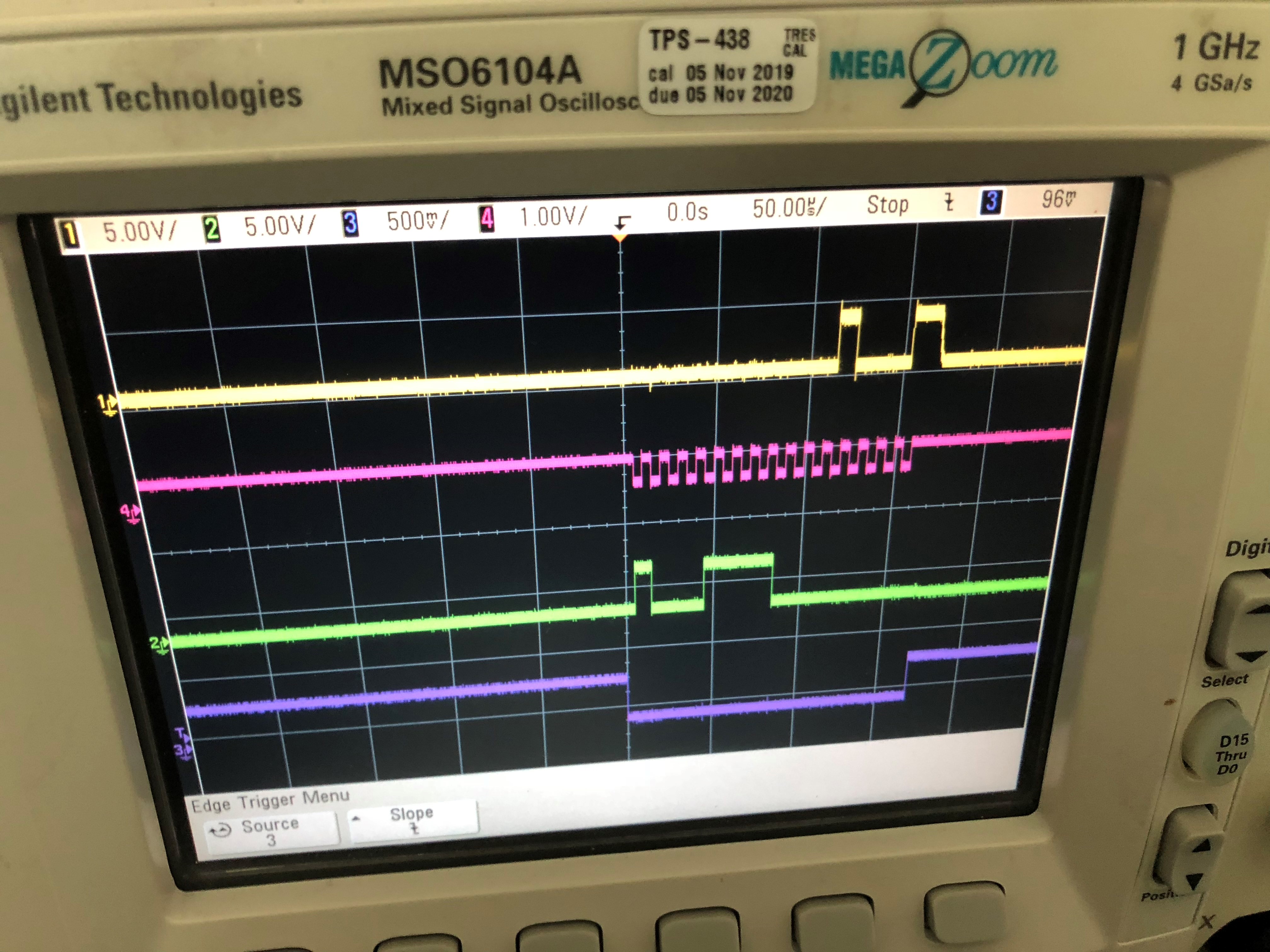
    Today I didn't get the logic analyzer, but got the 4-channel scope. I got my Arduino Nano and IIS3DHCC eval board working and took the picture of the cycle reading "WHO_AM_I" register and got value 0x11h (17 decimal). On the SDO I saw data 0001001.

    Then I got back to my setup of LauncXL-CC26X2R1 and IIS3DHCC eval board with the changes you recommended. I got 0 on the terminal port and the scope also showed data. I looked into the Arduino code and found that we need to send 0x8F instead of 0x0F as 1st byte. So I made following change to your code;

    masterTxBuffer[0] = 0x8F;

    This worked good and I saw SDO showing 00010001 (0x11h) as supposed to. But on my terminal I still was reading 0. So I made following change to your code;

    Display_printf(display, 0, 0, "Master received: %d", masterRxBuffer[1])

    WIth this change on my terminal I got 17 (0x11h) as supposed to and the scope also I could see SDO with value 00010001.

    I am attaching the scope picture for your record. Signals from bottom to top are CS, SDI, CLK and SDO.

    I will try rest of the code tomorrow and let you know the progress. I am sure I should be able to make rest of the code work, like my Arduino code.

    Thank you very much for your help.

    Regards,

    KM