This thread has been locked.

If you have a related question, please click the "Ask a related question" button in the top right corner. The newly created question will be automatically linked to this question.

CCS/LAUNCHXL-CC2650: I2S example codes

Part Number: LAUNCHXL-CC2650
Other Parts Discussed in Thread: CC2650, CC2640R2F, CC2650STK

Tool/software: Code Composer Studio

Hi Team,

I am designing a demo with LED-audio sync function. Basically what I need to do is 1) Read 32-bit data from digital audio source by I2S protocol as below. 2) Map the audio information with LED brightness. 3)  Write brightness value to LED driver by I2C.
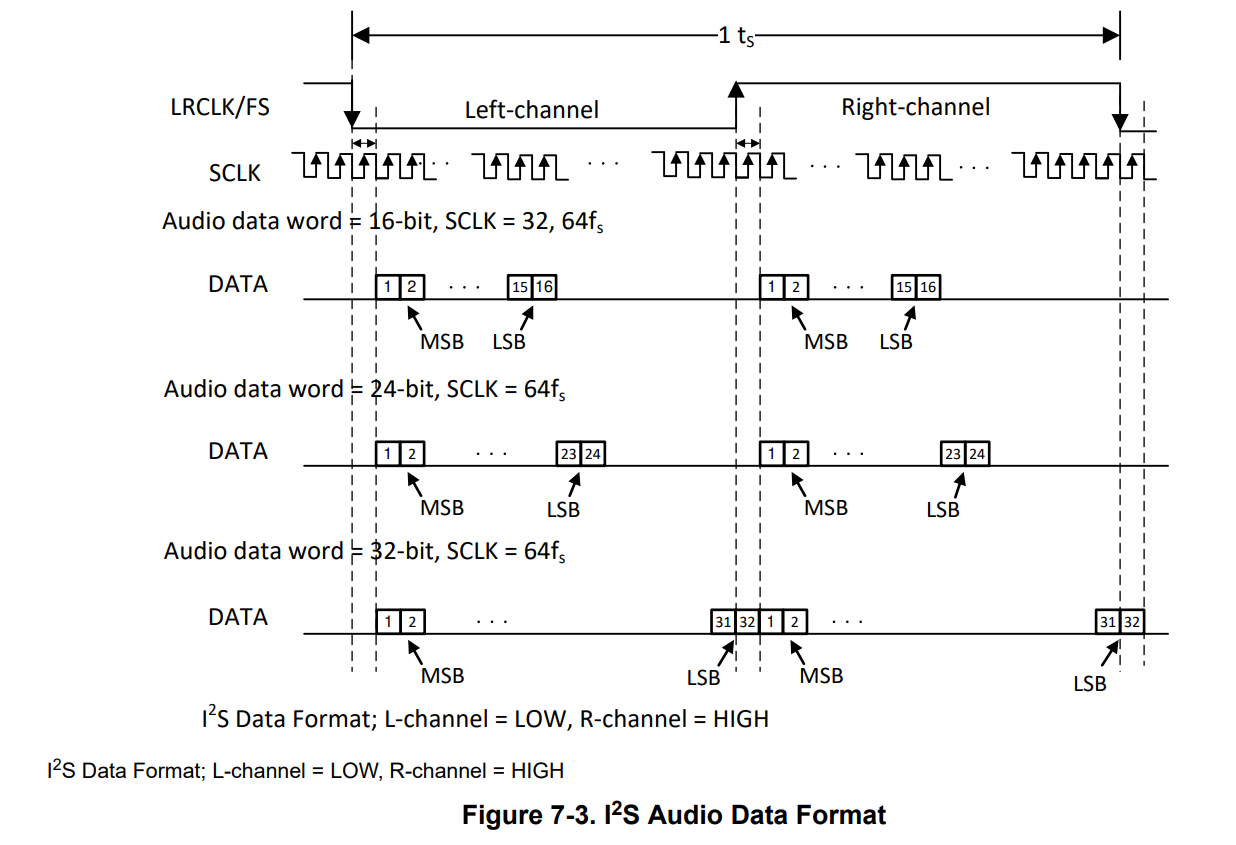
I tried to use SPI to read data by MSP430 but there are always some data lost when continually read. So I changed to CC2650 with integrated I2S block. It is my first time to use CC2650 platform and deal with I2S protocol. There are lots of resource but I have no enough time to study, since the project is urgent. Could you help to share an example code of basic I2S read function and I2C write function with the head files I need? Thanks a lot.

  • Hi Hardy,

    Im just a newbie, but Im going to take my chances to explain it as good as possible

    In Resource Explorer you can find some example codes of Drivers(including I2C and I2S). Juts search your Board and download them.

    Then if you are working on CCS IDE you can create a folder and include(copying or linking) the necessary files for your Interfaces. The Interface files are located usually into your TI folder(ti>simplelink_cc2650_sdk_4_20_00_04>source>ti>drivers).

    If you are not sure which files you need to include for your I2C and I2S interfaces, just check which types of files are included for example in the Project_Zero_app>Drivers(usually are just 2 header files).

    Once you've done this you can check the examples for your drivers to see the how to initiate them and transfer information.

    Here some hints that could help you:

    the I2C example(i2ctmp.c) has already a TXBuffer, where you can send the Slave address to connect with the device and then send the Info(Just normal I2C Protocol). If you want to config the PINs where the I2C is connected see the "GPIO_setConfig".

    To read Info from the I2S just follow the same steps as from the I2C. (hint: the read function is called readCallbackFxn)

    Greetings,

    Thomas

  • Hi,

    To complete the previous answer, you may want to review the i2secho example written for CC2640R2F.

    I am also aware of an example running on CC2650STK displaying the volume of the sound sampled through PDM.

    Let us know if you need further assistance,

    Best regards,

  • Hi Thomas,

    Really appreciate for your full guidance. It help me a lot to quickly understand how to use CC2650 launchpad. Here is some more questions also need your help.

    1) For example i2ctmp and i2secho, where could I config the which IO pin it used for the protocols?

    2) For new CC2650 CCS project, there always have a problem 'unresolved symbol ResetISR' while building. How can I overcome it?

  • Hi,

    1) As I said to select the PIN you have to give the name of the PIN in "GPIO_setConfig". All the PIN names/config can be found in the Board.h(this is usually included, hence in the "Includes" folder). My strategy to access the PIN names or config is just right click on a PIN name variable and click on "Open Declaration". Important: do not configure the Board file, this is just to get the names from the PINs.

    2) This looks like a variable is not defined. Check if you imported correctly all the necessary header files required in the code of the error. (I dont think thats the case but if it is a problem of the IDE you can compare by building the project on CCS Cloud.)

    :)

    regards,

    Thomas

  • Hi Thomas,

    Here is another basic issue I met... Rtos system is quite complex for me to understand and modify the code.

    Is there any I2S example with no-rtos?