This thread has been locked.

If you have a related question, please click the "Ask a related question" button in the top right corner. The newly created question will be automatically linked to this question.

CCS/CC2640R2F: Regarding Secondary MAC Address

Part Number: CC2640R2F
Other Parts Discussed in Thread: UNIFLASH,

Tool/software: Code Composer Studio

Hi Teams,

I try to write SECONDARY MAC ADDRESS to CC2640R2F BLE5 based chip by the TOOL of TI's Uniflash V6.1

(Step 1) When the device is scanned in advertising stage which shows the SECONDARY MAC ADDRESS on iPad mini 4 of TI's 'Starter APP' (it is OK)

(Step 2) Then run Starter APP 's Service Explorer in connecting stage which shows the Services listing (it is OK)

(Step 3) after go back the previous scanning mode of Starter APP which shows the PRIMARY MAC ADDRESS  (strange things here!) 

after run on Step 3 then ALWAYS shows PRIMARY MAC ADDRESS even re-power iPad or reset CC2640R2F device  

I had used UNIFLASH V5.1 and V6.1 got the same results as Step 3

Regards,

Kevin

  • Kevin,

    Thanks for your inquiry. I notified one of our team members about this thread and he will provide additional insights as soon as possible.

    Regards,

    Rafael

  • Hi Kevin,

    During step 2 that you listed, are you pairing or bonding with the device, or only connecting to it? If you have bonded with the device then the information related to that connection is stored in NV, which would explain why you continue to see it even after resetting the device.

    Best Regards,
    Alec


  • Hi Alec,

    1. I just use TI's STARTER APP on iOS Phone then click SERVICE EXPLORER when one of BLE5 devices on the listing be selected on step2

        It did not be pairing or bonding just connecting and show SERVICES listing on APP

    2. They are different display on the DEVICE-NAME shown on Android Phone and iOS Phone reported as followings,

        (Case 1) In Android Phone system shows the SECONDARY MAC address always on the way both of ADVERTISING stage or RE-SCAN advertising

                       after quit  from CONNECTING

       (Case 2) In iOS Phone system shows the SECONDARY MAC address  on  ADVERTISING stage, but shows the PRIMARY MAC address

                     in RE-SCAN advertising after quit from CONNECTING, from now on the PRIMARY MAC address always shows on even RESET the device

                     or RE-START iOS Phone

    3. I try to use TI's SNIFFER Tool to check the ADVERTISING message and found that the message bytes is packed by SECONDARY MAC address

        that means the device is advertising based on the SECONDARY MAC address by reading from NV which flashed by UNIFLASH Tool

    Why are the different behaviors on Android and iOS Phone system? and how to fixed it?

    Regards,

    Kevin

  • Hi Kevin,

    I will need some time to recreate this issue since I do not have the phone on hand. Also, is the image that you are flashing the device with one of our examples, or is it a modified application? If it is a custom application it would be helpful if you attached the image.

    Best Regards,
    Alec

  • Hi Alec,

    Please wait for some time to prepare the image file

    That's for verifying the difference behavior on Android and iOS Phones

    Regards,

    Kevin

  • Hi Kevin,

    Additionally would you mind providing sniffer logs? They would be very helpful in understanding what is happening between your devices.

    Best Regards,
    Alec

  • Hi Alec,

    1. Attached image file for checking,

        file inserted here, file name: E2E_check_Android_vs_iPhone.hex

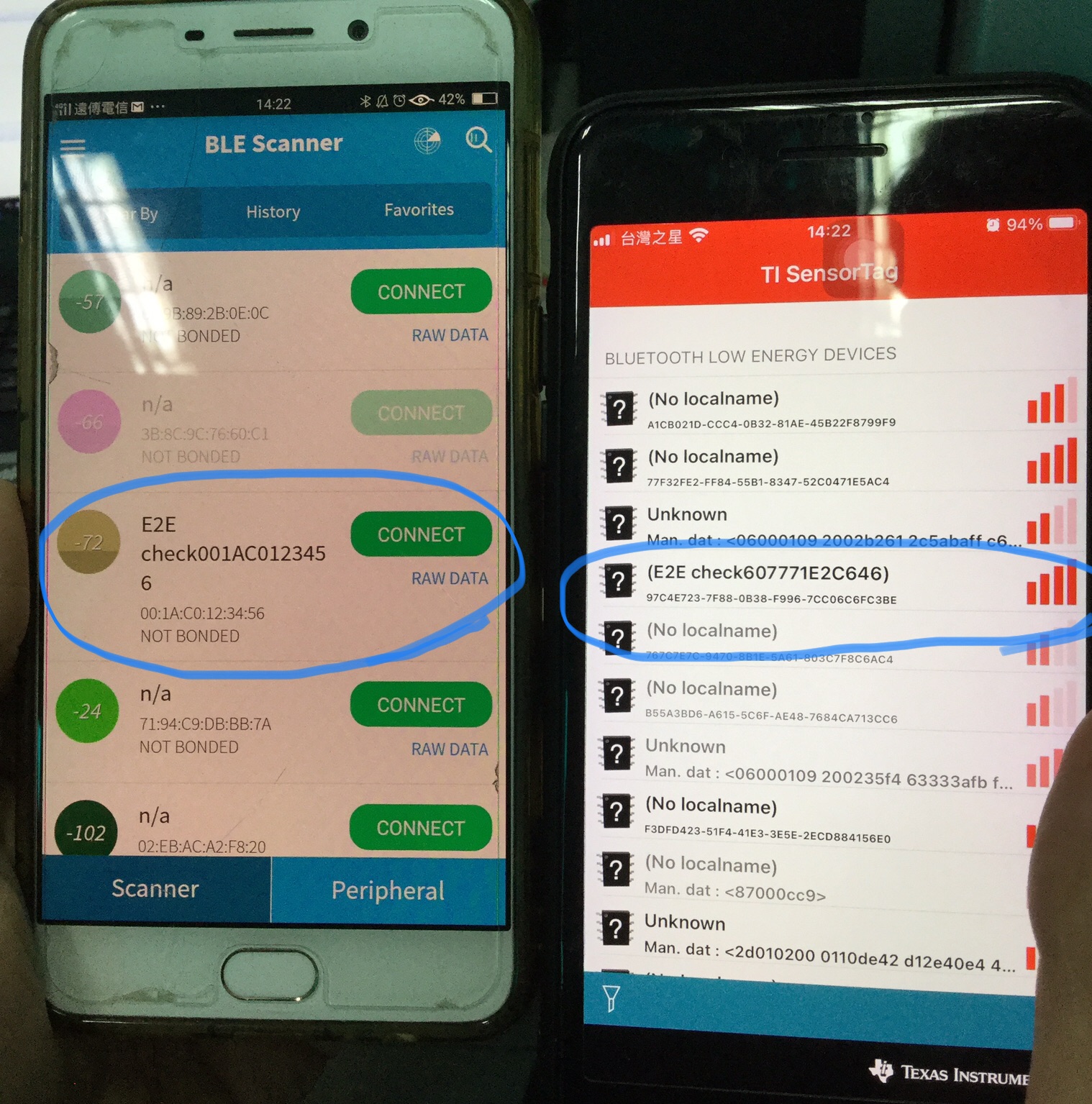
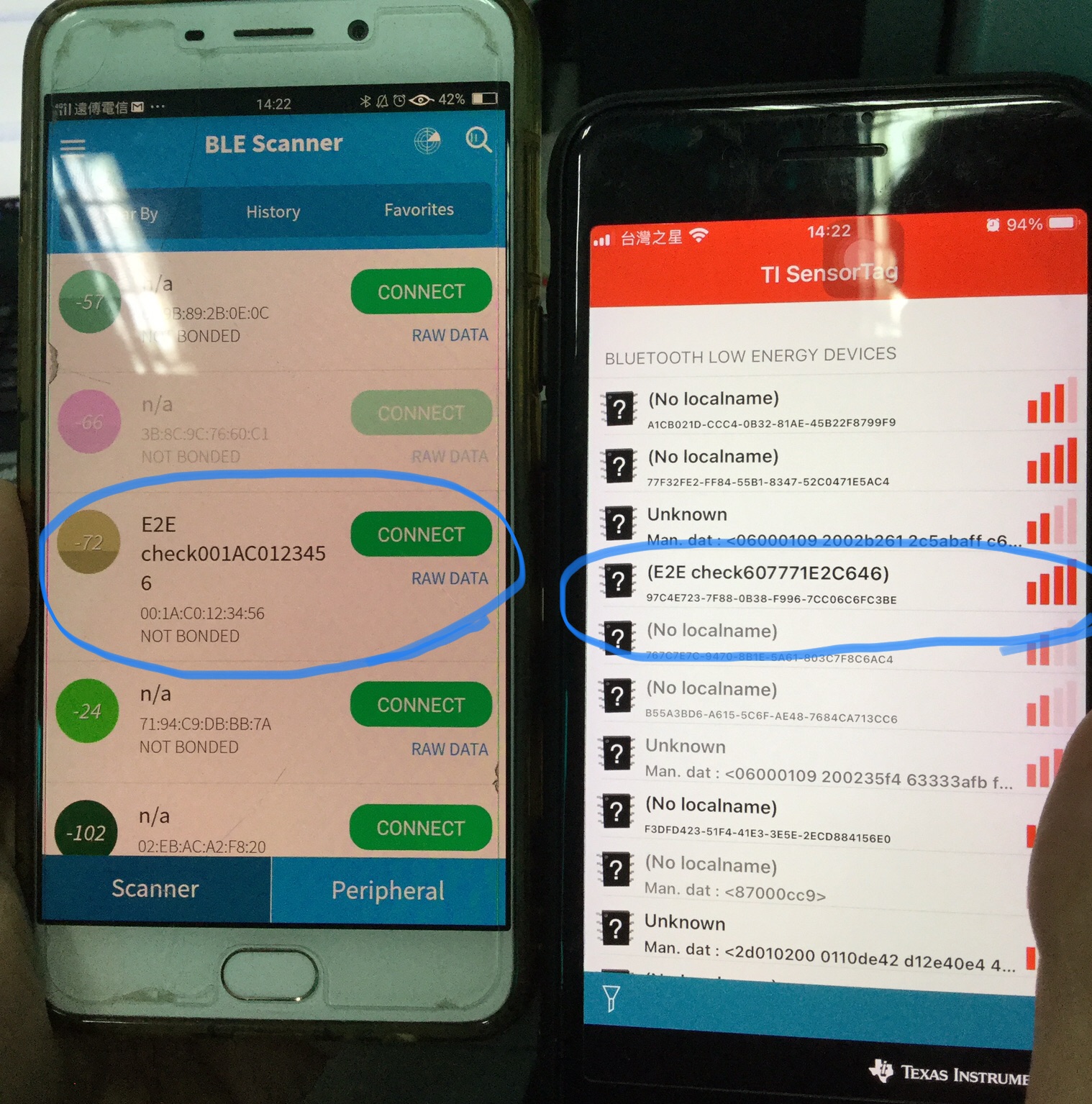
    2. The report on Android and iOS Phone,

        As following, Android Phone shows SECONDARY MAC address

                             iOS Phone       shows PRIMARY        MAC address

    Regards,

    Kevin

  • Hi Alec,

    I try to attached image file, but failed!

    Regards,

    Kevin

  • Hi Alec,

    Report the behavior on Andriod Phone and iOS Phone as following,

    As you can see Android Phone shows SECONDARY MAC address

                             iOS Phone shows PRIMARY MAC address

    Regards,

    Kevin

  • Hi Kevin,

    Thank you for uploading those images, they are indeed helpful. Could you upload some sniffer logs showing what you are seeing as well? I suspect there may be something going on "under the hood" here.

    Best Regards,
    Alec

  • Hi Alec,

    Please wait a couple of days I will send the sniffer logs for checking

    Regards,

    Kevin

  • Hi Alec,

    1. Please check attached file of "SnifferLog_forE2E.psd" as following,

    SnifferLog_forE2E.psd

    2. The secondary address is 0x12345E2EE2E in this logging file

    Regards,

    Kevin

  • Hi Alec,

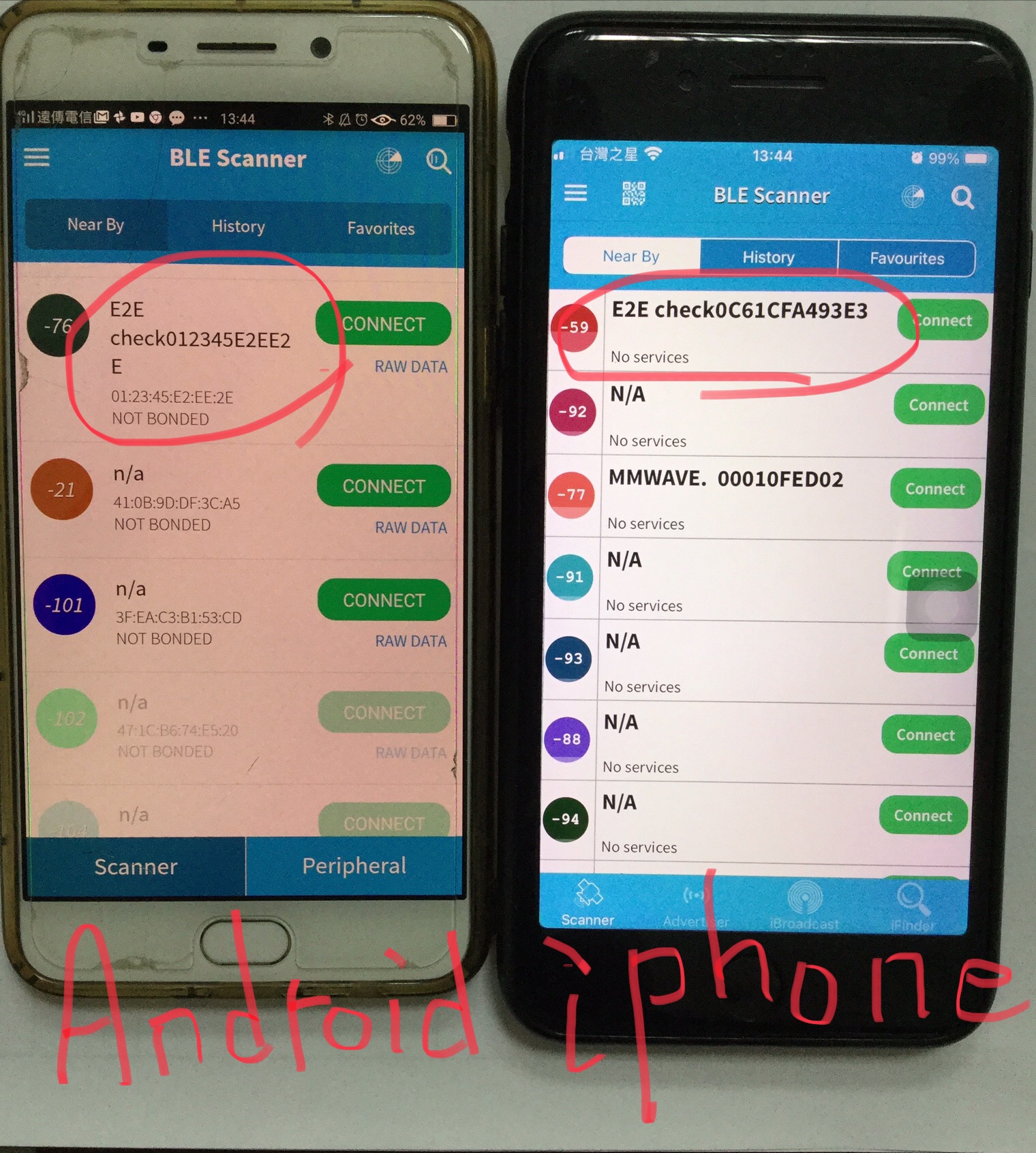
    1. Attached snapshot for checking,

        As you can see the secondary MAC address of "0x12345E2EE2E" can bee seen on Android Phone,

        but the iPhone shows the primary MAC address

    Regards,

    Kevin

  • Hi Kevin,

    I am going to attempt to recreate this issue on my end. Is the image that you are flashing the device with from one of our examples, or is it from a custom project of yours? Is it possible to attach the hex/bin if it is a custom one?

    Best Regards,
    Alec

  • Hi Alec,

    1. The HEX file attached as following,

         name is "E2E_checkSecondaryMac.hex"

      Notes: 

       I try to upload above HEX file but report message shows

       "An error occurred. Please try again or contact your administrator."

       Do you have another method to send this HEX file?

    2. This HEX file is building up based on TI's BLE5 project0 lab

        The scanRspData[] and advertData[] had been replaced by

        string of prefix "E2E check" and pending <Secondary_MAC_address>

        so the scanRspData[] and advertData[] had the same meaning of "E2E check" and <Secondary_MAC_address>

        Notes:

        the  <Secondary_MAC_address> is read from NV memory which programmed by UniFlash Tool V6.1

    Regards,

    Kevin


  • Hi Kevin,

    I was able to find a similar behavior on the iphone version of the simplelink starter app, and I believe this to be an issue in the app itself. I am contacting the correct team to try to get this resolved in a future update. Is there anything else that I can do for you? I presume this is not an issue blocking your development, since it is only an app issue. Let me know if you have any other questions. 

    Best Regards,
    Alec

  • Hi Alec,

    If any update on this issue by your team please inform me

    I would like to close this thread

    Best Regards,

    Kevin