


Part Number: LAUNCHXL-CC26X2R1
Other Parts Discussed in Thread: SYSCONFIG, , SYSBIOS
Tool/software: Code Composer Studio
Hi folks,
I am unable to generate execution or load analysis graphs. I followed the TI-RTOS Basics tutorial to familiarize myself with the debugging tools available through CCS, deviating only from the provided source to rely on SysConfig and the empty example project (.\simplelink_cc13x2_26x2_sdk_4_30_00_54\examples\rtos\CC26X2R1_LAUNCHXL\drivers\empty\tirtos\ccs). I strongly suspect this is a user error associated with my debug.cfg, DefaultSession.usmxml, RTOS_Training.uia.xml, or RTOS_Training.syscfg files. I have included these and online references I reviewed at the end of this post. The rest of this post documents the overall project setup.
Thank you in advance for your input!
Ken (Rye)
EDIT: Fixed broken file uploads and picture uploads.
Experimental Setup
I am running Code Compositor Studio 10.1.1 on Windows 10 with the LAUNCHXL-CC26X2R1 featuring the CC2652R1F Cortex M4.
|
Project Overview |
Board Config |
|
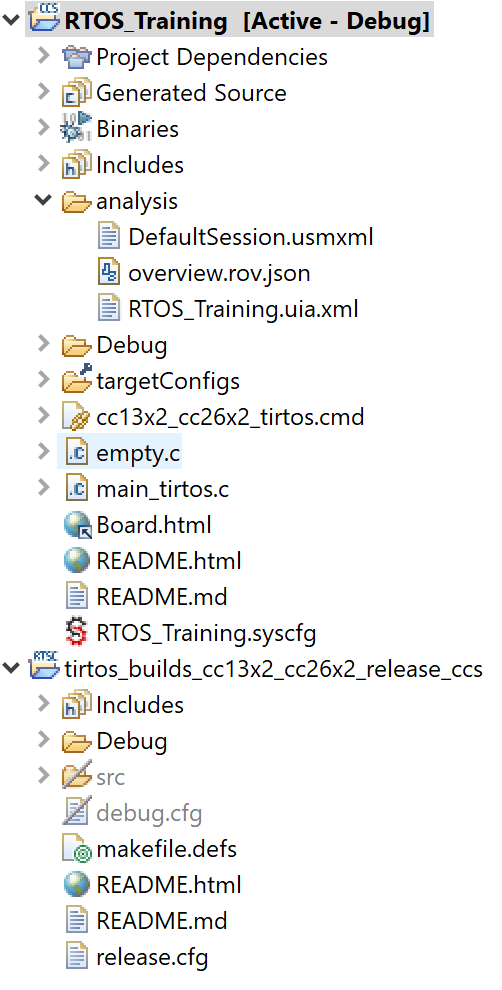
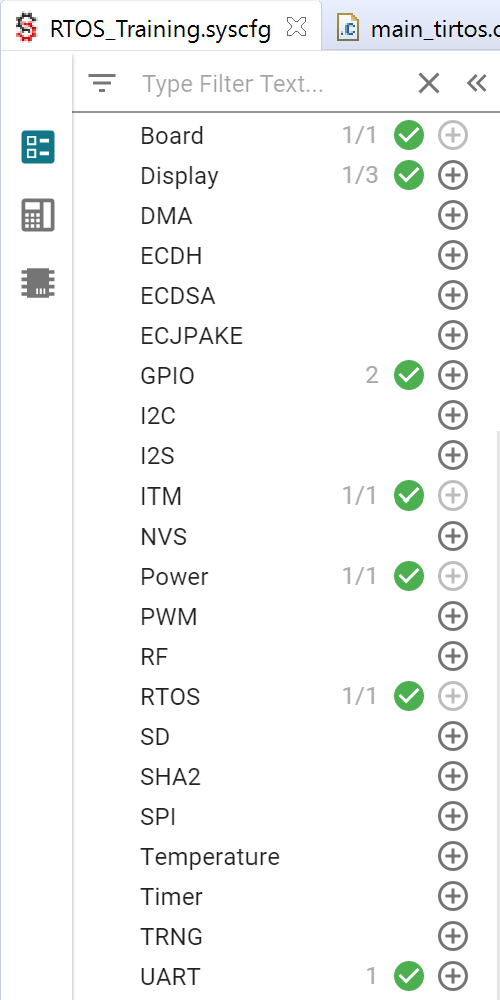
Configuration and Results
Following the tutorial, I commented out the code in the "ROM Configuration" and uncommented the code in "Logging Configuration." I have also added the line, "var UIAProfile = xdc.useModule('ti.uia.events.UIAProfile');"
|
/* == ROM configuration == */ var ROM = xdc.useModule('ti.sysbios.rom.ROM'); ROM.romName = ROM.CC13X2V2; |
/* == Logging configuration == */ //var Log = xdc.useModule('xdc.runtime.Log'); var LoggingSetup = xdc.useModule('ti.uia.sysbios.LoggingSetup'); LoggingSetup.loadLoggerSize = 256; LoggingSetup.mainLoggerSize = 512; LoggingSetup.sysbiosLoggerSize = 1024; |
I cleaned the project and ensured that the secondary project, “tirtos_builds_cc13x2_cc26x2_release_ccs” was set to “Debug” rather than “Release” before building the source. I disabled all breakpoints in the code before debugging the code and opening the Execution Analysis (Tools → RTOS Analyzer → Execution Analysis/Load Analysis). I created a new UIA config with the following settings and by renaming an empty text file to RTOS_Training.uia.xml to proceed.
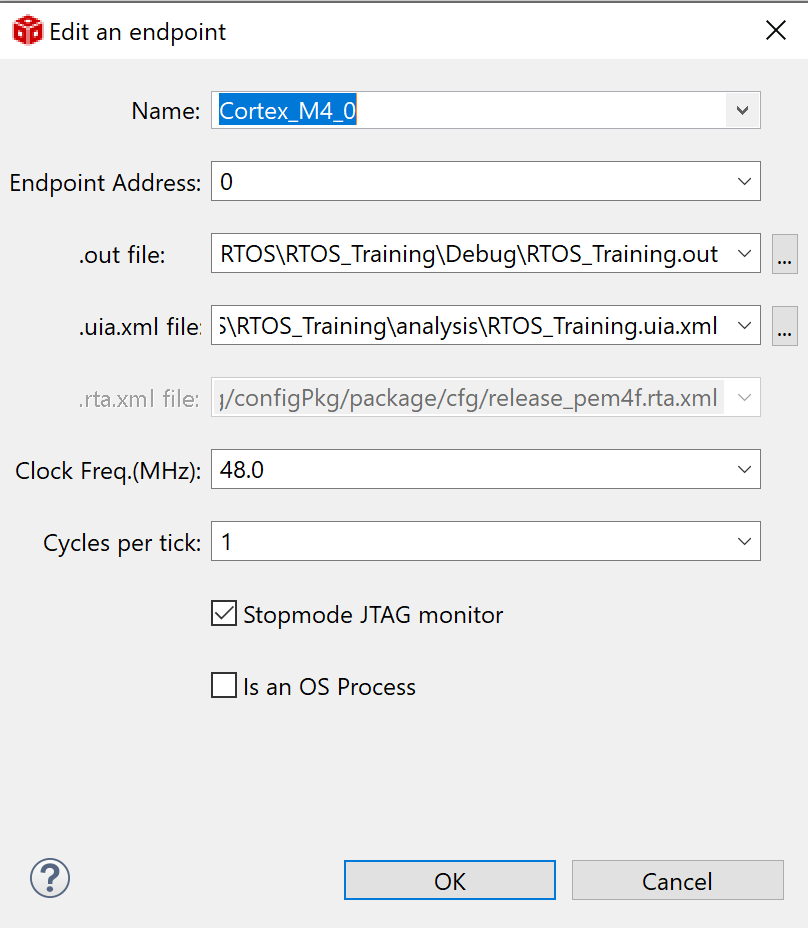 |
 |
The Live Session for both Execution and Load Analysis fail to populate. I have tried to run program before and after hitting Play/Stop in the live session window.

I have tried a number of different settings within my debug.cfg file based on other forum posts (linked in resources below), however I fail to see any kind of LoggerStopMode resource within Runtime Object View. While exploring SysConfig, I found the following set of configuration settings that APPEAR to be doing something (as indicated by the new modules populating in ROV, but the Live Session data is still unpopulated,
 |
 |
My Project Resources for Review
RTOS_Training.syscfg and DedfaultSession.usmxml extensions were changed for upload compatability
| debug.cfg | 3264.debug.cfg |
|
RTOS_Training.syscfg (Remove.xml Extension) |
/**
 * These arguments were used when this file was generated. They will be automatically applied on subsequent loads
 * via the GUI or CLI. Run CLI with '--help' for additional information on how to override these arguments.
 * @cliArgs --board "/ti/boards/CC26X2R1_LAUNCHXL" --product "simplelink_cc13x2_26x2_sdk@4.30.00.54"
 * @versions {"data":"2020090214","timestamp":"2020090214","tool":"1.6.0+1543","templates":"2020090214"}
 */

/**
 * Import the modules used in this configuration.
 */
const Display        = scripting.addModule("/ti/display/Display", {}, false);
const Display1       = Display.addInstance();
const GPIO           = scripting.addModule("/ti/drivers/GPIO");
const GPIO1          = GPIO.addInstance();
const GPIO2          = GPIO.addInstance();
const RTOS           = scripting.addModule("/ti/drivers/RTOS");
const LoggerITM      = scripting.addModule("/ti/loggers/drivers/LoggerITM", {}, false);
const LoggerITM1     = LoggerITM.addInstance();
const ExGr_LoggerBuf = scripting.addModule("/ti/loggers/utils/ExGr_LoggerBuf");
const Bench          = scripting.addModule("/ti/utils/runtime/Bench", {}, false);
const Bench1         = Bench.addInstance();
const ExGr_SYSBIOS   = scripting.addModule("/ti/utils/runtime/ExGr_SYSBIOS");
const ExGr_tiutils   = scripting.addModule("/ti/utils/runtime/ExGr_tiutils");
const LogMain        = scripting.addModule("/ti/utils/runtime/LogMain");
const LogSite        = scripting.addModule("/ti/utils/runtime/LogSite", {}, false);
const LogSite1       = LogSite.addInstance();
const LoggerText     = scripting.addModule("/ti/utils/runtime/LoggerText", {}, false);
const LoggerText1    = LoggerText.addInstance();

/**
 * Write custom configuration values to the imported modules.
 */
Display1.$name                    = "CONFIG_Display_0";
Display1.$hardware                = system.deviceData.board.components.XDS110UART;
Display1.uart.$name               = "CONFIG_UART_1";
Display1.uart.txPinInstance.$name = "CONFIG_PIN_4";
Display1.uart.rxPinInstance.$name = "CONFIG_PIN_5";

GPIO1.$hardware         = system.deviceData.board.components.LED_RED;
GPIO1.$name             = "CONFIG_GPIO_LED_0";
GPIO1.pinInstance.$name = "CONFIG_PIN_0";

GPIO2.$hardware         = system.deviceData.board.components.LED_GREEN;
GPIO2.$name             = "CONFIG_GPIO_LED_1";
GPIO2.pinInstance.$name = "CONFIG_PIN_1";

const CCFG              = scripting.addModule("/ti/devices/CCFG", {}, false);
CCFG.ccfgTemplate.$name = "ti_devices_CCFGTemplate0";

LoggerITM1.$name = "CONFIG_ti_loggers_drivers_LoggerITM_0";

const ITM                = scripting.addModule("/ti/drivers/ITM", {}, false);
ITM.swoPinInstance.$name = "CONFIG_PIN_2";

ExGr_LoggerBuf.ExecGraphLogger.$name = "Config_ExecGraphLogger_0";

Bench1.$name = "CONFIG_Bench_0";

const ExGr_XDCtools                          = scripting.addModule("/ti/utils/runtime/ExGr_XDCtools", {}, false);
ExGr_XDCtools.ExecGraphLogger_xdctools.$name = "Config_ExecGraphLogger_1";

ExGr_tiutils.ExecGraphLogger_utils.$name   = "Config_ExecGraphLogger_2";
ExGr_tiutils.ExecGraphLogger_drivers.$name = "Config_ExecGraphLogger_3";

LogSite1.$name = "ti_utils_runtime_LogSite_0";

const LoggerBuf        = scripting.addModule("/ti/loggers/utils/LoggerBuf", {}, false);
const LoggerBuf1       = LoggerBuf.addInstance({}, false);
LoggerBuf1.$name       = "CONFIG_ti_loggers_utils_LoggerBuf_0";
LogSite1.logger        = LoggerBuf1;
LogMain.LogSite.logger = LoggerBuf1;

LoggerText1.$name = "CONFIG_ti_utils_runtime_LoggerText_0";

/**
 * Pinmux solution for unlocked pins/peripherals. This ensures that minor changes to the automatic solver in a future
 * version of the tool will not impact the pinmux you originally saw.  These lines can be completely deleted in order to
 * re-solve from scratch.
 */
Display1.uart.uart.$suggestSolution       = "UART1";
Display1.uart.uart.txPin.$suggestSolution = "boosterpack.4";
Display1.uart.uart.rxPin.$suggestSolution = "boosterpack.3";
GPIO1.gpioPin.$suggestSolution            = "boosterpack.39";
GPIO2.gpioPin.$suggestSolution            = "boosterpack.40";
ITM.swoPin.$suggestSolution               = "boosterpack.29";
|
|
DefaultSession.usmxml (Remove.xml Extension) |
<?xml version="1.0" encoding="UTF-8"?>
<java version="1.8.0_144" class="java.beans.XMLDecoder">
 <object class="com.ti.uia.host.core.Session$Config" id="Session$Config0">
  <void property="endpoints">
   <void method="add">
    <object class="com.ti.uia.host.core.Session$Config$Endpoint">
     <void property="clockFreq">
      <long>48000000</long>
     </void>
     <void property="eventTransport">
      <object class="com.ti.uia.host.core.Session$Config$Transport">
       <void property="type">
        <string>JTAG</string>
       </void>
      </object>
     </void>
     <void property="name">
      <string>Cortex_M4_0</string>
     </void>
     <void property="outFile">
      <string>C:\Users\rRye\Texas Instruments Projects\Tutorial_RTOS\RTOS_Training\Debug\RTOS_Training.out</string>
     </void>
     <void property="rtaFile">
      <string>C:/Users/rRye/Texas Instruments Projects/Tutorial_RTOS/tirtos_builds_cc13x2_cc26x2_release_ccs/Debug/configPkg/package/cfg/release_pem4f.rta.xml</string>
     </void>
     <void property="uiaFile">
      <string>C:\Users\rRye\Texas Instruments Projects\Tutorial_RTOS\RTOS_Training\analysis\RTOS_Training.uia.xml</string>
     </void>
    </object>
   </void>
  </void>
  <void property="eventTransport">
   <object class="com.ti.uia.host.core.Session$Config$Transport" id="Session$Config$Transport0">
    <void property="type">
     <string>None</string>
    </void>
   </object>
  </void>
  <void property="msgTransport">
   <object class="com.ti.uia.host.core.Session$Config$Transport">
    <void property="type">
     <string>None</string>
    </void>
   </object>
  </void>
 </object>
<void class="com.ti.uia.host.core.Session$Config$Transport" id="Field0" method="getField">
 <string>customProperties</string>
 <void id="Properties0" method="get">
  <object idref="Session$Config$Transport0"/>
  <void method="put">
   <string>Address</string>
   <string>localhost</string>
  </void>
  <void method="put">
   <string>Port</string>
   <int>8080</int>
  </void>
 </void>
</void>
<void idref="Properties0"/>
</java>
|
| RTOS_Training.uia.xml | Empty FIle |
Online Resources:
- TI-RTOS Basics
- Kernel Configuration
- System Analyzer User Guide (See Section 3.x)
- System Analyzer Tutorials (See Important Notes, See Tutorial 1: How to Run the System Analyzer Tutorial 1 Project)
- module ti.uia.events.UIAProfile
- module ti.uia.sysbios.LoggingSetup
- CCS/TMS320F28377S: ROV Execution Analysis Configuration
- UIA Product Installation and Inclusion
- CCS/CC2640R2F: How to use Execution Analysis with simple_peripheral project?
- Example CFG File and Configuration tutorial, tried a remix of these settings.
- Execution Graph Gaps due to Data Loss and Log Start Control
- Another example CFG File, tried a remix of these settings.
- Inspecting the ROV for Live Session Logging Data
