This thread has been locked.

If you have a related question, please click the "Ask a related question" button in the top right corner. The newly created question will be automatically linked to this question.

CC2642R: Trying to use Sharp 400*240 display

Part Number: CC2642R
Other Parts Discussed in Thread: SYSCONFIG, BOOSTXL-SHARP128

Hello,

Recently I bought a BOOSTXL-SHARP128 (which has a 128*128 Sharp LCD) board to add a LCD Display for a product, the tests were all good and we decided to go with the bigger 400*240 LCD from same manufacturer since we needed a bigger display by our requirements. The 400*240 LCD works good after I changed the display size sin sysconfig for the project. I changed it to 400 as the image below and after that I was able to see tha same displays as per the 128*128 display.

My problem really is that ther upper half of the LCD doesnt persist, It only shows and then it is cleared even if I dont have any clear command running from the app. (If someone needs a video of this issue just let me know and I can show the issue on video directly).

I have looked the forums and some people stated that I may have to increase RAM buffer for the LCD Display Driver or maybe tell the driver that it is now running an 400*240 LCD Display and not the smaller 128*128 but I was not able to manage to do this (I'm quite unexperienced (one year or so) still on TI tools and sysconfig, ccs and CC2642 FW development)

If anyone have any insigh or could help me on this topic I would appreciate really much.

Best Regards and thanks in advance.

  • Miguel,

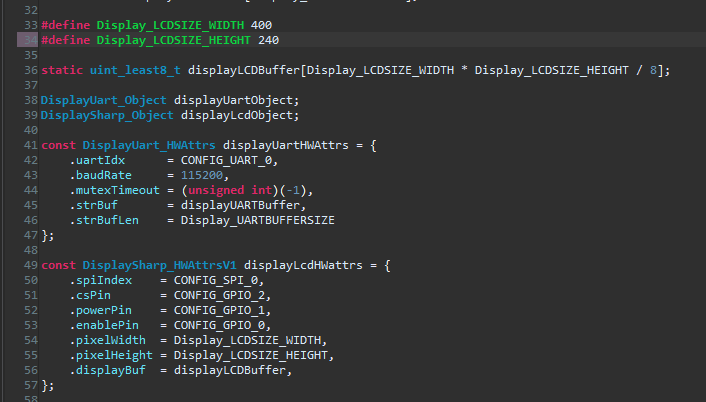
    A potential issue could be that the display driver is designed to use a square display (like 128x128) and your display is a rectangle (400x240). The driver could be trying to draw outside of your actual display. In the ti_drivers_config.c file that is generated by SysConfig, you will see how the hardware attributes and buffers are set up for the display. It might be good to try plugging in the appropriate values for height and width there.

    Note: you will need to exclude your .syscfg file from your project after making these so that SysConfig doesn't overwrite the changes.

    My next suggestion would be to look at how grlib handles drawing to the display. The driver needs to know the width and height of the display so it can draw and clear the appropriate ares. If it thinks your display has the wrong dimensions, it could cause unexpected behavior.

    To make sure your application isn't running out of memory, refer to this training lab: https://dev.ti.com/tirex/explore/node?node=AAvd2v6HXXe-QpjluM.XgA__pTTHBmu__LATEST  Task 2 will show you how to view system heap and stack memory using ROV.

    Regards,

    Daniel

  • daniel_o said:
    A potential issue could be that the display driver is designed to use a square display (like 128x128) and your display is a rectangle (400x240). The driver could be trying to draw outside of your actual display. In the ti_drivers_config.c file that is generated by SysConfig, you will see how the hardware attributes and buffers are set up for the display. It might be good to try plugging in the appropriate values for height and width there.

    I think the same, the library is writing more than the amount of pixels of the display and thus the display's upper half is getting blanked. I disabled sysconfig using a guide that I found here on forums, and then modified the values but setting height to 240 doing this seems to mess all on the display, the display turns on but all of the content seems to be misplaced.

    daniel_o said:
    My next suggestion would be to look at how grlib handles drawing to the display. The driver needs to know the width and height of the display so it can draw and clear the appropriate ares. If it thinks your display has the wrong dimensions, it could cause unexpected behavior.

    I went deep into the grlib, display.c on grlib folder and some of the sharp drivers and even if I change them and save changes it doesnt seem to have any effect since I tried commenting out the whole spi writing function and the Display still shows the misplaced pixels. How you I tell the CCS to recompile source include files?

    daniel_o said:
    To make sure your application isn't running out of memory, refer to this training lab: https://dev.ti.com/tirex/explore/node?node=AAvd2v6HXXe-QpjluM.XgA__pTTHBmu__LATEST  Task 2 will show you how to view system heap and stack memory using ROV.

    I did not verify the system heap using ROV but since everything works properly on my app I don't really think is a memory issue. Will verify later on and If anything comes uo will update this comment.

    Best Regards,

  • Miguel,

    To rebuild TI Drivers, please see this document: https://dev.ti.com/tirex/explore/node?node=AE7RAnqQArlbuhRki8hahA__pTTHBmu__LATEST in the "TI Drivers" section.

    Have you confirmed that your height and width are set correctly and not switched? Does printing text to the LCD Display work? Does using the test image in the Display example work?

    Regards,

    Daniel