This thread has been locked.

If you have a related question, please click the "Ask a related question" button in the top right corner. The newly created question will be automatically linked to this question.

CC2652RB: Syscfg - Defining Custom Hardware

Part Number: CC2652RB
Other Parts Discussed in Thread: SYSCONFIG,

Hello - 

How do we define our own custom PCB/hardware (similar to how the LP's are defined) for syscfg?

Not just delete everything that is associated to the LP, but actually define an alternate board to take its place, including naming pins and hardware interfaces. I've found that it's difficult to replicate in syscfg what we were able to achieve with the base board files from previous SDK versions.

We've previously taken the base output files from syscfg and altered them (while excluding projectName.syscfg) to build directly into our project. This is a pain to replicate every single time we update SDKs or change between example projects to add more capability to our product.

_________________________________

I'll also add a bit of feedback on syscfg's operation in general here: it does not seem to work consistently. I've had a few experiences with it where the entire interface became unresponsive and would not change views when I tried clicking on other modules. When that happened, I tried saving my changes and it threw an "Oh Snap" message about some exception occurring. It seems to be OK right now, but its a frustrating enough process to not have a robust tool to work with.

I'm all the way updated to SDK v 5.10.00.48 and CCS v10.3, FYI.

  • Hello,

    I have assigned an expert to comment on this, but in the meantime I believe you may find the following Custom Board Support chapter of the SysConfig documentation helpful. Can you verify the linked chapter is helpful to your usecase?

    Regards,

    Jan

  • Jan -

    I have tried the methods in that chapter (especially section 1.3) using previous SDKs and had little success.

    I am currently in the process of trying that all again on our current project, while also migrating from a simple peripheral example over to the multi-role example as the basis for our project.

    It's quite a large bit to bite off all at once, but I will let you know if the guide method is successful for me or not.

  • Jan - 

    Looks like I haven't gotten any response in a few days, and granted, I haven't made much progress on my side either.

    Maybe a first question to the expert can be this: why does syscfg get rid of the naming conventions I just gave to pins and override it?

    As a setup - I am following 1.3 from your link before. I have told syscfg that this is custom hardware and it should have abandoned all references to the LaunchPad at this point.

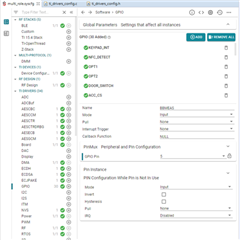
    As you can see below, I have two screenshots. The first shows how I've set up all my GPIOs for their initial configurations within syscfg. I don't think I'm missing anything basic (please let me know if I am), but when I allow the syscfg to output the drivers_config files, there is no definition of my pin names pointing to those specific GPIOs, but there IS a blatant over-write back towards the conventions it remembers from the LaunchPad (shown in the second screenshot).

    Why does this happen? And more importantly, how can I tell syscfg that IOID_NN is our BUZZER pin so that we can carry this naming convention through our application (like we have for the past few years of development)?

    I know that I'll probably run into some more issues (especially with specific GPIOs I want to name, set up with a particular configuration on startup, then use for a comms module in some cases) - so I definitely think a way for customers to define their hardware even at the point of what pin is what name should be a reasonable request for the tool to achieve.


  • Tyler,

    Please apologize for the delay.

    It seems the guide may be somewhat incomplete. Using the same principle as shown in the "Migrating Board Variant" shown in the BLE5 User's Guide, I went to the entry "Board" and selected the option "Use Custom Board"

    This still kept the original GPIO pins on the <ti_drivers_config.c> as shown below in the comparison between a stock and my modified file:

    Deleting the original LP pins and adding the new ones just like you did to the GPIO Sysconfig section, the <ti_drivers_config.c> was correctly modified.

    Naturally, any attempts to build the project failed as the sources still used the original LP pin names, but it indicates the pins were actually changed.

    Please give this a try and see if you can get the new pins to "stick".

    Hope this helps,

    Rafael

  • Rafael - thank you for the update, and no worries on the delay, I understand these things can take time to track down.

    So, yes, I was able to do what you did (if I delete the pins rather than modifying them, the references to the LP pins go away). However, your solution doesn't solve my problem. 

    On your second set of screenshots, the pins are still called GPIOCC26XX_DIO_NN, rather than the names you attempted to give them. 

    When you start with the LaunchPad hardware, it creates #defines for the pin names and assigns them to the DIO values they represent. Deleting/creating/editing these pins does not do the same thing; this is what I think is missing.

    Why isn't there an easy interface within syscfg to say DIO_00 = KEYPAD_INT?

    I want to use those names when I'm defining the usage of GPIOs/modules moving forward, rather than having to refer back to the device pinout every time, then not having those created aliases when I use the pins in the application.

    In my previous experience, if I defined a GPIO in syscfg to name a pin (which doesn't actually do what I want), and then try and use said GPIO in a module, syscfg yells at me for using the same pin for two things. That response makes sense, but that just lends further evidence that the definition of the GPIOs the way syscfg does it is NOT what I want to do - hence why I was wondering if there was a way that I could define a "board" similar to how the LaunchPad does to integrate my pin names into the syscfg project space.

    Let me know if this makes more sense, or if this is even possible.

  • Rafael - I had a hunch to look into the .syscfg file itself to see if there may be a way around things; it has led me down a rabbit hole that has shown some measurable success.

    It seems that there could be a way to modify the GPIOX.pinInstance.$name to make the definitions I want. See the snippet below from my .syscfg file.

    GPIO1.pull              = "Pull Up";
    GPIO1.$name             = "KEYPAD_INT";
    GPIO1.gpioPin.$assign   = "7";
    GPIO1.pinInstance.$name = "CONFIG_PIN_BTN1";
    
    GPIO2.$name             = "NFC_DETECT";
    GPIO2.pull              = "Pull Down";
    GPIO2.gpioPin.$assign   = "8";
    GPIO2.pinInstance.$name = "CONFIG_PIN_BTN2";
    
    GPIO3.$name             = "OPT1";
    GPIO3.gpioPin.$assign   = "40";
    GPIO3.pinInstance.$name = "CONFIG_PIN_0";

    The thing I don't understand is how the actual syscfg interface within CCS is supposed to achieve this modification. Also, it doesn't look like this setup is available from the perspective of the module side of things.

    To test this out, I deleted two pins that I want named in my project (I2C_SDA and I2C_SCL) and input those pins into the module setup for the I2C comms module. Since there is no place to name those pins, those names never get created and the pins are referred to by two super generic GPIO/PIN pre-defined values, which both lead back to the same definition based on the IOID number.

    Digging deeper, I think I found the interface from the syscfg side for where it gets the metadata for the LaunchPad board: SDK_BASE/source/ti/boards/.meta/LP_CC2652RB.syscfg.json (and inadvertently how to do emojis in forum posts Astonished)

    So - I guess the question now is - how are these .json files created?

    Do I have to hand-edit this file and hope for the best, or is there a tool I can use that will make this process easier? Is there a way to point the scripting of the syscfg such that it will point to a different .json file if I can create it?

    It seems really silly to me that these sorts of interfaces are set up for what are basically hobbyist/evaluation boards that and not available for customers to adjust them for their own custom boards that they will produce. Who can utilize a tool that is so pigeon-holed?

  • Tyler,

    I had time to discuss this with the dev team and a few clarifications were provided.

    the pins are still called GPIOCC26XX_DIO_NN, rather than the names you attempted to give them. 

    Thank you for the additional post; I now understand the crux of the matter.

    The name is matched to the driverlib .h file <GPIOCC26XX.h> under SDK_ROOT/source/ti/drivers/gpio and therefore I can see how it is preserved to prevent breaking the connection to the driver itself, regardless of the user modifications. Sure, you could potentially change these entries but I suspect there would be consequences to the GPIO calls.

    Why isn't there an easy interface within syscfg to say DIO_00 = KEYPAD_INT?

    That would be explained by the highlighted aspect above - a more conservative stance that follows the original driver constructs. In your code, however, you could perhaps add a custom header file with #define that does the matches, although obviously the initial flexibility of the GUI is completely lost.

    I want to use those names when I'm defining the usage of GPIOs/modules moving forward, rather than having to refer back to the device pinout every time, then not having those created aliases when I use the pins in the application.

    The reason for this is probably due to the emphasis to use the PIN driver.

    In the file <ti_drivers_config.c>, the names mentioned in the BoardGpioInitTable[] are all generic (CONFIG_PIN_0, CONFIG_PIN_1, etc) but, since this table is consumed by the PIN driver (by means of the PIN_init shown at the bottom of this file), the names here do not have much influence throughout the code.

    Instead, in the application itself you would create a handle for each pin (with a meaningful name) with the PIN_open() and only reference that throughout your code.

    how are these .json files created?

    These files are shipped with the Sysconfig product itself that match our development kits. These modifications you are doing change the names of the PIN driver resources themselves and it would certainly be feasible to allow the GUI to do that, but the dev team mentioned that at a certain point a decision was made to not allow this on the tool. Therefore at this point I don't have another workaround and this is not officially supported (as you can imagine already).

    One last aspect regarding the lockups you are experiencing: this issue was identified and a bug report shows it will be fixed in CCSv11. Unfortunately at this time we don't have a workaround other than to not click on any other part of the project while the Syscfg UI is opened in CCS.

    Regards,

    Rafael

  • Rafael - 

    I think this sounds like an endpoint for the issue, but I really don't think that I feel comfortable saying it "resolved my issue" - since it seems that the resolution was essentially "the dev team decided to not allow what you want."

    Like I've mentioned before, I think it is really silly (and actually a bit embarrassing) for a product line to have a "configurable SW tool" that only works for their own specific hardware, which is only feasibly helpful for the first month of development and evaluation rather than ongoing development and support that is required for an actual customer end product.

    If there is any chance of this decision being swayed by customer opinions, I'd urge the product team to rethink the strategy with allowing even an easy .json replacement tool or generator that could allow someone to define their pin names/module names and run with that.

    That all being said, I think my best option is to modify the .json file to align with my board hardware and try and have syscfg link that into the project.

    This is not a great solution since the file that I'll be customizing lives within the SDK. We do not track our full SDK (and try not to modify any of these files) within our git repo, so we will have to be creative with how we track this file ourselves. We'll also have to ensure that with each SDK update we replace the proper file within the SDK to pull our changes through. A bit sketchy, but probably less effort in the long run than re-tooling the entirety of our syscfg output files like we've done previously.

  • Tyler,

    I think this sounds like an endpoint for the issue, but I really don't think that I feel comfortable saying it "resolved my issue" - since it seems that the resolution was essentially "the dev team decided to not allow what you want."

    I fully understand and feel the wording does not fully encompass the multitude of outcomes of a thread. In other words, this is an answer, not a solution (at least not at this time).

    That said, I also agree with you there is room for improvement and actually performing the desired functionality promised by the GUI. My previous post was intended to give you the current state of affairs and some history behind the design, but I will file an enhancement report to the dev team to track its implementation.

    This is not a great solution since the file that I'll be customizing lives within the SDK. We do not track our full SDK (and try not to modify any of these files) within our git repo, so we will have to be creative with how we track this file ourselves. We'll also have to ensure that with each SDK update we replace the proper file within the SDK to pull our changes through. A bit sketchy, but probably less effort in the long run than re-tooling the entirety of our syscfg output files like we've done previously.

    I would definitely keep track of these modifications in your version control system and, since you are at it, also keep track of any linked file in your project that physically still resides in the SDK directory tree. There are known cases where a simple change in tool versions removed modifications to the custom project.

    Regards,

    Rafael