This thread has been locked.

If you have a related question, please click the "Ask a related question" button in the top right corner. The newly created question will be automatically linked to this question.

LAUNCHXL-CC26X2R1: RTLS UI ERROR

Part Number: LAUNCHXL-CC26X2R1

I will ask you a question for the first time.

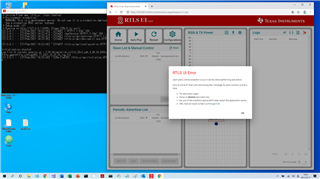
When I execute "C: \ ti \ simplelink_cc13x2_26x2_sdk_4_40_04_04 \ tools \ ble5stack \ rtls_agent \ rtls_ui \ rtls_ui.exe" on Windows 10, "RTLS UI Error" occurs.

python uses Python 3.7.5.

The contents of the LOG file at this time are as attached.

Please tell me how to eliminate this error.
  • Hi,

    Interesting; you are not the first to report this error. Can you check the suggestions in the thread below and see if you reach a similar conclusion as the other poster?

    LAUNCHXL-CC26X2R1: troubles launching RTLS Agent

    Hope this helps,

    Rafael

  • Thank you for answering.

    I saw LAUNCHXL-CC26X2R1: troubles launching RTLS Agent.

    The log data is only the one sent last time.

    Send configuration.json for reference.

    Please let me know if you have any further advice.

    {
        "version": 9,
        "general": {
            "websocket_port": 5050,
            "rtls_util_timeout": 30,
            "max_log_messages": 10000,
            "number_of_messages_per_page": 75,
            "cci_graph_parameters": {
                "scale": {
                    "min": 0,
                    "max": 110,
                    "step": 10
                }
            },
            "aoa_graph_parameters": {
                "number_of_points_to_display": 50,
                "average_each_n_point": 2,
                "scale": {
                    "min": -180,
                    "max": 180,
                    "step": 20
                }
            },
            "aoa_bar_graph_parameters": {
                "channels": [
                    "1",
                    "5",
                    "10",
                    "15",
                    "20",
                    "25",
                    "30",
                    "35"
                ],
                "scale": {
                    "min": 0,
                    "max": 360,
                    "step": 20
                }
            },
            "space_view_parameters": {
                "points_per_meter": 100
            },
            "color_schema": [
                "#0e367c",
                "#fba257",
                "#4874bf",
                "#f44242",
                "#ab3434",
                "#ffc425",
                "#f37735",
                "#00aedb",
                "#00b159",
                "#d11141"
            ]
        },
        "scan_connection": {
            "scan_time": 10,
            "connection_interval": 100
        },
        "aoa_parameters": {
            "aoa_run_mode": "AOA_MODE_ANGLE",
            "aoa_raw_analyze_algo": "algo1",
            "aoa_algo_search_speed": "fast",
            "aoa_cc2640r2": {
                "aoa_cte_scan_ovs": 4,
                "aoa_cte_offset": 4,
                "aoa_cte_length": 20,
                "aoa_sampling_control": 0
            },
            "aoa_cc26x2": {
                "aoa_cte_length": 20,
                "aoa_cte_interval": 1,
                "aoa_slot_durations": 1,
                "aoa_sample_rate": 1,
                "aoa_sample_size": 1,
                "aoa_sampling_control": 16,
                "aoa_sampling_enable": 1,
                "aoa_pattern_len": 3,
                "aoa_ant_pattern": [
                    0,
                    1,
                    2
                ]
            }
        },
        "cci_parameters": {
            "channels": [
                "1",
                "5",
                "10",
                "15",
                "20",
                "25",
                "30"
            ]
        },
        "cl_aoa_parameters": {
            "cl_aoa_raw_analyze_algo": "algo1",
            "cl_aoa_algo_search_speed": "fast",
            "cl_aoa_scanner": {
                "use_periodic_adv_list": false,
                "reporting_initially": true,
                "skip": 0,
                "sync_timeout": 30,
                "sync_cte_type": 0
            },
            "cl_aoa_config": {
                "cl_aoa_role": "AOA_MASTER",
                "cl_aoa_result_mode": "AOA_MODE_RAW",
                "cl_aoa_slot_durations": 1,
                "cl_aoa_sample_rate": 1,
                "cl_aoa_sample_size": 1,
                "cl_aoa_sampling_control": 17,
                "max_sample_cte": 1,
                "cl_aoa_pattern_len": 3,
                "cl_aoa_ant_pattern": [
                    0,
                    1,
                    2
                ]
            },
            "cl_aoa_slave_by_angle_chart_params": {
                "channels": [
                    "1",
                    "5",
                    "10",
                    "15",
                    "20",
                    "25",
                    "30",
                    "35"
                ]
            }
        }
    }

  • Hi,

    Thanks for sending the .json configuration; it matches with what I have here.

    Regarding the log, given it seems very similar to what is reported in the other thread, I suspect there may be a scenario where something in the OS, the environment, character set/encoding may be influencing the ability of python to properly work. Searching the internet for similar errors indicate this is plausible.

    I will confer with some colleagues and see if I can reach some additional ideas.

    Regards,

    Rafael

  • Hi,

    I was able to reproduce this issue in my personal laptop with Windows 8.1 (Brazilian Portuguese), therefore this is probably an error caused by the localization of the Operating System. 

    I will report this to the development team and check for some possible workarounds or a scheduled fix.

    At this moment there is no known workaround other than change the localization of the OS.

    I apologize for the inconvenience,

    Rafael

  • Hi,

    The dev team provided an updated <rtls_ui.exe> executable that I tested and worked on my Brazilian Portuguese Windows version.

    Please backup your existing rtls_ui.exe and copy the uncompressed file to the same directory.

    Hope this helps,

    Rafael

    rtls_ui.zip