This thread has been locked.

If you have a related question, please click the "Ask a related question" button in the top right corner. The newly created question will be automatically linked to this question.

RF4CE - RF4CE Scroll Function.

Other Parts Discussed in Thread: REMOTI, CC2533

Hi. everyone. 

Currently I'm being development of motion Remote controller using RF4CE stack.

My system is consist of CC2533F96 + 3-axis Gyro + 3-axis Accelerometer + Touch PAD.

Other function was complete, but Scroll function is not applied in my system.

I was found to many refernece documents & example source codes but I did not find.

I want to implement of scroll function using touch-PAD, like laptop mouse touch pad.

I want to know about how I can do apply to scroll function.

Have you ever  apply to implement scroll function?

or Do you have any method of implement scroll function?

I need  your great help.

Have a nice day! good luck to you!

best regards,

IK.Jang

  • Hi Jang,

    Are you asking about sensor software, or what message to send over-the-air, or how to process a message containing information about scroll on the Target (receiving) side.

  • Hi Sorby.

    Thank you for your reply.

    I want to know how i apply for  scroll function in both side (Remote controller, target)

    for example,

    1. remote controller side:

        1) add to scroll variable in TX format.

        2) read data from touch-pad.

        3) send to the data a direction of target side through over-the-air.

        4) previous send to the data, what is the profile & command apply for read data from touch-pad? (In accordance with  RF4CE Spectification)

    2. target side :

         1) if i receive the data from recomte controller, What do i use the API for put the scroll data?

         2) using the API, then receive data is conversion to scroll function autonomically?

    If it is possible, please let me know what can  i use API List. and how can i apply API.

    Thanks you.

    Best reards,

    IK.JANG

  • Hi Jang,

    For formatting the data to be sent over-the-air please refer to "C:\Texas Instruments\RemoTI-CC253xDK-1.3\Documents\User Guides\RemoTI ZID Dongle Developer's Guide.pdf". Although not enabled there is a frame work in the RemoTI-1.3 installer for sending the frames documentet in the referred document. Please check predefined data types, structures and macros in "C:\Texas Instruments\RemoTI-CC253xDK-1.3\Projects\RemoTI\Profiles\zid\zid_profile.h". All of the reports defined in this file can be used as Mouse and Keyboard is used in the sample software.

    Do you have a touch pad driver for 8051, or external device controlled over e.g. I2C? The Advanced Remote sample software contains example of communicating with external motion sensors like Gyro and Accelerometer.

    We have implemented Mouse and Keyboard for now since Windows have these HID drivers implemented by default.

  • Hi sorby.

    Thank for your kindly reply.

    Touch-PAD was controled by external device and CC2533 & external device are communicate by I2C. 

    Please check predefined data types, structures and macros in "C:\Texas Instruments\RemoTI-CC253xDK-1.3\Projects\RemoTI\Profiles\zid\zid_profile.h".                                                                                                                                  All of the reports defined in this file can be used as Mouse and Keyboard is used in the sample software.

    According to yout advise, Can I create to the function As like below?

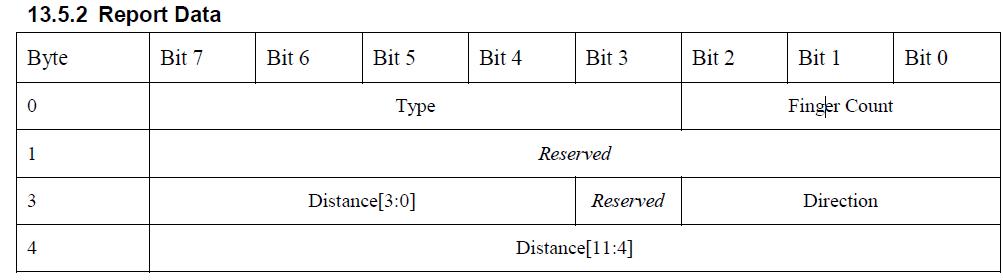
    Based on Static void rsaBuildAndSendZidMouseReport( uint8 mouseStates, int8 mickeysX, int8 mickeysY ) Function,  Can i create new function is create as blow?

    static void rsaBuildAndSendZidMouseReport( uint8 mouseStates, int8 mickeysX, int8 mickeysY )       -> static void rsaBuildAndSendZidScrollReport( ( uint8 type_count, int8 dist_dir, int8 distance )                 

     uint8 buf[ZID_MOUSE_DATA_LEN + sizeof(zid_report_data_cmd_t) + sizeof(zid_report_record_t)];    ->  uint8 buf[ZID_GESTURE_SCROLL_DATA_LEN+ sizeof(zid_report_data_cmd_t) + sizeof(zid_report_record_t)];   

      zid_report_data_cmd_t *pReport = (zid_report_data_cmd_t *)buf;
      zid_report_record_t *pRecord = (zid_report_record_t *)&pReport->reportRecordList[0];
      zid_mouse_data_t *pMouse = (zid_mouse_data_t *)(&pRecord->data[0]);                                                ->  zid_gestureScroll_data_t *pScroll = (zid_gestureScroll_data_t *)(&pRecord->data[0]); 

     uint8 txOptions = (mouseStates==0) ? ZID_TX_OPTIONS_INTERRUPT_PIPE : ZID_TX_OPTIONS_CONTROL_PIPE;               -> ????????????

      /* Rapid mouse movements should go OTA via Interrupt transmission model, no broadcast */
      pReport->cmd = ZID_CMD_REPORT_DATA;                                                                         
      pRecord->len = sizeof(zid_report_record_t) + ZID_MOUSE_DATA_LEN - 1;               ->   pRecord->len = sizeof(zid_report_record_t) + ZID_GESTURE_SCROLL_DATA_LEN - 1;
      pRecord->type = ZID_REPORT_TYPE_IN;
      pRecord->id = ZID_STD_REPORT_MOUSE;                                                                      ->   pRecord->id = ZID_STD_REPORT_GESTURE_SCROLL;
      pMouse->btns = mouseStates;                                                                                              ->   pScroll ->type_count=type_count; 
      pMouse->x = mickeysX;                                                                                                            ->   pScroll ->reserved= 0
      pMouse->y = mickeysY;                                                                                                            ->   pScroll ->dist_dir= dist_dir;      

      /* Send report */                                                                                                                           ->  pScroll ->distance= distance;
      rsaState = RSA_STATE_NDATA;
      RTI_SendDataReq( rsaDestIndex, RTI_PROFILE_ZID, RTI_VENDOR_TEXAS_INSTRUMENTS, txOptions, sizeof( buf ), buf );


    Please check the contents of the above and let me know about the part you want to modify.
     
    Thanks you.
     
    Best regards,
     
    IK.JANG
  • Hi Jang,

    It looks good. I would recommend using short for distance, since distance is a 12 bit field. 

    This structure may be better suited:

    typedef struct {
      uint8 type_count;         // Bits 0-2: Finger count; Bits 3-7: Type of gesture detected
      uint8 reserved;           // Reserved
      uint8 dir:3;              // Bits 0-2:
      uint8 reserved:1;           // Reserved
      uint16 distance:12;       // Bits 3-15: Distance[0:11]
    }

    You can set tx options to ZID_TX_OPTIONS_CONTROL_PIPE or ZID_TX_OPTIONS_INTERRUPT_PIPE depending on the latency you require and the frequency of the reports. Interrupt pipe is less reliable, but faster, hence suitable for pointing data.

  • Hi Sorby.

    Thank you for your Answer, really.

    Your feedback was great help to me.

    After adding  scroll function, I'll do the test.

    i'll  let you know the test result.

    Thank you

    Best regards,

    IK.JANG