This thread has been locked.

If you have a related question, please click the "Ask a related question" button in the top right corner. The newly created question will be automatically linked to this question.

Smart RF Studio has no Sniffer export like the documentation shows, and still no sniffing...

Other Parts Discussed in Thread: STRIKE, SIMPLICITI, CC430F5137, TEST2

I have the latest 1.10.0 version. Not a big deal because I can program the RF settings manually, but several parameters are missing and it doesn't pick up any packets except for the occasional random (unfiltered) noise. I think I've ruled out transmission problems (used two TI boards and our boards through Smart RF Studio, both stock and manual RF settings) and nothing + the Spectrum shows activity. 

Any clues?

  • Hi John,

    Could you give some more information on the setup you have and what is not working correctly? Then we can replicate the setup here and see if we observe the same. I would need information on which HW you have, and how you are testing it with SmartRF Studio.

    Regards,

    Bjørn

  • I flash loaded the C1111DK_Dongle with the sniffer program using the CC Debugger. Register settings are per below. This should work??? Led is green on the C1111 when plugged in, and it shows in the sniffer.

    The other point was to use Smart RF studio to export the setting off my hardware in the Sniffer prs format, but that option doesn't exist in the RF Studio menus, V1.10.0

    PKTCTRL0 |0xDF04|0x04
    CHANNR |0xDF06|0x00
    FSCTRL1 |0xDF07|0x08
    FREQ2 |0xDF09|0x23
    FREQ1 |0xDF0A|0x31
    FREQ0 |0xDF0B|0x3B
    MDMCFG4 |0xDF0C|0xCA
    MDMCFG3 |0xDF0D|0x83
    MDMCFG2 |0xDF0E|0x93
    MDMCFG1 |0xDF0F|0x22
    MDMCFG0 |0xDF10|0xF8
    DEVIATN |0xDF11|0x34
    MCSM0 |0xDF14|0x10
    FOCCFG |0xDF15|0x16
    BSCFG |0xDF16|0x6C
    AGCCTRL2 |0xDF17|0x43
    AGCCTRL1 |0xDF18|0x40
    AGCCTRL0 |0xDF19|0x91
    FREND1 |0xDF1A|0x56
    FSCAL3 |0xDF1C|0xE9
    FSCAL2 |0xDF1D|0x2A
    FSCAL1 |0xDF1E|0x00
    FSCAL0 |0xDF1F|0x1F
    TEST1 |0xDF24|0x35
    TEST0 |0xDF25|0x09
    PA_TABLE0|0xDF2E|0x8E
    IOCFG0 |0xDF31|0x06

  • Hi John,

    Regarding your second point about missing option to export prs file It would be interesting to know where you are looking for this option?

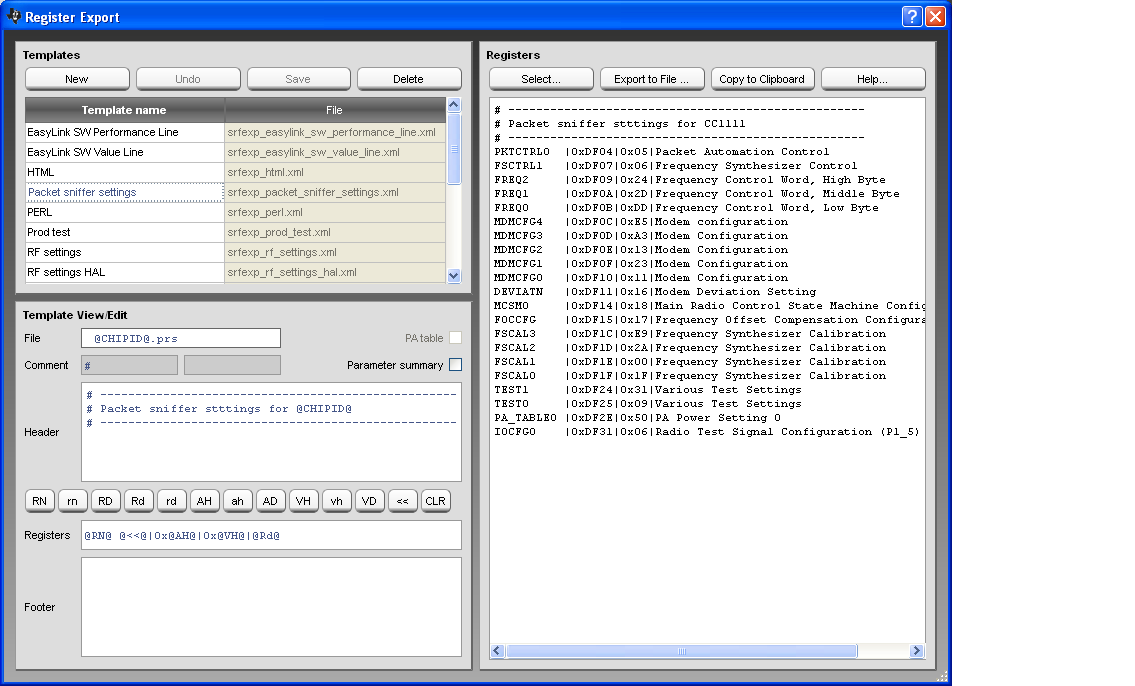
    If everything is OK with your installation you should find this option in the "Register export" dialog. Below you see a screenshot of the Register export. Under Template name there should be an option called "Packet snffer settings". The template is a file that is installed together with the rest of SmartRF Studio. Let me know if you don't see this option in the Register export dialog.

    Regards,

    Øyvind

  • Packet Sniffer option is missing, so missing or wrong template? Thanks.

  • It seems as if something went wrong during the installation. Normally you should have the following template file installed: srfexp_packet_sniffer_settings.xml
    On my installation (XP machine), I find it on the following location: C:\Program Files\Texas Instruments\SmartRF Tools\SmartRF Studio 7\config\codeexport

    If you try to export something the complete set of templates are copied to the user folder. On my XP machine this is:
    C:\Documents and Settings\<user id>\My Documents\Texas Instruments\SmartRF Studio v7\codeexport 

    Reinstalling SmartRF Studio might help or if you like, I have attached the template file.
    To be sure I cleaned up my PC and reinstalled SmartRF Studio. The template was installed. Let me know if you still have problems with the template.

    Regards,
    Øyvind


  • Still trying to sniff packets off the CC430, and strike 2, seems dead again. 

    I purchased another C1111 Dongle and checked the xml file stated above. It is still not recognized (srfexp_packet_sniffer_settings.xml). Mine are in a different sub-dir than you specified. Mine (Win 7) is in x86\...\SmartRF Studio 7\config\codeexport. Yet the file is present with the others. Anyway, I can do the settings manually, this is just a symptom possibly.

    After a disappointing Sniffer, I decided to use a known TI board as reference. My interface was said to be out of date (strange, it was already updated), so I did the update and that's when the problems all started (can't read the dongle to re-flash the firmware and sniffer doesn't work). 

    Worse yet, my new C1111 Dongle device doesn't show up on the Flash Programmer device list now, but it shows up as a device on the sniffer. But the sniffer isn't picking up anything. At first it picked up error packets - noise. Now it doesn't even do that.

    Rough day, any clues? I need to see packets!

    21

  • Hi John,

    The CC1111 Dongle doesn't show in the Flash Programmer if it is programmed with the sniffer FW. However, if you connect the CC Debugger to the CC1111 dongle you see it like in the scree shot below:

    Make sure you have selected "Program CCxxxx SoC or MSP430" and the "System-on-Chip" tab.

    After programming the sniffer FW on the CC1111 Dongle and with the correct drivers installed,  it should show in the packet sniffer as follows:

    I hope this is what you see as well?

    It seems to me that there is some problems with the settings and to make sure it will work sniffing packets from CC430 with the CC1111 I tried it myself.

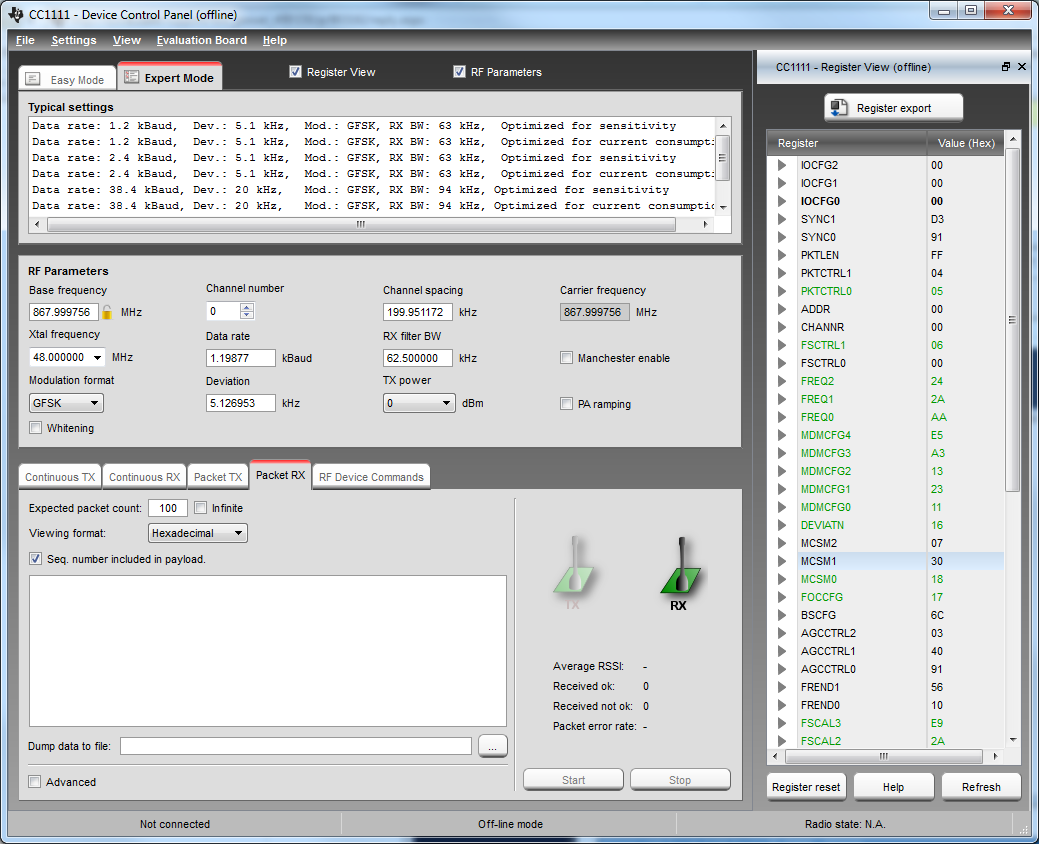
    I installed latest version of SmartRF Studio from the web (1.10.3). Started an off-line session for the CC1111 to export registers. Selected the right RF settings according what is used from the transmitter. The screen shot below show the device control panel:

    Make sure to select "Packet RX" because the sniffer will operate as a receiver. In my case I used the settings for 1.2 kBaud. I had to adjust the Base frequency because this was not the same as I was sending from CC430.

    Then select "Register Export". Screen shot below show the options I get:

    Then "Export to file" to make it available to the Packet Sniffer. It will also ask if you want to start the packet sniffer with these settings. I chose not to since I had already started the packet sniffer.

    In the packet sniffer I selected "Radio configuration" and "Browse" to load the settings.

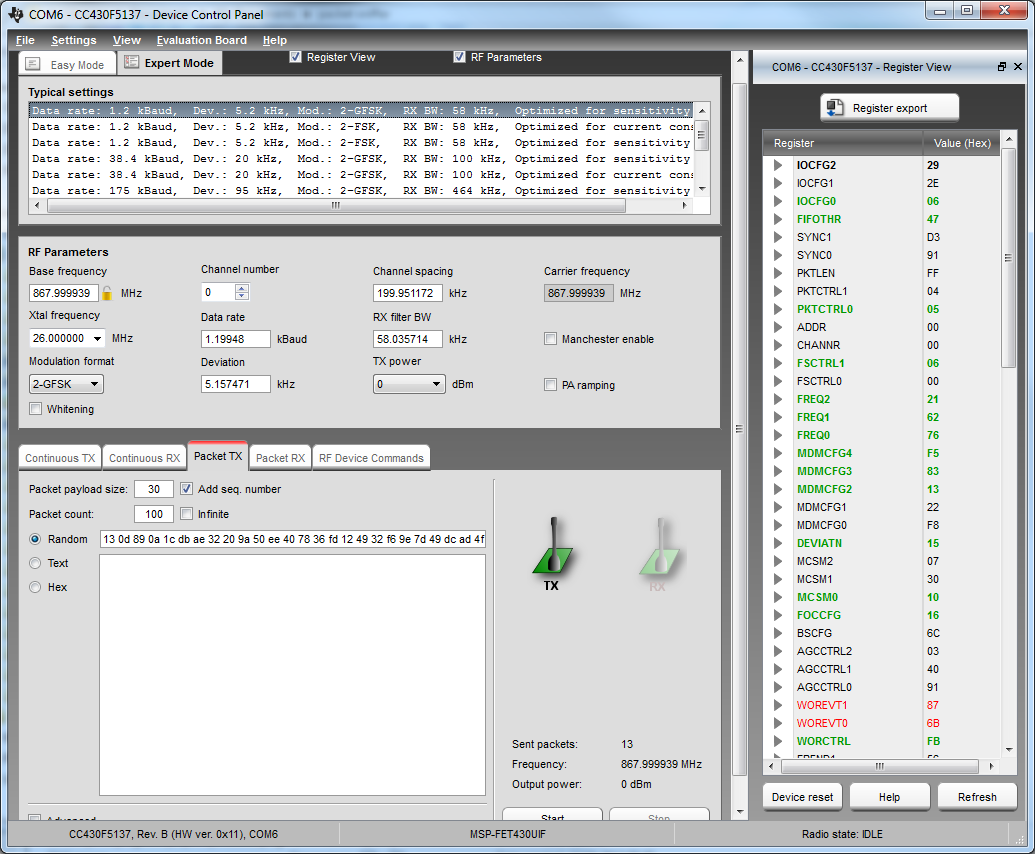
    For the sender I used SmartRF Studio and CC430F5137RF900 board. Below is a screen shot of the Device Control Panel.

    As you can see from the screen shot of the packet sniffer I was able to sniff packets.

    First of all I hope you are able to export settings from SmartRF Studio. Make sure to export settings for CC1111 and that the RF settings matches the settings used for CC430.

    Hope this help you to see some packets.

    Regards,
    Øyvind

  • You've been very helpful... but still no packets. I was doing 2 things wrong as you suspected. (Used Tx instead of Rx to export settings, and needed the CC debugger to see the dongle - I forgot that part). Also, the "Packet Sniffer Settings" only show up as one of the formats when you launch SmartRF Studio offline. Try it with a device connected, the sniffer options isn't there. 

    So still no packets, I'm questioning my radio now or the C1111 Dongle hardware (zapped but not likely because it flash loaded successfully again.) So, my hardware could be off tune although it shows up nice and centered on the spectrum analyzer when placed on 915 MHz. (I am setting the center frequency to 915 for both Rx export and Tx from my board - as you mentioned you did). However the reason I'm checking packets at all is because my RF signal doesn't go as far in range (yet it's stronger on the spectrum Analyzer than the TI boards, so should be better range you'd think right?). 

    So to eliminate my hardware, I set it up to talk to a TI Dev board and both can Tx/Rx both ways. (Ave RSSI on TI was -18dBm, and on my board was -22dBm). Since the C1111 is essentially the same radio as the CC430, this sniffer should work. I do notice only the green items are saved for the sniffer, so I assume the other settings are for the CC430 and sniffer doesn't need them (wondering if the sniffer has other registers set from prior loads). 

    I'm going to continue with some other settings using TI as the Tx for now, but don't see what's different from what you're doing above. Keep in mind at first I would get one random noisy packet each time I played the sniffer (on simplicity I think) but now nothing ever shows. Did I fry another Dongle... man, and I've got no carpet here. How could it successfully Flash load, so just crippled? 

    Thanks,

    21

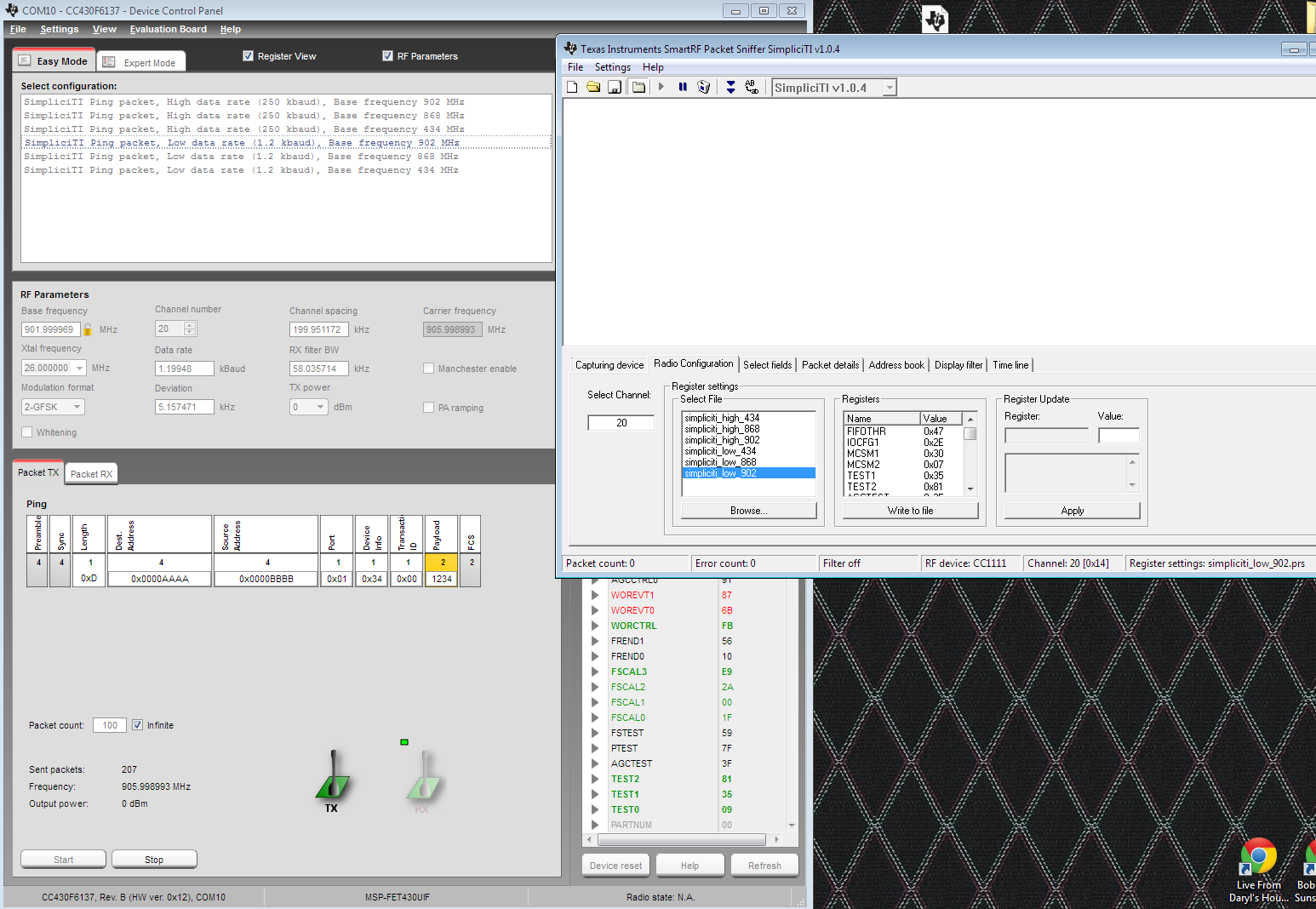
  • Here's my screenshot showing I'm using the SimpliciTi 902 low settings on both ends, and nothing. Tried all 4 SimpliciTi protocols.

    Any ideas? Thanks 21

  • I don't have any HW at hand to try this now so I can't say why this is not working.

    One possibility to check the sanity of the CC1111 Dongle is to use it as a receiver in SmartRF Studio. In fact that's the easiest way to find settings on CC430 and CC1111 that gives you a connection between the two. If you connect the CC Debugger to the CC1111 Dongle the same way as for programming the FW it should show up in the list of connected devices in SmartRF Studio.

    Indeed the CC430 and the CC1111 have the same radio but they are probably running with different crystal frequencies. This might give a slightly different base frequency. In my case it was not enough to not get a link though. Also remember the other RF parameters like modulation and stuff but this is a bit out of my league. I'm only working with SW for our tools. You probably know the RF parameters better than me. If I'm not totally wrong I think it could help to increase the RX Filter bandwith on the receiver to see if you are able to receive anything.

    When exporting the register settings only the values different from the reset value is taken into account. That is normally all the none black colored registers.

    Regards,
    Øyvind

  • We're getting there, thanks again didn't know I could use the ccdebugger that way!

    Rx Simplicity works with the Dongle, but not expert mode. Correct, different crystals and numbers a bit, and doesn't have 2-GSFK list the Dev board interface. So tried to match things, no luck.

    Will open up Rx Filter Bandwidth, then maybe load the same simpliciti settings that work with the dongle now into my app. Will I need extra functions in my code for SimpliciTi or just use the different settings and press go? Wouldn't mind trying it for the node thing. Do you know if it is more robust or much slower with that extra layer?

    Thanks,

    21

  • Oh man, that worked (wider B/W Filter)!  

    Great Help! You work with TI?

    21

  • Happy to hear that you have some success. : -)

    Yes, I'm working with TI Norway. It's getting a bit late over here so I think I call it a day. For the question about changes in simplicity I guess it's better to hand that over to some of the embedded protocol experts. I'l see on monday what I can do.

    Have a nice weekend,
    Øyvind

  • Although I was able to get some communication with the packet sniffer from SmartRF Studio 7, I couldn't pick up anything using our code to Tx while using the same SmartRF register settings.

    This could be a separate question, but I think they're related so let's continue...

    Now consider this fact: Our code with our hardware at both ends has very poor range and could be causing what I call a stutter (locks up for a second, then continues fine... about every 15 sec). Eliminating hardware issues, I loaded SmartRF on 2 computers and I can walk outside with my laptop with zero packet loss, and at 250K BR!

    So I've got a feeling we're doing something wrong in our code. Does any of this sound familiar? Anything to check first? Any other code you'd like to see?

    ALL RADIO CODE IS UNCHANGED FROM the TI SAMPLES. THIS IS NOT A PROPRIETARY PROTOCOL, so it should work, right?

    Thanks,

    21

    TRANSMITTER CODE (mostly transmits)

    // init...

    //setup the watchdog timer to expire every 100 ms. Use this to drive data collection and
    // transmit data. Enter low power state afterwards
    // setup WDT timer and set LED to yellow. Set it to green after link status becomes active
    WDTCTL = WDT_MDLY_32; //WDT_ADLY_16; // WDT_ADLY_1000;
    SFRIE1 |= WDTIE; // Enable WDT interrupt

    //int event_index = 0;

    //__bis_SR_register(GIE );

    while( true ) {

    __bis_SR_register( LPM3_bits + GIE );

    }
    /*
    // check if any interrupts needs servicing and service them
    // __bis_SR_register( GIE );
    for (event_index = 0; event_index < EVENT_COUNT; event_index++) {
    if (radio->intrEvt[event_index].evt != (INT_EVENT_HANDLER)NULL) {
    radio->intrEvt[event_index].evt((int)radio->intrEvt[event_index].evtArg);
    radio->intrEvt[event_index].evt = (INT_EVENT_HANDLER)NULL;
    }
    }

    }

    WATCHDOG (Tx about every 32ms)

    #pragma vector=WDT_VECTOR // Watchdog Timer interrupt service routine
    __interrupt void watchdog_timer(void)
    {

    // Begin sampling and transmitting continuously
    accel->sampleData();
    radio->receiveOff();
    radio->receiving = 0;
    radio->transmit((unsigned char*)accel->getData(), sizeof(Accel::AccelData));
    radio->transmitting = 1;

    // save off the accelerometer data for toe analysis, or do the analysis here
    //__bic_SR_register_on_exit(LPM3_bits);

    RECEIVER CODE (mostly receives):

    while( true ) {

    // check if any interrupts needs servicing and service them
    if (radio->pendingEvents) {
    for (event_index = 0; event_index < EVENT_COUNT; event_index++) {
    if (radio->intrEvt[event_index].evt != (INT_EVENT_HANDLER)NULL) {
    radio->pendingEvents--;
    radio->intrEvt[event_index].evt((int)radio->intrEvt[event_index].evtArg);
    radio->intrEvt[event_index].evt = (INT_EVENT_HANDLER)NULL;
    }
    }
    }

    // Toggling the radio receive with a delay is necessary.
    // 4000 is about the minimum value to for the receiver to settle
    radio->receiveOff();
    radio->receiveOn();
    __delay_cycles(5000);

    // read the fsr, curve, gain
    if (++potSampleCount > 2) {
    potSampleCount = 0;
    ADC12CTL0 |= ADC12SC; // Start adc conversion - software trigger
    __delay_cycles(100);
    pot->potFsr = (0xFFF - ADC12MEM0)>>4; // Move A0 results, IFG is cleared
    pot->potCurve = (ADC12MEM1)>>4; // Move A1 results, IFG is cleared
    pot->potGain = (ADC12MEM2)>>4; // Move A2 results, IFG is cleared
    if (pot->potFsr >= Util:: FootSwitchDelta) {
    processFootSwitchEvent(0);
    }
    }
    }

  • Hi John,

    Before I hand this over to some of our CC430 Embedded experts I would like to clarify a couple of things.

    To eliminate HW issues you used SmartRF Studio. Does it means that you could use SmartRF Studio on your HW?
    I guess the answer is yes and that you are using the MSP-FET430 to interface your HW.

    It sounds most likely something with the register settings. If you have the same settings as used by SmartRF Studio you should get the same range. Which setting from SmartRF Studio are you using?
    Make sure the power settings are correct. You could try to increase the output power and see if this makes any difference (Unless you already used max output power of 10dBm).

    The Transmit function would likely be the most interresting part for someone to check what's going on. Have you tried to run the TI examples "untouched" on your HW?

    Best Regards,
    Øyvind

  • Good questions. I was using 100% my HW on both ends with RF Studio. Both are based off the CC430F5137 (so none of your hardware is involved). My current settings are below, along with several others that I tried (from exporting RF Studio Settings). I also thought about using known RF software from the TI examples, but I don't have hardware buttons to interact (just a pressure sensor on each end - so we would have to rewrite your code quite a bit to test this. But not impossible and could be a last resort if you can't think of anything else that could cause this. 

    FYI, I run the Tx side from a fresh 2032 battery on my hardware, while SmartRF uses the USB for power (I'll verify it's not sucking the battery down for some reason, but doubt it). My hardware uses the same balun and Johanson components as the Chronos Watch, including having a separate power plane fed by an inductor for the radio, and the antenna is a 1/4 wave wire (7.5 cm). I did the board layouts with help from an RF consultant as needed. My Spectrum analyzer shows both to be centered just below 915 as expected, and power levels are better than the Chronos using our code on our HW. So that's another oddity because the spectrum says it should have better range, but it's much worse in fact.

    Here are my RF settings (along with a bunch more tried below that). It's how I learned I could only go up to 38K BR with less than half the range as SmartRF and the sniffer can't see anything off my hardware, even with wider bandwidth settings on Rx. (To clarify... I'm transmitting from my HW to RF Studio using identical settings.) Both were on 0dbm power for an apples to apples comparison. Ya I know, I'm baffled too, but driving me crazy. The program "stutter" problem is possibly related, no way of knowing yet without more testing to possibly include timer data in the packets, and without the sniffer, I have no way of knowing if it's on the Tx side or the Rx side. The reason I know it's hanging is because we're using PWM on an LED (based on pressure) and that freezes occasionally along with no response for a moment. And there is another problem possibly related, and that's that the Rx/Tx should reverse for an update of status and that's not happening either - so it only goes one way on our HW (that sounds like a SW bug though). 

    namespace Rf1a {

    #ifdef MHZ_915

    #define SM_FSCTRL1 0x08 // FSCTRL1 Frequency synthesizer control.
    #define SM_FSCTRL0 0x00 // FSCTRL0 Frequency synthesizer control.
    #define SM_FREQ2 0x23 // FREQ2 Frequency control word high byte.
    #define SM_FREQ1 0x31 // FREQ1 Frequency control word middle byte.
    #define SM_FREQ0 0x3B // FREQ0 Frequency control word low byte.
    #define SM_MDMCFG4 0xCA // MDMCFG4 Modem configuration.
    #define SM_MDMCFG3 0x83 // MDMCFG3 Modem configuration.
    #define SM_MDMCFG2 0x93 // MDMCFG2 Modem configuration.
    #define SM_MDMCFG1 0x22 // MDMCFG1 Modem configuration.
    #define SM_MDMCFG0 0xF8 // MDMCFG0 Modem configuration.
    #define SM_CHANNR 0x00 // CHANNR Channel number.
    #define SM_DEVIATN 0x34 // DEVIATN Modem deviation setting (when FSK modulation is enabled).
    #define SM_FREND1 0x56 // FREND1 Front end RX configuration.
    #define SM_FREND0 0x10 // FREND0 Front end TX configuration.
    #define SM_MCSM0 0x10 // oes: 0x18 // MCSM0 Main Radio Control State Machine configuration.
    #define SM_FOCCFG 0x16 // FOCCFG Frequency Offset Compensation Configuration.
    #define SM_BSCFG 0x6C // BSCFG Bit synchronization Configuration.
    #define SM_AGCCTRL2 0x43 // AGCCTRL2 AGC control.
    #define SM_AGCCTRL1 0x40 // AGCCTRL1 AGC control.
    #define SM_AGCCTRL0 0x91 // AGCCTRL0 AGC control.
    #define SM_FSCAL3 0xE9 // FSCAL3 Frequency synthesizer calibration.
    #define SM_FSCAL2 0x2A // FSCAL2 Frequency synthesizer calibration.
    #define SM_FSCAL1 0x00 // FSCAL1 Frequency synthesizer calibration.
    #define SM_FSCAL0 0x1F // FSCAL0 Frequency synthesizer calibration.
    #define SM_FSTEST 0x59 // FSTEST Frequency synthesizer calibration.
    #define SM_TEST2 0x81 // TEST2 Various test settings.
    #define SM_TEST1 0x35 // TEST1 Various test settings.
    #define SM_TEST0 0x09 // TEST0 Various test settings.
    #define SM_FIFOTHR 0x47 // FIFOTHR RXFIFO and TXFIFO thresholds.
    #define SM_IOCFG2 0x29 // IOCFG2 GDO2 output pin configuration.
    #define SM_IOCFG0 0x06 // IOCFG0 GDO0 output pin configuration. Refer to SmartRF®
    #define SM_PKTCTRL1 0x04 // PKTCTRL1 Packet automation control.
    #define SM_PKTCTRL0 0x04 // PKTCTRL0 Packet automation control.
    #define SM_ADDR 0x00 // ADDR Device address.
    #define SM_PKTLEN 0x08 // PKTLEN Packet length.
    #endif

    // Export from SmartRF Studio 7, 175KBR (Sensitive), 915, 2GFSK,

    // 0x06, // IOCFG0 GDO0 Output Configuration
    // 0x05, // PKTCTRL0 Packet Automation Control
    // 0x0C, // FSCTRL1 Frequency Synthesizer Control
    // 0x23, // FREQ2 Frequency Control Word, High Byte
    // 0x31, // FREQ1 Frequency Control Word, Middle Byte
    // 0x3B, // FREQ0 Frequency Control Word, Low Byte
    // 0x3C, // MDMCFG4 Modem Configuration
    // 0xB9, // MDMCFG3 Modem Configuration
    // 0x13, // MDMCFG2 Modem Configuration
    // 0x57, // DEVIATN Modem Deviation Setting
    // 0x10, // MCSM0 Main Radio Control State Machine Configuration
    // 0x1D, // FOCCFG Frequency Offset Compensation Configuration
    // 0x1C, // BSCFG Bit Synchronization Configuration
    // 0xC7, // AGCCTRL2 AGC Control
    // 0x00, // AGCCTRL1 AGC Control
    // 0xB0, // AGCCTRL0 AGC Control
    // 0xFB, // WORCTRL Wake On Radio Control
    // 0xB6, // FREND1 Front End RX Configuration
    // 0xEA, // FSCAL3 Frequency Synthesizer Calibration
    // 0x2A, // FSCAL2 Frequency Synthesizer Calibration
    // 0x00, // FSCAL1 Frequency Synthesizer Calibration
    // 0x1F, // FSCAL0 Frequency Synthesizer Calibration
    // 0x09, // TEST0 Various Test Settings


    // Sensitive, 38.4KBR, 915

    // 0x06, // IOCFG0 GDO0 Output Configuration
    // 0x47, // FIFOTHR RX FIFO and TX FIFO Thresholds
    // 0x05, // PKTCTRL0 Packet Automation Control
    // 0x06, // FSCTRL1 Frequency Synthesizer Control
    // 0x23, // FREQ2 Frequency Control Word, High Byte
    // 0x31, // FREQ1 Frequency Control Word, Middle Byte
    // 0x3B, // FREQ0 Frequency Control Word, Low Byte
    // 0xCA, // MDMCFG4 Modem Configuration
    // 0x83, // MDMCFG3 Modem Configuration
    // 0x13, // MDMCFG2 Modem Configuration
    // 0x35, // DEVIATN Modem Deviation Setting
    // 0x10, // MCSM0 Main Radio Control State Machine Configuration
    // 0x16, // FOCCFG Frequency Offset Compensation Configuration
    // 0x43, // AGCCTRL2 AGC Control
    // 0x87, // WOREVT1 High Byte Event0 Timeout
    // 0x6B, // WOREVT0 Low Byte Event0 Timeout
    // 0xFB, // WORCTRL Wake On Radio Control
    // 0xE9, // FSCAL3 Frequency Synthesizer Calibration
    // 0x2A, // FSCAL2 Frequency Synthesizer Calibration
    // 0x00, // FSCAL1 Frequency Synthesizer Calibration
    // 0x1F, // FSCAL0 Frequency Synthesizer Calibration
    // 0x81, // TEST2 Various Test Settings
    // 0x35, // TEST1 Various Test Settings
    // 0x09, // TEST0 Various Test Settings
    // 0x80, // RSSI Received Signal Strength Indication
    // 0x94, // VCO_VC_DAC Current Setting from PLL Calibration Module


    // 0x06, // IOCFG0 GDO0 Output Configuration
    // 0x47, // FIFOTHR RX FIFO and TX FIFO Thresholds
    // 0x05, // PKTCTRL0 Packet Automation Control
    // 0x06, // FSCTRL1 Frequency Synthesizer Control
    // 0x23, // FREQ2 Frequency Control Word, High Byte
    // 0x31, // FREQ1 Frequency Control Word, Middle Byte
    // 0x3B, // FREQ0 Frequency Control Word, Low Byte
    // 0xCA, // MDMCFG4 Modem Configuration
    // 0x83, // MDMCFG3 Modem Configuration
    // 0x13, // MDMCFG2 Modem Configuration
    // 0x35, // DEVIATN Modem Deviation Setting
    // 0x10, // MCSM0 Main Radio Control State Machine Configuration
    // 0x16, // FOCCFG Frequency Offset Compensation Configuration
    // 0x43, // AGCCTRL2 AGC Control
    // 0x87, // WOREVT1 High Byte Event0 Timeout
    // 0x6B, // WOREVT0 Low Byte Event0 Timeout
    // 0xFB, // WORCTRL Wake On Radio Control
    // 0xE9, // FSCAL3 Frequency Synthesizer Calibration
    // 0x2A, // FSCAL2 Frequency Synthesizer Calibration
    // 0x00, // FSCAL1 Frequency Synthesizer Calibration
    // 0x1F, // FSCAL0 Frequency Synthesizer Calibration
    // 0x81, // TEST2 Various Test Settings
    // 0x35, // TEST1 Various Test Settings
    // 0x09, // TEST0 Various Test Settings

    // 1.2KBR 915 Sensitive
    // 0x06, // IOCFG0 GDO0 Output Configuration
    // 0x47, // FIFOTHR RX FIFO and TX FIFO Thresholds
    // 0x05, // PKTCTRL0 Packet Automation Control
    // 0x06, // FSCTRL1 Frequency Synthesizer Control
    // 0x23, // FREQ2 Frequency Control Word, High Byte
    // 0x31, // FREQ1 Frequency Control Word, Middle Byte
    // 0x3B, // FREQ0 Frequency Control Word, Low Byte
    // 0xF5, // MDMCFG4 Modem Configuration
    // 0x83, // MDMCFG3 Modem Configuration
    // 0x13, // MDMCFG2 Modem Configuration
    // 0x15, // DEVIATN Modem Deviation Setting
    // 0x10, // MCSM0 Main Radio Control State Machine Configuration
    // 0x16, // FOCCFG Frequency Offset Compensation Configuration
    // 0x87, // WOREVT1 High Byte Event0 Timeout
    // 0x6B, // WOREVT0 Low Byte Event0 Timeout
    // 0xFB, // WORCTRL Wake On Radio Control
    // 0xE9, // FSCAL3 Frequency Synthesizer Calibration
    // 0x2A, // FSCAL2 Frequency Synthesizer Calibration
    // 0x00, // FSCAL1 Frequency Synthesizer Calibration
    // 0x1F, // FSCAL0 Frequency Synthesizer Calibration
    // 0x81, // TEST2 Various Test Settings
    // 0x35, // TEST1 Various Test Settings
    // 0x09, // TEST0 Various Test Settings
    // 0x7F, // LQI Demodulator Estimate for Link Quality
    // 0x80, // RSSI Received Signal Strength Indication
    // 0x94, // VCO_VC_DAC Current Setting from PLL Calibration Module

    Thanks!

    21

  • Just to be sure, I don't see anything about the power setting (PA_TABLE). Maybe it is handled outside of the normal setting of the registers?

    It is poorly documented in SmartRF Studio and you have to check "PA table" to get these settings and it must be handled in a special way in the code. The file RF1a.c (..\Asynchronous\HAL) from the code examples contains examples on how this can be done.

    With a bit of luck this is the easy explanation of the behaviour.

    Regards,
    Øyvind

  • It's set to 0x51 (0dbm) in another header and it is written. I thought you had it at first, good try though.

    21

  • Hmm.. On my version of SmartRF Studio it says 0x8D for 0dBm (CC430).

    PA_TABLE0 = 0x8D
    FREND0.PA_POWER = 0  (using power value from index 0 in the PA Table)

    If you try 0x51 in SmartRF Studio you will get a message that the value is "unknown".

    I hope you get a better result with 0x8D.

    Regards,
    Øyvind


  • That's better range. Do I need to set the friend (FREND0.PA_POWER = 0) or is that just the register in the chip and just use Friend 0 and 1 off SmartRF?

    I'll try the sniffer again and let you know if it picks anything up now. I think 51 is above -6 but below 0 dbm.

    FYI, I got that value from TI's LT_FIFO RF code samples, this is an error especially since it states "0 dbm." 

    #include "RF_Toggle_LED_Demo.h"

    #define PACKET_LEN (0x05) // PACKET_LEN <= 61
    #define RSSI_IDX (PACKET_LEN) // Index of appended RSSI
    #define CRC_LQI_IDX (PACKET_LEN+1) // Index of appended LQI, checksum
    #define CRC_OK (BIT7) // CRC_OK bit
    #define PATABLE_VAL (0x51) // 0 dBm output

    Also, how does PA Ramping help things, better signal quality because of more stable RF power?

    Thanks, will let you know if this is solved.

    21

  • Please start a new thread for questions different from the one related to the first one. It increases the probability to get an answer.

    PA ramping is to decrease the frequency splattering. If you go from no output power to max output power without ramping you have basically a square wave in the time domain and in the frequency domain this will create a lot of tones. The goal with ramping is to go from no power to max power in a way that create the least amount of tones.