This thread has been locked.

If you have a related question, please click the "Ask a related question" button in the top right corner. The newly created question will be automatically linked to this question.

Installation problem with SmartRF06 Evaluation board

Other Parts Discussed in Thread: CC2640

Hi,

I bought a couple of SmartRF06 Evaluation boards directly from TI, a few months ago. The first one that I pulled out from the package works well on my Windows 7 laptop.

Since I needed another SmartRF06 EB, I decided to pull the second one out from the brand new anti-static pack and plugged it into my laptop.  I get the dull low frequency sound from the laptop indicating that the device is not recognized.  The screenshot below shows the state of the Device Manager.  I see only one "Texas Instruments XDS100v3" in "Other devices" and not two as mentioned in the SmartRF06 Evaluation Board User Guide (SWRU321A – May 2013).  The red "Advanced Mode" LED on the SmartRF06 EB is lit but the POWER LED is like a really tiny Green (like a pinpoint), almost like it's flickering, unlike the working SmartRF06 EB board which is fully lit.
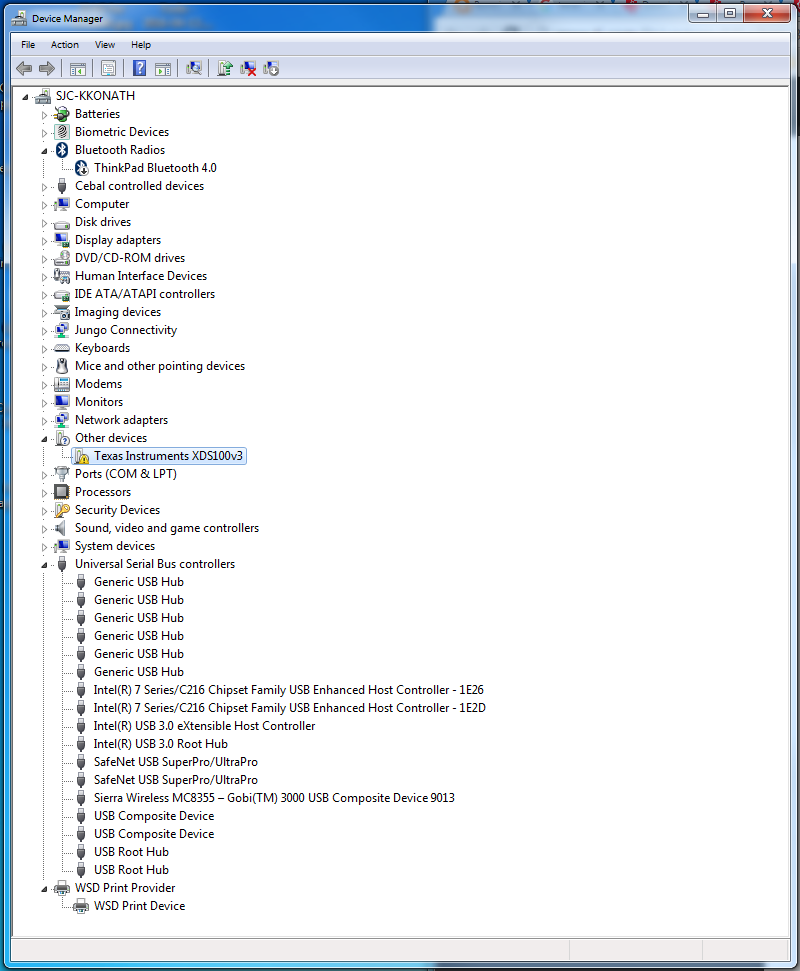
I follow instructions in the User's Guide and select the ftdi directory in the drivers directory of SmartRF Tools, but the following two screenshots show that even though the right directory has been selected, Windows 7 does not seem to think that there is a driver there.

I was a bit stumped at this point, but tried the following. Rather than manually picking a directory in the second figure above, I selected the choice to "Let me pick from a list of device drivers on my computer". I chose the device type as Universal Serial Bus Controllers, the Manufacturer as FTDI and then selected "TI XDS 100v3 Channel A" as shown in the figures below.
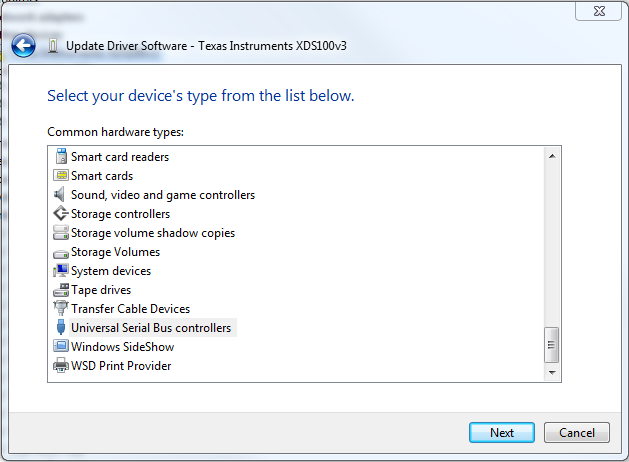
I click Next and the driver is installed. TI XDS100v3 Channel A appears under Universal Serial Bus controllers. Interestingly, now, the green LED is ON (not the faint one I mentioned earlier) and the red LED is OFF. However, there is no way for me to install the driver for Channel B. See Device Manager screenshot below:

Some info that may help: I did not have any daughter cards in the EM connectors. However I did try with and without hooking up my CC2640 board (internally developed) to the 10-pin ARM Cortex Debug header with the same results as above. I also tried using different USB cables but there was no change in behavior. Though it doesn't really matter, since I have not moved beyond the first step, in case you are interested, I use IAR 7.40.2 with BLE Stack 2.1.1.

What puzzles me is that this is a brand new SmartRF06 board that I removed afresh by cutting open the anti-static bag.  The older board works well.

Am I missing something basic out here.  I would appreciate your help in resolving this problem.

Regards,
KK

  • If you use Flash Programmer 2, does it recognize this new SmartRF06EB?
  • Hi YiKai,

    Thanks for the quick response!

    Hmm....I did not even think of checking if SmartRF Flash Programmer 2 is able to recognize the SmartRF06EB, since the basic driver installation had failed.

    Well, using the approaching of picking device drivers, I selected Universal Serial Bus Controllers, hit Next, selected FTDI as the manufacturer and TI XDS100v3 Channel A and successfully installed the first driver as I had mentioned in my earlier email. I invoked SmartRF Flash Programmer 2 and it was able to successfully recognize my device connected to the 10-pin debug header on the SmartRF06EB. I tested it (successfully) by programming an image into my device and it started beaconing with the new image.

    Thanks for asking me to check on this.

    Now, the next question is why does the second TI XDS100v3 Channel B device not show up in the Windows 7 Device Manager as mentioned in the SmartRF06EB USer's manual?

    What functionality do I lose because of the absence of the second device, TI XDS100v3 Channel B?

    Regards,
    KK
  • I don't know what functionality you will lose because of the absence of the second device, TI XDS100v3 Channel B. By the way, do you try to restart your Windows to see if TI XDS100v3 Channel B pops up?
  • Hi YiKai,

    Thanks for your suggestion. I rebooted my Windows system, but it comes up with TI XDS100v3 Channel A only .

    TI XDS100v3 Channel B does not show up.

    Regards,
    KK
  • I have no idea why it doesn't pop up. Anyway, if you have no problem to use SmartRF06 without it, I don't think it matters.
  • KK,

    You should not loose any debug functionality by not having channel B. What you may observe, is that if your 06EB is in use in debug session in for example CCS, the 06EB will not be listed in SmartRF Flash Programmer 2. This is because of the way the FTDI drivers work. But I don't think it will inhibit you in any way.

    Regarding why Channel B does not show up on your computer: You can try the following:
    1. Uninstall SmartRF Flash Programmer 2
    2. Download FTDI's tool "CDM Uninstaller" from www.ftdichip.com/.../Utilities.htm
    3. Disconnect 06EB from PC.
    4. Open CDM Uninstaller GUI.
    5. Specify Vendor ID 0403, and Product ID A6D1 and click the "Add" button.
    6. Click the "Remove Devices" button.
    7. When CDM Uninstaller has completed, reboot PC.
    8. Install SmartRF Flash Programmer 2
    9. Connect 06EB to your PC.

    Br,
    TIABO

  • Hi TIABO,

    I followed the above steps but with no luck.  In fact, when I run the CDM Uninstaller, I get the error shown below. The first figure shows the configuration and then the following figure shows the error.

    Nonetheless I continued with the steps you mentioned above and I only saw one device appearing in Device Manager, rather than Channel A and Channel B.

    One other point, now the working board that used to present two channels, shows only one channel, while the so-called "non-working board" also shows only one channel.

    I uninstalled everything (IAR EWARM-8302, SmartRF Programmer 2) and reinstalled it.  Still no luck.

    I uninstalled the above and then I installed SmartRFStudio, IAR EWARM, SmartRF Flash Programmer 2.  Still the same problem occurs.

    I even tried installing Code Composer but still the same results.

    It's a bit frustrating.  I wonder if there is some way for me to completely remove the FTDI driver (just uninstalling from Control Panel > Programs and Features > Uninstall) does not seem to remove the underlying driver or at least that's my premise.

    Any other suggestions?

    Regards,
    KK

  • Hi,

    I see your frustration. The "CDM Uninstaller" tool is the tool FTDI provides to uninstall FTDI drivers. To further investigate why the tool doesn't work, I think you must contact FTDI.

    What VID/PID is listed for your 06EB in the device manager? Is it not 0403/A6D1?

    TIABO

  • Hi TIABO,

    I installed a tool called "usbview" from the FTDI website, plugged in the SmartRF06 EB board, and it shows up VID/PID of 0403/A6D1.  

    However, if I try to uninstall the driver using the CDM uninstaller, it does not seem to able to find the device.  Not sure why?

    I could contact FTDI but I think they only deal with the vendors, like TI.

    For now, so long as I can manually pick the driver for TI XDS100v3 Chanel A from the Manufacturer FTDI, I think I'm fine, since SmartRF Flash Programmer 2 is able to program my 2640.  I've not checked if I can debug in this mode using IAR EWARM-8302.  

    BTW, you had made this suggestion in relation to a question I had asked about XDS110.  I did install the TI emulation pack using "Run as Administrator".  Just to be sure, I ran it again with Administrator privileges, with the same results.

    Before I give up on getting a fully functional SmartRF06EB, some questions:

    1. Since IAR EWARM is my development IDE, do I need to install Code Composer Studio at all?  The TI emupack is also installed as part of IAR EWARM, so I'm wondering whether I need Code Composer Studio, if that is the reason for installing CCS.  Besides the TI website distributes the TI emupack separately.
    2. Do I need to install SmartF Studio?  Somewhere there is a suggestion that I need SmartRF Studio to get some drivers.  I think the SmartRF06 EB User Guide seems to suggest that if all the drivers are not installed properly when the board is plugged into the USB of the Windows 7, I should manually update the driver and point it to you c:/Program (x86)/Texas Instruments/SmartRF Tools/Drivers/ftdi.  This ftdi directory, I believe, is a result of installing SmartRF Studio 7.  Needless to say, when I do attempt to update the driver by pointing to this directory, it promptly returns saying, there is no valid driver in this directory.

    Regards,
    KK

  • You should be able to use the 06EB on your machine with IAR EWARM with only Channel A.

    1. No, you don't need CCS if you wish to use IAR EWARM.
    2. No, SmartRF Flash Programmer 2 installs the same drivers as SmartRF Studio.

    Have you tried the SmartRF06EB and XDS110 boards on a different machine, do you see the same behaviour there?

    TIABO
  • Hi TIABO,

    I stepped away from this for a day to think about the problem.  When a SmartRF06 EB that used to work for me, stopped working by presenting itself with only one channel, where it used to present itself with Channel and Channel B, I decided there was some corruption with the USB driver on my machine, probably during the installation of either IAR or TI products since those are the only changes that have occurred in my system for the past few months.

    I essentially deleted all the USB drivers on my Windows 7 laptop, by uninstalling all USB devices from Device Manager.  After that I performed "Scan for Hardware changes" in Device Manager and Windows automatically reinstalled all the drivers for non-TI devices.  I did a repair of my IAR 7.40.2 to reinstall the Dongle Drivers and TI Emupack.  I then reinstalled SmartRF Flash Programmer 2. On plugging the SmartRF06 EB, the device presented itself with both Channel A and Channel B.  For good measure I tried the XDS110 and Windows 7 happily installed the drivers for it. Though I haven't tried programming any CC2640 device, I don't foresee any issues.  

    Thanks for your help.

    Regards,
    KK