This thread has been locked.

If you have a related question, please click the "Ask a related question" button in the top right corner. The newly created question will be automatically linked to this question.

RF430FRL152H: RF430FRL152H : How to get raw data?

Part Number: RF430FRL152H
Other Parts Discussed in Thread: MSP-EXP430G2ET, , TRF7970A, MSP430G2553

Hi. My name is minhyung.

Currently MSP-EXP430G2ET + DLP7970ABP with Master kit
I am trying to make a custom device with RF430FRL152H.

It is a device that outputs LED light intensity received by Light sensor. After that we will reconstruct the Light sensor data to derive the final result. To do this, we need raw data. However, I found that it was impossible to get raw data from the RF430FRL152H GUI interface and save it to a computer. Is there a other way to do this?

And looking a little bit about it, I get to know that we need to know the baud rate of the UART. Can you tell me the baud rate of the master kit?

Thank you.

  • Hi Minhyung

    we do not have a description of the protocol to the TRF7970 reader.

    I can give you some information as a starting point.

    You do not have to care about the baudrate, because it is not a USB to UART converter.

    Just communicate with the reader with  a terminal program (i.e. Termite) or a own application using the assigned COM port.

    Do not terminate the commands by CR or LF.

    At first the reader has to be initialized and then you can communicate with the RF430FRL152H via the ISO15693 RF interface.

    The following shows an example of commands and the expected responses (RF430FRL152H GUI Demo Mode):

    Initalization of the TRF7990 Reader:

    ------------------------------------

    Command: 0108000304FF0000                    Response: TRF7970A EVM

    Command: 010C00030410002101020000     Response: Register write request

    Command: 0109000304F0000000                 Response: AGC Toggle

    Sequence for the Demo Mode:

    ----------------------------------

    Setup RF430FRL152H virtual registers (write block 1,2,0)

    Command: 01130003041802210100000000000000000000     Response: Request mode [00]

    Command: 01130003041802210211111008000000000000     Response: Request mode [00]

    Command: 01130003041802210001000701010100400000     Response: Request mode [00]

    Read ADC data (read block 9) (Adr. 0xF8B0 - 0xF8B4)

    Command: 010B000304180220090000                     Response: Request mode [00D027DC266C25FFFF]


    The commands are constructed like this (example for the ISO15693 Read Block command):

    01 Startbyte (fix)
    0B Length of command
    00 fix
    03 fix
    04 fix
    18 Send ISO15693 command
    02 ISO15693 Flags
    20 ISO15693 Read Block Command
    09 ISO15693 Block Number
    00 fix
    00 fix

    Hope that helps.

    Best regards,

    Helfried

  • Dear Helfried 

    Thanks to your reply. 

    However I can not understand your reply perfectly.

    -----------------------------------------------------------------------------------------------------------------------------

    You do not have to care about the baudrate, because it is not a USB to UART converter.

    -----------------------------------------------------------------------------------------------------------------------------

    I don't under stand it. I would like to output the raw data that the MSP430G2553 received from the RF430FRL152H to the PC. But Communication between MSP430G2553 and PC is known as USB to UART. Is not it ..?

    The final goal I want is to plot the received information from the RF430FRL152H on MSP430G2553 in real-time from PC to Matlab. To do this, matlab must communicate with the Usb port in a serial manner, which requires information such as baud rate, parity, and terminator.
    for example)
    s = serial ('COM4')
    set (s, 'BaudRate', 115200)
    set (s, 'Terminate', CRLF)

    But I don't know well how to communicate between MSPG2553 and PC to transmit the data recived from RF430FRL152H. Could you help me in this part?

    How can you use the 'command' mentioned in your answer to do this?

    Thanks again for your kind reply.

    Best Regards,

    Minhyung

  • Hi Minhyung,

    because this is a "virtual" COM port the data transfer is handled like it is a UART.

    Try using to communicate with the reader with a terminal program (i.e. Termite).

    If you send the string (without CRLF) : 0108000304FF0000 to the MSPG2553 + TRF7970ABP it should return the string: TRF7970 EVM

    Then send all the other commands I described before to the reader and you will receive the ADC data with the last command.

    Best regards,
    Helfried
  • Hi my name is minhyung.

    I mistakenly clicked "This resolved my issue".

    I write the command(0108000304FF0000) you suggest, but Nothing happens.

    I don't know reason.

    Please help me.
  • Hello Minhyung,

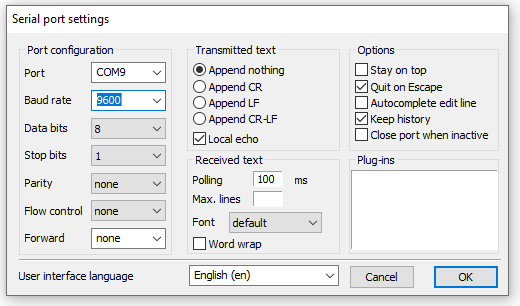
    please see the following screenshots for a sample Termite Terminal session with the TRF7970ABP+EXP430G2 and the RF430FRL152H EVM.

    It is essential that no CRLF is transmitted when sending the commands.

    In the last line of this session you see the data read from block 9 which contains the ADC value

    Best regards,

    Helfried

  • I did it.. but it is not working in my PC....

    I post the detailed bellow thread. Please help me...
    e2e.ti.com/.../804846
  • Problem was solved in a second thread.
    e2e.ti.com/.../2979849

    I will close this thread.

    Best regards,
    Helfried