This thread has been locked.

If you have a related question, please click the "Ask a related question" button in the top right corner. The newly created question will be automatically linked to this question.

CC1312R: CC1312R1F3RGZT UART Linux

Part Number: CC1312R
Other Parts Discussed in Thread: AM6442, , CC1310, SYSCONFIG, UNIFLASH

Hi,

I have a custom board with a AM6442 CPU (running Linux) and a CC1312R1F3RGZT SUB-G.

The board design was reviewed by TI's team.

CC1312R1F3RGZT <-> AM6442 communication should be over UART.

UART RX (SUB-G to CPU) is connected to DIO_2.

UART TX (CPU to SUB-G) is connected to DIO_3.

I have another signal that I can configure as UART CTS or GPIO connected to DIO_1 (Which I need to use to flash the SUB-G device),

and another signal that I can configure as UART RTS or GPIO which is connected to RESET_N.

I could not find examples on how to communicate with this device with Linux.

How can I check if it is alive (maybe some magic UART message)?

How can I flash it from Linux?

Can you refer me toCC1312R1F3RGZT usage with Linux examples?

Thanks

  • - Does that mean you have a CC1312R that has not been programmed before? If that is the case, look at https://www.ti.com/lit/pdf/swra466 on how to boot a device over the UART interface. 

    - If you are referring to "normal" UART communication you have to run an application using UART on the CC1312R. See https://dev.ti.com/tirex/explore/node?node=ADGSwIeHnJW2ckPQQBvtpA__pTTHBmu__LATEST for some examples that shows the usage of the UART driver. 

  • Hi,

    I'm trying to interact with the MCU's bootloader without success.

    I found the SBL sources following this post:

    https://e2e.ti.com/support/wireless-connectivity/bluetooth-group/bluetooth/f/bluetooth-forum/617647/cc2640r2f-sbl-code-on-linux

    I compiled SBL for my architecture (ARM64), and I'm trying to interact with the booloader, but it is stuck at "Connecting", (the "loader line" moves, but nothing happens)

    ./host_cc13xx-sbl /dev/ttyS1 host_collector cc13x0 -e
    Using USB SBL Interface
    ./host_cc13xx-sbl ccDnld-v1.00.00 -- Dec  5 2021 13:06:21
    
    Device set to: cc13x0
    Opening serial port /dev/ttyS1
    Unrecognized file extension. Supported formats are *.bin and *.hex
    Assuming Intel Hex format
    Open binary file host_collector
    Binary file size = 580200
    Connecting:
    |

    Maybe you can help with that?

    Thanks

  • Hi,

    This thread has been assigned to someone. They will get back to you with some feedback. 

    Regards,
    Siddanth

  • Hi,

    I compiled SBL for my architecture (ARM64), and I'm trying to interact with the booloader, but it is stuck at "Connecting", (the "loader line" moves, but nothing happens)

    Can you elaborate on how you have reach to this point? This might help me understand what might be wrong.

    For instance, I noticed that line 5 in the "terminal output" that you provided indicates that the device is a CC13x0. This most likely is causing some problems as your device is a CC13x2. I'd recommend trying a more updated example. This is the latest release for the TI 15.4-Stack Gateway Linux SDK.

    https://dev.ti.com/tirex/explore/node?node=AEi1WI7lC-qIyRxxiJnQ3w__oGlG4RW__LATEST

    After that, make sure to adjust the example to your particular device.

    BR,
    Andres

  • Thanks for the reply.

    You're right, It should be cc13x2.

    I tried it now with cc13x2 and the problem wasn't solved..

    ./host_cc13xx-sbl /dev/ttyS1 host_collector cc13x2 -e
    Using USB SBL Interface
    ./host_cc13xx-sbl ccDnld-v1.00.00 -- Dec  5 2021 13:06:21
    
    Device set to: cc13x2
    Opening serial port /dev/ttyS1
    Unrecognized file extension. Supported formats are *.bin and *.hex
    Assuming Intel Hex format
    Open binary file host_collector
    Binary file size = 580200
    Connecting:
    /
    

    I'll try to elaborate a little more:

    I downloaded the following SDK: https://www.ti.com/tool/download/TI-15-4-STACK-GATEWAY-LINUX-SDK

    Then, 

    In folder linux/ti/ti154stack_linux_x64_3_30_01_02/example/cc13xx-sbl/app/linux

    I modified the Makefile to use an ARM64 compiler

    CC_HOST=aarch64-none-linux-gnu-gcc

    And compiled host_cc13xx-sbl.

    Now I'm trying to use this sbl to communicate with the bootloader.

    I'm using a dummy file (host_collector from linux/ti/ti154stack_linux_x64_3_30_01_02/prebuilt/bin folder).

    The file is not really important, I'm just trying to communicate with the bootloader and get responses.

    Am I doing something wrong?

  • Hi,

    Allow me to run the example to see if I can reproduce what you are seeing. And we'll take it from there. I'll let you know about my findings as soon as I can.

    BR,
    Andres

  • OK, thanks.

    I have another question in the meantime, 

    In my design, the UART connection is:

    SoC's UART RX is connected to DIO_2.

    SoC's UART TX is connected to DIO_3.

    Table 2-9 in swra466 indicates that:

    UART_RX pad is DIO2  and UART_TX pad is DIO3.

    What exactly does this mean? 

    The CC1312's RX is DIO2? or SoC's RX should be connected to DIO2?

    Are my connections good?

    Update

    I noticed that the the SBL_TWO_WIRE variable was commented in the makefile.

    I uncommented it and recompiled the sbl.

    It still doesn't work, this is the output:

    ./host_cc13xx-sbl /dev/ttyS1 host_collector cc13x2 -e
    Using Two wrire SBL Interface
    ./host_cc13xx-sbl ccDnld-v1.00.00 -- Dec  9 2021 12:34:13
    
    Device set to: cc13x2
    Opening serial port /dev/ttyS1
    Unrecognized file extension. Supported formats are *.bin and *.hex
    Assuming Intel Hex format
    Open binary file host_collector
    Binary file size = 580200
    Connecting:
    |

    I modified the getCmdResponse function, to see if I get a response from the bootloader (the new printf line):

    static CcDnld_Status getCmdResponse(CcDnld_Dev_Ack* bAck)
    {
        uint8_t pIn[2];
        uint32_t recvData = 0;
        uint32_t bytesRecv = 0;
        /* Expect 2 bytes (ACK or NAK) */
        do
        {
            recvData = uartFxns->sbl_UartReadByte();
            printf("RECEIVED DATA: %02x\n", recvData);
            if((recvData&0x00000500) == 0)
            {
                pIn[bytesRecv]=(uint8_t) recvData;
                bytesRecv += 1;
            }
        }
        while(bytesRecv < 2);
    
        if((bytesRecv >= 2) &&
                (pIn[0] == 0x00 &&
                (pIn[1] == CCDNLD_DEVICE_ACK || pIn[1] == CCDNLD_DEVICE_NACK)))
        {
                *bAck = pIn[1];
                return CcDnld_Status_Success;
        }
    
        return CcDnld_Status_Cmd_Error;
    }

    And this is the output I get:

    ./host_cc13xx-sbl /dev/ttyS1 host_collector cc13x2 -e
    Using Two wrire SBL Interface
    ./host_cc13xx-sbl ccDnld-v1.00.00 -- Dec  9 2021 12:49:27
    
    Device set to: cc13x2
    Opening serial port /dev/ttyS1
    Unrecognized file extension. Supported formats are *.bin and *.hex
    Assuming Intel Hex format
    Open binary file host_collector
    Binary file size = 580200
    Connecting:
    RECEIVED DATA: 00
    RECEIVED DATA: 50
    RECEIVED DATA: 00
    RECEIVED DATA: 50
    RECEIVED DATA: 00
    RECEIVED DATA: 50
    RECEIVED DATA: 00
    RECEIVED DATA: 50
    RECEIVED DATA: 00
    RECEIVED DATA: 50
    RECEIVED DATA: 00
    RECEIVED DATA: 50

  • Hi,

    Sorry for the delay. It has taken me some time because I need to procure some hardware and access to a Linux machine to run the example.

    Having said this, you definitely are on the right track with the SBL_TWO_WIRE flag.

    I have one question for you. And this might be silly but still. What image are you using in the launchpad before testing the SBL?

    From the link that you provided:


    Program the CC13x0 device with an application that enables the bootloader feature (explained in the Bootloader chapter of the TI CC13x0 Technical Reference Manual). The CoProcessor example embedded application demonstrates the bootloader feature. Specifically, the CoProcessor applications enable the bootloader feature through the DIO13 Pin (Button 1 on the CC1310 LP). To force entry into the bootloader, use the following steps:

    1. Connect the LP.
    2. Start the flash update tool; the tool will display connecting…
    3. Press and hold the LP BTN-1.
    4. Press and release the LP RESET button.
    5. The application connects and performs the flash update (see Figure 115. for the connection diagram).

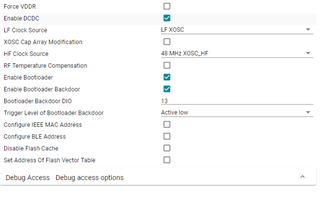
    Basically, the original application in your device should have the bootloader feature enabled. In sysconfig you would have something like this:

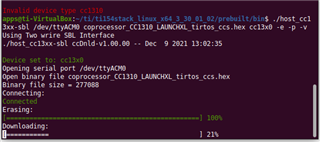
    Or in order to test, you could simply try use the coprocessor example, which is already configured that way. If you do, you will see something like this:

    So basically, make sure that you have flashed an appropriate image to the Launchpad (one with the bootloader feature enabled), and then follow the instructions in that guide that you shared.

    BR,
    Andres

  • Hi,

    Thanks for the detailed response.

    I'm not sure which launchpad you mean.

    I have a custom PCB with a CC1312R connected to an AM64X SoC via UART (the PCB design was reviewed by TI's team).

    1 additional GPIO connected to the CC1312R's reset.

    1 additional GPIO connected to the CC1312R's DIO_1 (to use as a bootloader backdoor).

    So, the situation is that the CC1312R was never flashed (unless it comes with a default FW flashed in factory), and I'm just trying to test the SoC<-> CC1312R UART connectivity using SBL.

    How can I proceed from this point?

    Can you please confirm the following part?

    In my design, the UART connection is:
    
    SoC's UART RX is connected to DIO_2.
    
    SoC's UART TX is connected to DIO_3.
    
    Table 2-9 in swra466 indicates that:
    
    UART_RX pad is DIO2  and UART_TX pad is DIO3.
    
    What exactly does this mean? 
    
    The CC1312's RX is DIO2? or SoC's RX should be connected to DIO2?
    
    Are my connections good?

  • Hi,

    I should have been more clear. I'm sorry.

    The example that you are relying on (the one in the Linux Gateway SDK) assumes that the device (I said launchpad because that's what I have at hand) already has an application that has enabled the bootloader feature and that also has enabled the bootloader back door.

    So the example itself can't be used in your particular case. So I guess your option would be to use the App note that describes the process, but you'll have to adjust, since the application note provides instructions for a windows-based host, if I'm not mistaken.

    BR,
    Andres

  • Thanks, this is clear now.

    Are you sure that there is no "ready to use" Firmware downloader for devices without any application in it? for Linux (ARM64 or Linux sources).

    What should your customers who wish to use CC1312R in a Linux environment do in order to flash the device for the first time?

    Does all customers with a CC1312R in their design are required to write themselves the Firmware downloader?

    Also, can you please confirm this:

    In my design, the UART connection is:
    
    SoC's UART RX is connected to DIO_2.
    
    SoC's UART TX is connected to DIO_3.
    
    Table 2-9 in swra466 indicates that:
    
    UART_RX pad is DIO2  and UART_TX pad is DIO3.
    
    What exactly does this mean? 
    
    The CC1312's RX is DIO2? or SoC's RX should be connected to DIO2?
    
    Are my connections good?

    Thanks.

  • Hi,

    There are several "ready to use" tools that you can use. But it all depends on your use-case. And I think in this case, your question might have been put a lot of focus on the SBL and UART aspect of it, which might have led us to believe that you wanted to implement the entire thing yourself.

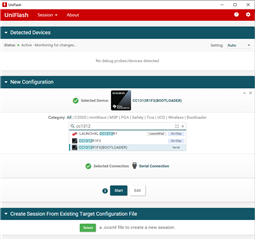
    So let's take a step back, and just consider (as you mentioned in your last reply) "ready to use" tools to flash your device. I can think of at least two tools to do this, but since you need a tool that works with Linux, Uniflash might be your best bet.

    https://www.ti.com/tool/UNIFLASH

    I've only used the tool with Launchpads, but from what I see, you should be able to use it directly using serial.

    After this step, you can then select the image, the COM port, the UART speed, etc.

    You can find the User's guide here:

    software-dl.ti.com/.../uniflash_quick_start_guide.html

    Hopefully this is more of what you need.

    BR,
    Andres

  • Thanks.

    Sorry, I guess I wasn't clear enough.

    UNIFLASH won't work since this is a GUI,  x86 Linux tool.

    I opened a more focused and clearer post.

    https://e2e.ti.com/support/wireless-connectivity/sub-1-ghz-group/sub-1-ghz/f/sub-1-ghz-forum/1061426/cc1312r-flashing-an-empty-cc1312r1f3rgzt-from-an-embedded-processor

    Thanks for the patience.

  • Hi,

    In that case, I'll close this thread then.

    BR,
    Andres