This thread has been locked.

If you have a related question, please click the "Ask a related question" button in the top right corner. The newly created question will be automatically linked to this question.

LAUNCHXL-CC1352R1: Data not transmitted between CC1352R and CC1312R

Part Number: LAUNCHXL-CC1352R1
Other Parts Discussed in Thread: CC1312R, CC1352R, SYSCONFIG

Dear Experts,

i have CC1352R and CC1312R launch pads, i have use the UART_Bridge example of both with Easylink long-range RF settings as follows

CC1312R settings:
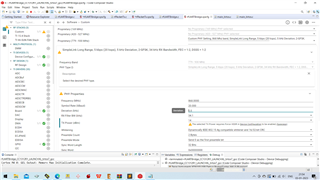
  

CC1352R Settings:
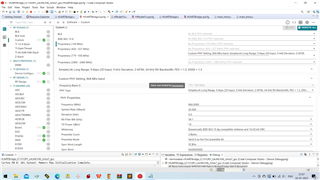
i can't find the reasons because both boards are working perfectly when i checked with default RF settings, please help to find the mistakes...

regards

Surya

  • I tested the examples and change the settings to the 5 kbps SLR, and did not have any problems getting it to work.

    Sysconfig files are attached.

    Siri

    https://e2e.ti.com/cfs-file/__key/communityserver-discussions-components-files/156/rfUARTBridge_5F00_CC1352R1.syscfg

    https://e2e.ti.com/cfs-file/__key/communityserver-discussions-components-files/156/rfUARTBridge_5F00_CC1312R1.syscfg

  • Hi Siri,

    Thanks for the files, but i have changed the syscfg file same as your suggestions but i am getting an error.

    Description Resource Path Location Type
    'RF_cmdPropRadioDivSetup' undeclared (first use in this function) rfUARTBridge.c /rfUARTBridge_CC1352R1_LAUNCHXL_tirtos7_gcc line 179 C/C++ Problem
    'RF_cmdPropRx' undeclared (first use in this function) rfUARTBridge.c /rfUARTBridge_CC1352R1_LAUNCHXL_tirtos7_gcc line 146 C/C++ Problem
    'RF_cmdPropTx' undeclared (first use in this function) rfUARTBridge.c /rfUARTBridge_CC1352R1_LAUNCHXL_tirtos7_gcc line 156 C/C++ Problem
    'RF_prop' undeclared (first use in this function); did you mean 'RF_Op'? rfUARTBridge.c /rfUARTBridge_CC1352R1_LAUNCHXL_tirtos7_gcc line 179 C/C++ Problem
    gmake: *** [rfUARTBridge.o] Error 1 rfUARTBridge_CC1352R1_LAUNCHXL_tirtos7_gcc C/C++ Problem
    gmake: Target 'all' not remade because of errors. rfUARTBridge_CC1352R1_LAUNCHXL_tirtos7_gcc C/C++ Problem
    recipe for target 'rfUARTBridge.o' failed subdir_rules.mk /rfUARTBridge_CC1352R1_LAUNCHXL_tirtos7_gcc/Debug line 9 C/C++ Problem

    because your syscfg file has some other settings in RF Command symbols but  my syscfg file doesn't..

    regards

    Surya

  • HI Siri,

    I have solved the error now but i can't achieve the long-range with CC1312R and CC1352R launch pads, i have tested with the straight road it has communicate just 100meters only and i have tested with Hi raised apartment ground floor on opposite sides of the building it does not communicate..

    please guide me to achieve the long-distance...

    regards

    Surya

  • Hi Surya,

    I have some questions to you. 

    1. Are you using the pcb antenna which is on the launchpads?

    2. If you are using the pcb antenna, are you holding the devices vertically or horizontally? The pcb antenna on the lauchpads transmits most its power vertical to the lauchpad (on top and bottom side, and not parallel to the device). Can you try that?

    3. In what kind of environment are doing the testing? If there is too much interference, the range will decrease significantly. You can do a measurement of the noise floor where you are doing the testing. This can be done in SmartRF Studio by setting the device in continues rx mode and read the rssi value.

    4. Can you also try doing the test on another frequency than 868 MHz?

    Best regards,

    Haiatullah

  • Hi 

    Thanks for the reply, 

    1. Yes i have tested with CC1312R and CC1352R Launchpads PCB Antenna.

    2. i have held the device vertically(Antenna side forward direction of the sky), i have tested with multiple positions like placing the board horizontally and the antenna side is to the ground too...

    3. I have tested the area as a Mall, with Not much traffic, i have tested with the UART bridge code and i will check with RF studio in the same environment and let you know the result...

    4. No, i will check with other frequencies...

    Is a need to change RF Command Symbols to the code based on syscfg or not needed?? 

    regards

    Surya

  • Hi Surya,

    About you last question, you don't need to do anything after you have selected the phy and the frequency. Just build the project and everything is suppose to work. And can you send me a copy of your sysconfig files please?

    Best regards,

    Haiatullah

  • Hi

    Thanks for the quick response, i can't attach my syscfg file here... so i have attached it as a link below

    https://www.transfernow.net/dl/20230106q4cnKsCi

    Regards

    Surya

  • Hi Surya,

    Were you able to measure the noise floor? I suspect that the noise floor will be quite high. In a mall you have a lot of interference. That can explain why you only get 100 meters of range. Interference and obstacles (walls and other objects) between the transmitter and receiver will degrade the rf performance significantly.

    Best regards,

    Haiatullah

  • Hi

    Thanks for the response, Sorry i don't have the equipment for measuring the noise level, maybe it occurs but i have tested another area i have achieved 200 meters at the line of sight, 

    Please confirm whether my syscfg settings are correct or not..

    regards

    Surya

  • Hi Surya,

    The link to your sysconfig file are blocked by TI system, and cannot access it. Could you kindly go to my profile and request to connect with me? That way you can send your files directly to me.

    Best regards,

    Haiatullah

  • In addition, post the content/ files of the syscfg folder in your project after compilation for the two projects. This will show exactly what is used.  

  • Hi Surya,

    You don't need any special instruments to get a rough idea of the noise floor. This can be done with the two devices that you have and SmartRF Studio. Here is what you need to do: 

    In SmartRF Studio, on your receiver choose the options as shown on the picture below. When you press the start button, the device will wait for packets to receive. On point 4 that I have marked, you can see the average RSSI value and how many packets that the device has received.

    Choose the following options for your transmitter device:

    Start your transmitter after you have set up your receiver. When you press the start button, it will send 100 packets.

    When the devices are close, you will get 100 packets received each time you do this. Then move the devices further from each other until you get for example 30% packet loss. At the distance where you get 30% packet loss, see what the RSSI average value is and report it back here please.

    Best regards,

    Haiatullah

  • Hi Surya,

    I was wondering if you where able to measure what I suggested. Could you provide an update?

    Best regards,

    Haiatullah

  • Hi

    Thanks for the reply, Now we have checked with ti preferred external antenna now we can achieve a high distance, i will let you know the exact distance after I complete my testing at various locations...

    regards

    Surya

  • Hi Surya,

    I have the same issue. How did you fix it? or Could you please give me a recommendation to fix it?

    Regards,

    Tania

  • Are you testing with a PCB antenna or SMA antenna(Ti preferred from pulse electronics)... and Launchpad or custom board...

    Please explain the issue it will help to understand the issue more..

    regards

    Surya

  • thanks for the update...