This thread has been locked.

If you have a related question, please click the "Ask a related question" button in the top right corner. The newly created question will be automatically linked to this question.

CC1354P10: how to change the scifStartRtcTicksNow() RTC tick rate inside the TI Sensor Code Studio GUI vs C code changes in the main application

Part Number: CC1354P10

TI Friends & Family,

Our customer would like to know how to change the scifStartRtcTicksNow() RTC tick rate inside the TI Sensor Code Studio GUI.  I would like to find out if this is possible.

First, to level-set, in general, users can set the sample interval to 10 msec in the main application:


// Set the Sensor Controller sample interval

scifStartRtcTicksNow(0x00010000 / 100); // sensor controller runs every 10 ms


In the SCS code, setting (1):


fwScheduleTask(1); will cause the sensor controller to wake up every sample interval (1 x 10 ms = 10 ms)


setting (10)


fwScheduleTask(10); will cause the sensor controller to wake up every 10th sample interval (10 * 10 ms = 100)


The customer does this today;  but wants to know if there is a way to do this also within / inside Sensor Control Studio.


Any input is welcomed.


TY,

CY

  • Hi Chris, 

    I am not sure it can be done, but I will ask around.

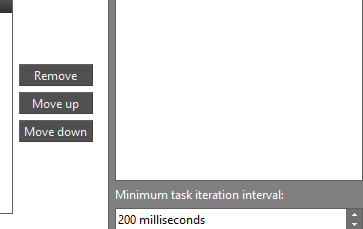
    For testing however, one can set the task iteration interval in SCS:

    Regards,

    Arthur

  • Arthur, thanks for the quick reply on this one.  Siri and I were also talking about it earlier today/yesterday.  Anything more you find out would be appreciated.

    TY again,
    Chris 

  • Hi Chris,

    The suggestion I got was to use the 0/1/2 Timers for scheduling instead, if that helps the customer..

    Regards,

    Arthur

  • Thank you Arthur, I appreciate the follow up.

    Honestly, there are a couple of ways now that you/we've identified now to do this so I think we can close this one out.

    Regards,

    Chris

  • Authur,

    Customer has replied with the following guidance:

    "

     Let me explain again:

    Tools I used : logic analyzer, power analyzer.

    Inside sensor controller :

    test gpio to toggle,

    fwScheduleTask(1 or 10) // change duration based on state

    Outside sensor controller:

    call scifStartRtcTicksNow(0x00010000 / 100) once; // sensor controller runs every 10 ms


    Issue:

                    When we change duration inside sensor controller using fwScheduleTask(1 or 10), from logic analyzer and test gpio. We can see duration works as expect.

                    But from power analyzer, power pulse duration always stay at 10ms duration.


    What we want:

                    from power analyzer, power pulse duration also should be change, so we wonder if we can change RtcTicks Inside sensor controller.

     "

     Any further input welcomed.

    Thank you,
    Chris 

  • Hi Chris

    When

    scifStartRtcTicksNow(0x00010000 / 100);

    the SC will always wake up at a rate of 10 ms, but it will only execute its code every 100 ms, given

    fwScheduleTask(10);

    is set in the execution code in SCS.

    Consider this execution code:

    for (U16 n = 0; n < 50; n++) {
    gpioToggleOutput(AUXIO_O_SC_OUTPUT_PIN);
    fwDelayUs(10);
    }
    
    // Schedule the next execution
    fwScheduleTask(10);

    Looking at the current profile, you will see that the SC wakes up every 10 ms (for a very short period of time), but that the code is executed only every 10th wake (100 ms)

    If the current contribution of waking up every 10 ms is too big, you will need to wake up the main controller and change the interval from the application.

    This will increase your current consumption when switching interval since you need to wake up the main CPU, but decrease the current draw from the SC since it sleeps longer.

    You can wake up the MCU using

    fwGenAlertInterrupt();

    and then change the wakeup interval in the scTaskAlertCallback

    Below is the current profile, when changing the wakeup interval to 20 ms (from 10) every 5th time the scTaskAlertCallback was called:

    static uint8_t count = 0;
    
    void scTaskAlertCallback(void)
    {
        // Clear the ALERT interrupt source
        scifClearAlertIntSource();
    
        // Acknowledge the ALERT event
        scifAckAlertEvents();
    
        count++;
    
        if(count == 5)
        {
            count = 0;
            scifStartRtcTicksNow(0x00010000 / 50); // sensor controller runs every 20 ms
        }
        else
        {
            scifStartRtcTicksNow(0x00010000 / 100); // sensor controller runs every 10 ms
        }
    }

    It is not possible to change the RTC wakeup from the CS

    An alternative is to wake up on something other than the RTC. Have the RTC interval set to 100 ms, and then use a timer in the SC set up an interval every 10 ms and use the Timer 0 Event Trigger to have some event code execute at this rate when needed.

    BR

    Siri


  • Team;  Arthur and Siri,

    In an offline email I believe we have a mutual understanding here of what can and perhaps cannot be configured via the SCS GUI and the SCS application code itself.  If the customer cares to comment further, that's fine.  Otherwise, we can probably close this thread out.

    However, one last request is a list of known differences (if it exists) between the SCS GUI itself and SCS application example code itself.  I don't think this formally exists but are either of you aware?

    TY,

    Chris 

  • Hi Chris

    I am not aware of any such list/documentation.

    BR

    Siri