This thread has been locked.

If you have a related question, please click the "Ask a related question" button in the top right corner. The newly created question will be automatically linked to this question.

Using Sensor Controller Studio generated files on Code Composer Studio

Other Parts Discussed in Thread: CC1310

Hi,

I wrote a basic code for lighting LED on CC1310 LaunchPad using Sensor Controller Studio and convert it to use on Code Composer Studio. My plan is use Sensor Controller core for lighting LED without involvement in M3 core. How can i make main.c file achieve this task. If anyone can help me it would be grateful for me.

scif.c
scif.h
scif_framework.c
scif_framework.h
scif_osal_tirtos.c
scif_osal_tirtos.h

These are the files that i generated using Sensor controller studio.

  • Hi Harsha,

    When you installed Sensor Controller Studio, some examples were also included.

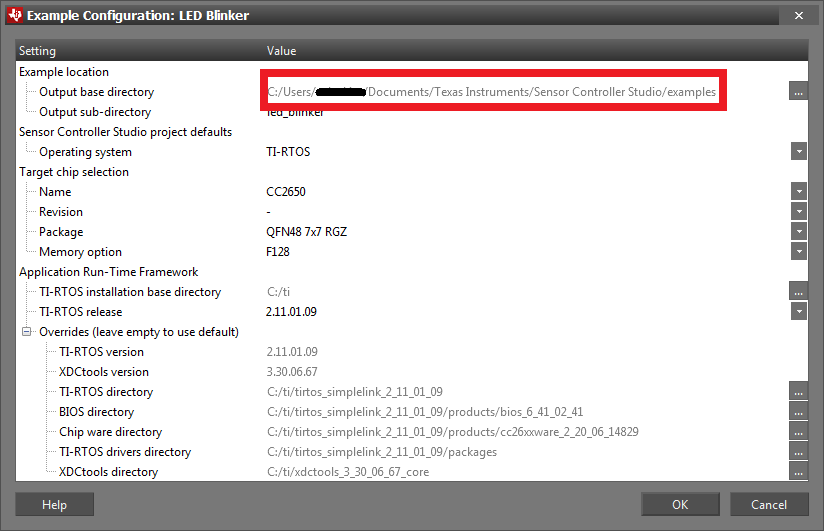
    1. Open SCS and on the start page, open and create one of the examples at the bottom. During creation, you should have seen an output base directory (image below) and the sub-directory. That is where the files will be located.

    2. Open that folder on your computer.
    3. You should see a source folder, open it.
    4. You should a file called main_tirtos.c (you should also have all the other .c files mentioned in your post)
    5. The main_tirtos.c will show how to include your output files to your project.

    Try opening the different examples too see what is possible to do with the sensor controller.

    Regards,

    Michel

  • Hi Michel,

    Thank you for your quick attention.
    When i create my own project file and generate the source file there is no file generated as main_tirtos. Generated other files only. Can you help me for this?
  • Hi Harsha,

    The files will not be created for your own project files.

    I explained the steps to create an example so you can study them and learn how to do it for your own project.

    The reason the files are not created for your project is that there are many ways of using the sensor controller (single running task, continuous running task, repetition intervals, with alerts or without, multiple tasks, etc.)

    That is also why I suggested to open different examples to see what is possible so you can use that as an inspiration for your own project.

    Regards,
    Michel
  • I would recommend you to go through the Sensor Controller Studio trainings in SimpleLink Academy (software-dl.ti.com/.../overview.html) which explain how to combine a SCS project with a CCS project.
  • Hi Michel,

    Thank you for your quick attention. I will go through the Sensor Controller Studio trainings in SimpleLink Academy.