This thread has been locked.

If you have a related question, please click the "Ask a related question" button in the top right corner. The newly created question will be automatically linked to this question.

CC1200: Using beaglebone black to transmit data via spi and recieve on another cc12200 with SmartRF tool (Packet RX)

Part Number: CC1200


Hello,

I'm trying to transmit data from one cc1200 radio to another. On the one end I'm communicating with the cc1200 transmitter using a beaglebone black, the other radio I have hooked up to my laptop and am running the packet rx function in smartRF studio. 

I'm seeing no values on the smart RF tool.

My current process is to calibrate the transmit radio using burst bit and the first address, followed by the value at that address, followed by the values at each consecutive address. I exported these values using smart RF tool in packet TX mode at the desired frequency and power. I then use the strobe command, and then send data. The status byte shows that the chip is in transmit mode (2F) when I am sending the data, however, nothing is appearing on the receiving radio in smart RF.

Is my order of operations incorrect? Is there something I am missing? Any help would be much appreciated. 

Thanks.

  • I'm using spidev_test.c available online (github.com/.../spidev_test) and changing the hex values in the array (I run separate programs for each step). My values when I send data begin with 0x7F (according to documentation, should put the radio in FIFO write mode and burst the following hex values) and then I send random hex values following.
  • Hi SRB,

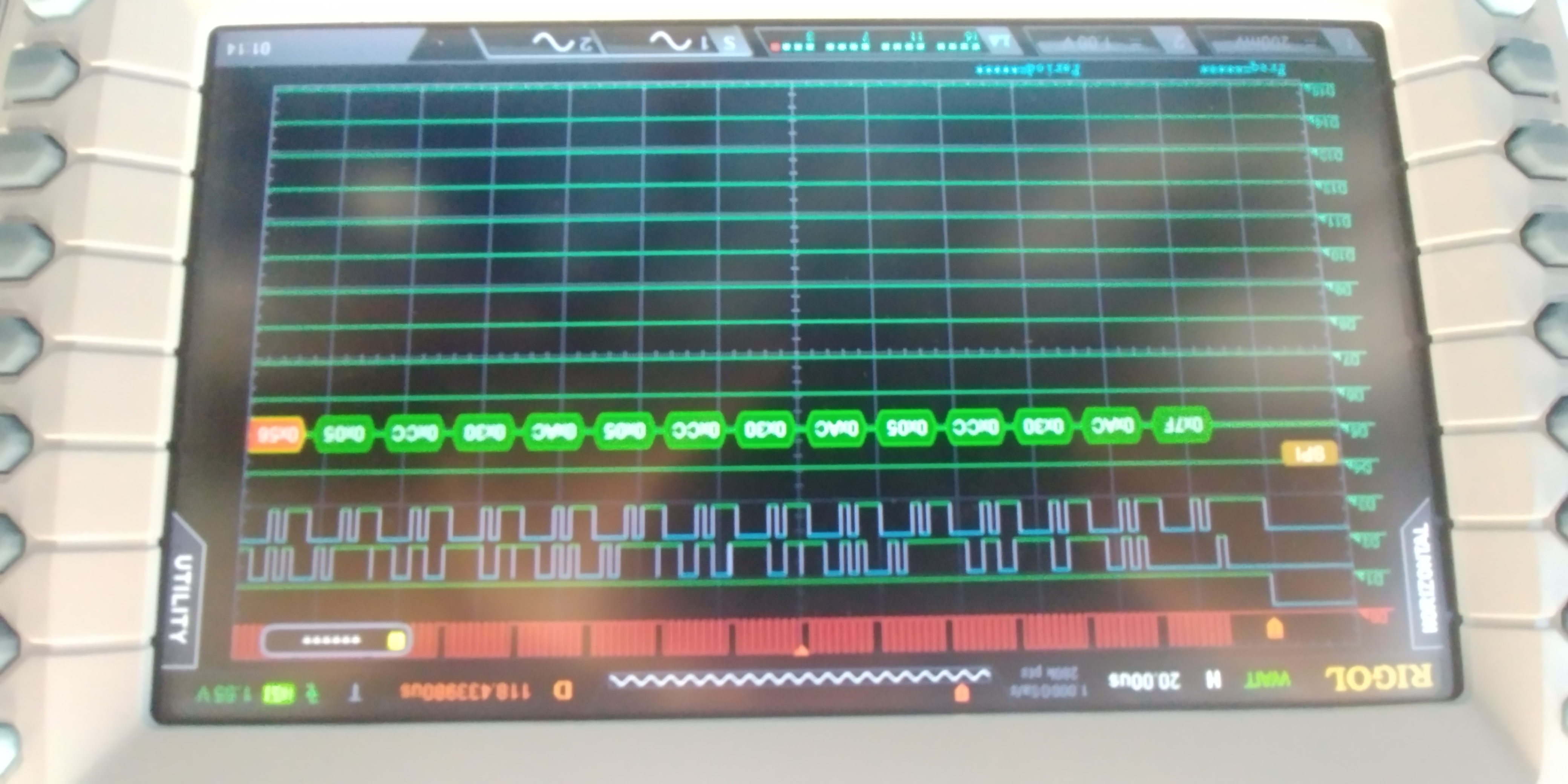
    Can you please provide the code snippet where you configure the radio and start the packet transmission? Can you also provide logic analyzer snippet of the communication with the CC1200?

    Regards,
    Fredrik
  • Thanks for the response Fredrik,

    I am using spidev_test.c found online. I replace the values in the hex array with the desired values.

    I run 3 programs, each with different hex values in the array.

    1. To configure the cc1200

    2. strobe command 0x35 - STX (Enable TX)

    3. Send data: 0x7F followed by length value (0x08) followed by 8 random hex values.

    I'm new to beaglebone, and don't know how to actually program the spi drivers myself. (I have a general idea of what needs to be done, but dont know any of the commands or syntax.

    (I've had a difficult time finding this info online, possibly because what I think I should be looking for isn't what I actually should be looking for.)

    So, below is the code, and I can't point you specifically to where the transmission is in the code, but it is quite compact. Before the code I've attached my DLA data. d0:CLK, d1: CS, d2: MOSI, d3 MISO. 

    Configuring:

    Attempting to send data:

    /*
     * SPI testing utility (using spidev driver)
     *
     * Copyright (c) 2007  MontaVista Software, Inc.
     * Copyright (c) 2007  Anton Vorontsov <avorontsov@ru.mvista.com>
     *
     * This program is free software; you can redistribute it and/or modify
     * it under the terms of the GNU General Public License as published by
     * the Free Software Foundation; either version 2 of the License.
     *
     * Cross-compile with cross-gcc -I/path/to/cross-kernel/include
     */
    
    #include <stdint.h>
    #include <unistd.h>
    #include <stdio.h>
    #include <stdlib.h>
    #include <getopt.h>
    #include <fcntl.h>
    #include <sys/ioctl.h>
    #include <linux/types.h>
    #include <linux/spi/spidev.h>
    
    #define ARRAY_SIZE(a) (sizeof(a) / sizeof((a)[0]))
    
    static void pabort(const char *s)
    {
    	perror(s);
    	abort();
    }
    
    static const char *device = "/dev/spidev1.0";
    static uint8_t mode;
    static uint8_t bits = 8;
    static uint32_t speed = 500000;
    static uint16_t delay;
    
    static void transfer(int fd)
    {
    	int ret;
    	uint8_t tx[] = {
    		0xFF, 0xFF, 0xFF, 0xFF, 0xFF, 0xFF,
    		0x40, 0x00, 0x00, 0x00, 0x00, 0x95,
    		0xFF, 0xFF, 0xFF, 0xFF, 0xFF, 0xFF,
    		0xFF, 0xFF, 0xFF, 0xFF, 0xFF, 0xFF,
    		0xFF, 0xFF, 0xFF, 0xFF, 0xFF, 0xFF,
    		0xDE, 0xAD, 0xBE, 0xEF, 0xBA, 0xAD,
    		0xF0, 0x0D,
    	};
    	uint8_t rx[ARRAY_SIZE(tx)] = {0, };
    	struct spi_ioc_transfer tr = {
    		.tx_buf = (unsigned long)tx,
    		.rx_buf = (unsigned long)rx,
    		.len = ARRAY_SIZE(tx),
    		.delay_usecs = delay,
    		.speed_hz = speed,
    		.bits_per_word = bits,
    	};
    
    	ret = ioctl(fd, SPI_IOC_MESSAGE(1), &tr);
    	if (ret < 1)
    		pabort("can't send spi message");
    
    	for (ret = 0; ret < ARRAY_SIZE(tx); ret++) {
    		if (!(ret % 6))
    			puts("");
    		printf("%.2X ", rx[ret]);
    	}
    	puts("");
    }
    
    static void print_usage(const char *prog)
    {
    	printf("Usage: %s [-DsbdlHOLC3]\n", prog);
    	puts("  -D --device   device to use (default /dev/spidev1.1)\n"
    	     "  -s --speed    max speed (Hz)\n"
    	     "  -d --delay    delay (usec)\n"
    	     "  -b --bpw      bits per word \n"
    	     "  -l --loop     loopback\n"
    	     "  -H --cpha     clock phase\n"
    	     "  -O --cpol     clock polarity\n"
    	     "  -L --lsb      least significant bit first\n"
    	     "  -C --cs-high  chip select active high\n"
    	     "  -3 --3wire    SI/SO signals shared\n");
    	exit(1);
    }
    
    static void parse_opts(int argc, char *argv[])
    {
    	while (1) {
    		static const struct option lopts[] = {
    			{ "device",  1, 0, 'D' },
    			{ "speed",   1, 0, 's' },
    			{ "delay",   1, 0, 'd' },
    			{ "bpw",     1, 0, 'b' },
    			{ "loop",    0, 0, 'l' },
    			{ "cpha",    0, 0, 'H' },
    			{ "cpol",    0, 0, 'O' },
    			{ "lsb",     0, 0, 'L' },
    			{ "cs-high", 0, 0, 'C' },
    			{ "3wire",   0, 0, '3' },
    			{ "no-cs",   0, 0, 'N' },
    			{ "ready",   0, 0, 'R' },
    			{ NULL, 0, 0, 0 },
    		};
    		int c;
    
    		c = getopt_long(argc, argv, "D:s:d:b:lHOLC3NR", lopts, NULL);
    
    		if (c == -1)
    			break;
    
    		switch (c) {
    		case 'D':
    			device = optarg;
    			break;
    		case 's':
    			speed = atoi(optarg);
    			break;
    		case 'd':
    			delay = atoi(optarg);
    			break;
    		case 'b':
    			bits = atoi(optarg);
    			break;
    		case 'l':
    			mode |= SPI_LOOP;
    			break;
    		case 'H':
    			mode |= SPI_CPHA;
    			break;
    		case 'O':
    			mode |= SPI_CPOL;
    			break;
    		case 'L':
    			mode |= SPI_LSB_FIRST;
    			break;
    		case 'C':
    			mode |= SPI_CS_HIGH;
    			break;
    		case '3':
    			mode |= SPI_3WIRE;
    			break;
    		case 'N':
    			mode |= SPI_NO_CS;
    			break;
    		case 'R':
    			mode |= SPI_READY;
    			break;
    		default:
    			print_usage(argv[0]);
    			break;
    		}
    	}
    }
    
    int main(int argc, char *argv[])
    {
    	int ret = 0;
    	int fd;
    
    	parse_opts(argc, argv);
    
    	fd = open(device, O_RDWR);
    	if (fd < 0)
    		pabort("can't open device");
    
    	/*
    	 * spi mode
    	 */
    	ret = ioctl(fd, SPI_IOC_WR_MODE, &mode);
    	if (ret == -1)
    		pabort("can't set spi mode");
    
    	ret = ioctl(fd, SPI_IOC_RD_MODE, &mode);
    	if (ret == -1)
    		pabort("can't get spi mode");
    
    	/*
    	 * bits per word
    	 */
    	ret = ioctl(fd, SPI_IOC_WR_BITS_PER_WORD, &bits);
    	if (ret == -1)
    		pabort("can't set bits per word");
    
    	ret = ioctl(fd, SPI_IOC_RD_BITS_PER_WORD, &bits);
    	if (ret == -1)
    		pabort("can't get bits per word");
    
    	/*
    	 * max speed hz
    	 */
    	ret = ioctl(fd, SPI_IOC_WR_MAX_SPEED_HZ, &speed);
    	if (ret == -1)
    		pabort("can't set max speed hz");
    
    	ret = ioctl(fd, SPI_IOC_RD_MAX_SPEED_HZ, &speed);
    	if (ret == -1)
    		pabort("can't get max speed hz");
    
    	printf("spi mode: %d\n", mode);
    	printf("bits per word: %d\n", bits);
    	printf("max speed: %d Hz (%d KHz)\n", speed, speed/1000);
    
    	transfer(fd);
    
    	close(fd);
    
    	return ret;
    }

  • Please do:
    - SRES before init
    - Write to the TX FIFO before you senda TX strobe

    Could you explain the second plot some since it looks like you say you send certain data but the plot doesn't show these data.
  • Thanks TER,

    I tried SRES before configuring, still no results.

    Still no results when writing data then strobing.

    The second plot does not contain the data I showed in the code, I don't use the data shown in the code snippet for any commands.
    The data shown on the second plot is what I'm sending to write to the TX FIFO.

    I'm now trying to make sure it is writing correctly to the TX FIFO, but am unsure how to read the extended register. The command I'm using is:
    0xAF, followed by 0xD8 (extended register FIFO_NUM_TXBYTES) which is returning: 00 00 (After attempting to write data, and before strobing)

    Appreciate the help.
  • Could you clarify what you mean here: "I don't use the data shown in the code snippet for any commands", does that mean you send the data as arguments to the command? Do you just use the calls in the code you shared from a terminal of a different code? In either case it's a bit difficult to see what you are doing.
  • I actually run multiple programs, each matching the code I've posted above except for one difference - the values in the "uint8_t tx[]" array. That being said, the values in that array in the snippet I posted above are just random, I don't use those values in any of my programs.

    So, running multiple programs, the values contained in each respective program:

    1. SRES (0x30)
    2. config (0x40, 0x06, 0x06, so on)
    3. send data (0x7F ( burst write to FIFO), 0x08 (byte length of packet), 8 random values
    4. tx strobe (0x35)

    The radio does then return to IDLE state, which leads me to believe the packet was succesfully delivered.

    I have now hooked up the other radio (reciever) to different spi ports on my beagle bone black. When I do a FIFO read command, the hex value 10 is returned. (which is different from reading before the tx strobe)

    but the first value after my length byte hex is 0x31. In fact, the value 0x10 isn't even in my data arrray.


    Thanks

  • After I configure the radio and write to FIFO, I then read num_txbytes and the reading is 9, as it should be (I'm assuming I don't need the "length of packet byte") After strobing tx I read it again and its at 0. However, reading the num_rxbytes on the receiver returns 0.
  • - Are you intending to use beaglebone or the processors it uses together with CC1200 in volume production?
    - Have you looked into which VCO calibration setting you use? Check SETTLING_CFG.FS_AUTOCAL setting. It could be that you need to issue a SCAL.
  • No, I'm just using the beaglebone for testing purposes.

    I'll check that. Thanks.

    When configuring I'm writing to 209 registers. I've picked the appropriate settings for my radio in RFstudio and then wrote each ascending register value into the data array in my code (after writing the appropriate burst write followed by 1st address command, in this case 0x40.) As mentioned, this writes to 209 registers. However, if I use the export command after selecting the appropriate settings, it gives me far less, about 42 registers I need to configure if I remember correctly. The problem is they aren't in perfectly ascending order. I can easily not use the burst command, my only confusion is when it comes to writing to the extended register space.

    When writing to the extended register space, it says to write the command 0x2F followed by the register to be written to followed by the data in that register. My question is, do I need to constantly write 0x2F to write to another extended register, or can I simply put 0x2F and then register value register value etc.?

    Thanks.

  • If you choose to do burst write to all register you have to divide the burst access into two. One for register space and one for extended register space. For burst access to extended register space, you only need to send the 0x2F once. This is described in Table 3 in the User’s Guide.

    Siri


  • Thanks Siri, what if I don't want to use burst access, but still want to continually access extended registers? As in, I want to continuously write to extended registers, but they aren't in incremental order - do I need to then write "0x2F, extaddress, data@extadress, 0x2F, extaddress2, data@extaddress2"?
  • yes, your do.

    Siri