This thread has been locked.

If you have a related question, please click the "Ask a related question" button in the top right corner. The newly created question will be automatically linked to this question.

WL1837MOD: WL1837MOD

Part Number: WL1837MOD


We are using TI WL1827MOD in some products
The test house is asking us how to set up BLE Rx test and “hopping test”

This is how we set up BLE tx test mode from linux prompt:
Bluetooth LE testing
Log in as for WiFi testingWrite commands:

 killall bluetoothd
 

“Enable bluetooth in GUI”

 hciconfig hci0 noscan
 bleprep 
 bletx
 bletx 0 37 0                                                                                               
(Sets channel, length and test pattern i.e. bletx frequency modulation, testpattern, power)
 blestop


We have no commands for Rx in our linux prompt.

 root@evco-04F179:~# b                                                                                            
 backlight       bccmd           bletx           break           bttest          busybox.suid                     
 badblocks       bg              blkid           btconfig        bttx            bzcat                            
 base64          bind            blockdev        btload          builtin         bzip2                            
 basename        bitapp          bluemoon        btmon           bunzip2                                          
 bash            bitappgui       bluetoothctl    btpkt           busctl                                           
 bashbug         bleprep         bootctl         btprep          busybox                                          
 bbconfig        blestop         brctl           btstop          busybox.nosuid                                   
 root@evco-04F179:~#    
 

 The app note swra750 "WL18xx Bluetopia PM Bluetooth RF Testing" suggest that there is a way to do a receiver test


 3 Bluetooth Low Energy Testing

Below are the HCI commands from the Spec to place the device in Bluetooth Low Energy test mode :

Transmitter Test

Send_HCI_BLE_Transmitter_Test 0x201e, 0x00, 0x00, 0

Wait_HCI_Command_Complete_BLE_Transmitter_Test_Event 5000, any, HCI_BLE_Transmitter_Test, 0x00

Send_HCI_BLE_Test_End 0x201f

Wait_HCI_Command_Complete_BLE_Test_End_Event 5000, any, HCI_BLE_Test_End, 0x00, 0

Receiver Test

Send_HCI_BLE_Receiver_Test 0x201d, 0x00

Wait_HCI_Command_Complete_BLE_Receiver_Test_Event 5000, any, HCI_BLE_Receiver_Test, 0x00

Send_HCI_BLE_Test_End 0x201f

Wait_HCI_Command_Complete_BLE_Test_End_Event 5000, any, HCI_BLE_Test_End, 0x00, 0

To disable RF Calibration

Send_HCI_VS_DRPb_Enable_RF_Calibration_Enhanced 0xFDFB, 0x1, 0xFF, 0x80000000, 0x00

Wait_HCI_Command_Complete_VS_DRPb_Enable_RF_Calibration_Enhanced_Event 5000, any,HCI_VS_DRPb_Enable_RF_Calibration_Enhanced, 0x00


But how is that done from the Linux prompt?

/KFor

  • Hi,

    I apologize for the delay, but thanks for reaching out.

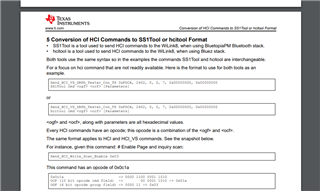
    To run these tests on a linux prompt, depends on the bluetooth stack you are using. If using BlueZ you can use the hcitool utility to send these the hci commands for testing. If using TI s BluetopiaPM stack there is a similar tool called SS1TOOL

    It is better explained in section 5 

    https://www.ti.com/lit/an/swra750/swra750.pdf

    Kind Regards,

    Rogelio

  • Ok. I have the hcitool available in the prompt, but the swra750 does not tell what commands to send using hcitool. Seems to be some scripts that are used. Correct? From where can I get them and how can I install them to my embedded linux system?

  • Hi,

    The scripts shown in swra750 are used in an applicaton called HCITester which sends HCI commands directly through the uart lines. If you dont have acces to the uart lines or would rather use the stack to send these hci commands, then you would use the HCI tool.

    If you want to do the receiver test that you mentioned above. You would have to send the commands in the script.

    In this case the script uses the following HCI commands

    Send_HCI_BLE_Receiver_Test 0x201d, 0x00

    Send_HCI_BLE_Test_End 0x201f

    These hci commands are defined in the bluetooth core spec. You would have to then format these commands and the parameters for proper use for hcitool which is explained in section 5 in swra750.

    Kind Regards,

    Rogelio

  • Ok. Now I get it I think.
    To send a command using hcitool the syntax is:

    hcitool -i <interface> cmd <ogf> <ocf>

    where <interface> is hci0 in my case
    <ogf> is defined for different scopes. For LE commands ogf is 0x08 (from core spec)
    <ocf> is the command. 

    command LE_Receiver_Test: ocf=0x001D (from core spec, version 1 of this command)
    command LE_Tes_Stopt: ocf=0x001F (from core spec)


    swra750 section 5 describes Rx test for BlueZ as below:

    SS1Tool cmd 0x3f 0x01fb 0x01 0xff 0x00 0x00 0x00 0x80 0x00 //disable RF Calibration

    SS1Tool cmd 0x08 0x001d 0x00

    SS1Tool cmd 0x08 0x001f

    so this translates to hcitool as below:

    hcitool -i hci0 cmd 0x3F 0x01FB 0x01 0xff 0x00 0x00 0x00 0x80 0x00    //disable RF Calibration
    hcitool -i hci0 cmd 0x08 0x001D 0x00      //HCI_LE_Receiver_Test, channel 0
    hcitool -i hci0 cmd 0x08 0x001F               //HCI_LE_Test_End


    Core spec:
    https://www.bluetooth.com/specifications/specs/core-specification-5-3/

    https://www.bluetooth.org/DocMan/handlers/DownloadDoc.ashx?doc_id=521059

    swra750: https://www.ti.com/lit/an/swra750/swra750.pdf?ts=1695906627408&ref_url=https%253A%252F%252Fwww.google.com%252F

    Thanks.

    /K