This thread has been locked.

If you have a related question, please click the "Ask a related question" button in the top right corner. The newly created question will be automatically linked to this question.

CC3301: Stuck at ctrlCmdFw_ContainerDownload("rambtlr") - waiting for HINT_SECOND_LOADER_INIT_COMPLETE

Part Number: CC3301
Other Parts Discussed in Thread: CC3351, CC3300

Tool/software:

Similar to the issue CC3300: Driver compatibility and firmware upload - Wi-Fi forum - Wi-Fi - TI E2E support forums, however, the thread is locked so I'm posting another thread.


Setup:

* Custom Board with CC3301 chip

* RTOS, SPI, and interrupts properly set up


Problem:

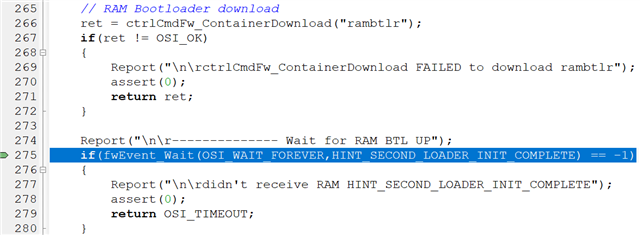
When calling Wlan_Start() the program succesfully reaches the highlighted line:
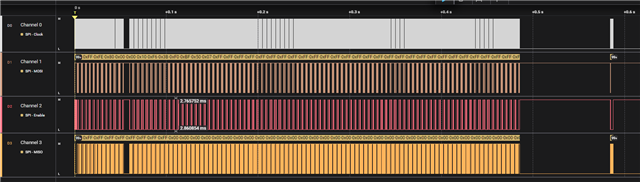
At this point, the program will be stuck as it it is wating for the "2nd hint". The SPI trace reveals, that the contents of 'rambtlr' has been sent:
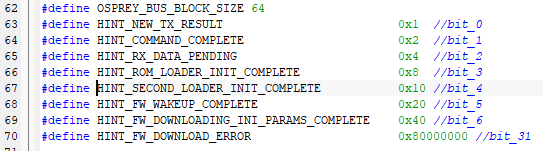
And the 5 bytes of the rx_status of the last package is, which I understand to signal that the command has been completed but not signaling that the 'rambtlr' transfer is finished:


Notes:

* Drivers and fw taken from "cc33xx_mcu_package_R5" 

* the rambtlr-file is has been assumed to be the file "/tools/wifi_fw/cc33xx_2nd_loader.bin" (ending with 0x09C08A90)


Questions:

* Is it the correct assumption w.r.t. the rambtlr? and if not, where can I access the correct file?

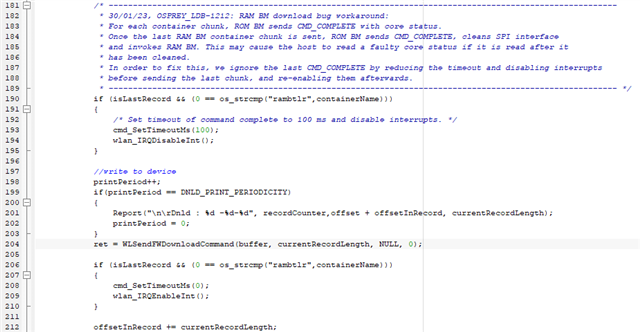
* W.r.t. the workaround seen in the screenshot below, if the last CMD_COMPLETE is ignored, will this not also result in the flag for HINT_SECOND_LOADER_INIT_COMPLETE to be ignored? Or how should this workaround be seen?

Thanks in advance,
    Albert Hansen

  • Hi,

    The file should be OK.

    Basically, the case when the IRQ is not received could be only because of timing issue.

    we wait 100mSec to let the RAM bootloader get validated and executed. It is required since the execution involves SPI initialization so we mask the interrupts during this time and re-enable those after the timeout.

    Can you attach the full logic?

    Shlomi

  • CC3301_spi_data.csv

    Clock speed should be 8MHz

    Data was collected with 500 MS/s

  • Hi,

    Sorry I was out.

    Can I please get the saleae raw file and not the csv so I can open it locally in GUI?

    Regards,

    Shlomi

  • Hi,

    The bootloader programming looks OK.

    I am missing the interrupt line in the logic, would be good to get it as well.

    Just from the logs it is hard to determine whether the host is stuck somewhere. I would expect to see the 0x10 status just on the next 0xBFFC which does not appear on your capture.

    What I can suggest is the followings:

    • add the IRQ to your logic
    • try to increase the delay from 100mSec to 1 second and retest
    • add logger capture from the LOG pin. All you need is a level shifter connected to your PC and the toolbox. Just use the logger option from the toolbox and use the attached logger.bin parser for R5

    Shlomihttps://e2e.ti.com/cfs-file/__key/communityserver-discussions-components-files/968/7776.logger.bin

  • The host is stuck waiting for a semaphore at the following line from 'init_device.c', which I can see with my debugger in IAR:

    if(fwEvent_Wait(OSI_WAIT_FOREVER,HINT_SECOND_LOADER_INIT_COMPLETE) == -1)


    I've attached a zip-file, CC3301_capture_saleae_w_int_and_log.zip, with the data capture of the SPI-communication, the interrupt-pin, and the LOG pin for a couple of different delays (including 100ms and 1s)

    I'm not sure I understand how to use the parser, so it would be helpful if you could elaborate on this point

  • Hi,

    What you need to do with the parser is to use it as part of the toolbox.

    You can download it from https://www.ti.com/tool/SIMPLELINK-WIFI-TOOLBOX#downloads and install.

    under the docs you should see a user guide but to elaborate here as well, after installing and connecting an external level shifter, you should execute it, choose Logger and pick the COM port. Then, under the Parser option, just pick a custom parser option and direct it to the logger.bin I attached. This is important since the logger parser is tightly attached to the FW running on R5.

    Then, simply execute it and a wireshark should be opened and all messages from FW should pop up.

    This would provide some details and hints on what is going on.

    You can use the regular 100mSec delay.

    Regards,

    Shlomi

  • CC3301_logger.zip

    I've attached the wireshark and logic captures and they seem to be configured correctly, however, I can't see any warnings or errors

  • Hi,

    The logger seems strange and not what I expected.

    I expect to see chunk by chunk (size of around 768 bytes) and not as described.

    Not sure if this is a mismatch between the driver and FW/BL since those need to match.

    Can you elaborate if it worked on CC3351 and now it is not working on CC3300? since this is what I saw on the original thread.

    Also, would be good to get the actual 2nd bootloader, fw and conf file you are using.

    Shlomi

  • Hi,

    W.r.t. both CC3351 and CC3300 - they have only been mentioned because I believed that the problem from the original thread was similar in nature to what I've been experiencing: CC3300: Driver compatibility and firmware upload - Wi-Fi forum - Wi-Fi - TI E2E support forums

    However, we are using the CC3301


    The files we are using: cc3301_files.zip

  • OK, so it seems like a clean R5.

    can you also attach the conf.h header file you are using?

  • this is also very strange that the logger is not printing as expected.

    you can see it even when comparing the different logger captures you attached.

    and also there are many missed log messages.

    what level shifter are you using?

  • conf.h

    The level shifter is TXS0108EQPWRQ1 - so the signal value is ~3.6 V (can be seen in attached saleae capture)

    I also noticed that for wlan_IRQDisableInt and wlan_IRQEnableInt it says "need to implement only if working with active low assertion", so I've also attached another capture with the contents of these functions commented out.

    100ms_IRQ_ASSERTION_HIGH.zip

  • Hi Albert,

    When asserting high the IRQ, you actually change the SOP mode of the device. You can see in the logger that the SOP now is 0x3 (instead of 0x1) and this means that the device goes into a test mode (for debug analysis). But, at least I can see more messages now, not sure why. In any case, it does seem that the 2nd boot loader is validated and executed but only a single interrupt is observed (for the command complete - 0x2) but the completion interrupt indicating 2nd boot loader completion is not seen.

    What platform are you using?

    is the interrupt set to edge? level?

    I remember analyzing something similar with another customer and we did the same experiment of increasing the timeout. What I remember is that we always saw an interrupt after ~140mSec which should denote the completion and execution of 2nd bootloader but since we waited for 1 second, we got another interrupt but this time it was the 2nd boot loader interrupt, i.e. the 0x10 and not the 0x2 like you get. Also, when we tested with 100mSec, we could observe 2 interrupts (after 100mSec with 0x2 and after another 40mSec with 0x10). In your case, we don't get the second interrupt.

    This makes sense since we do not see in your case the interrupt re-asserting after ~140mSec so it makes me wonder if the 2nd bootloader is successful in your case but without a working logger it would be hard to know (again, not sure why it does not work in your case).

    Just for your reference, I attached the working logger case with 100mSec delay so you see how it is supposed to look.

    Regards,

    Shlomihttps://e2e.ti.com/cfs-file/__key/communityserver-discussions-components-files/968/initialization_5F00_ThickMAC_5F00_R5.pcapng

  • development platform: IAR RX 4.10.2

    detect method: Rising edge

    Thank you for the reference, I'll have a look at that. If you have a capture of the SPI communication of a succesful device_init, I would also like to see that

  • sure, please find attached the SPI capture with the default 100mSec delay.https://e2e.ti.com/cfs-file/__key/communityserver-discussions-components-files/968/3884.cc33xx_5F00_MCU_5F00_full_5F00_platform_5F00_init_5F00_network_5F00_terminal.sal

  • I've looked through both the wireshark log and the SPI-communication of a successful boot, however, I've yet to set the HINT_SECOND_LOADER_INIT_COMPLETE-flag

    However, I've found some strange behaviours on the SPI-communication:
    1. (see P0 timing marker in the two saleae logic captures): The received status from the CC3301 in my measurement is not the same as the reference
    2. (see P1 timing marker in the two saleae logic captures): The first two bytes (which I believe to be the length times two, due to the bitshifts) is not the same the reference - 0x7228 instead of 0x69E8
    3. (see P2 timing marker in the two saleae logic captures): The data sent from the CC3301 in measurement is repetitively 0x55 until the transmission is over, meaning the status is not readable and the tsf-bytes are nonsensical

    I've attached three files: 2627.files.zip
    1. wirehark-log.pcapng is the parsed log from my capture (I believe the reason a lot of information was not present in my last logs was due to a loose connection)
    2. logic_capture_with_markers_and_comments.sal is my capture with markers and comments corresponding to the three "strange behaviours" explained above
    3. ti_reference_with_markers.sal is the capture sent in the parent-question with markers corresponding to the markers I've set in my own capture


    My questions are:

    • W.r.t. P0 timing marker is it essential that the status is the same as in the reference? If yes, do you know why the status is not equal to the reference?
    • W.r.t. P1 timing marker why is the length set to another value?
    • W.r.t. P2 timing marker Why does the CC3301 keep sending 0x55's and not the status and tsf?

    I've also created an excel file for a quicker overview of the differences between the wireshark-log from this post and the reference wireshark-log from the parent-question used as reference: wireshark-comparison.zip

    The "I"-column is TRUE/FALSE/Unknown based on whether the individual log-lines are equal/not equal/not received colored green/red/orange. Some log-lines on the measurement-log may have been lost due to a bad connection.

    Thank you in advance,
        Albert

  • Hi Albert,

    Thanks for the info.

    P0: this is meaningless as the status is 16 bits only which are 0 in both cases.

    You can see in the code that the core_status is AND-ed with this mask (core_status->rx_status & RX_BYTE_COUNT_MASK).

    P1: good question although I can see this value also in all other cases of 0xBFF8 in your log. In my case the length corresponds to 1268 bytes and in your case to 2324 bytes. I don't have a good explanation to it.

    P2: this is probably due to the fact that the procedure ends here so the TSF is not fired (i.e. the side effect and not the root cause).

    Now that the logger is OK, you can remove the high assertion of the IRQ since as long as SOP is 0x3, it would not proceed to the FW download.

    As for P1, can you open the following debug flags and send back the CLI log?

    • DEBUG_FW_EVENT_LOG and DEBUG_FWEVENT in fw_event_if.h
    • DEBUG_COMMANDS in commands.h

    Regards,

    Shlomi

  • Hi,

    It is hard to tell what is wrong.

    Did you try a higher SPI clock?

    I see from the logic that you are using 1.25MHz?

    Shlomi

  • Hi,
    Yes, I've tried with different clockrates, however, the result is the same. I will continue digging deeper into the problem and write again on this thread if any progress is made or if another question arise

  • Hi,

    Just wanted to update that the discrepancy seen on P1 above is not an issue.

    I recorded again and I see the same value as you see.

    The capture I shared before was from an older version of host driver and FW so probably this size was changed and should be OK.

    I am continuing my investigation in here as well and will let you know if I am able to manipulate and somehow reproduce what you see.

    Regards,

    Shlomi

  • Hi Shlomi,

    I am working together with Albert on this issue and I just have a few questions.

    I have attached my capture with markers.

    5736.Capture.zip

    My questions are:

    1. W.r.t P0 timing marker: Your MOSI seems to go low while you are receiving on MISO but ours stays high.
    2. W.r.t P1 timing marker: For every 4 bytes you receive the SPI enable goes high which ours doesn't 

    Could any of this be an issue? I am comparing with the capture you sent Apr. 16.

    Furthermore, you said this capture of yours was from an older version of the host driver and FW. Do you have a new capture with the R5 ?

    Regards,

    Casper

  • Hi,

    I am currently on a business trip but I can provide some answers to your questions.

    Basically, the CS line going low every 4 bytes is host specific. This was captured with one of our CC26xx hosts controlling the CC33xx.

    I captured again couple of weeks ago with an AM243 and the CS line is always low for this one and still it works well so this is probably not the issue you are experiencing. See attached.

    I do not think the MOSI is an issue as well since it does work during 2nd bootloader part.

    I have to say that the last capture is different from the one already shared before in a sense that reading the mailbox (via the 0xBFF8) returns expected values.

    In the past it returned the sync pattern followed by all 0x0. This time I see the expected opcode+length and also the returned code. Not clear why you don't get the extra IRQ to denote RAM bootloader finish.

    At this point, the FW logger would be necessary again (hopefully it does not miss any messages).

    Regards,

    Shlomi

    https://e2e.ti.com/cfs-file/__key/communityserver-discussions-components-files/968/networkTerminal_5F00_init_5F00_R6_5F00_noDebug_5F00_good.sal

  • Hi Shlomi,

    Your attachment says R6 - Should that make a difference? 

    I have attached our latest captures and logs with R5

    CC3301_logs_20_05.zip

    Regards,

    Casper

  • No, it should not matter. It is a newer one but should not make a difference since the R5 should also work.

    This one also shows the expected output on the 0xBFF8 mailbox reading so you should be fine.

    we are about to release a new package, e/o this month but if loading is not working on your side, I doubt if the new version will.

    I need to consult what else can happen on your side but a logger would really be helpful.

    the logger needs to be recorded using the toolbox, not into the logic like you did.

    you should be familiar with this process since you already did it.

    Regards,

    Shlomi

  • Hi Shlomi,

    The logger is also a part of the zip i attached. The file is named "CC3301_logger_20_05.pcapng" and I also used the toolbox. I used the .bin file you sent Apr. 10.

    Please let me know if you meant something else.

    Regards,

    Casper

  • Hi Casper,

    I missed that, sorry.

    From the logger I can still see that you left the IRQ pulled high? I can see SOP=0x3.

    See above my explanation: "When asserting high the IRQ, you actually change the SOP mode of the device. You can see in the logger that the SOP now is 0x3 (instead of 0x1)". This means you set the device into a debug mode. I am not sure what would happen after the BL is programmed.

    Can you revert it so we get SOP=0x1?

    With SOP set to 0x1 we didn't get very reliable logger. Not sure why.

    Regards,

    Shlomi

  • Hi Shlomi,

    I modified our IRQ line and now it says SOP=0x1.

    I believe it's working now but can you maybe confirm that by looking at the attached files ? 

    26_05_capture.zip

    In the logger there seems to be a lot of "dropped bytes" is that important ?

    EDIT:

    I can see there is no SoP Mode = 0x1 in the logger file I attached.. Sometimes we don't get all the packages in the logger. Maybe due to some noise but I don't know. I have attached another zip with SoP Mode = 0x1.

    SOP_1_capture.zip

    Regards

    Casper

  • Thanks Casper,

    So I am confused now.

    We started by this SOP issue and then i asked to revert it so we get SOP=0x1 as required and it didn't work.

    What is different now?

    seems that it works now.

    Are you able to proceed and work with the device?

    Regards,

    Shlomi

  • Hi Shlomi,

    Apparently it is important for our application to asserting high the IRQ. So I had to make it low while activating CC3301 to make it SOP=0x1 and then back in high afterwards.

    It seems like we can continue with the device now. 

    Thanks a lot for your contribution.

    Regards,

    Casper

  • Sure, thanks for the update.

    Shlomi