Part Number: CC3235MODASF
Other Parts Discussed in Thread: CC3235SF
Hi Ti,
I am trying to set up an HTTPS server on CC3235SF and cannot connect via HTTPS. Details are as follows:
Environment and Certificate Generation:
-
OpenSSL version:
OpenSSL 3.6.1 27 Jan 2026 -
Commands used to generate key and certificate:
openssl genrsa -out server-key.pem 2048
openssl req -new -x509 ^
-key server-key.pem ^
-out server-cert.pem ^
-days 365 ^
-sha256openssl x509 -in server-cert.pem -out server-cert.der -outform DER
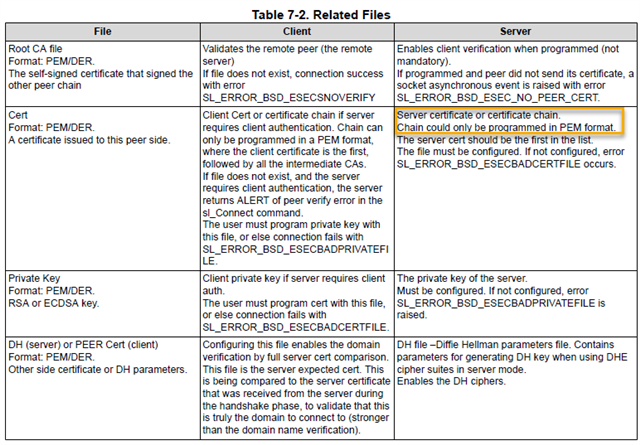
openssl rsa -in server-key.pem -out server-key.der -outform DER - Placed
server-cert.derandserver-key.derinto the project/userFile/certs/directory.
HTTPS Server Setup in Code:
unsigned char ServerCertificateFileName[] = "/certs/http_cert.der";
unsigned char ServerKeyFileName[] = "/certs/http_key.der";
unsigned char SecurityMode[] = {0x1};
unsigned char HttpsPort[] = {0xBB, 0x01}; // 443
unsigned char SecondaryPort[] = {0x50, 0x00}; // 80
unsigned char SecondaryPortEnable[] = {0x1};

// Set certificate and private key
sl_NetAppSet(SL_NETAPP_HTTP_SERVER_ID, SL_NETAPP_HTTP_DEVICE_CERTIFICATE_FILENAME, sizeof(ServerCertificateFileName), ServerCertificateFileName);
sl_NetAppSet(SL_NETAPP_HTTP_SERVER_ID, SL_NETAPP_HTTP_PRIVATE_KEY_FILENAME, sizeof(ServerKeyFileName), ServerKeyFileName);

// Enable HTTPS on primary port
sl_NetAppSet(SL_NETAPP_HTTP_SERVER_ID, SL_NETAPP_HTTP_PRIMARY_PORT_SECURITY_MODE, sizeof(SecurityMode), SecurityMode);
sl_NetAppSet(SL_NETAPP_HTTP_SERVER_ID, SL_NETAPP_HTTP_PRIMARY_PORT_NUMBER, sizeof(HttpsPort), HttpsPort);

// Enable secondary port for HTTP redirect
sl_NetAppSet(SL_NETAPP_HTTP_SERVER_ID, SL_NETAPP_HTTP_SECONDARY_PORT_NUMBER, sizeof(SecondaryPort), SecondaryPort);
sl_NetAppSet(SL_NETAPP_HTTP_SERVER_ID, SL_NETAPP_HTTP_SECONDARY_PORT_ENABLE, sizeof(SecondaryPortEnable), SecondaryPortEnable);

// Restart HTTP server
sl_NetAppStop(SL_NETAPP_HTTP_SERVER_ID);
sl_NetAppStart(SL_NETAPP_HTTP_SERVER_ID);
Observed Behavior:
-
http://<IP>works correctly. -
https://<IP>orhttps://<IP>:443fails withERR_CONNECTION_REFUSEDin the browser. -
All
sl_NetAppSetandsl_NetAppStartcalls return0(success), no errors.
What I Have Checked / Tried:
-
Both DER and PEM formats for certificates.
-
Confirmed the certificate and private key use RSA.
-
SecurityMode set to
0x1(TLS enabled). -
Secondary HTTP port enabled for redirect, still cannot connect.
-
Browser does not have the self-signed certificate installed.
Questions:
-
Should the HTTPS server be configured before or after Wi-Fi connection?
-
Besides
sl_NetAppSetandsl_NetAppStart, are there other required steps (e.g., certificate format, permissions, file path)? -
Does the PC browser need to install the self-signed certificate to connect?
-
Are there recommended ways to test or verify that the HTTPS server is actually running (e.g., port checking)?