This thread has been locked.

If you have a related question, please click the "Ask a related question" button in the top right corner. The newly created question will be automatically linked to this question.

CC3551E: Encountering issues while testing enterprise encryption

Part Number: CC3551E

I have been using network_terminal recently to test the enterprise encryption functionality, but I am encountering some issues. I hope to get your help. The problem is described as follows:

  1. On Linux (Ubuntu), I used OpenSSL to generate the certificate files for the RADIUS server and the client with the following steps:

     
    openssl genrsa -out ca.key 2048
    openssl req -x509 -new -nodes -key ca.key -sha256 -days 3650 -out ca.crt
    openssl genrsa -out server.key 2048
    openssl req -new -key server.key -out server.csr
    openssl x509 -req -in server.csr -CA ca.crt -CAkey ca.key -CAcreateserial -out server.crt -days 3650 -sha256
    openssl genrsa -out client.key 2048
    openssl req -new -key client.key -out client.csr
    openssl x509 -req -in client.csr -CA ca.crt -CAkey ca.key -CAcreateserial -out client.crt -days 3650 -sha256
    

    I generated the mobile client certificate using the following command:

     
    openssl pkcs12 -export -in client.crt -inkey client.key -out client.p12 -passout pass:123456
    
  2. I have converted ca.crtclient.crt, and client.key into arrays and placed them into ca_certificate.hclient_certificate.h, and client_private_key.h.

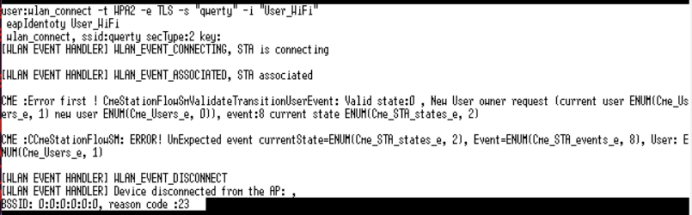
  3. When I disable the FORCE_CA_CRT_VERIFY macro, sending the command wlan_connect -t WPA2 -e TLS -s "qwerty" -i "User_WiFi" can successfully establish a connection. However, when I enable #define FORCE_CA_CRT_VERIFY to enable CA certificate verification, the connection fails, and the CC3551E returns the following logs:image.png
Meanwhile, the RADIUS server shows the following error:
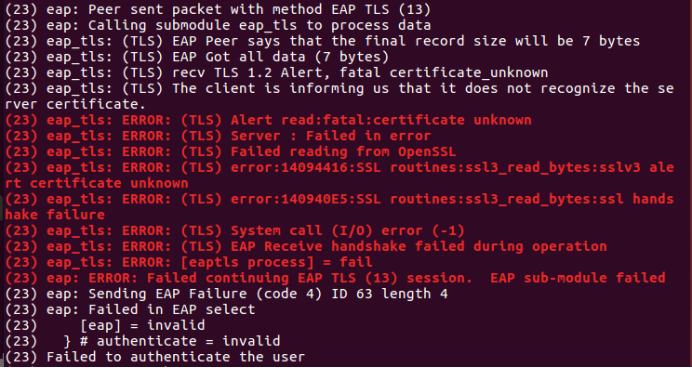
image.png

The same certificates work fine when tested on an Android phone without any issues. Could you please help me check what might be causing this? Did I do something wrong? Thank you!

  • Hello,

    You mention that the "same certificates work fine," are they the client certificates or the server ones? Right now the client is having trouble trusting the certificates presented by your server. 

    Usually, this can be remedied by including the root CA in the client's certificate store so that it can properly validate the server's certificate. You can also try making sure that the system clock is properly set because the config-hsm.h included by network_mbedtls might be trying to validate the date and time.

  • Hi 

    1. "Same certificates work fine" means the same server and client certificates are being used. As mentioned in step 1 above, the certificates ca.crt, server.key, and server.crt are placed on the server side, while ca.crt, client.crt, and client.key are stored on the CC3551E. On the mobile device, ca.crt and client.p12 are installed.
    2. The root CA has already been stored on the client side, as the ca.crt has been converted into an array and updated in ca_certificate.h.
    3. How should the system clock be set in the network_terminal example? 
  • Hi,

    My mistake, I did not realize that you used your ca.crt as the certificate authority for both the client and server.

    To sync time with an NTP server, do the following:

    1. Set up your device as a station

    2. sntp_config_servers -s 216.239.35.0 (configure NTP server to use time.google.com, which should be 216.239.35.0)

    3. Connect your device to an access point

    4. sntp_update

    You should now see the following:

    user:sntp_update
    Syncing time with NTP server...
    Current UTC time: 2026-03-03T17:49:24

    Now, any subsequent get_date_time on the network terminal should print the correct time.

  • Hi BLiu

    I followed the steps you provided to configure the NTP servers and set up three different server addresses, but none of them were able to synchronize the NTP time. What could be the reason? Here is the log:

    user:sntp_config_servers -s 10.167.188.21 -s 219.239.35.0 -s 166.111.8.28
    Configure the NTP servers: num of servers 3: 10.167.188.21 219.239.35.0 166.111.8.28
    
    user:sntp_update
    Syncing time with NTP server...
    sntpTask_syncTime_task: recvfrom 0x15bca70a failed (-3)(err_enum_t), moving to the next server
    sntpTask_syncTime_task: recvfrom 0x23efdb failed (-3)(err_enum_t), moving to the next server
    sntpTask_syncTime_task: recvfrom 0x1c086fa6 failed (-3)(err_enum_t), moving to the next server
    

    Later, I found the set_date_time command and manually configured UTC. After that, I was able to successfully connect using the following command:

    wlan_connect -t WPA2/WPA3 -e TLS -s "qwerty" -i "192.168.135.108"
    

    Is setting UTC required because the MBEDTLS_HAVE_TIME macro is enabled? How should I modify the relevant macro definitions?

  • Hello,

    Can you try IPs from this list?

    https://tf.nist.gov/tf-cgi/servers.cgi

    You can also try time.google.com's which is 216.239.35.0.

    For the MBEDTLS macro definitions (assuming you are looking at config-hsm.h), you can edit them, but you must also rebuild the mbedtls library and SDK to apply all of the changes.