CC3300MOD: Require information on validating TI SDK API

Part Number: CC3300MOD
Other Parts Discussed in Thread: CC3300, CC3301MOD, , CC3301, BP-CC3301

Hi All,

We have integrated TI SDK for CC3300 on our STM32F412ZG code base.

We confirmed working “WLAN_START” command and found it is working ok.

To further validating other SDK API, we tried few “wlan_comd.c” api after confirming the parameters on TI EVAL board.

  ret = cmdWlanStartCallback("");

  ret = cmdGetFwVerCallback("");


   //ret = cmdWlanRoleUpStaCallback("-r \"00\"");

   //ret = cmdScanCallback("-n 2");


    ret = cmdWlanRoleUpApCallback("-s \"Thermostat_AP\" -t WPA/WPA2 -p \"12345678\" -r \"00\"");


we found cmdWlanStartCallback, cmdGetFwVerCallback, cmdWlanRoleUpStaCallback works correctly.

We found cmdWlanRoleUpApCallback and cmdScanCallback fail in “cmd_send” function as below

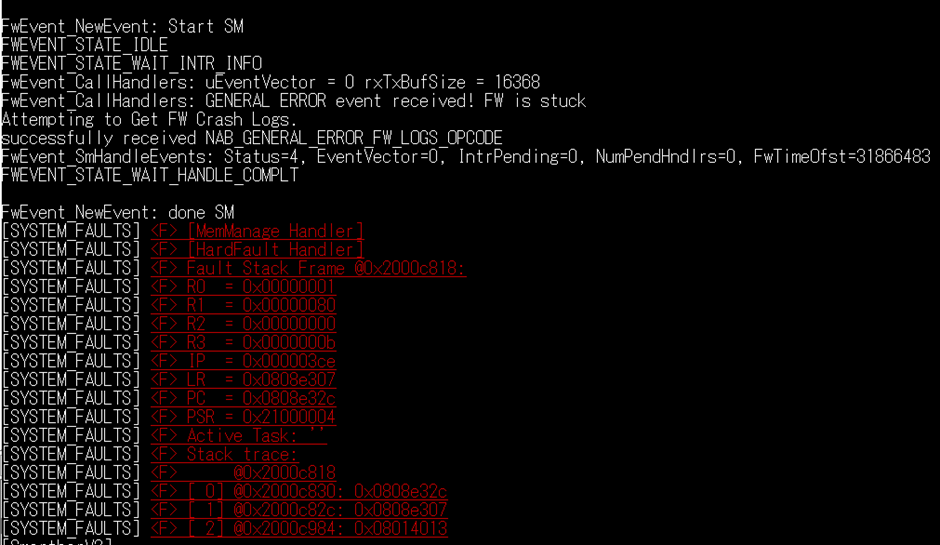
  • On executing “trnspt_RequestSchedule” we came across “FW is stuck” error
  • On executing osi_SyncObjWait, it fails to take Semaphore and system crash with log in red colour

Our queries:

  1. The way we are testing command is ok?
  2. What might be possible reason for “cmd_send” to fail for cmdWlanRoleUpApCallback and cmdScanCallback and not for other command?
  3. Is there any issue with power supply since we are giving supply using laptop usb port (no c type)

Thanks....
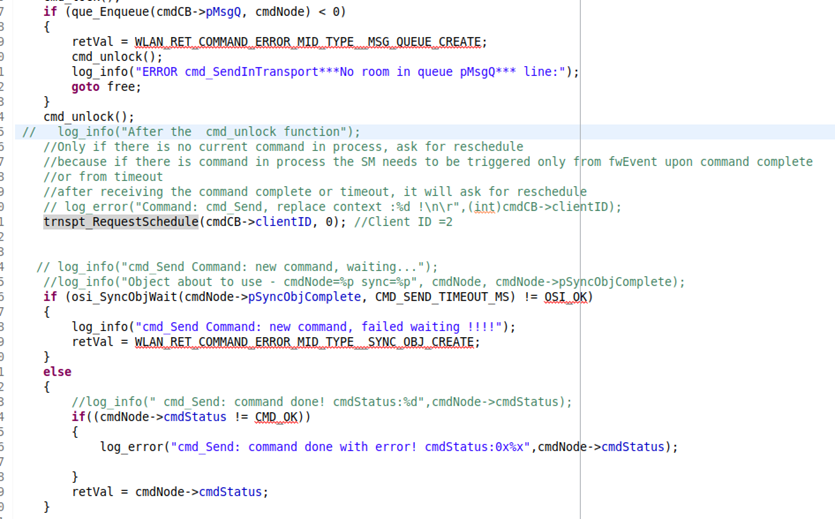
image.png

image.png

  • Hi All,

    We have carried out few exercise with few other commands and our findings as below.

    Command

    Working status

    cmdWlanStartCallback("")

    OK


    cmdWlanRoleUpStaCallback("-r \"00\"")

    OK

    cmdScanCallback("-n 2")

    Not OK

    cmdWlanConnectCallback("-s \"GalaxyY\" -t WPA2 -p \"12345678\"")

    Not OK


    cmdWlanRoleUpApCallback("-s \"Thermostat_AP\" -t OPEN -p \"12345678\" -r \"00\"")

    Not OK


    OK

    cmdGetPsModeCallback("")

    OK

    cmdGetPsModeCallback("-m 2")

    OK

    cmdGetMacAddressCallback("-i 0")

    OK

    cmdGetFwVerCallback("")

    OK


    It looks like the command which involve RF operation is not working.

     Did we miss something related to RF configuration, etc?

    Operation wise how different RF related API than normal API

    When “FW is stuck” is detected by the host controller


    Regards….

     Yogesh

  • Hi All,

    We captured CC3300 Log from our development board having CC3300MOD and TI Eval board having CC3301MOD.

    We found difference in log.

    Please analyze the log and tell us the reason for difference and whether it has any relation for few SDK API commands not working as mentioned above.

    Log files 5 June.zip

  • Hi All,

    We also captured raw log Wlan_connect in following scenario one at a time. 

    //ret = cmdWlanConnectCallback("-s \"GalaxyY\" -t WPA2 -p \"9833276215\"");  - FW STUCK error observed

     ret = cmdWlanConnectCallback("-s \"GalaxyY\" -t OPEN"); - FW stuck error not observed. But not connected to AP.

    2026_06_08_14_45_40_WLANCONNECTOPEN.zip

    2026_06_08_14_55_49_WLANCONNECTWPA2.zip

    Please give us input to our queries related few CAllback commands are not working mainly related to RF operation.

    We are waiting for last 2-3 days.

    Thanks........

  • Hi Yogesh,

    Can you send me your terminal input/output rather than the FW logs for testing the commands?

    Is there any issue with power supply since we are giving supply using laptop usb port (no c type)

    Since some of these commands are working and others are not, I am inclined to think it could be a power related issue. On the AM-243 host, we require a 5V / 3A USB-C connection in order to ensure operation, I am not sure of the STM32F412ZG requirements but I imagine they would be similar.

    We captured CC3300 Log from our development board having CC3300MOD and TI Eval board having CC3301MOD.

     What is the CC3301MOD's host? Is it the same STM32F412ZG device or how is this configuration different from just the CC3300MOD?

    I cannot read these files as these are .bin, but this is explained either by wrong command format (AP is not OPEN, so cannot connect), or not enough power to initiate connection, causing FW error.

    If the issue is confirmed to not be power, the fw_downloading_ini_params process should be verified and investigated.

    Best Regards,

    Josh Prushing

  • Hi Josh,

    Following are the various command which get executed but not performing the required operation. Complete terminal log attached at the end.

    Command Name               Actual Command                                                                   Observed result

    Set AP                               int ret = cmdWlanStartCallback("NULL");                               Command executed but AP not visible on mobile

                                              ret = cmdWlanRoleUpApCallback("-s \"TISDKAP\" -t OPEN -r \"00\""); 

     Set STA and connect        int ret = cmdWlanStartCallback("NULL");                              Command executed but not connected to AP and timeout trigger

                                               ret = cmdWlanRoleUpStaCallback("-r \"00\"");

                                               ret = cmdWlanConnectCallback("-s \"GalaxyY\" -t OPEN");

    Set STA and scan              int ret = cmdWlanStartCallback("NULL");                               Command executed and came across "FW Stuck" error, code crash

                                               ret = cmdWlanRoleUpStaCallback("-r \"00\"");

                                               ret = cmdScanCallback("-n 2");

    In log we observed "HINT_FW_DOWNLOADING_INI_PARAMS_COMPLETE event" which you highlighted.

    Our queries:

    1) In "Set AP" log we can see "local interface IP is 10.0.0.3", "UP starting DHCP Server". But AP not visible on mobile. What might be the issue? Did you come across similar observation in past?

    FwEvent_NewEvent: done SM
    [NWK_LWIP] <I>
    status_callback==UP, local interface IP is 10.0.0.3


    FwEvent_NewEvent: Start SM
    FWEVENT_STATE_IDLE
    FWEVENT_STATE_WAIT_INTR_INFO
    FwEvent_CallHandlers: uEventVector = 0 rxTxBufSize = 16368
    [NO_TAG] <I> last released desc =, current idx =
    [NO_TAG] <I> TX command complete , last_fw_rls_idx:, txResultQueueIndex
    FwEvent_SmHandleEvents: Status=4, EventVector=0, IntrPending=0, NumPendHndlrs=0, FwTimeOfst=41197150
    FWEVENT_STATE_WAIT_HANDLE_COMPLT

    FwEvent_NewEvent: done SM
    [NWK_LWIP] <I>
    link_callback==UP starting DHCP Server

    2) " Set STA and connect" command executed but not connected to AP and timeout trigger. What might be the issue?

    3)  "Set STA and scan" command crash with "FW Stuck Error"

    •      What is "FW Stuck Error"

    Terminal Log 9 June.zip

    Thanks.....

  • Hi Yogesh,

    What is "FW Stuck Error"

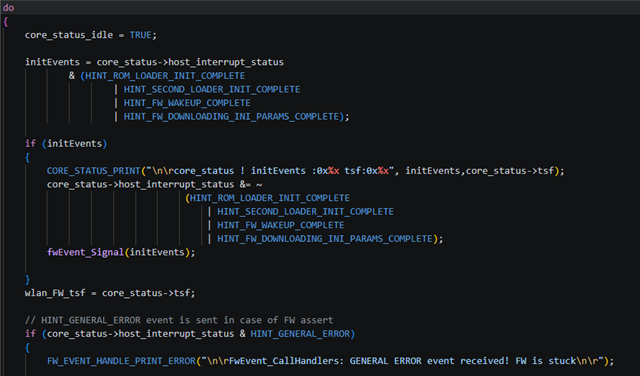
    This error is sent when anything causes the FW to crash. In looking at the code around where that error message is printed, I found something critical: I do not believe that the initialization completed. As per snippet below, there should be a print statement with the status of rom loader, second loader, fw wakeup, and ini params if they have finished initializing by this point. Because we don't see this print statement, I believe this indicates what I mentioned at the end of my last post, that the fw_downloading_ini_params process should be verified and investigated.

    Since it appears like the device is not browning out due to lack of power, I think the ini params are the root cause. Can you share how you determined these were being initialized correctly?

    Best Regards,

    Josh Prushing

  • Hi  

    We just check log "WLAN_START_STA_SCAN.txt" log

    We found all expected events in log.

    core_status ! initEvents 8 And :17035

    core_status ! initEvents 16 And :4993091

    core_status ! initEvents 32 And :6925

    core_status ! initEvents 64 And :54663  (HINT_FW_DOWNLOADING_INI_PARAMS_COMPLETE)

    Did we understand wrong. Please clarify.

  • Hi Yogesh,

    Those logs indicate the device became unresponsive and the watchdog forced a reset, I'm not exactly sure what caused this but at least one of the initialization processes must've failed. I will try to investigate this more in detail over the next few days.

    Best Regards,

    Josh Prushing

  • Hi  

    We observe "FW Stuck" error only for "Set STA and scan" and not for " Set STA and connect" and "Set AP"

    For " Set STA and connect" we observed same log when executed command on TI Eval board, but AP not visible on mobile

    Our queries:

    1) What is your opinion on "Set AP" executed with log "status_callback==UP, local interface IP is 10.0.0.3" and "link_callback==UP starting DHCP Server"
    but not showing AP on mobile?

    2) How we can confirm RF hardware working correctly for transmission and reception using Terminal Log and CC3300 Log

    3) When we are executing "Set AP" command, what is role of SDK FW running of Host controller (STM32) and FW Binary executing on CC3300. Is there additional activity spawn at Host controller end. Any heap and stack configuration, do u think we need to check?

    4) As you mentioned "one of the initialization processes must've failed", how we can check which initialization process is failed. we can give attempt to check same parallel to you.

    5) On TI eval board we have cc3301 MOD and our setup we have CC3300 MOD. As you already confirm, please binaries (bootloader, FW, configuration) for both the modules are same.

    Thanks....

  • Hi Yogesh,

    In taking a closer look at the Log files 5 June.zip, it seems like TI Eval board boots just fine, but CC3300 never reaches the validation stage ("Container Validation Success" in TI Eval logs), never invokes RAM Bootloader ("Invoking RAM Bootloader" in TI Eval logs), and never starts WLAN ("WLAN LP: Start Role 1" in TI Eval logs). Can you share more information on the TI Eval setup? What host is this device using, what are the differences between the two setups? Are you just using the BP-CC3301 or what does this setup look like?

    Understanding this setup will help me answer 1, 2, and 4.

    3) When we are executing "Set AP" command, what is role of SDK FW running of Host controller (STM32) and FW Binary executing on CC3300. Is there additional activity spawn at Host controller end. Any heap and stack configuration, do u think we need to check

    There are a lot of things to check here, SPI/SDIO communication, application/network stack configuration and interfacing to/from these stacks, command serialization/deserialization, etc. My first guess would be that there is some breakdown in communication between the network stack and the host controller, so can you check the below for setting up an AP?

    • Is tcpip_network_stack_add_if_ap being called?
    • Is link_callback being called?
    • Are both network_send and network_recv functioning?

    This should provide insight onto where the process is failing and what needs to be changed.

    5) On TI eval board we have cc3301 MOD and our setup we have CC3300 MOD. As you already confirm, please binaries (bootloader, FW, configuration) for both the modules are same.

    The same binary files are used for these devices, no issues here.

    Best Regards,

    Josh Prushing

  • Hi Josh,

    For 5 June log which we shared, the logs are not reliable since we captured log using 3.2v compatible converter. Either we need to use converter 1.8v compatible or use 1.8v to 3.2v as used by the TI eval board for CC3301 MOD. We are working on either of solution and will share new log with you.

    We added following debug for point which you asked us to confirm.

    • tcpip_network_stack_add_if_ap       - In tcpip_network_stack_add_if_ap-1  
    • link_callback being                           - In LinkCALLBAck--2
    • network_send                                   - In NWSEND--3
    • network_recv                                    - In NWRECV--4

    we did not observe NWRECV--4. All other event observed as shown in attached log.

    -------------- Download RAM-BTL
    Header length = 138
    The Record Length = 152
    
    Header length = 115
    The Record Length = 128
    
    [NO_TAG] <I> Offset3  280
    
    Header length = 115
    The Record Length = 128
    [NO_TAG] <I> Offset3  408
    
    Header length = 444
    The Record Length = 456
    [THERM_MODEL] <E> Failed to retrieve thermostat temperature.
    [NO_TAG] <I> Offset3  864
    
    Header length = 2058
    The Record Length = 2072
    [NO_TAG] <I> Offset3  2936
    
    Header length = 67968
    The Record Length = 67980
    [BOILER_ONOFF] <I> Started
    
    Dnld offset : 6 -4472-768
    Dnld offset : 6 -12152-768
    Dnld offset : 6 -19832-768
    Dnld offset : 6 -27512-768
    Dnld offset : 6 -35192-768
    Dnld offset : 6 -42872-768
    Dnld offset : 6 -50552-768
    Dnld offset : 6 -58232-768
    Dnld offset : 6 -65912-768
    [TIWIFI_CMD] <I> CommandSM: cmdStatus: CMD_ERR_TIMEOUT
    [TIWIFI_CMD] <E> cmd_Send: command done with error! cmdStatus:0x8000581d
    [ISR] IRQ line already active and synchronized
    [NO_TAG] <I> Offset3  70916
    
    [NO_TAG] <I>
    -------------- Wait for RAM BTL UP
    HINT_SECOND_LOADER_INIT_COMPLETE
    core_status ! initEvents 16 And :1758924
    HINT_SECOND_LOADER_INIT_COMPLETE event
    [NO_TAG] <I>
    -------------- Download FW
    
    Header length = 139
    The Record Length = 152
    [NO_TAG] <I> Offset3  152
    
    Header length = 116
    The Record Length = 128
    [NO_TAG] <I> Offset3  280
    
    Header length = 3142
    The Record Length = 3156
    [NO_TAG] <I> Offset3  3436
    
    Header length = 2058
    The Record Length = 2072
    [NO_TAG] <I>
    Dnld offset : 4 -4972-768
    [NO_TAG] <I> Offset3  5508
    
    Header length = 420224
    The Record Length = 420236
    
    Dnld offset : 5 -12420-768
    
    Dnld offset : 5 -20100-768
    
    Dnld offset : 5 -27780-768
    
    Dnld offset : 5 -35460-768
    
    Dnld offset : 5 -43140-768
    
    Dnld offset : 5 -50820-768
    
    Dnld offset : 5 -58500-768
    
    Dnld offset : 5 -66180-768
    
    Dnld offset : 5 -73860-768
    
    Dnld offset : 5 -81540-768
    
    Dnld offset : 5 -89220-768
    
    Dnld offset : 5 -96900-768
    
    Dnld offset : 5 -104580-768
    
    Dnld offset : 5 -112260-768
    
    Dnld offset : 5 -119940-768
    
    Dnld offset : 5 -127620-768
    
    Dnld offset : 5 -135300-768
    
    Dnld offset : 5 -142980-768
    
    Dnld offset : 5 -150660-768
    
    Dnld offset : 5 -158340-768
    
    Dnld offset : 5 -166020-768
    
    Dnld offset : 5 -173700-768
    
    Dnld offset : 5 -181380-768
    
    Dnld offset : 5 -189060-768
    
    Dnld offset : 5 -196740-768
    
    Dnld offset : 5 -204420-768
    
    Dnld offset : 5 -212100-768
    
    Dnld offset : 5 -219780-768
    
    Dnld offset : 5 -227460-768
    
    Dnld offset : 5 -235140-768
    
    Dnld offset : 5 -242820-768
    
    Dnld offset : 5 -250500-768
    
    Dnld offset : 5 -258180-768
    
    Dnld offset : 5 -265860-768
    
    Dnld offset : 5 -273540-768
    
    Dnld offset : 5 -281220-768
    
    Dnld offset : 5 -288900-768
    
    Dnld offset : 5 -296580-768
    
    Dnld offset : 5 -304260-768
    
    Dnld offset : 5 -311940-768
    
    Dnld offset : 5 -319620-768
    
    Dnld offset : 5 -327300-768
    
    Dnld offset : 5 -334980-768
    
    Dnld offset : 5 -342660-768
    
    Dnld offset : 5 -350340-768
    
    Dnld offset : 5 -358020-768
    
    Dnld offset : 5 -365700-768
    
    Dnld offset : 5 -373380-768
    
    Dnld offset : 5 -381060-768
    
    Dnld offset : 5 -388740-768
    
    Dnld offset : 5 -396420-768
    
    Dnld offset : 5 -404100-768
    
    Dnld offset : 5 -411780-768
    
    Dnld offset : 5 -419460-768
    [NO_TAG] <I> Offset3  425744
    
    Header length = 79366
    The Record Length = 79380
    
    Dnld offset : 6 -426512-768
    
    Dnld offset : 6 -434192-768
    
    Dnld offset : 6 -441872-768
    
    Dnld offset : 6 -449552-768
    
    Dnld offset : 6 -457232-768
    
    Dnld offset : 6 -464912-768
    
    Dnld offset : 6 -472592-768
    
    Dnld offset : 6 -480272-768
    
    Dnld offset : 6 -487952-768
    
    Dnld offset : 6 -495632-768
    
    Dnld offset : 6 -503312-768
    [NO_TAG] <I> Offset3  505124
    
    Header length = 48364
    The Record Length = 48376
    
    Dnld offset : 7 -510500-768
    
    Dnld offset : 7 -518180-768
    
    Dnld offset : 7 -525860-768
    
    Dnld offset : 7 -533540-768
    
    Dnld offset : 7 -541220-768
    
    Dnld offset : 7 -548900-768
    [NO_TAG] <I> Offset3  553500
    
    [NO_TAG] <I> -------------- Wait for FW UP
    
    HINT_FW_WAKEUP_COMPLETE
    core_status ! initEvents 32 And :2471
    HINT_FW_WAKEUP_COMPLETE event
    [NO_TAG] <I> -------------- Download IniParams
    core_status ! initEvents 64 And :29070
    HINT_FW_DOWNLOADING_INI_PARAMS_COMPLETE event
    [NO_TAG] <I>
    -------------- Wait for IniParams complete
    
    HINT_FW_DOWNLOADING_INI_PARAMS_COMPLETE
    [TIWIFI_WLAN_CMD] <I>
    Wlan start success!
    
    [NWK_LWIP] <I> In tcpip_network_stack_add_if_ap-1
    [TIWIFI_WLAN_CMD] <I> AP TISDKAP channel: 1
    [ISR] IRQ line already active and synchronized
    [NWK_LWIP] <I>
    status_callback==UP, local interface IP is 10.0.0.3
    
    [NWK_LWIP] <I> In NWSEND--3
    [NWK_LWIP] <I> In LinkCALLBAck--2
    [NO_TAG] <I> last released desc =, current idx =
    [NO_TAG] <I> TX command complete: 0, last_fw_rls_idx:0, txResultQueueIndex:1
    [NWK_LWIP] <I>
    link_callback==UP starting DHCP Server
    
    [NWK_LWIP] <I> In NWSEND--3
    [NWK_LWIP] <I> In NWSEND--3
    [NO_TAG] <I> last released desc =, current idx =
    [NO_TAG] <I> TX command complete: 1, last_fw_rls_idx:1, txResultQueueIndex:2
    [NO_TAG] <I> last released desc =, current idx =
    [NO_TAG] <I> TX command complete: 2, last_fw_rls_idx:2, txResultQueueIndex:3
    [NWK_LWIP] <I>
    Ip address was not received!!
    
    [NWK_LWIP] <I> autoip is 0
    
    [NWK_LWIP] <I> In NWSEND--3
    [NO_TAG] <I> last released desc =, current idx =
    [NO_TAG] <I> TX command complete: 3, last_fw_rls_idx:3, txResultQueueIndex:4
    [NWK_LWIP] <I> In NWSEND--3
    [NO_TAG] <I> last released desc =, current idx =
    [NO_TAG] <I> TX command complete: 4, last_fw_rls_idx:4, txResultQueueIndex:5
    [NWK_LWIP] <I> In NWSEND--3
    [NO_TAG] <I> last released desc =, current idx =
    [NO_TAG] <I> TX command complete: 5, last_fw_rls_idx:5, txResultQueueIndex:6
    [NWK_LWIP] <I> In NWSEND--3
    [NO_TAG] <I> last released desc =, current idx =
    [NWK_LWIP] <I>
    [NO_TAG] <I> TX command complete: 6, last_fw_rls_idx:6, txResultQueueIndex:7
    status_callback==UP, local interface IP is 169.254.145.60
    
    [NWK_LWIP] <I> In NWSEND--3
    [NO_TAG] <I> last released desc =, current idx =
    [NO_TAG] <I> TX command complete: 7, last_fw_rls_idx:7, txResultQueueIndex:8


    Thanks....

    Yogesh

  • Hi Yogesh,

    Thanks for these logs, and thanks for letting me know on the 5 June logs.

    From the 11 June logs, the fw (seemingly) is being loaded correctly. However, it appears that there is an issue with the lwIP core, which is causing the AP role up to fail. Can you add debug prints to the following?

    • before and after dhcp_inform(state_netif) in network_lwip.c that shows the static IP to see if it is being cleared
    • directly inside status_callback(struct netif *state_netif) in network_lwip.c with netif_is_up(state_netif) and ip4addr_ntoa(netif_ip4_addr(state_netif)) prints to track when this is being called.

    If we can identify when the IP address changes from 10.0.0.3 -> 0.0.0.0 -> 169.254.145.60 (or whatever IP is generated), this would be extremely helpful. This IP address is assigned by autoIP, which is a fallback mechanism that assigns a link-local address when the IP is lost.

    Best Regards,

    Josh Prushing

  • Hi  

    Today i executed code from my machine instead of my colleague's machine

    Observed only 10.0.0.3 -> 0.0.0.0 

    "IP Address was not received" not observed.

    Added debug as you mentioned and find same in attachment.

    Next week will put time to find out why 10.0.0.3 -> 0.0.0.0 

    Can you please provide some possible reason that will help to analyze above point.

    Also can you please give input on how AP enable work in coordination with LwIP and other components.

    One more point, how we can confirm our RF and Antenna circuitry is working from current log

    Thanks....

    [NO_TAG] <I> -------------- Wait for FW UP
    
    HINT_FW_WAKEUP_COMPLETE
    
    FwEvent_NewEvent: Start SM
    core_status ! initEvents 32 And :8046
    HINT_FW_WAKEUP_COMPLETE event
    
    FwEvent_NewEvent: done SM
    [NO_TAG] <I> -------------- Download IniParams
    
    FwEvent_NewEvent: Start SM
    core_status ! initEvents 64 And :68986
    HINT_FW_DOWNLOADING_INI_PARAMS_COMPLETE event
    parse_control_message: CTRL_MSG_COMMND_COMPLETE msg receive
    
    FwEvent_NewEvent: done SM
    [NO_TAG] <I>
    -------------- Wait for IniParams complete
    
    HINT_FW_DOWNLOADING_INI_PARAMS_COMPLETE
    [NO_TAG] <I>
     Wlan_Start ret = 0
    
    FwEvent_NewEvent: Start SM
    parse_control_message: CTRL_MSG_COMMND_COMPLETE msg receive
    
    FwEvent_NewEvent: done SM
    
    FwEvent_NewEvent: Start SM
    parse_control_message: CTRL_MSG_COMMND_COMPLETE msg receive
    
    FwEvent_NewEvent: done SM
    
    FwEvent_NewEvent: Start SM
    parse_control_message: CTRL_MSG_COMMND_COMPLETE msg receive
    
    FwEvent_NewEvent: done SM
    
    FwEvent_NewEvent: Start SM
    parse_control_message: CTRL_MSG_COMMND_COMPLETE msg receive
    
    FwEvent_NewEvent: done SM
    [TIWIFI_WLAN_CMD] <I>
    Wlan start success!
    
    
    FwEvent_NewEvent: Start SM
    parse_control_message: CTRL_MSG_COMMND_COMPLETE msg receive
    
    FwEvent_NewEvent: done SM
    [NWK_LWIP] <I>
     In tcpip_network_stack_add_if_ap-1
    
    FwEvent_NewEvent: Start SM
    
    FwEvent_NewEvent: done SM
    
    FwEvent_NewEvent: Start SM
    
    FwEvent_NewEvent: done SM
    
    FwEvent_NewEvent: Start SM
    parse_control_message: CTRL_MSG_COMMND_COMPLETE msg receive
    
    FwEvent_NewEvent: done SM
    [NWK_LWIP] <I>
     status_callback - 5
    
    FwEvent_NewEvent: Start SM
    parse_control_message: CTRL_MSG_COMMND_COMPLETE msg receive
    
    FwEvent_NewEvent: done SM
    [NO_TAG] <I> ip4addr_ntoa - 9
    [NWK_LWIP] <I>
    status_callback==UP, local interface IP is 10.0.0.3
    
    [NWK_LWIP] <I>
     In NWSEND--3
    
    FwEvent_NewEvent: Start SM
    
    FwEvent_NewEvent: done SM
    [NWK_LWIP] <I>
     In LinkCALLBAck--2
    [NWK_LWIP] <I>
    link_callback==UP starting DHCP Server
    
    [NO_TAG] <I> dhcp_inform - 8
    [NWK_LWIP] <I>
     In NWSEND--3
    
    FwEvent_NewEvent: Start SM
    
    FwEvent_NewEvent: done SM
    [NWK_LWIP] <I>
     In NWSEND--3
    
    FwEvent_NewEvent: Start SM
    
    FwEvent_NewEvent: done SM
    [NWK_LWIP] <I> autoip is 0


  • Hi  

    Once you get time please update us on our above point.

    Thanks.... 

  • Hi Yogesh,

    Are these logs complete? Does the device hang after starting the dhcp server?

    From what you shared, there are a few things we need to verify:

    • Comment out autoip, this is not enabled in my setup and may be impacting the role up process
    • network_set_up may not be reached
    • Wlan_RoleUp might have failed

    Can you try the following and let me know what the results are?

    • Comment out autoip and see if role up succeeds
    • provide return value of wlan_cmd.c 
    • can you provide the parameters you are sending with the ap role up command?
    • can you verify network_set_up is being called?
    Also can you please give input on how AP enable work in coordination with LwIP and other components.

    AP role up calls the network_set_up function which initiates the lwIP connection and starts the DHCP server.

    One more point, how we can confirm our RF and Antenna circuitry is working from current log

    You can make another e2e ticket for a schematic review and our hardware team will look into it. There is no way for us to check this through logs.

    Best Regards,

    Josh Prushing

  • Hi  

    Find below our comment against each point.

    Are these logs complete? Does the device hang after starting the dhcp server?

    Logs are complete

    Device does not get hanged after DHCP server started. We tried to "read firmware command" after "RoleUpAP" command

    From what you shared, there are a few things we need to verify:

    • Comment out autoip, this is not enabled in my setup and may be impacting the role up process
    • network_set_up may not be reached
    • Wlan_RoleUp might have failed

    Can you try the following and let me know what the results are?

    • Comment out autoip and see if role up succeeds
      • autoip_start is also disabled in our case. We by mistake open below log. Now commented log.

        // err = autoip_start(state_netif);

        //log_info("autoip is %d\r\n", err); //Ashok Enable because of error

    • provide return value of wlan_cmd.c 
      • return value of cmdWlanRoleUpApCallback is zero
    • can you provide the parameters you are sending with the ap role up command?
      • We are using below commandwith parameter. In our case GetFwVer is also working.
      • int ret = cmdWlanStartCallback("NULL");
      • ret = cmdWlanRoleUpApCallback("-s \"TISDKAP\" -t OPEN -r \"00\"");
      • ret = cmdGetFwVerCallback("");
    • can you verify network_set_up is being called?
      • Yes it is called

    We have one question about understanding of "RoleUpAp", which we understood from ChatGPT.

    As per this we understood, cmdWlanRoleUpApCallback() send command to CC3300 over SPI and CC3300 handles bacon transmit, client connection. Once client connected, then CC3300 fw will send IRQ to host once client connected.

    Is this understanding, correct? 

    Then what is role of DHCP running at host, if everything managed by CC3300?

    cmdWlanRoleUpApCallback()

    wlan_roleUp(AP)

     ↓
    sl_wlan_setMode(AP)

    SPI write

     ↓
    CC3301 firmware
    ├─ Configure AP parameters
    │    ├─ SSID
    │    ├─ Security
    │    ├─ Channel
    │    └─ Beacon interval

    ├─ Enable RF

    ├─ Start Beacon Transmission

    ├─ Start Probe Response Engine

    ├─ Wait for STA connection

    ├─ Authentication

    ├─ Association

    ├─ WPA/WPA2/WPA3 Handshake

    └─ Link established

     ↓
    IRQ generated


    network_recv()

     ↓
    Driver event dispatcher

     ↓
    WlanStackEventHandler()

     ↓
    Station Connected Event

     ↓
    lwIP / DHCP Server start

     ↓
    DHCP OFFER


    DHCP ACK


    Client IP assigned

  • Hi Yogesh,

    Is this understanding, correct? 

    The flow for AP role up is more like this:

    cmdWlanRoleUpApCallback()

    network_stack_add_if_ap()

    Wlan_RoleUp(WLAN_ROLE_AP)

    ctrlCmdFw_WLSendCommand(WLAN_ROLE_UP)

    SPI write

    CC33xx firmware:
         - Configure AP parameters (SSID, security, channel)

    Firmware returns success

    Wlan_RoleUp() returns 0

    network_set_up(apif)
         - netif_set_up() + netif_set_link_up()

    Set status bits:

         - NET_IF_AP_BIT
         - STATUS_BIT_AP_CONNECTION
         - STATUS_BIT_IP_ACQUIRED

    Return 0 (SUCCESS)

    The DHCP started on the host side during this process primarily initializes a UDP socket that listens for a discover message that will be sent later when a station connects to the AP.

    Can you send your most recent logs? It seems like if the callback function is returning 0 that the AP should be up and available to connect to. Are you able to see the AP on a mobile device?

    If you are seeing both status_callback==UP, local interface IP is 10.0.0.3 and link_callback==UP starting DHCP Server messages, but the AP is not visible on a mobile device, it mostly likely means the status bits are not being set correctly.

    Best Regards,

    Josh Prushing

  • Hi  

    Thanks for sharing flow for cmdWlanRoleUpApCallback.

    This will help to understand the cmdWlanRoleUpApCallback getting executed but AP not visible.

    Will share recent log tomorrow.

    Our queries:

    how "AP WiFi Beacon" will send by CC3300. Whether it is initiated by CC3300 on its own or trigger by host.

    If "AP WiFi Beacon" initiated by CC3300 and not visible on mobile in our case, then what might be the problem.

    Since we are using CC3300, we don't have "ANT_SEL" pin routed to host. Is that ok or lt plays some role for CC3300

    Do see any issue in parameter of cmdWlanRoleUpApCallback("-s \"TISDKAP\" -t OPEN -r \"00\""); 

    In our command we did not mention channel number. Is that ok and how it gets handled.

    As you mentioned " it mostly likely means the status bits are not being set correctly", what might be possible reasons

    Is there any possibility to have call with you, so you can understand the issues which we are facing and give solution.

    Thanks...

  • Hi Yogesh,

    Will share recent log tomorrow.

    If you can also send FW logs this would be helpful as well. Otherwise, we can try to make do with the terminal output.

    how "AP WiFi Beacon" will send by CC3300. Whether it is initiated by CC3300 on its own or trigger by host.

    The individual beacons are handled by the CC3300, not the host.

    If "AP WiFi Beacon" initiated by CC3300 and not visible on mobile in our case, then what might be the problem.

    Here's a few more things to check:

    • confirm which channel is being used, it should be either 1, 6, or 11 (assuming you are wanting to use 2.4GHz network). You can try to specify this by including a -c option with either 1, 6, or 11
    • could be an internal error that is causing the beacon transmission to fail (firmware logs can show this)
    • maybe there is an issue with wlan_start? as in maybe it does not actually init the wifi correctly? (firmware logs can show this)
    • can you specify RoleUpApParams.hidden = 0 somewhere in the code to ensure it is not being set as a hidden AP?
    • can you confirm RoleUpApParams.tx_pow is >0?
    Since we are using CC3300, we don't have "ANT_SEL" pin routed to host. Is that ok or lt plays some role for CC3300

    I do not believe this should be an issue in this scenario.

    Do see any issue in parameter of cmdWlanRoleUpApCallback("-s \"TISDKAP\" -t OPEN -r \"00\""); 

    No issues here from what I can tell, but you can try my suggestion above on specifying channel/non-hidden/confirming tx power to ensure this is executing correctly.

    As you mentioned " it mostly likely means the status bits are not being set correctly", what might be possible reasons

    These are set by the host, it's possible there is something with the STM host configuration that is not properly setting or mapping these bits.

    Is there any possibility to have call with you, so you can understand the issues which we are facing and give solution.

    I'm unable to meet this week, but I can meet next week if you wish. You can send me a meeting invite through email if there is a time that works well for you.

    Best Regards,

    Josh Prushing

  • Hi  

    Thank you very much for detailed information on various points.

    As you suggested we confirm channel number, hidden AP, Power related setting. Observed same behaviour where 3 RF commands are not working.

    As you suggested we captured CC3300 FW log and compared with TI Eval board log 

    In our log during "Invoking RAM Bootloader" we observed "Twt_SendSetup: descriptor allocation failed ! linkId 0x0" and other error. Same not observed in TI log

    Also observed ROM Bootman Trasnsition.

    In TI Eval Board:

    1.0.0.31
       ↓
    1.0.0.248

     In our Custom Board:

    1.0.0.31

    Attached our testing FW log, Host Terminal log for following command. TI log attached for Set Station and connect to AP

    Set AP 

    int ret = cmdWlanStartCallback("NULL");//Wlan_Start(WlanStackEventHandler); 
    ret = cmdWlanRoleUpApCallback("-s \"TISDKAPYOG\" -t OPEN -r \"00\""); // Working

    Set Station and connect to AP

    int ret = cmdWlanStartCallback("NULL");//Wlan_Start(WlanStackEventHandler); 

    ret = cmdWlanRoleUpStaCallback("-r \"00\"");

     ret = cmdWlanConnectCallback("-s \"GalaxyY\" -t OPEN");

    Our queries:

    1) What is this ""Invoking RAM Bootloader" and other error

    2) Does this have relation to AP not observed on mobile

    3) Why we observed single "ROM BootMan" Version transition. Does this something related to WiFi and BLE present in TI eval board and only WiFI in our board.

    4) We found basic command like Get FW version, Set MAC, etc are working. How they are working as there are error in log during "Ram Bootloder Invoke"

    5) Do we need to check anything in out host implementation side.

    Regards.......18JuneLogs.zip

    Yogesh

  • Hi Yogesh,

    Can you confirm which SDK version you are using for the CC33xx? Is this the cc33xx_rtos_mcu_package_R8_1?

    Best Regards,

    Josh Prushing

  • Hi 

    Yes, we are using "cc33xx_rtos_mcu_package_R8.1"

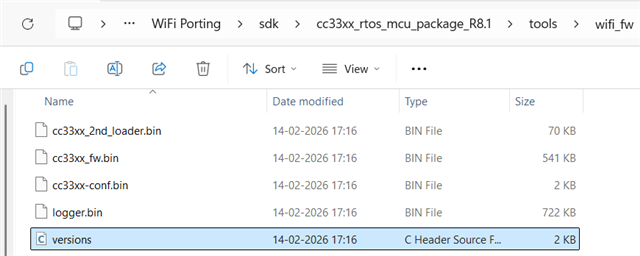
    We are using attached binaries from package. FW Version showing 1.7.4.329

    Our queries:

    What is use of "Logger.bin". Other binaries we are using currently.

    Currently we are using only 3 binaries other than "Logger.bin". Any other binary required to transfer to CC3300?

    Now we are thinking RAM Bootloader is not getting invoke properly. So Host is sending command to CC3300, but CC3300 is not responding. Is our understanding correct.

    Added yesterday queries as below.

    1) What is this "Twt_SendSetup: descriptor allocation failed ! linkId 0x0" and other error. Under which situation that error will trigger by CC3300

    2) Does this have relation to AP not observed on mobile

    3) Why we observed single "ROM BootMan" Version transition. Does this something related to WiFi and BLE present in TI eval board and only WiFI in our board.

    4) Do we need to check anything in out host implementation side.

    Thanks....

    Yogesh


  • Hi Yogesh,

    Apologies for the delay, I was OoO Friday.

    Currently we are using only 3 binaries other than "Logger.bin". Any other binary required to transfer to CC3300?

    Those 3 are the only other binaries.

    Now we are thinking RAM Bootloader is not getting invoke properly. So Host is sending command to CC3300, but CC3300 is not responding. Is our understanding correct.

    To confirm if this is true, can you take some FW logs? You will need some sort of UART to USB or cable.

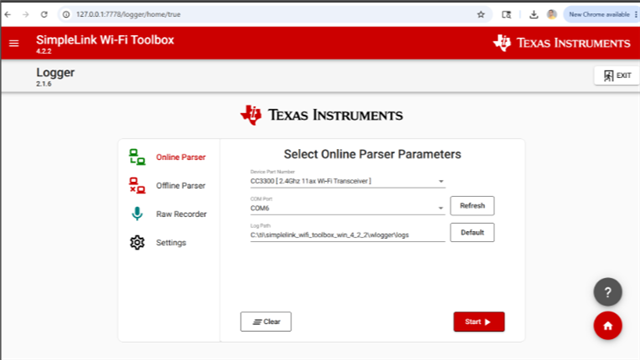
    In the toolbox, go to logger, under Online Parser -> Device Part Number select Custom Parser File and under Parser Bin select your logger.bin file. Select your COM port and use the default log path. Can you send the logs for the whole init process?

    1) What is this "Twt_SendSetup: descriptor allocation failed ! linkId 0x0" and other error. Under which situation that error will trigger by CC3300

    2) Does this have relation to AP not observed on mobile

    I'm not sure why this error is showing here, as this is an error in initializing the target wake time feature. I do not believe this is causing the AP to not be observed, but this in combination with the FW logs should help us understand what is going wrong.

    3) Why we observed single "ROM BootMan" Version transition. Does this something related to WiFi and BLE present in TI eval board and only WiFI in our board.

    FW logs should indicate what is missing from your setup. I do not believe this is related to BLE presence.

    4) Do we need to check anything in out host implementation side.

    Not at this point in time.

    Best Regards,

    Josh Prushing

  • Hi  

    as you suggested earlier, to analyze API not working we captured CC3300 FW log from logger pin and shared with you already.

    Attaching once gain for your reference.

    In our CC3300 FW log during "Invoking RAM Bootloader" we observed "Twt_SendSetup: descriptor allocation failed ! linkId 0x0" and other error. Same not observed from cc3301 FW log captured from TI evaluation board.

    Also observed ROM Bootman Transition as below in CC3300 FW log.

    In TI Eval Board:

    1.0.0.31
       ↓
    1.0.0.248

     In our Custom Board:

    1.0.0.31

    Log details:

    1) CC3300LogWLAN_START_WLAN_UP_AP_OPEN_18JUNE2026 - CC3300 FW log for WlanStart and WlanRoleUpAP_OpenMode

    2) STM32TerminalLogWLAN_START_ROLE_UP_AP_OPEN_18June - Terminal log of STM32 for above case

    3) TI_EVAL_BOARDCC3300loger_WLAN_START_STA_UP_WLAN_CONNECT_OPEN_5June2026 - TI eval board log captured for WlanStart and WlanStaRoleUp and WlanConnect in Open mode

    So, our queries:

    1) Now we are thinking RAM Bootloader is not getting invoke properly. So Host is sending command to CC3300, but CC3300 is not responding. Is our understanding correct.

    2) What is this "Twt_SendSetup: descriptor allocation failed ! linkId 0x0" and other error. Under which situation that error will trigger by CC3300

    3) Why we observed single "ROM BootMan" Version transition. Does this something related to WiFi and BLE present in TI eval board and only WiFI in our board.

    Thanks....5633.18JuneLogs.zip

  • Hi Yogesh,

    The logs you sent for the CC3300 side do not make sense, can you confirm you are using the custom parser in the toolbox logger? This should be the logger.bin in the cc3300 R8_1 SDK. It does not make sense that you are receiving a TWT error right after invoking RAM bootloader. It should look something like this:

     Custom_parser_logs_correct.csv

    Can you upload the logger.bin you are using when you collect logs through the toolbox or provide your steps to collect the 18 June logs? I am looking for the following lines to confirm proper initialization that are currently missing from your current logs: 

    • -------------Validation Start -------------
    • -------------Container Validation Success -----------------
    • -------------Invoking WSOC FW -----------------
    • Main Init finished successfully, Firmware version cc3xxx_rev_ ....

    Best Regards,

    Josh Prushing

  • Hi  

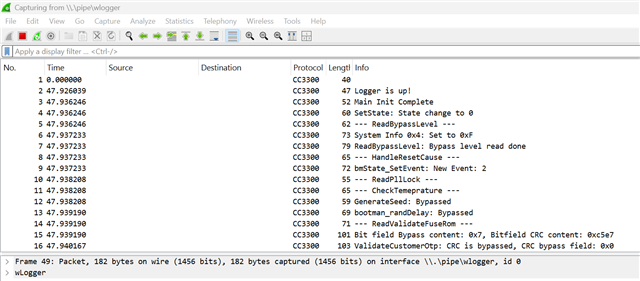
    We are using logger tool as below.

    We are using "Online Parser" and started application using "Start" button 

    Wireshark window opened.

    Once log captured, we used to copy log from Wireshark and shared with you.

    Not remembering that we have selected "logger.bin".

    Attached "logger.bin" present in our SDK and all other binaries.

    1882.wifi_fw.zip

    Please tell procedure to capture log using logger.bin and how it different from procedure which we followed above.

    Regards...

    Yogesh

  • Hi Yogesh,

    Instead of choosing CC3300 in the "Device Part Number", please select "Custom Parser File" as seen below. There will be a new option called "Parser Bin", this is where you upload logger.bin file.

    All other steps are correct.

    Best Regards,

    Josh Prushing

  • Hi  

    This is very good information.

    We parsed log using logger.bin and found all checkpoint in log which indicate CC3300 fw initialize correctly.

    We are testing following sequence and AP point is not visible.

    int ret = cmdWlanStartCallback("NULL");//Wlan_Start(WlanStackEventHandler);

     osi_Sleep(10);

    ret = cmdWlanRoleUpApCallback("-s \"TISDKAPYOG\" -t OPEN -r \"00\"");

    Then we take out all signal form our board and connected TI eval board and executed our code and still AP is not visible. This indicates something missing in our host side implementation.

    Attached is parsed log from our side.

    Our queries: 

    Do you see something in log for which AP is not showing.

    Once host send command to cc3300 for RoleUpAp, what is the role of Host so that AP visible on mobile.

    What is possible missing thing at Host side, for which AP not visible on mobile.

    CC3300Log18JuneWlanInitWlanRoleUPOpen.csv

    Thanks...

    Yogesh

  • Hi Yogesh,

    Can you please provide the source code? From logs it seems to be initializing correctly. I am wondering if the AP Callback function is not functioning as expected.

    Feel free to send this through email if you do not wish to send here.

    Best Regards,

    Josh Prushing