This thread has been locked.

If you have a related question, please click the "Ask a related question" button in the top right corner. The newly created question will be automatically linked to this question.

HTTPSERVER demo project will not go ONLINE

Other Parts Discussed in Thread: CC3200, UNIFLASH, CC3200SDK

Using the HTTPSERVER demo application:  I debug and target CCS to the cc3200 Launchxl  ,  jumped  p58 to vcc  and  sop2 .

The led’s d1 and d4, lighting direct  and d2 flickering first while debugging and later lighting stable. The red light d7 flickering 3 times. No bugs with debugging. And in CCS  I connect the target.

On the android or Iphone I can connect the  WIFI Access Point  mysimplelink-AP (this is the only parameter  I changed). 

The  browser shows me the mysimplelink.net webpage with current state OFFLINE cannot run de demo’s.  Question is:  what to do to go ONLINE to see  the demo’s?


Installed projects:  driverlib, httpserver, oslib, simplelink and  ti_rtos_config

Thanks a lot, Teun

  • Using the HTTPSERVER demo application:  I debug and target CCS to the cc3200 Launchxl  , jumped  p58 to vcc  and  sop2 . The led’s d1 and d4, lighting direct  and d2 flickering first while debugging and  later lighting stable. The red light d7 flickering 3 times. No bugs with debugging. In CCS  I connect the target.

    On the android or Iphone I can connect the  WIFI Access Point  mysimplelink-AP (this is the only parameter  I changed).  The  browser shows me the mysimplelink.net webpage with current state OFFLINE cannot run de demo’s.  Question is:  what to do to go ONLINE to see  the demo’s?


    Installed projects:  driverlib, httpserver, oslib, simplelink and  ti_rtos_config

    See Tera Term VT results:

                     *************************************************

                          CC3200 HTTP Server Application

                     *************************************************

    Host Driver Version: 1.0.0.10

    Build Version 2.2.0.1.31.1.2.0.2.1.0.3.23

    Device is configured in default state

    Device is in AP Mode, Please Connect to AP [mysimplelink-AP] andtype [mysimplelink.net] in the browser

  • Hi,

    Have you tried the out-of-box demo without problems?

    Try httpserver station mode by removing the jumper at P58-vcc and opening the internal webpage using your pc browser.

    - kel
  • Hi Teun,

    Can you please confirm that you have flashed the necessary files into the serial flash using uniflash, before using the program?

    Regards,
    Raghavendra
  • Hi Markel,
    Thanks for answer.
    Because for this problem I describe and I am inexperienced with CCS, I install CCS more times with unexpected problems. Now no debugs problems. Installing the out-of the box demo take some more time to do it.
    To experience I use the wireless Iphone or Samsung tablet. What do you mean by opening the internal webpage? The PC I used is wired with the router and not with WIFI.
    Do you mean that it is possible to connect over the UART com 4 to come into the internal webpage from the Launchxl launchpad? ?
    Teun
  • Thanks for Answer. No, I have not yet flash necessary files into the serial flash using uniflash. I shall download uniflash now. If this is necessarily to do the demo working, which files I have to flash?
  • Hi Teun,

        Did you follow the CC3200 Getting Started Guide? This guide will help familiarize you how to setup CCS and CC3200 SDK Example Programs.

        Regarding the Out Of Box Demo I meant this below. To try the demo, first have Uniflash installed.

    1. Place jumper at SOP2.
    2. Using Uniflash format your CC3200 with 1 MB Size, Secure and Alert option left unchecked.
    3. Using Uniflash Load the latest Service Pack.
    4. Using Uniflash load Out of Box Demo .ucf which is located at "\cc3200-sdk\example\out_of_box\html". Then program the Out of Box demo.
    5. Test the Out of Box Demo as shown at the youtube video.


  • Hi Markel,

    Thanks a lot to support me!!

    All software I used is from this week!

    --- The HTTPSERVER I tried in CCS is running on the CC3200 because as extra check I led light on the green Led. On the Iphone or Android tablet the mysimplelink.net I can connect. But demo stay offline and don’t work. See Tera Term VT results:
    *************************************************
    CC3200 HTTP Server Application
    *************************************************
    Host Driver Version: 1.0.0.10
    Build Version 2.2.0.1.31.1.2.0.2.1.0.3.23
    Device is configured in default state
    Device is in AP Mode, Please Connect to AP [mysimplelink-AP] andtype [mysimplelink.net] in the browser


    --- On your suggestion I have placed jumper SOP2 , download Uniflash and take some experiences with this. I have Programed the Out Of Box (see notepad console logging). After flashing the demo the logging finish to say disconnect. Did I have to start it? And how?


    Other note : removing P58-Vcc give no result do or see something with the browser

    It seems to me both off these CCS or Uniflash methodes runs not as aspect.

    Finally after experimenting between starting loading CCS and doing program with Uniflash the console gives:

    [19:32:09] INFO: --- please restart the device ---
    [19:32:10] Cancelling current process <ServicePackProgramming>, please wait...
    [19:32:24] ERROR: ---reading ACK signal failed---
    [19:32:24] WARNING: ---seting break signal to false failed---
    [19:32:26] INFO: setting break signal
    [19:32:26] INFO: --- please restart the device ---
    [19:32:26] INFO: Cancel button pressed
    [19:32:27] WARNING: ---seting break signal to false failed---
    [19:32:27] FATAL: --- Can't connect to device !! ---
    [19:32:29] FATAL: Error connecting to the device. Please check your COM port settings. Error code: -2
    [19:32:29] INFO: > Executing Operation: Disconnect
    [19:32:29] Operation Canceled: Process<ServicePackProgramming> canceled.
    > INFO: setting break signal < Where does this came from????

    Can this be an JTAG communication failure

    I understand from distance its difficult but I hope you have some anwers for me?
    your help is very welcome

    Teun
  • Hi,

       Did you follow the CC3200 Getting Started Guide before trying out httpserver?


    Teun Liedorp said:
    The HTTPSERVER I tried in CCS is running on the CC3200 because as extra check I led light on the green Led. On the Iphone or Android tablet the mysimplelink.net I can connect. But demo stay offline and don’t work. See Tera Term VT results:

    That is very unusual.

    Teun Liedorp said:
    Other note : removing P58-Vcc give no result do or see something with the browser

    You need the jumper there when trying out httpserver using your smartphone.

    Teun Liedorp said:
    [19:32:24] ERROR: ---reading ACK signal failed---

    Wait for a TI Engineer to help you regarding this. There is also a post with solution to this that you can try. The post was originated by Martin Valencia.

    Hi TI,

    It would be convenient to have a sticky post regarding this "reading ACK signal failed"

    - kel

  • Hi Teun,

    Regarding Uniflash, it seems you cannot connect to the device.

    There are many posts regarding connection issues but let me summarize anyway all the steps you need to follow:

    1. make sure no other utility grabs the COM port
    2. Is the FTDI recognized on Windows Device Manager? If so, can you provide Device Manager capture so I can see the COM ports?
    3. SOP2 jumper should be connected during flashing. Is it connected?
    4. Have you pressed reset button when asked?
    5. can you perform a quick FTDI functionality test as follows? In this test a loopback is applied on the correct COM port and characters typed on a terminal emulator connected to the same board should get echoed back. on LaunchPad board, identify J6 and J7 jumpers. By default these jumpers should be connected on FLASH. Disconnect the two jumpers and connect J6 to J7 as closest to the FTDI chipset. Attached picture describes the connction.

      Reset the board, open a terminal emulator and start typing characters. If these characters are looped back, FTDI is functional and you should restore the setup back to its default working state.
    6. Have you probed power levels? 

      Voltage on VDD_ANA1 should be around 1.9V

      Voltage on VDD_DIG1 should be around 1.2V

      Voltage on VDD_ANA2 should be around 3.3V
    7. Lastly, it is best to test whether it is possible to work with the device in debug mode, via JTAG lines (and not UART lines).
      Please open any project from the SDK that involves interaction with the device (i.e. includes the sl_start() API) using your chosen IDS (CCS, IAR, GDB, other). Compile the project, load it into the device and get to the sl_start() API. Execute this line. Can you work in debug?

    Shlomi

  • Hi Markel,

    While waiting for TI to answer the “Uniflash target communication problem” I make me more and more familiar to continue with CCS, therefore I like please to ask you:

    Following to build the WLAN example In the getting started SWRU376A page11 it shows to Build the combination of wlan_station,  driverlib, simplelink, oslib and  ti_rtosconfig.

     With this as example I tried to build the Out of Box and/or HttpServer  also combined with driverlib, simplelink, oslib and  ti_rtosconfig.  This gives different results. Ones, the Out of the Box displays on the tablet including the  Demo- Menu but this will not work.

    Can you tell me (or point me where to find for example projects) which projects I have to combine and to build for the HttpServer  and  Of Out of the Box, and how much files this projects contain?

    I used de latest SDK CC3200SDK_1.1.0 , I used the Launchpad CC3200-LaunchXLA rev 4.1

    I hope you can give me the information to tackle the problem.

    Thanks, Teun

  • Hi Teun,

    The CC3200 Getting Started Guide doc is located at "\cc3200-sdk\docs" of your CC3200 SDK installation directory. Once you have gone through the steps of this guide you can import other example programs from the SDK and try it. The problem is that you don't have a wifi router so you can not try wlan_station. But you can try other examples like blinky and out of box demo.

    Try to make simple programs work first like blinky using CCS.

    - kel
  • Hi Kel, Thanks

    Hi Shlomi, Thanks

    Follow your advise steps:
    1. Ok no other terminals.
    2. Yes we see CC3200 LP dual Port com4 and USB CC3200 JTAG Port A and Port B
    3 Yes Jumper over SOP 2
    4. Pressing Reset pressing Trying this time gives an another situatiën. see console info below
    5 With TeraTerm I can communicate when J^and J7 connect.
    6. No power levels. Works stand alone.
    7. I don’t no what this mean but, I see D2 first flickering and then lighting up with CCS Debug.

    Installing driverlib, OOB [active] , simplelink , ti_rtos_config. (do i have to instal more?)

    After connecting D2 flickering again.
    After this actions’ A) there are no WIFI, B) the message shows : Can't find a source file at "D:/GIT/a0132167_sdk_1.1.0/source-1p1-rahul/driverlib/i2c.c"
    Locate the file or edit the source lookup path to include its location.


    Now I disconnect CCS and Setup with uniflash:
    I open and collect the example project "Out Of Box" From de SDK and trys several project files here

    After service Pack Programming De console replyed with folloing info ;
    [14:15:32] Begin ServicePackProgramming operation.
    [14:15:33] INFO: > Executing Operation: Connect
    [14:15:35] INFO: setting break signal
    [14:15:35] INFO: --- please restart the device ---
    [14:15:41] INFO: connection succeeded
    [14:15:41] INFO: getting storage list
    [14:15:41] INFO: > Executing Operation: ServicePackProgramming
    [14:15:41] INFO: Path to the service pack file: C:/ti/CC3200SDK_1.1.0/cc3200-sdk/example/out_of_box/ccs/.ccsproject
    [14:15:41] INFO: reading version info
    [14:15:41] INFO: CC3200R Device detected.
    [14:15:41] ERROR: Incorrect bundle format. Please make sure you selected a valid service pack file. Operation cancelled.
    [14:15:41] INFO: > Executing Operation: Disconnect
    [14:15:41] Operation ServicePackProgramming returned.

    I hope you see the problem.

    Teun
  • Hi Kel, Thanks

    You are right to do some exercise. Of course out of de box is the coal.
    And I tried this with different results. Regular I start it over and over. I miss something.
    I think the combination of the building files?

    Tried the blinking leds with CCS. This works fine currently blinking red yellow green

    With uniflash it dont.
    [14:45:52] INFO: CC3200R Device detected.
    [14:45:52] ERROR: Incorrect bundle format. Please make sure you selected a valid service pack file. Operation cancelled.
    [14:45:52] INFO: > Executing Operation: Disconnect
    [14:45:52] Operation ServicePackProgramming returned.

    Teun
  • Teun,

    You picked a wrong service pack file.

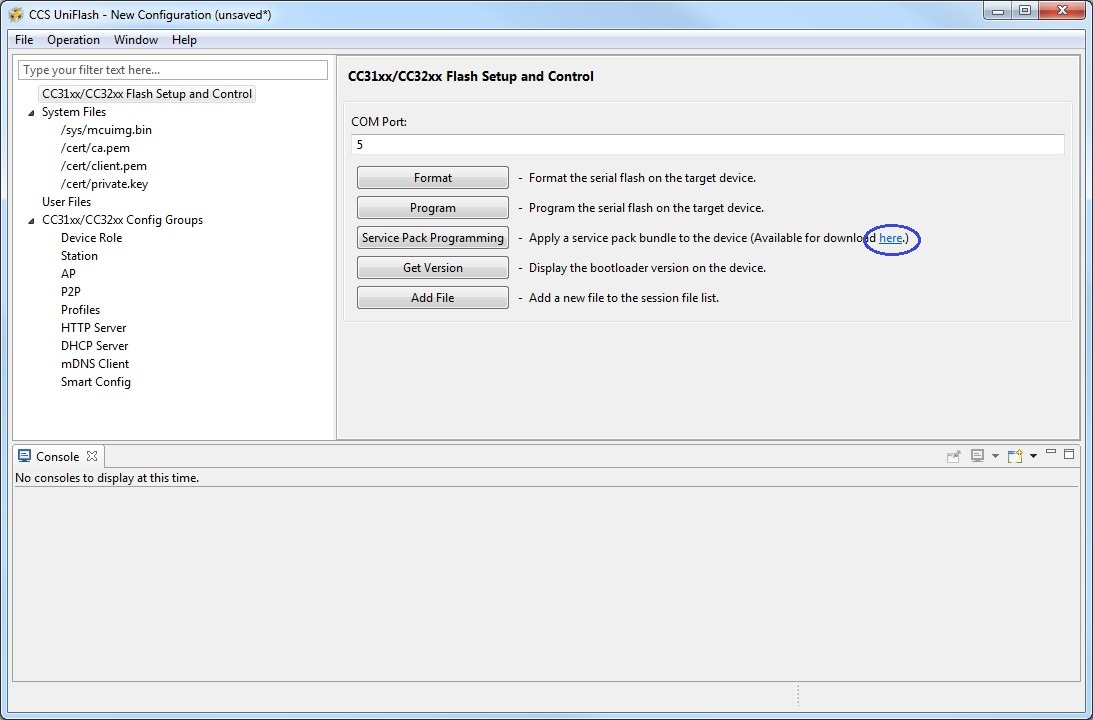
    You need to pick the service pack binary from the service pack installation. There is a link to it in Uniflash next to the button.

    In you case you tried another file which explains the bundle error.

    C:/ti/CC3200SDK_1.1.0/cc3200-sdk/example/out_of_box/ccs/.ccsproject

    Shlomi

  • Hello ShIomi,
    Thank for your answer! Using Uniflash the project file I have to use, you said, is: C:/ti/CC3200SDK_1.1.0/cc3200-sdk/example/out_of_box/ccs/.ccsproject.? Is this the same as to use in CCS? Is that right?

    I tried that before. But you said I had to first do: ‘”You need to pick the service pack binary from the service pack installation.””
    C:\TI\CC31xx_CC32xx_ServicePack_1.0.0.10.0\servicepack_1.0.0.10.0 BINbestand .

    You said now there is a link to it in Uniflash next to the button. I cannot find it, what do you exactly mean? Where can I find this to place the upgrade? And if I understand you right, do I have to do the same service pack upgrade for CCS?

    Thanks again,
    Teun
  • Teun,

    What you need to do in Uniflash is to update the service pack.

    On Uniflash, there is a link to download the service pack (see picture below).

    Just click on 'Service Pack Update' and choose servicepack_1.0.0.10.0.bin.

    Shlomi

  • Hello Markel, Kel ,Shlomi and Raghavendra

    To combine all your answers make me to realize I miss the overview of the process to compile and flash.

    My earlier experience with IAR and the Launchpad MSP EXP430G did need only have to download and it was flashed on.

    Now with the CC3200, I understand I have to compile with CCS and flashed with Uniflash working from the same workspace (here I copied the complete SDK +service Pack SDK). The Jumper SOP2 only need with flashing. Demo Out of the Box works fine but stays OFFLINE(no problem!).

    During so long with my reply was because I would try experience first in this learning process I described above. The experience i do is tried to make more ports available. For that, I find out needing the pinmux tool and copied the new generating ports in the pinmux.c file. This new phenomena cost some time.

    For implementing this port arising the question how? For example:
    This code is placed in the pinmx.c but.
    // Configure PIN_63 for GPIO Output
    //
    PinTypeGPIO(PIN_63, PIN_MODE_0, false);
    GPIODirModeSet(GPIOA1_BASE, 0x1, GPIO_DIR_MODE_OUT);

    Question is what to do to make pin 63 high or low programming in main.c ?

    I do in the Main.c of OutOffBox :
    #include "pinmux.h"
    #include "pinmux.c"

    unsigned int OUTPORT;
    unsigned char OUTPIN;
    #define TEST 8 //PIN 63 GPIO 8 output generated by Pinmux Tool
    #define TESTHIGH GPIO_IF_SET(TEST, OUTPORT, OUTPIN,1)
    #define TESTLOW GPIO_IF_SET(TEST, OUTPORT, OUTPIN,0)

    void main()
    {
    GPIO_IF_GetPortNPin(TEST,&OUTPORT, &OUTPIN);
    TESTHIGH;
    }
    What do I wrong or forget?
    If you see the solution You are again very welcome.
    Your All Very thanks for now.
    Teun
  • Teun,

    It does eem OK.

    You need to make sure you physically connect on pin #63 in your case.

    Also make sure you enable the respective clock peripheral in pinmux.c. In your case, it is:

    PRCMPeripheralClkEnable(PRCM_GPIOA1, PRCM_RUN_MODE_CLK);

    Shlomi

  • Hi ShIomi,

    Sometimes the pc must be down for whatever after debugging.
    To communicate with input and output pin generated by pinmux is working now !

    Too test I do it like below: After configuring first with pinmux.

    Between pin 3 the switch is connected to vcc, and also from pin 3 a resistance(10k) to ground.
    To control Pin 63 i connect a led with resistance.

    I define the following;

    #define INPUT3 12 //pin 3

    #define POWERUP 5 //pin 60 GPIO 5 output GEGENEREERD MET Pinmux Tool
    #define TEST 8 //PIN 63 GPIO 8 output GEGENEREERD MET Pinmux Tool

    #define TESTHIGH GPIO_IF_Set(TEST, OUTPORT, OUTPIN,1) //TEST =PIN63
    #define TESTLOW GPIO_IF_Set(TEST, OUTPORT, OUTPIN,0) //TEST =PIN63


    unsigned int OUTPORT;
    unsigned char OUTPIN;
    char inputtest ;


    The main.c out off the box i include After Handle Async Events
    the routine see between the ////////////

    //Handle Async Events
    while(1)
    {
    //////////////////////////
    GPIO_IF_GetPortNPin(INPUT3,&OUTPORT,&OUTPIN);
    inputtest = GPIO_IF_Get(INPUT3,OUTPORT,OUTPIN); //test status pin 3

    if (inputtest == 1 ){ GPIO_IF_GetPortNPin(TEST, &OUTPORT, &OUTPIN) ; TESTHIGH; //set pin 63 high
    } else { GPIO_IF_GetPortNPin(TEST, &OUTPORT, &OUTPIN); TESTLOW ; ;} //set pin 63 low
    //////////////////////////
    //LED Actions
    if(g_ucLEDStatus == LED_ON)
    {
    GPIO_IF_LedOn(MCU_RED_LED_GPIO);
    osi_Sleep(500);
    }
    if(g_ucLEDStatus == LED_OFF)
    {
    GPIO_IF_LedOff(MCU_RED_LED_GPIO);
    osi_Sleep(500);
    }
    if(g_ucLEDStatus==LED_BLINK)
    {
    GPIO_IF_LedOn(MCU_RED_LED_GPIO);
    osi_Sleep(500);
    GPIO_IF_LedOff(MCU_RED_LED_GPIO);
    osi_Sleep(500);
    }
    }
    This construction works fine. I will marking after pushing or release the button, the delay is almost 2 seconds.
    Is there somewhere else in the program a better place to speeding up the reaction?
    Will the reaction speedup when I remove unnecessarily HTML pages?
    Thanks a lot,
    Teun
  • Hi Teun,

    I would expect the delay to be around 500mSec as this is the delay when the RED light is off (be default).

    Not sure why you are having a 2 seconds delay. Maybe this time is spent on detecting the PIN3 button pressed?

    The location in the OOB task main function is OK, at least for the testing.

    Shlomi

  • Hi Shlomi,

    Ok, 0,5 s I hope the delay wil be less after stripping some functions.

    Thanks for reply.
  • Teun,

    Can I close this thread?

    Shlomi

  • Teun,

    I'm closing this thread. If you have followup queries regarding this issue please open a new post and link to this one.

    Regards,

    Shlomi

  • Yes. Thanks you very much
    Teun
  • Start with an explorer app that isn't coming from the background. You know when you close and app on iphone by hitting the desktop key, the app goes and sits around in some state. Clean it out of the background then run your explorer app.
  • Found very good answer at
    e2e.ti.com/.../1787628

    It contained the solution. After the LP was back to out of box state. I found that to connect to mysimplink server with IPhone 6s, it is neccessary to start with a clean browzer app. Make sure IPhone browzer is not sitting as a background app when you start it. Otherwise the cc3200 webserver will come up on the IPhone but be unresponsive.