This thread has been locked.

If you have a related question, please click the "Ask a related question" button in the top right corner. The newly created question will be automatically linked to this question.

WL18xx - Error after scan using iMX6

Other Parts Discussed in Thread: WL1837, WL1271

Hello all.

I'm using WL1837 with WL18XXCOM82SDMMC  adapter connected to an iMX6 module.

I already read most of the tutorials showing how to add wl18xx support to the iMX6 board.

First of all I started with this tutorial but selecting the kernel 3.14.

https://community.freescale.com/thread/358671

My kernel comes from this Link:

http://git.toradex.com/cgit/linux-toradex.git/log/?h=toradex_imx_3.14.28_1.0.0_ga

Addiing the patchs at build script "build_wl18XX.sh".

Some other tutorial that I used to compare what I did is:

processors.wiki.ti.com/.../WL18xx_First_Time_Getting_Started_Guide_(IMX6)

processors.wiki.ti.com/.../WL18xx_First_Time_Getting_Started_Guide_(IMX6SL)


My problem is: The wifi works some time but I got a kernel back trace 30 seconds after scan.

Take a look at the error bellow and check also the times:

root@colibri-imx6:~# [   31.597126] PU: Power-on latency exceeded, new value 4294666 ns
[   37.076952] sdhci-esdhc-imx 2190000.usdhc: card claims to support voltages below defined range
[   37.103829] mmc1: queuing unknown CIS tuple 0x91 (3 bytes)
[   37.110755] mmc1: new high speed SDIO card at address 0001
[   37.119045] wl1271_sdio mmc1:0001:2: legacy platform data not found, trying device tree
[   37.403110] wlcore: wl18xx HW: 183x or 180x, PG 2.2 (ROM 0x11)
[   37.455433] wlcore: loaded
[   37.868532] wlcore: PHY firmware version: Rev 8.2.0.0.163
[   37.907857] wlcore: firmware booted (Rev 8.5.0.0.55)
[   37.927760] IPv6: ADDRCONF(NETDEV_UP): wlan0: link is not ready

root@colibri-imx6:~# 
root@colibri-imx6:~# [   68.017500] wlcore: Scan completed due to error.
[   68.022148] ------------[ cut here ]------------
[   68.026869] WARNING: CPU: 0 PID: 95 at drivers/net/wireless/ti/wlcore/main.c:789 wl12xx_queue_recovery_work+0x6c/0x70()
[   68.037718] Modules linked in:
[   68.040820] CPU: 0 PID: 95 Comm: kworker/u4:2 Not tainted 3.14.28-00017-geba1b9c #48
[   68.048652] Workqueue: phy0 wl1271_scan_complete_work
[   68.053739] Backtrace: 
[   68.056297] [<80012680>] (dump_backtrace) from [<80012898>] (show_stack+0x18/0x1c)
[   68.063882]  r6:00000315 r5:00000000 r4:809aa548 r3:809884a4
[   68.069695] [<80012880>] (show_stack) from [<806effac>] (dump_stack+0x88/0x98)
[   68.076986] [<806eff24>] (dump_stack) from [<8002e724>] (warn_slowpath_common+0x74/0x90)
[   68.085119]  r5:00000009 r4:00000000
[   68.088762] [<8002e6b0>] (warn_slowpath_common) from [<8002e7e4>] (warn_slowpath_null+0x24/0x2c)
[   68.097589]  r8:8e5e8b58 r7:00000000 r6:8e54ed00 r5:8e54ed38 r4:8e54ed00
[   68.104448] [<8002e7c0>] (warn_slowpath_null) from [<803cd34c>] (wl12xx_queue_recovery_work+0x6c/0x70)
[   68.114049] [<803cd2e0>] (wl12xx_queue_recovery_work) from [<803df58c>] (wl1271_scan_complete_work+0x118/0x11c)
[   68.124195]  r4:8e54f024 r3:809884a4
[   68.127851] [<803df474>] (wl1271_scan_complete_work) from [<80044464>] (process_one_work+0x114/0x384)
[   68.137121]  r8:00000000 r7:8f020900 r6:82004400 r5:8e54f024 r4:8e43f280 r3:803df474
[   68.145022] [<80044350>] (process_one_work) from [<80045200>] (worker_thread+0x140/0x420)
[   68.153214]  r10:82004400 r9:8e44a000 r8:8e44a020 r7:8e44a000 r6:8e43f298 r5:82004414
[   68.161192]  r4:8e43f280
[   68.163777] [<800450c0>] (worker_thread) from [<8004b060>] (kthread+0xdc/0xf4)
[   68.171045]  r10:00000000 r9:00000000 r8:00000000 r7:800450c0 r6:8e43f280 r5:00000000
[   68.179015]  r4:8e43e440
[   68.181600] [<8004af84>] (kthread) from [<8000f118>] (ret_from_fork+0x14/0x3c)
[   68.188866]  r7:00000000 r6:00000000 r5:8004af84 r4:8e43e440
[   68.194650] ---[ end trace 697a562e7dad11d3 ]---
[   68.206841] wlcore: Reading FW panic log
[   68.213099] wlcore: Hardware recovery in progress. FW ver: Rev 8.5.0.0.55
[   68.220570] wlcore: pc: 0x0, hint_sts: 0x00000000 count: 1
[   68.226592] wlcore: down
[   68.230243] ieee80211 phy0: Hardware restart was requested
[   70.491321] wlcore: ERROR timeout waiting for the hardware to complete initialization
[   72.734704] wlcore: ERROR timeout waiting for the hardware to complete initialization
[   74.977911] wlcore: ERROR timeout waiting for the hardware to complete initialization
[   74.987158] wlcore: ERROR firmware boot failed despite 3 retries

Funny that looks every thing OK, I also try some other configuration in the IRQ Mux but always this back trace crash what is working.

This is what I'm doing at my device tree:

		pinctrl_usdhc1: usdhc1grp {
			fsl,pins = <
				MX6QDL_PAD_SD1_CMD__SD1_CMD    0x17069
				MX6QDL_PAD_SD1_CLK__SD1_CLK    0x17069
				MX6QDL_PAD_SD1_DAT0__SD1_DATA0 0x17069
				MX6QDL_PAD_SD1_DAT1__SD1_DATA1 0x17069
				MX6QDL_PAD_SD1_DAT2__SD1_DATA2 0x17069
				MX6QDL_PAD_SD1_DAT3__SD1_DATA3 0x17069
				MX6QDL_PAD_NANDF_D6__GPIO2_IO06  0x13059   // WL_EN
				MX6QDL_PAD_NANDF_D3__GPIO2_IO03  0x13059   // wl_irq
			>;
		};

/* MMC */
&usdhc1 {
	label = "MMC1";
	pinctrl-names = "default";
	pinctrl-0 = <&pinctrl_usdhc1>;
	bus-width = <4>;
	no-1-8-v;
	keep-power-in-suspend;
 	enable-sdio-wakeup;
#if 0
	vmmc-supply = <&wlan_en_reg>;
	non-removable;    // non-removable is not a variable, the fact it is listed is all that is used by driver
#endif
	cap-power-off-card;
	status = "okay";
	#address-cells = <1>;
	#size-cells = <0>;
	wlcore: wlcore@0 {
		compatible = "ti,wl1835";
		reg = <2>;
		interrupt-parent = <&gpio2>;
		interrupts = <3 IRQ_TYPE_EDGE_BOTH>;
	};
};

I'm not using the WLAN_ENABLE I just left it ON for know.

Thanks for all suggestion.

  • Hi,

    1. "[ 37.907857] wlcore: firmware booted (Rev 8.5.0.0.55)"
    This looks like a really old version. Please follow the instruction from: processors.wiki.ti.com/.../WL18xx_First_Time_Getting_Started_Guide_(IMX6) and build the latest driver.

    2. "I'm not using the WLAN_ENABLE I just left it ON for know."
    This will be a problem because subsequent wifi turn ons will fail. The device expects that every time you turn on the device, WLAN_EN is toggled, and firmware downloaded.

    Regards,
    Gigi Joseph.
  • Hello,

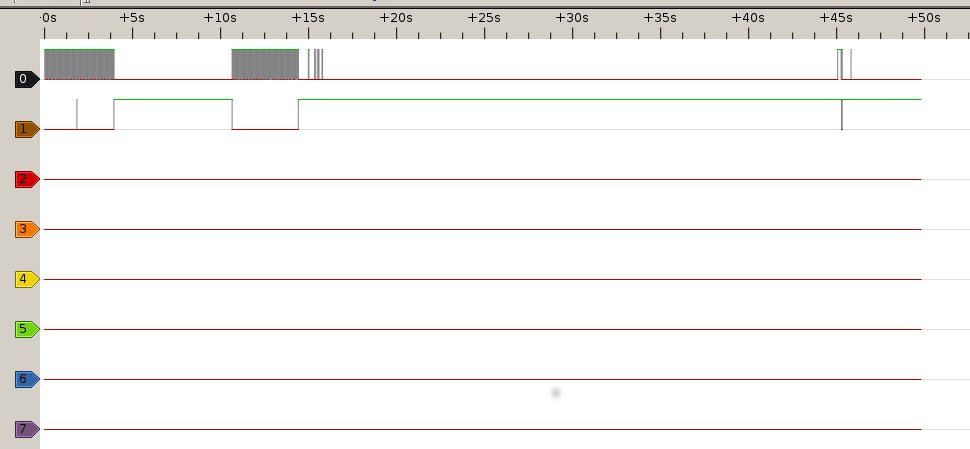
    I just add the WLAN_ENABLE, checked using oscilloscope and had the same error.

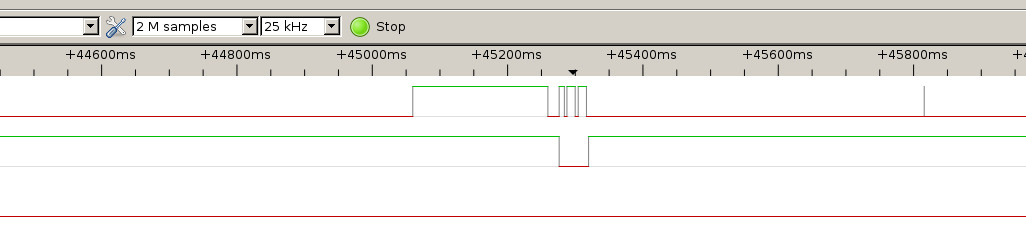
    Just took some pictures from the signal and I can show you the WL_EN and WL_IRQ working.

    Considering u-boot deley 3 seconds at about 15 seconds the firmware was loaded:

    3 seconds + [ 12.937891] wlcore: firmware booted (Rev 8.5.0.0.55)

    Then after 30 seconds at 45 seconds I got my kernel back trace.

    [ 43.054527] wlcore: Scan completed due to error.
    [ 43.059177] ------------[ cut here ]------------
    [ 43.063840] WARNING: CPU: 0 PID: 96 at drivers/net/wireless/ti/wlcore/main.c:789 wl12xx_queue_recovery_work+0x6c/0x70()
    [ 43.074718] Modules linked in:
    [ 43.077825] CPU: 0 PID: 96 Comm: kworker/u4:2 Not tainted 3.14.28-00017-geba1b9c-dirty #49
    [ 43.086171] Workqueue: phy0 wl1271_scan_complete_work
    [ 43.091256] Backtrace:
    [ 43.093763] [<80012680>] (dump_backtrace) from [<80012898>] (show_stack+0x18/0x1c)
    [ 43.101412] r6:00000315 r5:00000000 r4:809aa548 r3:809884a4
    [ 43.107220] [<80012880>] (show_stack) from [<806effac>] (dump_stack+0x88/0x98)
    [ 43.114502] [<806eff24>] (dump_stack) from [<8002e724>] (warn_slowpath_common+0x74/0x90)
    [ 43.122608] r5:00000009 r4:00000000
    [ 43.126285] [<8002e6b0>] (warn_slowpath_common) from [<8002e7e4>] (warn_slowpath_null+0x24/0x2c)
    [ 43.135112] r8:8e60cb58 r7:00000000 r6:8fc76d00 r5:8fc76d38 r4:8fc76d00
    [ 43.141947] [<8002e7c0>] (warn_slowpath_null) from [<803cd34c>] (wl12xx_queue_recovery_work+0x6c/0x70)
    [ 43.151317] [<803cd2e0>] (wl12xx_queue_recovery_work) from [<803df58c>] (wl1271_scan_complete_work+0x118/0x11c)
    [ 43.161446] r4:8fc77024 r3:809884a4
    [ 43.165119] [<803df474>] (wl1271_scan_complete_work) from [<80044464>] (process_one_work+0x114/0x384)
    [ 43.174380] r8:00000000 r7:8e5f5600 r6:82004400 r5:8fc77024 r4:8e220e00 r3:803df474
    [ 43.182256] [<80044350>] (process_one_work) from [<80045200>] (worker_thread+0x140/0x420)
    [ 43.190473] r10:82004400 r9:8e472000 r8:8e472020 r7:8e472000 r6:8e220e18 r5:82004414
    [ 43.198441] r4:8e220e00
    [ 43.201025] [<800450c0>] (worker_thread) from [<8004b060>] (kthread+0xdc/0xf4)
    [ 43.208288] r10:00000000 r9:00000000 r8:00000000 r7:800450c0 r6:8e220e00 r5:00000000
    [ 43.216258] r4:8e46a680
    [ 43.218844] [<8004af84>] (kthread) from [<8000f118>] (ret_from_fork+0x14/0x3c)
    [ 43.226108] r7:00000000 r6:00000000 r5:8004af84 r4:8e46a680
    [ 43.231863] ---[ end trace ef1d981496e87d0a ]---
    [ 43.241661] wlcore: Reading FW panic log
    [ 43.254912] wlcore: Hardware recovery in progress. FW ver: Rev 8.5.0.0.55
    [ 43.262072] wlcore: pc: 0x0, hint_sts: 0x00000000 count: 1
    [ 43.268277] wlcore: down
    [ 43.271933] ieee80211 phy0: Hardware restart was requested
    [ 43.737895] wlcore: PHY firmware version: Rev 8.2.0.0.163
    [ 43.777947] wlcore: firmware booted (Rev 8.5.0.0.55)

    Here you can see a zoon in to this time:

    So, I really can understand what is happening.

    About the firmware version, I also tried with the one getting from the command:

    [raul@localhost build-utilites]$ ./sudo_build_wl18xx.sh update R8.6

    I guess this is the way to get the last one? Do I'm rigth?

    So, after run this script I got two files:

    [raul@localhost firmware]$ cd ti-connectivity/
    [raul@localhost ti-connectivity]$ ls
    wl1271-nvs.bin wl18xx-fw-4.bin

    Then then I try with this firmwares first of all I saw this errors:

    root@colibri-imx6:~# dmesg | grep wl
    [    0.084164] wlan-en-regulator: 3300 mV 
    [    2.148147] wl1271_sdio mmc1:0001:2: legacy platform data not found, trying device tree
    [    2.159222] wl18xx_driver wl18xx.0.auto: Direct firmware load failed with error -2
    [    2.169309] wl18xx_driver wl18xx.0.auto: Falling back to user helper
    [    8.795899] (stk) :ldisc_install = 1<4>[    8.844754] wl18xx_driver wl18xx.0.auto: Direct firmware load failed with error -2
    [    8.854882] wl18xx_driver wl18xx.0.auto: Falling back to user helper
    [   10.915806] (stk) :ldisc_install = 1<3>[   11.259523] wlcore: ERROR could not get configuration binary ti-connectivity/wl18xx-conf.bin: -2
    [   11.273586] wlcore: WARNING falling back to default config
    [   11.669084] wlcore: wl18xx HW: 183x or 180x, PG 2.2 (ROM 0x11)
    [   11.796931] wlcore: loaded
    

    The "ti-connectivity/wl18xx-conf.bin" error I can fix using this:

    root@colibri-imx6:/lib/firmware/ti-connectivity# cat /sys/kernel/debug/ieee80211/phy0/wlcore/wl18xx/conf > /lib/firmware/ti-connectivity/wl18xx-conf.bin

    Than after that I have this error:

    root@colibri-imx6:~# ,[   46.282356] wl18xx_driver wl18xx.0.auto: Direct firmware load failed with error -2
    [   46.290060] wl18xx_driver wl18xx.0.auto: Falling back to user helper
    [   46.303837] wlcore: ERROR could not get firmware ti-connectivity/wl18xx-fw-2.bin: -2
    [   46.692404] wl18xx_driver wl18xx.0.auto: Direct firmware load failed with error -2
    [   46.700084] wl18xx_driver wl18xx.0.auto: Falling back to user helper
    [   46.713678] wlcore: ERROR could not get firmware ti-connectivity/wl18xx-fw-2.bin: -2
    [   47.102400] wl18xx_driver wl18xx.0.auto: Direct firmware load failed with error -2
    [   47.110077] wl18xx_driver wl18xx.0.auto: Falling back to user helper
    [   47.123785] wlcore: ERROR could not get firmware ti-connectivity/wl18xx-fw-2.bin: -2
    [   47.133369] wlcore: ERROR firmware boot failed despite 3 retries
    

    Than I just moved the frmware that I have to this name:

    root@colibri-imx6:~# mv /lib/firmware/ti-connectivity/wl18xx-fw-4.bin /lib/firmware/ti-connectivity/wl18xx-fw-2.bin

    After that I finally have this error:

    root@colibri-imx6:~# dmesg | grep wl
    [ 0.084039] wlan-en-regulator: 3300 mV
    [ 2.148110] wl1271_sdio mmc1:0001:2: legacy platform data not found, trying device tree
    [ 2.159217] wl18xx_driver wl18xx.0.auto: Direct firmware load failed with error -2
    [ 2.169333] wl18xx_driver wl18xx.0.auto: Falling back to user helper
    [ 7.688231] (stk) :ldisc_install = 0<6>[ 8.569887] wlcore: wl18xx HW: 183x or 180x, PG 2.2 (ROM 0x11)
    [ 8.675281] wlcore: loaded
    [ 12.859146] wlcore: ERROR Your WiFi FW version (8.9.0.0.48) is invalid.
    [ 12.859148] wlcore: ERROR error getting static data
    [ 13.414247] wlcore: ERROR Your WiFi FW version (8.9.0.0.48) is invalid.
    [ 13.435089] wlcore: ERROR error getting static data
    [ 13.934551] wlcore: ERROR Your WiFi FW version (8.9.0.0.48) is invalid.
    [ 13.955398] wlcore: ERROR error getting static data
    [ 13.971521] wlcore: ERROR firmware boot failed despite 3 retries

    So, I'm really confuse what is the correct firmware and the correct way to configure the "/lib/firmware/ti-connectivity/" folder.

    I really think that my hardware and device tree configuration is correct.

    Just a last update how it is my device tree:

    /* MMC */
    &usdhc1 {
    	label = "MMC1";
    	pinctrl-names = "default";
    	pinctrl-0 = <&pinctrl_usdhc1>;
    	bus-width = <4>;
    	no-1-8-v;
    	keep-power-in-suspend;
     	enable-sdio-wakeup;
    	vmmc-supply = <&wlan_en_reg>;
    	non-removable; 
    	cap-power-off-card;
    	status = "okay";
    	#address-cells = <1>;
    	#size-cells = <0>;
    	wlcore: wlcore@0 {
    		compatible = "ti,wl1835";
    		reg = <2>;
    		interrupt-parent = <&gpio2>;
    		interrupts = <3 IRQ_TYPE_EDGE_RISING>;
    	};
    };
    		pinctrl_usdhc1: usdhc1grp {
    			fsl,pins = <
    				MX6QDL_PAD_SD1_CMD__SD1_CMD    0x17069
    				MX6QDL_PAD_SD1_CLK__SD1_CLK    0x17069
    				MX6QDL_PAD_SD1_DAT0__SD1_DATA0 0x17069
    				MX6QDL_PAD_SD1_DAT1__SD1_DATA1 0x17069
    				MX6QDL_PAD_SD1_DAT2__SD1_DATA2 0x17069
    				MX6QDL_PAD_SD1_DAT3__SD1_DATA3 0x17069
    				MX6QDL_PAD_NANDF_D6__GPIO2_IO06  0x13059   // WL_EN
    				MX6QDL_PAD_NANDF_D3__GPIO2_IO03  0x13059   // wl_irq
    			>;
    		};
    	wlan_en_reg: fixedregulator@2 {
    		compatible = "regulator-fixed";
    		regulator-name = "wlan-en-regulator";
    		regulator-min-microvolt = <3300000>;
    		regulator-max-microvolt = <3300000>;
    		/* WLAN_EN GPIO for this board - Bank5, pin13 */
    		gpio = <&gpio2 06 0>;
    		startup-delay-us = <70000>;
    		enable-active-high;
    	};

    I hope all this information helps.

    Thanks

  • Hi,

    I think the wl18xx drivers are still the old ones.

    Please confirm that the build was successful, that the updated modules have been copied to the target and that they are the ones being inserted.
    To get to know the version of the driver/firmware, please use the instruction from: processors.wiki.ti.com/.../WL18xx_Driver_Debug

    Regards,
    Gigi Joseph.