This thread has been locked.

If you have a related question, please click the "Ask a related question" button in the top right corner. The newly created question will be automatically linked to this question.

CC3100MOD: SW version of CC3100 module

Part Number: CC3100MOD
Other Parts Discussed in Thread: CC3100

Hi team,

what is SW version of CC3100 module is ideal for Validation and Production?

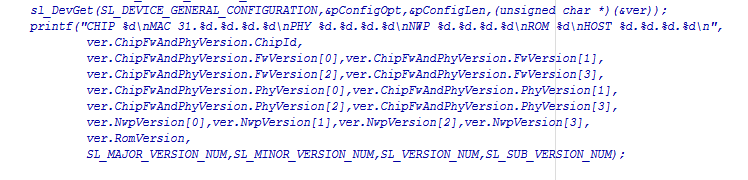
With the current module i checked the sw version using retVal = sl_DevGet(SL_DEVICE_GENERAL_CONFIGURATION, &configOpt, &configLen, (uint8_t *)(&ver)) API .
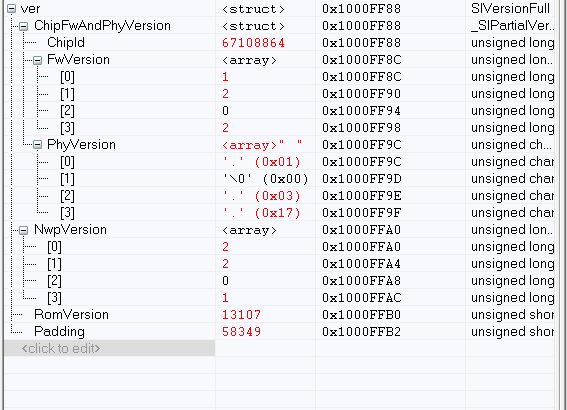
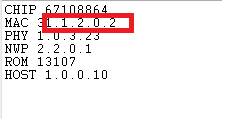
I could find the sw version as 1.2.0.2.Is my observation correct?

Thanks,

Likhitha

  • Hi Likhitha,

    If you have the most recent service pack (1.0.1.6-2.7.0.0), you will have the most up-to-date firmware.

    Best regards,
    Sarah
  • Hi,

    Thanks for your reply.

    But my question was "Is the service pack  (1.0.1.6-2.7.0.0) can be used for production and validation?"

    Is this the correct method to identify the sw version used in the cc3100?

    Thanks,

    Likhitha

  • Hi Likhitha,

    I'm getting a different result than you when using sl_DevGet on the most recent service pack:

    CHIP 67108880

    MAC 1.4.0.1

    PHY 1.0.3.34

    NWP 2.7.0.0

    ROM 13107

    HOST 1.0.1.6

    This is how I got this result:

        //Example for getting version:
        _u8 pConfigOpt;
        _u8 pConfigLen;
        SlVersionFull ver;
        pConfigLen = sizeof(ver);
        pConfigOpt = SL_DEVICE_GENERAL_VERSION;
        sl_DevGet(SL_DEVICE_GENERAL_CONFIGURATION,&pConfigOpt,&pConfigLen,(_u8 *)(&ver));
        UART_PRINT("CHIP %d\n\rMAC %d.%d.%d.%d\n\rPHY %d.%d.%d.%d\n\rNWP %d.%d.%d.%d\n\rROM %d\n\rHOST %d.%d.%d.%d\n\r",
                     ver.ChipFwAndPhyVersion.ChipId,
                     ver.ChipFwAndPhyVersion.FwVersion[0],ver.ChipFwAndPhyVersion.FwVersion[1],
                     ver.ChipFwAndPhyVersion.FwVersion[2],ver.ChipFwAndPhyVersion.FwVersion[3],
                     ver.ChipFwAndPhyVersion.PhyVersion[0],ver.ChipFwAndPhyVersion.PhyVersion[1],
                     ver.ChipFwAndPhyVersion.PhyVersion[2],ver.ChipFwAndPhyVersion.PhyVersion[3],
                     ver.NwpVersion[0],ver.NwpVersion[1],ver.NwpVersion[2],ver.NwpVersion[3],
                     ver.RomVersion,
                     SL_MAJOR_VERSION_NUM,SL_MINOR_VERSION_NUM,SL_VERSION_NUM,SL_SUB_VERSION_NUM);

    Please keep in mind sl_DevGet() must be called after sl_Start. Also, the MAC version returned by sl_DevGet is slightly off (it should be 1.4.1.1) due to an error in the service pack.

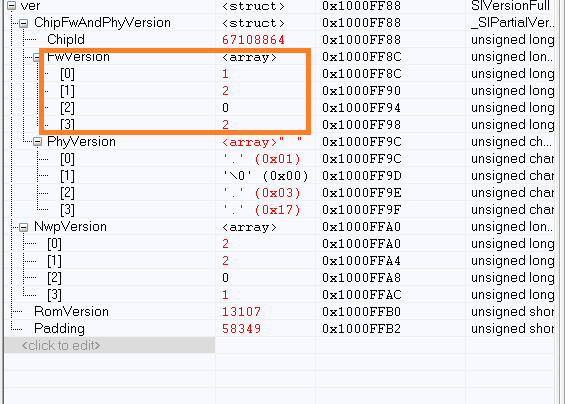
    What are the registers above that you are showing? Are you moving the information into arrays?

    Best regards,

    Sarah

  • Hi Sarah,

    1.Can you please confirm the sw version of cc3100 that can be used for production and validation?

    2.I used the sl_DevGet()api to get the sw version of cc3100.I am getting as 1.2.0.2.Is this the correct sw version used by cc3100 ?(please see the attached).

    As you can see in the above screen shot the sw version printed was 1.2.0.2.Is this correct?

    Thanks,

    Likhitha

  • Hi Likhitha,

    No, that is not the most up-to-date version of the MAC. The most recent version is what I posted above. What service pack are you using?

    Edit:

    Please keep in mind if you are using printf, you may have to change the format types to get an accurate print out. Please see below:

    printf("CHIP %lu\n\rMAC %lu.%lu.%lu.%lu\n\rPHY %hu.%hu.%hu.%hu\n\rNWP %lu.%lu.%lu.%lu\n\rROM %u\n\rHOST %lu.%lu.%lu.%lu\r\n",
                 ver.ChipFwAndPhyVersion.ChipId,
                 ver.ChipFwAndPhyVersion.FwVersion[0],ver.ChipFwAndPhyVersion.FwVersion[1],
                 ver.ChipFwAndPhyVersion.FwVersion[2],ver.ChipFwAndPhyVersion.FwVersion[3],
                 ver.ChipFwAndPhyVersion.PhyVersion[0],ver.ChipFwAndPhyVersion.PhyVersion[1],
                 ver.ChipFwAndPhyVersion.PhyVersion[2],ver.ChipFwAndPhyVersion.PhyVersion[3],
                 ver.NwpVersion[0],ver.NwpVersion[1],ver.NwpVersion[2],ver.NwpVersion[3],
                 ver.RomVersion,
                 SL_MAJOR_VERSION_NUM,SL_MINOR_VERSION_NUM,SL_VERSION_NUM,SL_SUB_VERSION_NUM);


    Best regards,
    Sarah

  • Hi Sarah,

    Which is the SW version of cc3100 i can use for production and validation?

    Thanks,
    Likhitha
  • Hi Likhitha,

    Please download and install the most recent service pack v1.0.1.6-2.7.0.0 fromt TI.com.
    CC3100SDK-SERVICEPACK: www.ti.com/.../CC3100SDK

    You will need to flash the servicepack_1.0.1.6-2.7.0.0.bin to the CC3100 serial flash. Then you will see the most recent firmware versions when calling sl_DevGet().

    Best regards,
    Sarah
  • Hi Sarah,

    I understand that if i am using the most recent service pack i will have the updated firmware.
    But my product is going for the production.I don't have option to update the CC3100 serial flash in the field.So which is the service pack i can use for production devices.

    Thanks,
    Likhitha
  • Hi Ti Team,

    I am waiting for your reply

    Thanks,
    Likhitha
  • Hi Likhitha,

    As Sarah said, if you are using SDK v1.2.0 , in this case use latest service pack ( v1.0.1.6-2.7.0.0 ) in your production devices.

    Previous versions of SDK + ServicePack you find here - processors.wiki.ti.com/.../CC31xx_Release_Notes. New ServicePack are backwards compatible ( see e2e.ti.com/.../2000761 ).

    Jan