This thread has been locked.

If you have a related question, please click the "Ask a related question" button in the top right corner. The newly created question will be automatically linked to this question.

CC3200-LAUNCHXL: AWS IOT sample code

Part Number: CC3200-LAUNCHXL
Other Parts Discussed in Thread: CC3200, CC3200SDK

I am working on an example "subscribe_publish_sample"  from "aws-iot-device-sdk-embedded-c" repository. I am using "READMECC3200.md " as a reference file. 

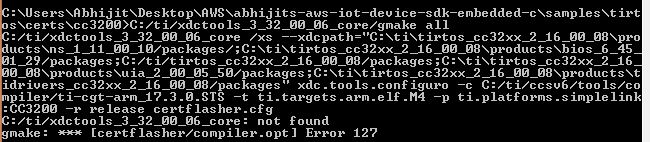
I am trying to build the 'codeflasher.c'  in command prompt while building command prompt shows following error:
I declared all the required paths in 'products.mak'  file.
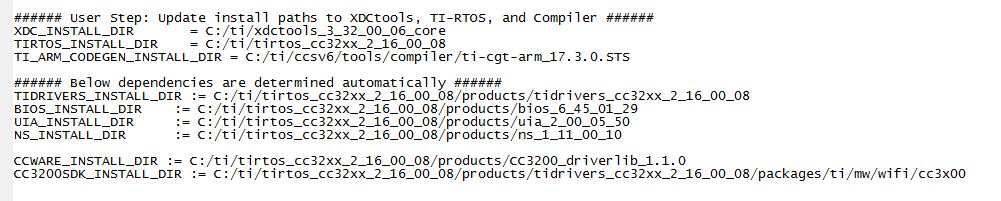
I tried to rectify the problem but it is showing the same error again and again.

Please guide.

Thank you.

  • Hi Abhijit,

    It look like the XDC_INSTALL_DIR is not correct. Try to update this with the your existing XDC tool folder (under c:\ti\xdctools_xxxxxx).

    br,
    Kobi
  • Hi Abhijit,

    I assume, you are trying to build the AWS library

    1) you need to change only the following paths

    ###### User Step: Update install paths to XDCtools, TI-RTOS, and Compiler ######
    XDC_INSTALL_DIR       = C:/ti/xdctools_3_32_00_06_core
    TIRTOS_INSTALL_DIR    = C:/ti/tirtos_cc32xx_2_16_01_14
    TI_ARM_CODEGEN_INSTALL_DIR = C:/ti/ccsv6/tools/compiler/ti-cgt-arm_5.2.5


    Try to correctly enter your XDC tools path on your machine in above steps

    Note you don't need to modify following paths keep them as it is.

    ###### Below dependencies are determined automatically ######
    TIDRIVERS_INSTALL_DIR := $(wildcard $(TIRTOS_INSTALL_DIR)/products/tidrivers_*)
    BIOS_INSTALL_DIR    := $(wildcard $(TIRTOS_INSTALL_DIR)/products/bios_*)
    UIA_INSTALL_DIR     := $(wildcard $(TIRTOS_INSTALL_DIR)/products/uia_*)
    NS_INSTALL_DIR      := $(wildcard $(TIRTOS_INSTALL_DIR)/products/ns_*)

    CCWARE_INSTALL_DIR := $(wildcard $(TIRTOS_INSTALL_DIR)/products/CC3200_driverlib*)
    CC3200SDK_INSTALL_DIR := $(TIDRIVERS_INSTALL_DIR)/packages/ti/mw/wifi/cc3x00

    1) Did you add GNU tool/gmake utility to  the  system environment variable path. It is recommended that the gmake tool be installed on your machine and added to the environment path. Else XDCtools contains gmake which can be utilized by adding the install location of XDCtools to the environment path.

    2) Have you installed the AWS command line Interface properly? and followed the every step explained in 'readme' file of the SDK.

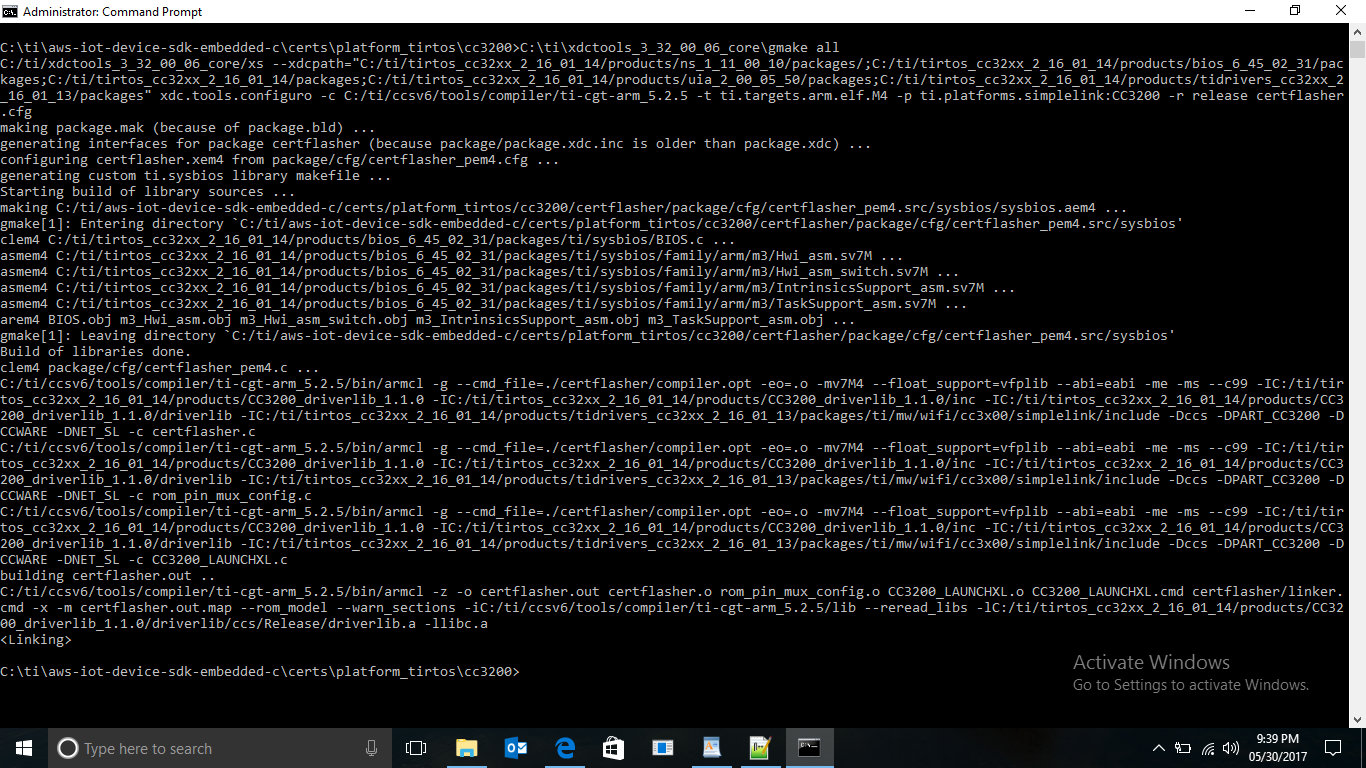
    3) Instead of running a user command prompt, try to enter the same commands from a administrator's command prompt, you should get  response like this. And you should be able to get a certflasher.out file in the folder.