This thread has been locked.

If you have a related question, please click the "Ask a related question" button in the top right corner. The newly created question will be automatically linked to this question.

LAUNCHCC3220MODASF: UniFlash. Generate Image > Program Image Fail. Wrong Device?

Part Number: LAUNCHCC3220MODASF
Other Parts Discussed in Thread: UNIFLASH, CC3220SF, CC3220S

I'm using the LAUNCHCC3220MODASF.

I'm following the tutorial TI Training "SimpleLink WiFi CC3220 Getting Started with Project 0". The Uniflash section step 10 where it ask to click "Generate Image", fails with message "Wrong Device". I choose to abort.

Here is my path of the binary I choose:

C:\ti\simplelink_cc32xx_sdk_1_60_00_04\tools\cc32xx_tools\servicepack-cc3x20\sp_3.6.0.3_2.0.0.0_2.2.0.6.bin

Help please.

Thanks,

Terry

  • Hi Terry,

    Are you able to connect to your launchPad in Uniflash? It's probably 1 of two things...

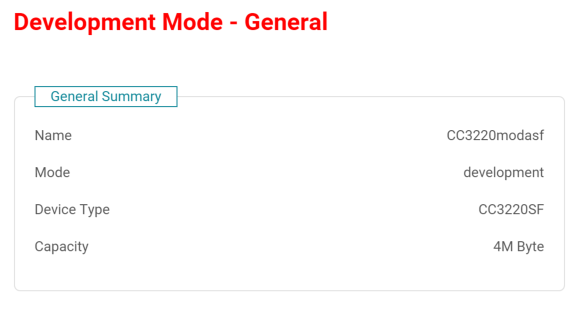
    1. Make sure "Device Type" is set to CC3220SF in the Uniflash General tab

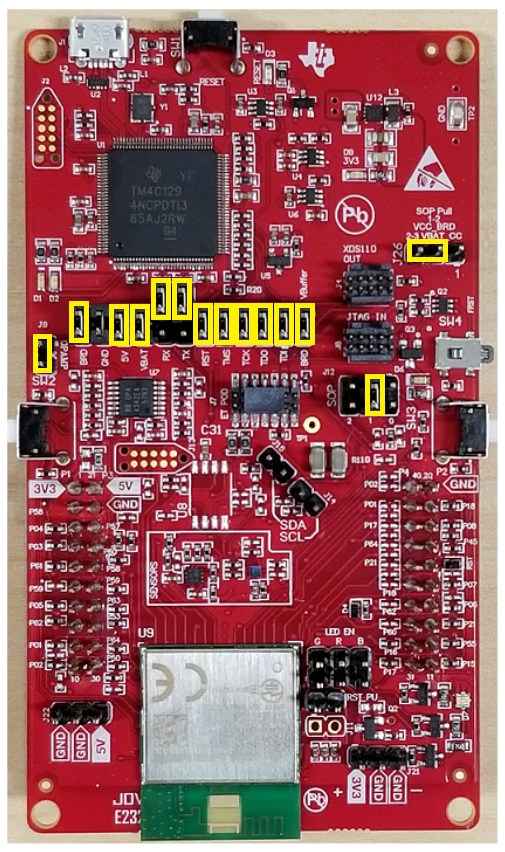
    2. The following launchpad pin set-up worked for me. If you are not able to connect in uniflash follow below (include pins marked in yellow):

    Hope this helps,

    Kevin

  • Thanks Kevin. Found my problem......

    It is easy to get sideways and not view the right literature. It's one thing I tend to go down a rabbit hole and not look at the right part number and the latest (most important) literature. Hopefully this will help others the make the same mistake.

    This is the right instructions:

    www.ti.com/.../swru473.pdf

    Section:
    Flashing the Out-of-Box Project:

    5. Click the Manage Projects button and then click the Import project from ZIP file button. Locate the
    OOB image according to the connected CC3220 and the desired OS (freertos or tirtos). Already
    imported projects shall appear on the list of available projects.
    For CC3220S secured device:
    • <SDK install dir>
    \examples\rtos\CC3220S_LAUNCHXL\demos\out_of_box\uniflash\OOB_RS_tirtos.zip
    • <SDK install dir>
    \examples\rtos\CC3220S_LAUNCHXL\demos\out_of_box\uniflash\OOB_RS_freertos.zip
    For CC3220SF secured device:
    • <SDK install dir>
    \examples\rtos\CC3220SF_LAUNCHXL\demos\out_of_box\uniflash\OOB_SF_tirtos.zip
    • <SDK install dir>
    \examples\rtos\CC3220SF_LAUNCHXL\demos\out_of_box\uniflash\OOB_SF_freertos.zip