This thread has been locked.

If you have a related question, please click the "Ask a related question" button in the top right corner. The newly created question will be automatically linked to this question.

CC3220S-LAUNCHXL: Uniflash cannot connect to device, returns "Operation failed: Timeout reading data"

Part Number: CC3220S-LAUNCHXL
Other Parts Discussed in Thread: UNIFLASH, CC3220S, CC3120

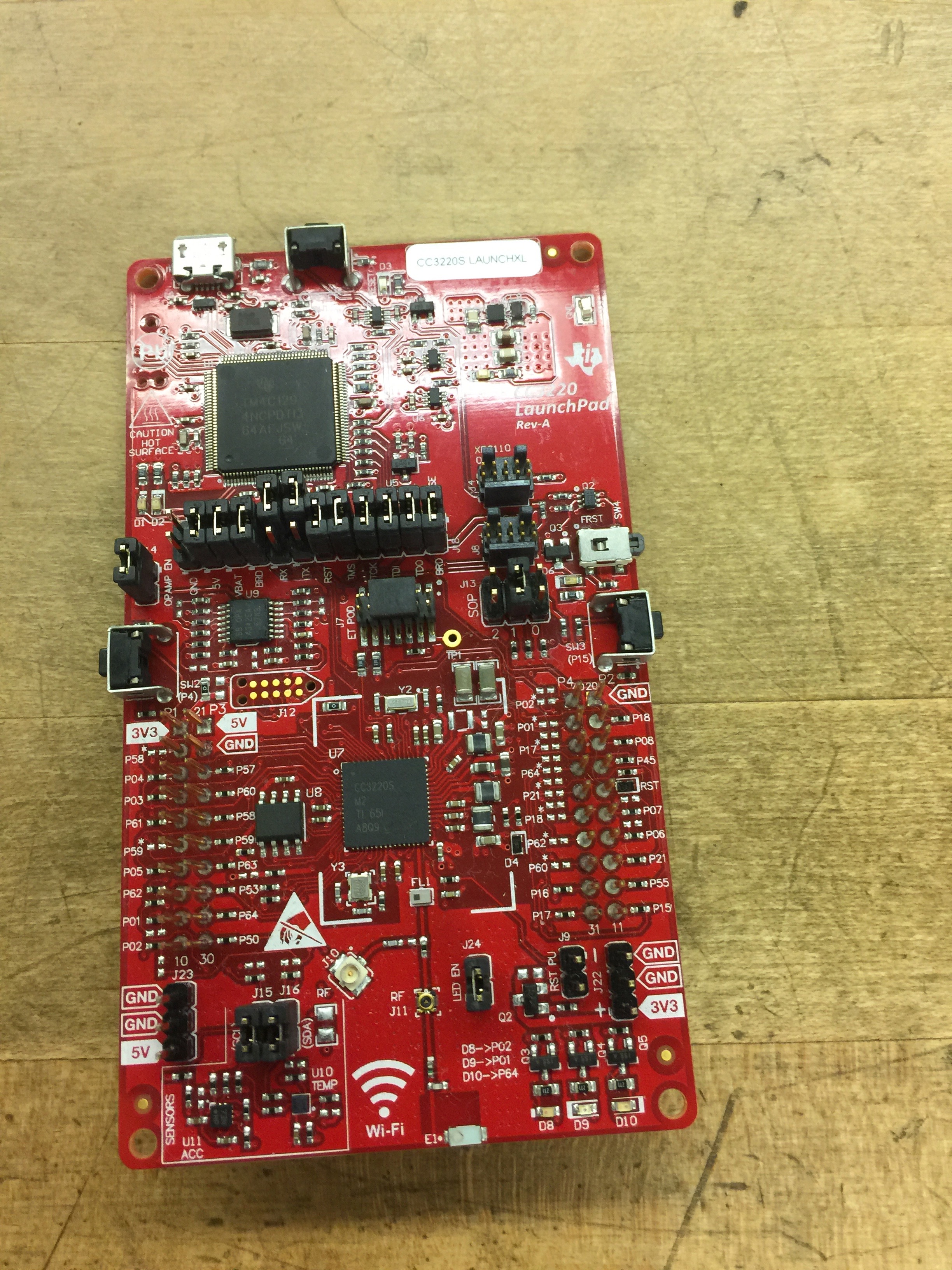
I am attempting to flash my CC3220S Launchpad with a program, using the method described in the Getting Started Guide.  I can debug the program from Code Composer Studio's debugger with no problems.  However, while Uniflash can detect my device, when I create a project and try to connect, I get the error "Operation failed: Timeout reading data".  I get this error with the SOP jumpers configured in 100, 010, 001 and 000 modes. when my device type in Uniflash is CC3120/CC3220 or CC3220S Launchpad, and whether I have fully created the image or just started.  Uniflash simply refuses to connect.

What can I do to fix this?

  • Hi,

    Please provide here photos of LP how you have connected jumpers when you tried connect by Uniflash.

    Jan
  • Also,

    Are you using MAC or PC? When you first open Uniflash does it autodetect a device?

    VR
  • I am using a Mac, with the downloaded app version of Uniflash.  It autodetects the device as "CC3220S Launchpad" with the SOP jumpers in 100 configuration, but does not autodetect with the SOP jumpers in 010 configuration.  This is my typical jumper configuration (I believe it is the default configuration).  It works fine with CCS, but not Uniflash.

    EDIT: I am using CCS 7.4.0 and Uniflash 4.2.2.

  • Hi,

    I am not sure why Uniflash is not able connect in SOP mode 010. At my Windows 10 computer it works properly with Uniflash v4.2.2 and v4.3.1.

    Jan
  • Okay, I still have a hard time believing this, but it turns out that moving the USB cable one port over allowed everything to work with SOP in 010 mode.  There was nothing wrong with Uniflash - the problem was with my Macbook Pro's differing capabilities between USB ports.

    I do still have two questions, though.  The first is about the jumpers - now that I've programmed the board, I'm planning to move it to battery power, and I'm somewhat confused on what jumper configuration is required.  The second is about how to set where Uniflash saves its projects, because I'd like to be able to put the saved release image on my team's Github page, and I'm not sure what I should be looking for or where I should be looking for it.

  • Hi,

    Interesting discovery about USB ports at Macbook Pro.

    It is hard to say what exact jumpers you should use in battery powered mode, because it depends on your needs. This user guides can give you a clue:

    -  http://www.ti.com/lit/pdf/swru463 (chapters 2.5, and 2.4.3)

    http://www.ti.com/lit/pdf/swra502 (chapter 2.4)

    I suppose that you want distribute Uniflash project not a binary file of release image. Project from Uniflash can be exported into ZIP file. Project can be imported into same version Unfilash only. For example if you import project from older Uniflash version, than you will have probably a issue.

    How to import/export project:

    Jan

  • On further research, the four ports on my specific model of Macbook Pro are the same, so this could be something with Uniflash, with the Macbook Pro 15" 2017 in general, or with my computer in particular.  Hard to tell without further research.  (If anyone reading this has a 15" 2017 Macbook Pro with Touch Bar, the lower right port didn't work for me, but the upper right port did.)

    For the battery, I plan to run the board off 3.3V from a regulator.  I've been reading those documents, but I'm unsure whether or not I should leave the RST jumper in place, and also whether it's safe to leave the jumpers in battery-power configuration while programming via USB.

    Thanks for the advice on project import/export!

  • Hi,

    Unfortunately I don't know exact answer to your questions right now. I would have to figure it out by the scheme of LaunchPad. Please wait for answer from TI.

    Jan
  • So, remember how I said I was able to connect and program the board?  Well, there are more problems.  I can connect, but:

    1. I can only connect from two of my computer's four USB ports - of the times I've tried, anyway - and I often have to try a port multiple times before it connects.

    2. Trying to program an image usually immediately disconnects the board.  The moment the dialog changes from "Creating image, please wait" to "Starting...", I can see the Device Status change to Disconnected in the background.  (Sometimes, this happens but the image successfully programs anyway.)

    Regardless of how the connection fails, I get the same "Operation failed: Timeout reading data" error - except once, when I got some description along the lines of "tried to connect 4 times but gave up."  I'm not sure what caused that one.

  • Trevor,

    Regarding jumper placement you should be fine leaving them as is. Are going to provide 5V or 3v3 to the board?

    Regarding the Mac issues, unfortunately I've also seen issues with Uniflash and MAC OS. My suggestion is to make sure you have Admin rights on the application when you launch. This has fixed a lot of the issues i've seen.
  • Thanks for the advice! I tried leaving the jumpers as-is, and it seems to run fine. The board is being given 3.3V.

    I'm running Uniflash from my admin account, but I'm not sure if the application has admin rights. In any case, I fixed the problem by asking a different project team (who have had no Uniflash problems, but can't get CCS' debugger working) to flash the board from their computer. It seems to work fine now.