This thread has been locked.

If you have a related question, please click the "Ask a related question" button in the top right corner. The newly created question will be automatically linked to this question.

CC3220: Transitioning CC3220 server from HTTP to HTTPS

Part Number: CC3220
Other Parts Discussed in Thread: UNIFLASH

Hi,

Is there a cohesive set of instructions on how to transition my CC3220 server to support HTTPS? Currently, all of my projects run the device as an Access Point, and the server is HTTP, however, I have some javascript/browser dependencies that require an HTTPS server.

Any help or direction would be much appreciated.

-Armen

  • Hi Armen,

    The local_ota example in the SDK features the CC3220 as a HTTPS server. If you look at ConfigureHttpServer() within local_ota_task.c, that function shows you how to setup the internal HTTP server as secured. Running that function will configure your HTTP server to support HTTPS.
    Do keep in mind that by default the examples will use a dummy certificate and key pair (ca-priv-key.der and ca_in_cert_store) that will be flagged as insecure by all browsers as the certificate is not signed by any well-known root CA. You can either tell your browser to ignore that error or provide your own certificate that is properly signed.

    Let me know if you need more clarification or have further questions.

    Regards,
    Michael
  • Hi Michael,

    Thank you for this information. It is helpful, and I will try to put it to use today. 

    I was aware that Local OTA was a good example to look at for HTTPS server and was trying to run the example code last week, but kept running into repeated MCU Reset Requests, so the application would not run much longer than a few moments. Is this a known issue? I tried flashing from both the SDK zip project directly in Uniflash and by building my own .bin file and loading that into the user files in Uniflash and creating my own ucf file to flash and had the same issue.

    Knowing that I can look at the ConfigureHttpServer() function for reference is helpful, as I may be able to just utilize that subsection of functionality and port it into my own application for testing. 

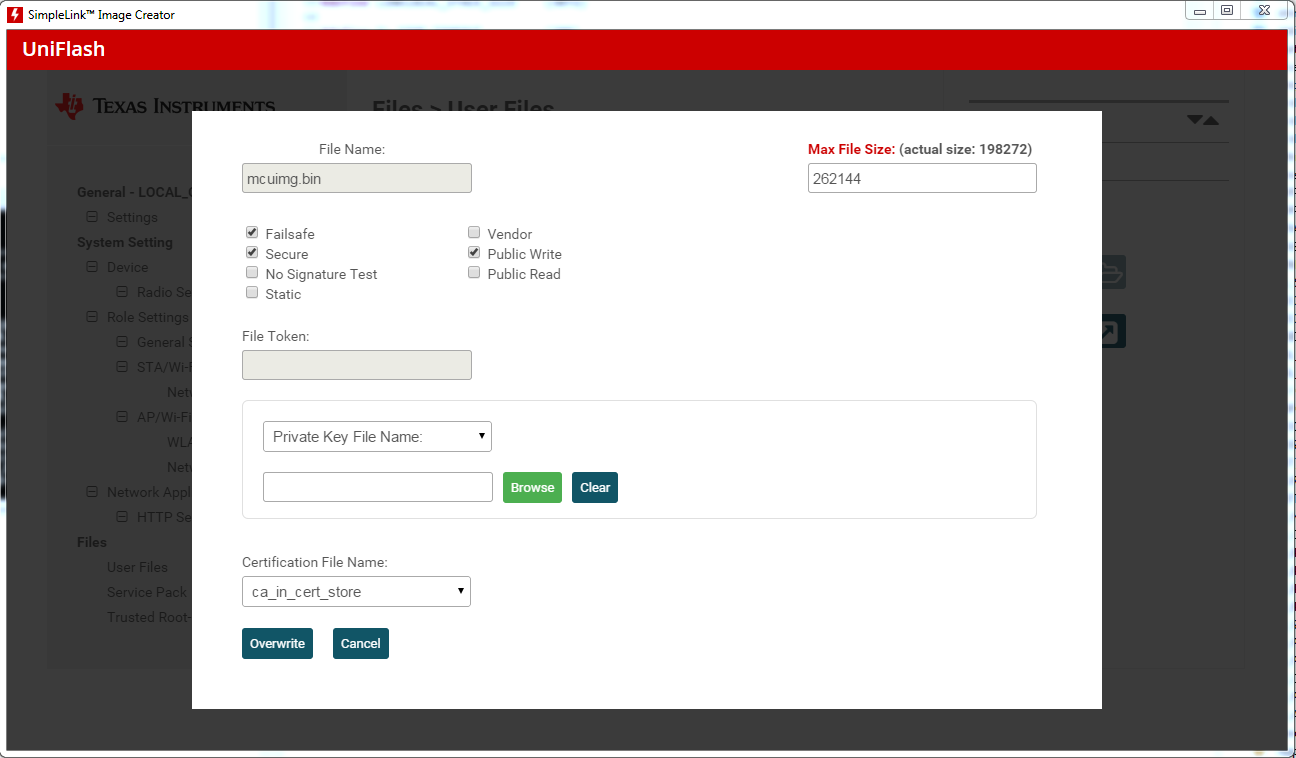
    In order to use the dummy certificates referenced in the example (ca-priv-key.der and ca_in_cert_store), how do I properly load and link these into the ucf file prior to flashing? Where in the SDK to I find these files? I've attached a screenshot below for reference. Do I need to select ca_in_cert_store as the Certificate File Name (as shown below) and then browse to link a Private Key File? (I wonder if doing this incorrectly on the local OTA example could have also been the cause of those Reboots).

    Thanks for the continued support.

    -Armen

  • Hi Armen,

    You should sign the mcuimg.bin as normal with the dummy-root-ca-cert-key, and marking it with the dummy-root-ca-cert file.
    For the certificate files, you can use the dummy-root-ca-cert and the dummy-root-ca-cert-key in place of the ca_in_cert_store and ca-priv-key.der respectively.

    Regards,
    Michael
  • Thanks Michael. To confirm, I just place these in the www directory of the user files in Uniflash? Or do they need to be referenced/linked in any other way?

  • Hi Armen,

    You can place those files anywhere on the filesystem. You will have to modify the SSL_SERVER_KEY and SSL_SERVER_CERT defines in local_ota.h to reflect your new filenames, but that should be it in terms of getting the HTTPS server to work.

    Regards,
    Michael