This thread has been locked.

If you have a related question, please click the "Ask a related question" button in the top right corner. The newly created question will be automatically linked to this question.

CC3220SF-LAUNCHXL: MQTT broker connection issue

Part Number: CC3220SF-LAUNCHXL


Hi,

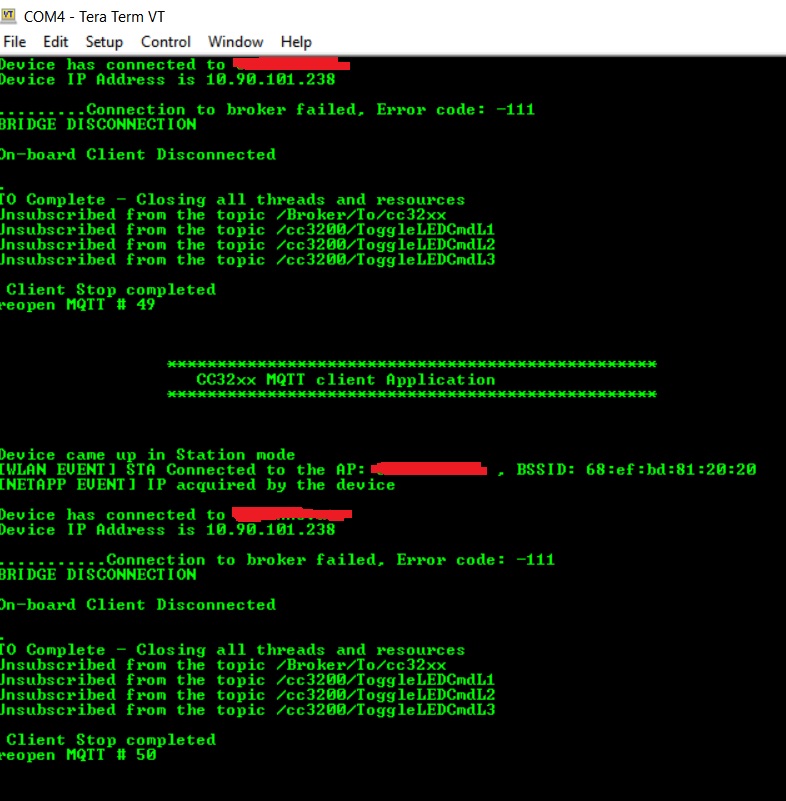
I'm trying to run the MQTT Client example on CC3220SF-LAUNCHXL. I've so far been successful in running the MQTT client,server-client and server examples using my home Wi-Fi network. But today I was trying to connect to a Wi-Fi network which I guess is a secured network and  I got the following error while trying to connect the client to a broker:
Any idea? 

Thanks,

  • Hi Kash,

    Error -111 indicates that the TCP connection to your MQTT server was refused. This can indicate that the MQTT server actively refused the connection by resetting the connection, or it could simply mean that the MQTT connection timed out due to being unable to reach your server.

    When you say you are connecting to a "secured network", is this a corporate network or network with firewalls/network access controls? The link-layer Wi-Fi security should not impact the operation of the MQTT examples. If you are able to connect and acquire an IP address from a network secured with WPA, then it shouldn't impact the functionality of the higher level socket and application code. However, if the network you are connected to blocks TCP communication on the needed MQTT ports then that could be the causes of your issue.

    As a test, you can try using your PC to connect to your MQTT server. You don't need to run an MQTT client on your PC, you just need to try opening a TLS connection to your server's IP and port. If that doesn't work then the issue most likely lies on your network, and not on the CC3220 code.

    Regards,
    Michael
  • Michael,
    Thanks for your reply.

    It's a corporate network of an airport. If I use my cellphone as a hotspot, the MQTT client and MQTT local server can establish the communication, but once I switched to the corporate Wi-Fi, the connection will get lost.

    So what do I need to do to open a TLS connection on my laptop to the broker server? I can go to the airport and try next week.
    Thanks,
  • Hi Kash,

    One thing to keep in mind is that with airports networks, there could be a captive portal in place, where clients have to authenticate through a web portal before they can access other network resources. If your network uses a captive portal, then it won't be possible to connect with the CC3220 to your MQTT broker as it cannot authenticate correctly through the captive portal.

    To open a TLS connection, there are a variety of tools that you can use. Basically any networking app that allows you to specify a server + port to connect to securely can be used. For example, I use curl (an HTTP testing tool). You can write your own script in something like python if you want output like what you might get with the CC3220. There isn't any one method that you're required to use.

    Regards,
    Michael
  • Hi Kash,

    I assume that you have resolved your issue since I have not heard back from you. If not, feel free to post a response to this thread, or open a new thread regarding this issue.

    Regards,
    Michael