This thread has been locked.

If you have a related question, please click the "Ask a related question" button in the top right corner. The newly created question will be automatically linked to this question.

CC3200MOD: HTTPS request: random delay

Part Number: CC3200MOD
Other Parts Discussed in Thread: CC3200

Hi,

We have a few thousands devices in the field equipped with the cc3200. It's working quite well with the typical http request done under a second, but at a few customers there are sometimes http requests which either time out or take very long (20-30s) for a few bytes of payload.

Our infra is the following:

The cc3200 connects through the customer wifi to our azure hosted server with tls1.2 and does https request with typically 100 byte of payload.

I have made some wireshark sniffing which captures this huge delay, but have not much idea what could be causing this. 

This capture shows a simple GET with the response being a 42 byte payload. The 18sec delayed frame is marked in black.
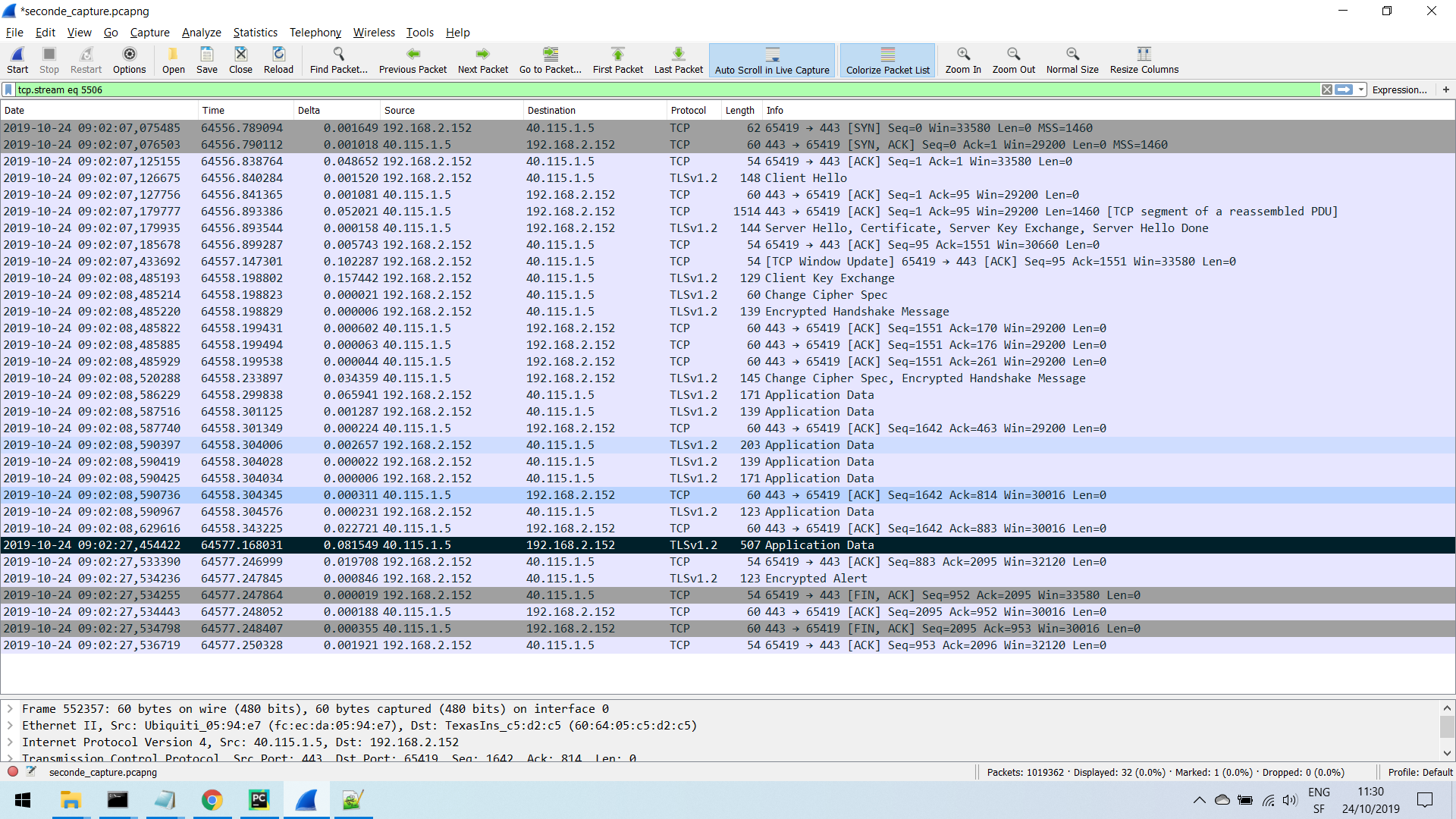
By any chance, do you have any experience or possible ideas of causes for such <10 sec delay?

I'll gladly take any idea ; )

/cfs-file/__key/communityserver-discussions-components-files/968/SingleRequest.zip

Thanks,

Cédric

  • Hi Cédric,

    Are the logs you have captured from an air sniffer? Do you see retransmissions from the CC3200 at any point?

    Something that some customers have noticed in the past is that TCP packets coming from a remote server to the CC3200 get delayed at the AP due to the AP not forwarding the packets back to the CC3200 correctly. Are you able to monitor the outgoing WAN port and checking if the data is arriving from the WAN successfully without a delay? If it seems like the packets arrive at the AP on time, but are not routed to the CC3200, then air sniffer logs during that period of time would be helpful to fully diagnose this issue.

    Regards,

    Michael

  • Hi Michael,

    Thanks for your feedback.

    No the log is taken from the AP through SSH, but it does not show the management packets. I will try to manage air sniffing. 

    Any advice on how to do it on windows? (Which program/network card for instance)

    I suppose the AP logs the packets only when they have been sent (not 100% sure though), I'll do another measure on the wan side to understand if the delay comes from the wireless or the wan side. 

    Thanks,

    Cédric

  • Hi Cédric,

    I use Omnipeek as my air capture software, but there are many other options out there that use Wireshark or other free tools to perform air sniffing. 

    Since you are capturing from the AP using SSH, checking the WAN port and seeing if there is a delay there will be very useful. If there is no delay on the WAN side, then taking a look at the air sniffer will be very important as there is most likely some low-level 802.11 interaction that is causing the AP to delay the packets back to the CC3200. 

    Also, do you happen to know which models of APs you are encountering the issue on? 

    Regards,

    Michael

  • Hi Michael,

    Ok, thanks for the details!

    We have found something which might indicate our server to be causing those random delay, so maybe the issue is somewhere else. I'll keep the thread updated when I have more info.

    The AP is a UniFi AP-AC-Pro.

    Best regards,

    Cédric