


Hello,
I'm facing an issue when trying to repair from iPhone (central) to the peripheral. The iPhone cannot connect to the peripheral once the iPhone is remove from the peripheral. I'm removing the remote iPhone device when disconnected. The iPhone still have peripheral (WL1835MOD) information (in Settings -> Bluetooth -> My devices). But peripheral (WL1835MOD) has erased iPhone device. When trying to connect back, it disconnect automatically.
This is want I want to achieve:
1. Accept only one paired device on the peripheral (WL1835MOD)
2. When another device is paired to the peripheral, remove the previous paired device on the peripheral (WL1835MOD)
This is my settings:
WL1835MOD (peripheral)
Apple iPhone 7 iOS 13.4.1 (central)
I'm using bluetopia GATM Server sample and this is how I'm configuring my peripheral:
./SS1BTPM &
./LinuxGATM_SRV
Initialize 1
SetDevicePower 1
DeleteRemoteDevices 0 (to make sure the list of remote devices is empty)
RegisterAuthentication 1
RegisterGATTCallback 1
ChangeLEPairingParameters 1 1 1 0 0 0 0
I/O Capability: 1 = Display Yes/No
Bonding Type: 1 = Bonding
MITM Requirement: 1 = Yes
SC Enable: 0 = No
P256DebugMode: 0 = No
OOBSupport: 0 = No
Keypress: 0 = No
EnableSCOnly 0
RegisterService 0 (register the first service in the sample. The first characteristic contain a GATM_SECURITY_PROPERTIES_AUTHENTICATED_ENCRYPTION_WRITE which will trigger a pairing request on the central).
StartAdvertising 0x36 1234
0x00000002 - Discoverable
0x00000004 - Connectable
0x00000010 - Advertise Name
0x00000020 - Advertise Tx Power
On the iPhone, I'm using nRF Connect or BLE Hero to connect to WL1835MOD device.
Once connected, I'm writing to the first characteristic to trigger a pairing request. I enter the PIN on the iPhone and the pairing is successful. I wait a few second and then do a disconnect on the iPhone.
On the WL1835MOD, this is what I'm doing:
DeleteRemoteDevices 0 so all remote devices are deleted
I then start advertise again:
StartAdvertising 0x36 1234
On the iPhone, I still have WL1835MOD device saved in the Settings -> Bluetooth -> My devices
I then try to connect to the peripheral and I'm getting this error on the iPhone:
ConnectionAttemptFailed ErrorDomain=CBATTErrorDomain Code=14 "Peer removed pairing information"
I've saved the debug log in format FTS file and I opened it with Wireshark and this is what I'm getting when trying to reconnect:
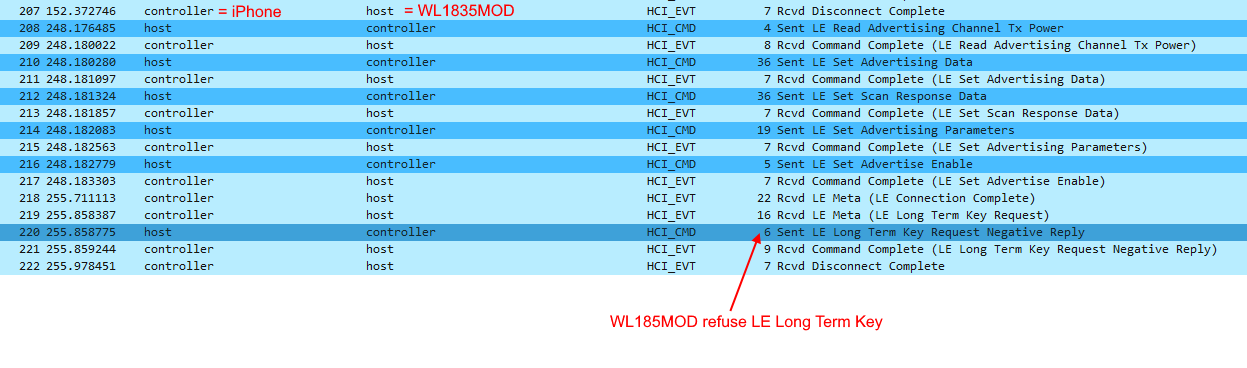
As you can see, WL1835Mod doesn't have anymore the LE Long Term Key and the iPhone fails to connect to peripheral. I don't want the user to go to iPhone settings and ask him to select the device and do a "Forget this device".
I did the same test with multiple Android phones and I did not encounter this issue.
I would like to know if this issue is normal with iPhones and how can I resolved it? Thank you.
