This thread has been locked.

If you have a related question, please click the "Ask a related question" button in the top right corner. The newly created question will be automatically linked to this question.

WL1835MOD: BLE Packet Error Test

Part Number: WL1835MOD
Other Parts Discussed in Thread: WL1835,

Hi Team,

Need your help on below request.

Our customer is trying to run the standard BLE packet error tests required by the EU RED. For this test they are R&S CMW500 test instrument.

They have connected the device via a USB to serial cable to the instrument and try run the standard HCI based test using the instruments HCI UART mode (these tests requires using the BT UART to control the DUT). They are manually controlling the enable/disable pin of the device and using the default 115200 bitrate configuration. The instrument is connected directly to the DUT UART. The scope runs the test, but reports none / empty results.

It seems that it is not possible to use a test instrument that does not have a UART supporting hardware flow control as the WL1835 firmware configures its UART in this mode at power-on. Additionally, it seems the test instrument need to support initialization of the WL1835 using the bts file (or the xml equivalent).

Can you pls confirm if the understanding above is correct?
1) If it is a requirement that the test instrument has a UART interface supporting hardware flow control can you advise an instrument that can be used?

2) If test instrument UART hardware flow control support is not needed can you pls provide a quick description of how to get the WL1835 working to run the EU RED BLE tests (the R&S CMW provides a pre-defined test program which does not include the bts initialization of the DUT)?

3) Can you help provide a description of how they can perform the required EU RED BLE tests with a standard test instrument?

Thanks in advance!

Art

  • I will ask one of our regulatory test experts to comment, but I know we support the CMW500, so it shouldn't be an issue.

    Regards,

    Travis

  • Thanks for looking into this Travis!

    Art

  • HI Art,

    I hope all is well. Our test house has used the CMW500 in our certification testing, so I would assume it would work. Locally in our lab we are using the BT CBT tester to do these types of tests.

    As I understand it before you connect to the CMW500 you need to ensure that the FW to the WL1835MOD has been loaded first and not use the CMW500 to be loading the FW. Once it is loaded, then you should be able to connect to the test instrument and run the tests.

    I would try this first to see if it resolves the issue. We load the FW first before running with the CBT tester to run the tests.

    I hope this helps.

    Thanks,

    Riz

  • Thanks Riz!

    I will let you know in case customer have further inquiries.

    Art

  • Hello Riz,

    I just got a feedback from our customer, and below are their response in verbatim.

    "The solution does not work as we cannot use the test instrument to perform the fw load. The test instrument will only run the pre-defined BLE tests.

    Even if we could use the test instrument to load the fw bts file it would need to support serial port hw flow control via its usb interface which it seems it does not.
    We have a dongle supporting this that works fine with the GCITool application on a PC.

    So to load the firmware we need to use a device with a serial port supporting hw flow control and able to load the bts file.
    So, we have tried loading the bts using the HViTest tool as well as our own device and then moving the serial cable over to the test instrument.
    This does not work as subsequent communications from the test instruments fails."

    Appreciate if you could provide further guidance on this.

    Thanks!

    Art

  • Hello Riz,

    Good day.

    Just like to update regarding the additional inquiries from our customer.

    Thanks!

    Art

  • Hello Riz,

    Good day.

    Any update regarding this?

    Art

  • Hi Art,

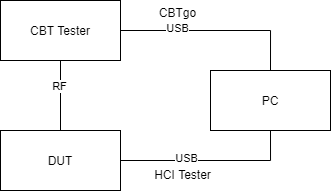
    You shouldn't need a serial cable from the DUT to the test instrument. You just need an RF (conducted) connection

    Here's the procedure for testing with the CBT. 

    1. make the following connections.

    2. Use HCI Tester to load the FW (BTS file)

    3. Use HCI Tester to load the attached script. This will put the device into test mode

    4. The device is now ready to undertake testing via CBT. This can either be done manually or remotely via CBTgo (which is the configuration i have shown above)

    Thanks,

    Alexis

  • Thanks for looking into this Alexis!

    Art

  • Hello Alexis,

    On item#3 you mentioned something about the attached script.I don't see any attached script.
    Could you attached it again?

    Thanks!

    Art

  • Hi Art,

    My apologies! Here is the script.

    Send_HCI_Set_Event_Filter 0x02, 0x00, 0x03
    Wait_HCI_Command_Complete_Set_Event_Filter_Event 5000, any, HCI_Set_Event_Filter, 0x00
    
    Send_HCI_Write_Scan_Enable 0x03
    Wait_HCI_Command_Complete_Write_Scan_Enable_Event 5000, any, HCI_Write_Scan_Enable, 0x00
    
    Send_HCI_Enable_Device_Under_Test_Mode
    Wait_HCI_Command_Complete_Enable_Device_Under_Test_Mode_Event 5000, any, HCI_Enable_Device_Under_Test_Mode, 0x00
    

    Thanks,

    Alexis

  • Thanks Alexis!

    Art