This thread has been locked.

If you have a related question, please click the "Ask a related question" button in the top right corner. The newly created question will be automatically linked to this question.

CCS/LAUNCHCC3235MOD: Do the OTA example programs actually work???

Part Number: LAUNCHCC3235MOD
Other Parts Discussed in Thread: UNIFLASH, CC3235SF, CC3220SF, CC3235MODASF, , SYSCONFIG

Tool/software: Code Composer Studio

I have tried the 'out_of_box' and 'local_ota' example projects following the exact instructions in the (very sparse) README files for both the CC3220SF and the CC3235SF LaunchPads using CCS V9.2 and V10 and have NEVER been able to successfully install an OTA update. I tried the 'out_of_box' example with the SimpleLink WiFi Pro iOS app (1-star rated - well earned as it did NOTHING) and the 'local_ota' example with 4 different web browsers. I have tried SimpleLink CC32xx SDK-4.20.00.07 and the two previous versions - nothing works! The many errors include: compile errors, file download errors, WiFi link errors, .tar file generation errors, UniFlash errors, reboot errors, OTAPrivateKey errors, SLImageCreator errors, etc.
I have not modified the example programs in any way except for entering my network  SSID_NAME, SECURITY_TYPE and SECURITY_KEY.

One simple question (and be honest) - Do the OTA example programs actually work???

I have been working on a project based on the CC3235MODASF for over 9 months. The custom designed boards will arrive in a few weeks and my waiting customer and I need the OTA functionality working now. At the bare minimum, I need a functioning ota example program to work with.

Any help would be greatly appreciated.

  • Hi Robert,

    Very sorry you are having a lot of trouble getting OTA to work. The readme in example assumes the user has some background knowledge on how it works. I recommend you try following our Wi-Fi OTA SLA for a tutorial to get it working. This should get you up and running.

    Jesu

  • Hi Jesu,

    The Wi-Fi OTA SLA tutorial was of little help as it is for the cloud_ota example which is much different and significantly more complex. My device just needs the local_ota example working.

    I need to know if the local_ota example works as is, or I am wasting my time with a buggy example that requires significant modifications "out-of-the-box"? (pun intended) Has the functionality of this code been tested (lately)? The complete lack of any documentation or comments in the code makes it very difficult to follow especially for an example application. Is there an overview or brief description of the source code files and their functions for the local_ota example project?

  • Hi,

    Example "local_ota" works without any issue as is. At my code I use my own way for OTA update, but I tested TI "local_ota" with some older SDK (4.10 or maybe 3.40) and all worked nice and smoothly. Basic tests with "local_ota" example is a job for a 15 minutes not a more.

    I am not sure what can be wrong at your case, but i haven't any issue with this example as many other users of CC32xx devices.

    Jan

  • Hi Jan,

    Have you tested local_ota_cc3235SF_LAUNCHXL_tirtos_ccs with:

    LAUNCHCC3235MOD

    CCS Ver: 10.1.0.00010

    cc32xx SDK 4.20.00.07

    ?

    I have went so far as to delete CCS V10.1 (and the 2 previous version) plus all Uniflash and SDK versions from my computer. (deleting all TI software). I only reinstalled the latest versions.

    I installed the local_ota_cc3235SF_LAUNCHXL_tirtos_ccs project and followed the instructions in the readme file explicitly.

    First, the CCS would not create the .tar file. TI support recommended a bug workaround by modifying the image.syscfg file by checking the Secured box in OTA

    I was finally able to create the OTA .tar file, flash the LAUNCHCC3235MOD and connect to the ota.html.

    Upload progress bar did not work in 4 different browsers. "Upload in progress 0%" never changed except for MS Edge (diplayed 2%)

    The ota progress always  failed and the MCU image never updated. The serial log file errors seem different for each browser.

    I tried using UniFlash to create the .tar file, but that file also failed to load.

    What an I doing wrong?

    Where do I find the error code descriptions?

    Thanks.

    Serial Error Logs:

    >>>>>>>>>>>>>>>>> Firefox 79.0(64-bit) <<<<<<<<<<<<<<<<<<<<<<<<<

    .....

    4ab776c3a74d89945f1a2575c5893069f62ffbe803f344549,  cert=, secured=0, bundle=0
    [_BundleCmdFile_Parse]    bundle cmd file=dummy_ota_vendor_cert.der, sig_len=0, SHA_256_Digets=a160b855d7a00a6002922181377249a80ecd6a738d23e1dd8976c8bb7fad1bcb,  cert=, secured=0, bundle=1
    [_BundleCmdFile_Parse]    bundle cmd file=/sys/servicepack.ucf, sig_len=256, SHA_256_Digets=b9c25aff1fd02f1337f983ab32a37348a2c1b6d282f92795ed975108c2c1094b,  cert=, secured=1, bundle=1
    [OtaArchive_RunParseTar]   Create/Open for write file dummy-root-ca-cert

     Hash verification succeeded.
        Total archive file bytes 9679.
    OtaArchive_RunParseTar: 1 files that are mentioned in the ota.cmd were saved
    [OtaArchive_RunParseTar] Downloading File Completed - Size=975
    [OtaArchive_RunParseTar]   Create/Open for write file /sys/mcubootinfo.bin
    [OtaArchive_RunParseTar] ERROR from sl_FsOpen, Status=-10279
    [OtaArchive_Rollback] ERROR sl_FsCtl, Status=-10282
    [Link local task] OtaArchive error -20106
    [Link local task] ota put done. status=-1
    [Link local task] waiting for signal from report server
    [ota report task] Error accepting client connection, aborting progress bar...
    [Common] CC32xx MCU reset request

    >>>>>>>>>>>>>>>>>> Chrome 84.0.4147.105 (64-bit) <<<<<<<<<<<<<<<

    ....

    [_BundleCmdFile_Parse]    bundle cmd file=dummy-root-ca-cert, sig_len=0, SHA_256_Digets=34941765501d16a4ab776c3a74d89945f1a2575c5893069f62ffbe803f344549,  cert=, secured=0, bundle=0
    [_BundleCmdFile_Parse]    bundle cmd file=dummy_ota_vendor_cert.der, sig_len=0, SHA_256_Digets=a160b855d7a00a6002922181377249a80ecd6a738d23e1dd8976c8bb7fad1bcb,  cert=, secured=0, bundle=1
    [_BundleCmdFile_Parse]    bundle cmd file=/sys/servicepack.ucf, sig_len=256, SHA_256_Digets=b9c25aff1fd02f1337f983ab32a37348a2c1b6d282f92795ed975108c2c1094b,  cert=, secured=1, bundle=1
    [OtaArchive_RunParseTar]   Create/Open for write file dummy-root-ca-cert

     Hash verification succeeded.
        Total archive file bytes 9679.
    OtaArchive_RunParseTar: 1 files that are mentioned in the ota.cmd were saved
    [OtaArchive_RunParseTar] Downloading File Completed - Size=975
    [OtaArchive_RunParseTar]   Create/Open for write file /sys/mcubootinfo.bin
    [OtaArchive_RunParseTar] ERROR from sl_FsOpen, Status=-10279
    [OtaArchive_Rollback] ERROR sl_FsCtl, Status=-10282
    [Link local task] OtaArchive error -20106
    [Link local task] ota put done. status=-1
    [Link local task] waiting for signal from report server
    [SOCK ERROR] an event received on socket 0
    [SOCK ERROR] Recoverable error occurred during the handshake -346
    [SOCK EVENT] - Unexpected Event [20x]

                                         [ota report task] OTA progress failed, aborting...
    [Common] CC32xx MCU reset request

    >>>>>>>>>>>>>> Microsoft Edge 84.0.522.52 (64-bit) <<<<<<<<<<<<<<<<<<<

    ...

    19181ce35fb33f714ffa57b8d8d30b2b9,  cert=, secured=0, bundle=1
    [_BundleCmdFile_Parse]    bundle cmd file=ca-priv-key.der, sig_len=0, SHA_256_Digets=d3f34abc6a4de3f009273b4e1d0c71957835425baa0c9896aca88cb508a7ee8b,  cert=, secured=0, bundle=1
    [_BundleCmdFile_Parse]    bundle cmd file=ca_in_cert_store, sig_len=0, SHA_256_Digets=34941765501d16a4ab776c3a74d89945f1a2575c5893069f62ffbe803f344549,  cert=, secured=0, bundle=1
    [_BundleCmdFile_Parse]    bundle cmd file=dummy-root-ca-cert, sig_len=0, SHA_256_Digets=34941765501d16a4ab776c3a74d89945f[SOCK ERROR] an event received on socket 0
    [SOCK ERROR] Recoverable error occurred during the handshake -346
    [SOCK EVENT] - Unexpected Event [20x]

                                         1a2575c5893069f62ffbe803f344549,  cert=, secured=0, bundle=0
    [_BundleCmdFile_Parse]    bundle cmd file=dummy_ota_vendor_cert.der, sig_len=0, SHA_256_Digets=a160b855d7a00a6002922181377249a80ecd6a738d23e1dd8976c8bb7fad1bcb,  cert=, secured=0, bundle=1
    [_BundleCmdFile_Parse]    bundle cmd file=/sys/servicepack.ucf, sig_len=256, SHA_256_Digets=b9c25aff1fd02f1337f983ab32a37348a2c1b6d282f92795ed975108c2c1094b,  cert=, secured=1, bundle=1
    [OtaArchive_RunParseTar]   Create/Open for write file dummy-root-ca-cert
    [ota report task] OTA progress 2%

     Hash verification succeeded.
        Total archive file bytes 9679.
    OtaArchive_RunParseTar: 1 files that are mentioned in the ota.cmd were saved
    [OtaArchive_RunParseTar] Downloading File Completed - Size=975
    [OtaArchive_RunParseTar]   Create/Open for write file /sys/mcubootinfo.bin
    [OtaArchive_RunParseTar] ERROR from sl_FsOpen, Status=-10279
    [OtaArchive_Rollback] ERROR sl_FsCtl, Status=-10282
    [Link local task] OtaArchive error -20106
    [Link local task] ota put done. status=-1
    [Link local task] waiting for signal from report server
    [SOCK ERROR] an event received on socket 0
    [SOCK ERROR] Recoverable error occurred during the handshake -346
    [SOCK EVENT] - Unexpected Event [20x]

                                         [ota report task] OTA progress failed, aborting...
    [Common] CC32xx MCU reset request

    >>>>>>>>>>>>>>>>> Internet Explorer 11 <<<<<<<<<<<<<<<<<<<<<<<

    .....
    [_BundleCmdFile_Parse]    bundle cmd file=ca-priv-key.der, sig_len=0, SHA_256_Digets=d3f34abc6a4de3f009273b4e1d0c71957835425baa0c9896aca88cb508a7ee8b,  cert=, secured=0, bundle=1
    [_BundleCmdFile_Parse]    bundle cmd file=ca_in_cert_store, sig_len=0, SHA_256_Digets=34941765501d16a4ab776c3a74d89945f1a2575c5893069f62ffbe803f344549,  cert=, secured=0, bundle=1
    [_BundleCmdFile_Parse]    bundle cmd file=dummy-root-ca-cert, sig_len=0, SHA_256_Digets=34941765501d16a4ab776c3a74d89945f1a2575c5893069f62ffbe803f344549,  cert=, secured=0, bundle=0
    [_BundleCmdFile_Parse]    bundle cmd file=dummy_ota_vendor_cert.der, sig_len=0, SHA_256_Digets=a160b855d7a00a6002922181377249a80ecd6a738d23e1dd8976c8bb7fad1bcb,  cert=, secured=0, bundle=1
    [_BundleCmdFile_Parse]    bundle cmd file=/sys/servicepack.ucf, sig_len=256, SHA_256_Digets=b9c25aff1fd02f1337f983ab32a37348a2c1b6d282f92795ed975108c2c1094b,  cert=, secured=1, bundle=1
    [OtaArchive_RunParseTar]   Create/Open for write file dummy-root-ca-cert

     Hash verification succeeded.
        Total archive file bytes 9679.
    OtaArchive_RunParseTar: 1 files that are mentioned in the ota.cmd were saved
    [OtaArchive_RunParseTar] Downloading File Completed - Size=975
    [OtaArchive_RunParseTar]   Create/Open for write file /sys/mcubootinfo.bin
    [OtaArchive_RunParseTar] ERROR from sl_FsOpen, Status=-10279
    [OtaArchive_Rollback] ERROR sl_FsCtl, Status=-10282
    [Link local task] OtaArchive error -20106
    [Link local task] ota put done. status=-1
    [Link local task] waiting for signal from report server
    [ota report task] OTA progress failed, aborting...
    [Common] CC32xx MCU reset request

  • Hi,

    Unfortunately I am not able to say exact reason of your issue. You will need to wait for a input from other users.

    My recommendation is to use Uniflash software to create .tar OTA file. Image creator feature was added into SysConfig tool recently and is still at "preview" state if I am not wrong.

    Error code you find at file errors.h in CC32xx SDK. At your case you have errors -10279 and -10282 related to file /sys/mcubootinfo.bin.

    #define SL_ERROR_FS_BUNDLE_FILE_SHOULD_BE_CREATED_WITH_FAILSAFE         (-10279L)
    #define SL_ERROR_FS_BUNDLE_NOT_IN_CORRECT_STATE                         (-10282L)

    Jan

  • Hi Robert,

    I'm not sure what you could be doing. Below are the steps I just followed and I can confirm it works. Hopefully you could reproduce:

    Setup: CC3235SF Launchpad + SDK v4.2.

    1. In Uniflash import the local_ota Uniflash project found in the example directory: cc3235sf_local_ota_tirtos.zip
      1. this contains all the necessary user files
    2. In CCS, import the TIRTOS version of the local_ota example for the CC3235SF
    3. In local_ota.h, update the SSID and key to match your local network
    4. Build the project and it should generate a .bin found in the MCU+Image folder
    5. Open the local_ota Uniflash project you imported and provide it the MCU image you just generated
    6. Flash the project to your device
    7. Open a terminal emulator program to verify it runs
    8. Go back to the local_ota.h and change the application name to whatever you want and build again to generate another .bin (this is just for testing purposes)
    9. Provide the new binary to your Uniflash project and this time create an OTA image - do NOT flash
    10. When clicking create OTA image you will be prompted for a key, provide the one at: C:\ti\simplelink_cc32xx_sdk_4_20_00_07\tools\cc32xx_tools\ota-example-cert\dummy_ota_vendor_key.der
    11. Save the OTA image to a known location so you can refer to it later
    12. Go back to the terminal emulator and verify your program is running. After init sequence it should be waiting for new OTA upload
    13. Go to the OTA side <your assigned IP from AP>/ota.html, provide the OTA image and upload

    Jesu

  • Hi Robert,

    I noticed in your logs you are including ca-priv-key.der in your ota bundle. You cannot update the HTTPS certificate and private key (in this example OTA -      ca_ in_ cert_store and ca-priv-key.der) over the air, because the server uses them in the OTA process. This is stated in the readme in the known issues and limitations section. This is likely why you are running into problems. 

    Also, in case this applies to what you are doing, there is some known issues with Syscfg in sdk v4.2 where it does not generate the TAR file correctly. We are working on fixing this. In the mean time use Uniflash as I have outlined above.

    Jesu

  • Hi Jesu,

    I followed your instructions exactly.

    At step "6. Flash the project to your device":

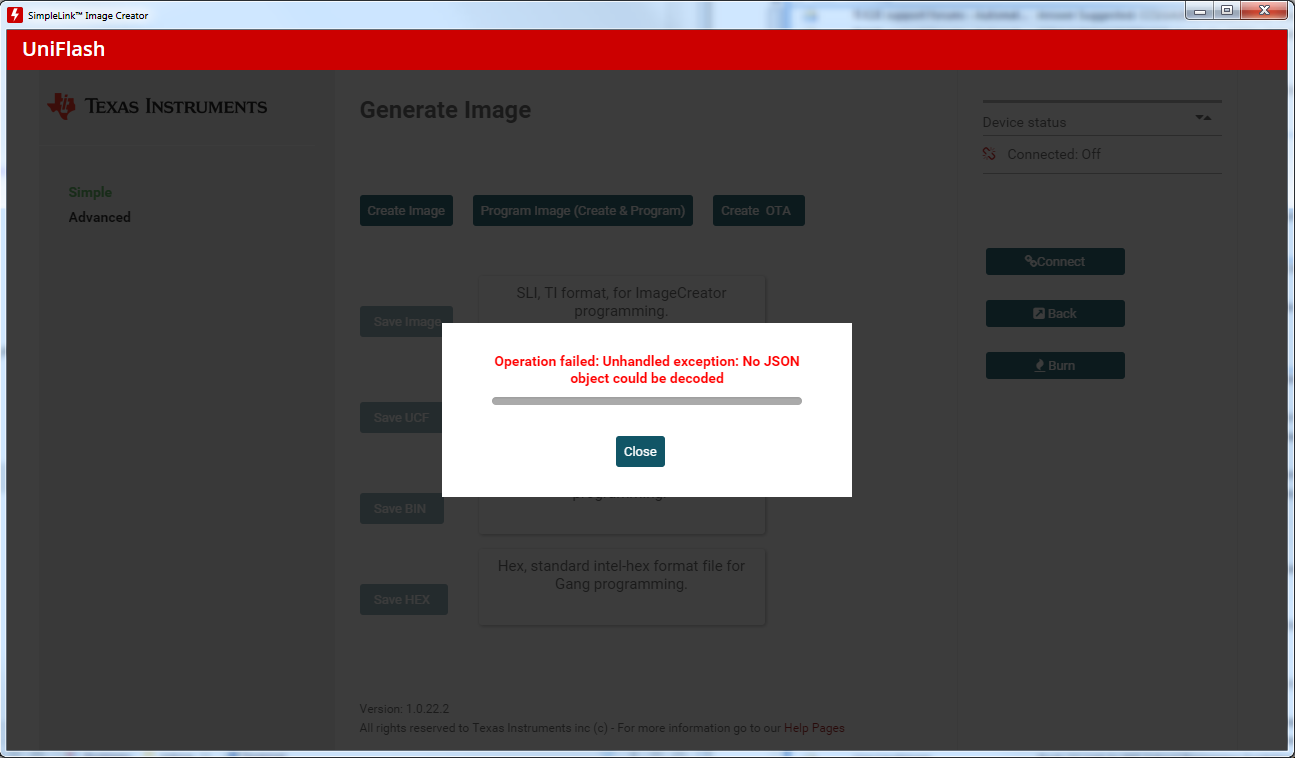
    When I pressed 'Program Image (Create & Program)' the first time I got:

    The second time I pressed 'Program Image (Create & Program)' it worked and downloaded the image.

    At Step 7. "Open a terminal emulator program to verify it runs"

    The program times out every ~5 sec and keeps rebooting:


                     =================================================
                               Per Jesu instructions - local OTA Example Ver. 1.00.00.10
                     =================================================


    [Local ota task] Wake up on Power ON
    [Local ota task] ConfigureHttpServer for secured mode...
    [Local ota task] HTTP Server Stopped
    [Local ota task] HTTP Server Re-started
    [Local ota task] Device is configured in default state
    [Local ota task] SimpleLinkInitCallback: started in role 0
    [Provisioning task] detected device is CC323xSF
    [Local ota task] Host Driver Version: 3.0.1.65
    Build Version 4.7.0.3.31.3.1.0.5.3.1.0.26
    [Local ota task] WlanConnect SSID=USR5465
    [Local ota task] Handle LocalOtaEvent_Timeout in state=1, next=0
    [Common] CC32xx MCU reset request


                     =================================================
                               Per Jesu instructions - local OTA Example Ver. 1.00.00.10
                     =================================================


    [Local ota task] Woken up from Hibernate
    [Local ota task] ConfigureHttpServer for secured mode...
    [Local ota task] HTTP Server Stopped
    [Local ota task] HTTP Server Re-started
    [Local ota task] Device is configured in default state
    [Local ota task] SimpleLinkInitCallback: started in role 0
    [Provisioning task] detected device is CC323xSF
    [Local ota task] Host Driver Version: 3.0.1.65
    Build Version 4.7.0.3.31.3.1.0.5.3.1.0.26
    [Local ota task] WlanConnect SSID=USR5465
    [Local ota task] Handle LocalOtaEvent_Timeout in state=1, next=0
    [Common] CC32xx MCU reset request


                     =================================================
                               Per Jesu instructions - local OTA Example Ver. 1.00.00.10
                     =================================================


    [Local ota task] Woken up from Hibernate

    ...

    ----------------------------------------------------------------------------------------------------------------------------------------

    When I flashed the same project through CCS using 'Load SLI Image to Serial Flash' it works (no timeouts):

                     =================================================
                               Flashed via CCS - local OTA Example Ver. 1.00.00.10
                     =================================================


    [Local ota task] Wake up on Power ON
    [Local ota task] ConfigureHttpServer for secured mode...
    [Local ota task] HTTP Server Stopped
    [Local ota task] HTTP Server Re-started
    [Local ota task] Device is configured in default state
    [Local ota task] SimpleLinkInitCallback: started in role 0
    [Provisioning task] detected device is CC323xSF
    [Local ota task] Host Driver Version: 3.0.1.65
    Build Version 4.7.0.3.31.3.1.0.5.3.1.0.26
    [Local ota task] WlanConnect SSID=USR5465
    [WLAN EVENT] STA Connected to the AP: USR5465 ,BSSID: 0:14:c1:46:86:2d
    [NETAPP EVENT] IP Acquired: IP=192.168.2.12 , Gateway=192.168.2.1
    [Local ota task] Pinging gateway, please wait...
    [Local ota task] pinging to gateway succeeded
    [Local ota task] waiting for new ota upload...

    ----------------------------------------------------------------------------------------------------------------------------------------------

    The timeout rebooting problem with projects loaded via Uniflash, but not CCS, is consistent with my testing over the past month.

    I created the OTA image using Uniflash as you instructed, adding the 'dummy_ota_vendor_key'.

    When I use ota.html with the working program (loaded via CCS) the OTA image fails to load:

    ...

       Total archive file bytes 11432.
    OtaArchive_RunParseTar: 2 files that are mentioned in the ota.cmd were saved
    [OtaArchive_RunParseTar] Downloading File Completed - Size=1192
    [OtaArchive_RunParseTar]   Create/Open for write file dummy_ota_vendor_cert.der

     Hash verification succeeded.
        Total archive file bytes 12902.
    OtaArchive_RunParseTar: 3 files that are mentioned in the ota.cmd were saved
    [OtaArchive_RunParseTar] Downloading File Completed - Size=614
    [OtaArchive_RunParseTar]   Create/Open for write file /sys/mcubootinfo.bin

    [OtaArchive_RunParseTar] !!!!!! SECURITY ALERT !!!!! on pOpenFile, Status=-10365

    [OtaArchive_Rollback] ERROR sl_FsCtl, Status=-10282
    [Link local task] OtaArchive error -20199
    [Link local task] ota put done. status=-1
    [Link local task] waiting for signal from report server
    [ota report task] Error accepting client connection, aborting progress bar...
    [Common] CC32xx MCU reset request


                     =================================================
                               Flashed via CCS - local OTA Example Ver. 1.00.00.10    
                     =================================================


    [Local ota task] Woken up from Hibernate
    [Local ota task] ConfigureHttpServer for secured mode...
    [Local ota task] HTTP Server Stopped
    [Local ota task] HTTP Server Re-started
    [Local ota task] Device is configured in default state
    [Local ota task] SimpleLinkInitCallback: started in role 0
    [Provisioning task] detected device is CC323xSF
    [Local ota task] Host Driver Version: 3.0.1.65
    Build Version 4.7.0.3.31.3.1.0.5.3.1.0.26
    [Local ota task] WlanConnect SSID=USR5465
    [WLAN EVENT] STA Connected to the AP: USR5465 ,BSSID: 0:14:c1:46:86:2d
    [NETAPP EVENT] IP Acquired: IP=192.168.2.12 , Gateway=192.168.2.1
    [Local ota task] Pinging gateway, please wait...
    [Local ota task] pinging to gateway succeeded
    [Local ota task] waiting for new ota upload...
    [Link local task] HTTP GET Request
    [Link local task] characteristic is: version
    [_ReadOtaVersionFile] file ota.dat, status=SL_ERROR_FS_FILE_NOT_EXISTS
    [Link local task] ota bundle version file  does not exist

    --------------------------------------------------------------------------------------------------------------------------------------------------------

    What now?

  • Hi Robert,

    Could you try following the steps again? Only use CCS for generating the binary - nothing else to verify the steps. It's odd we are following the same steps but the results are different. The only errors I got were handshake (-346) but this does not stop OTA from completing.

    Jesu

  • Hi Jesu,

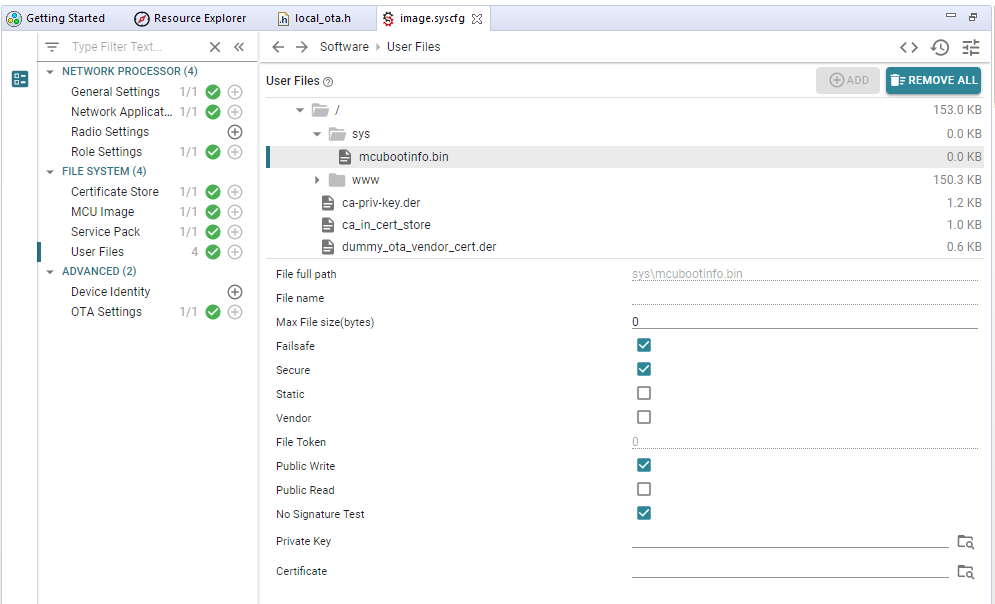
    Good news, I was finally able to update the firmware via the local_ota example (after months of work) by changing the default settings of mcubootinfo.bin in image.syscfg

    I set mcubootinfo.bin to 'Failsafe', 'Secure', 'Public Write' and 'No Signature Test' (No boxes where selected by default).

    I used CCS to generate the .taf file and used ota.html to load it.

    I am not versed in the inner details of the CC32xx SimpleLink software and have no idea why this worked. I was just following a suggestion from Kobi - https://e2e.ti.com/support/wireless-connectivity/wifi/f/968/p/929692/3434861#3434861 that mentioned the mcubootinfo.bin file and I more or less just randomly changed the settings to see if anything worked.

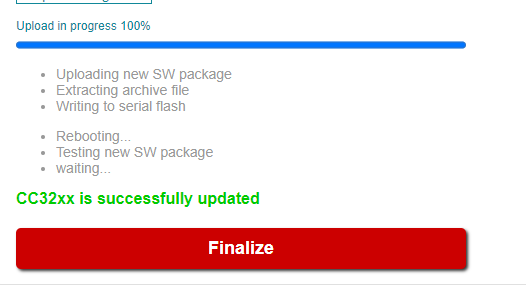
    The progress bar in ota.html still does not work, and sometimes it locks up after the download without showing a successful update, but when I reset the module the firmware is updated which is a huge step forward.

    What browser did you use to show the working progress bar?

  • Hi Robert,

    This is great. I used chrome but keep in mind the web pages we provide are for demo purposes only. They are not tested for compatibility across browsers and only updated when there are fatal errors with it. I too can confirm that I have experienced inconsistencies with the web page. You are free to take the source and modify it to your needs but we do not recommend you use it for release.

    Jesu