This thread has been locked.

If you have a related question, please click the "Ask a related question" button in the top right corner. The newly created question will be automatically linked to this question.

CC2530 TIMER SLEEP Mode

Other Parts Discussed in Thread: CC2530, Z-STACK

Dear  Community,

                  I present a problem that seems to have frustrated more than a few of us. I am trying to get the GenericApp example program that comes with Z-stack 2.4.0-1.4.0 to run in TIMER SLEEP  mode. I am using a CC2530, which means the nominal current draw for should be 1 uA in this state.

                I have taken the following steps:

                1. Commented out  ZDO_COORDINATOR  and    RTR_NWK  in f8wCoord.cfg to specify an end device as a target.

                2. Set POLL_RATE=0 and RFD_RCVC_ALWAYS_ON=FALSE in f8wConfig.cfg

                3. Set POWER_SAVING in the preprocessor (using IAR EW for 8051).

                4. Hardcoded Hal_KeyIntEnable = HAL_KEY_INTERRUPT_ENABLE   in hal_key.c

                5. The only OSAL timer running is the send "Hello World" event, which is running at the maximum allowed OSAL interval (65 s).


              After downloading and debugging this application, I have noticed a few things:

               1. Nominal current consumption between OSAL events is 1.7 mA (much higher than timer sleep mode).

               2. The following code segment in osal_pwrmgr_powerconserve always has "next" values of either 600 or 1000, which means some process has events scheduled

                 every 600 or 1000 ms, despite my attempts to turn everything off except the send message OSAL event in the GenericApp.


                                // Hold off interrupts.
                                HAL_ENTER_CRITICAL_SECTION( intState );

                               // Get next time-out
                              next = osal_next_timeout();

                             // Re-enable interrupts.
                            HAL_EXIT_CRITICAL_SECTION( intState );

                            // Put the processor into sleep mode
                            OSAL_SET_CPU_INTO_SLEEP( next );


This leads me to two questions:

                                1. What further steps are needed to achieve power mode 2?

                                2. What are these events and how do I turn them off? If these events are due to some debug process, how do I turn them off in IAR?


Thanks.


---Stu


  • Hmmm, I've never tried "morphing" the Coordinator configuration to make an End-Device. Is there a particular reason why you're not using the End-Device configuration?

    If you are using the SmartRF05 platform, are you taking your current measurement at jumper P15 (V_EM)?

  • xyzzy said:

    Hmmm, I've never tried "morphing" the Coordinator configuration to make an End-Device. Is there a particular reason why you're not using the End-Device configuration?

    If you are using the SmartRF05 platform, are you taking your current measurement at jumper P15 (V_EM)?

    From experimenting with GenericApp, it seems that commenting out  ZDO_COORDINATOR  and   RTR_NWK  in f8wCoord.cfg  has the same effect as excluding f8wCoord.cfg in the build tree and including the corresponding file for end devices in its place (since there is no preprocessor flag for enabling end device functionality).  Would this functionally differ from the End-Device configuration you would use? 

    I am using a custom platform with a CC2530F256 mcu, but I can precisely measure the current consumption of the mcu at all times with my setup. 

  • Using the End-Device configuration would "automatically" use the End-Device library. You could change the Coordinator configuration to use that library (it defaults to the Router library). I don't know that TI has done any testing of End-Device builds that used the Router library.

  • xyzzy said:
    Using the End-Device configuration would "automatically" use the End-Device library. You could change the Coordinator configuration to use that library (it defaults to the Router library). I don't know that TI has done any testing of End-Device builds that used the Router library.


    Per your suggestion, I have excluded f8wCoord.cfg and f8wRouter.cfg from the build and included f8wEndev.cfg. The power consumption is still the same, which is consistent with what was previously stated.

    There should be no separate "libraries" for the various device types. It should simply be the case that certain device types are enabled or disabled through flags.

    What could these 1000ms and 600ms processes be?

  • Forgive me if I wasn't clear enough in my previous answer. I should have said: "Using the End-Device configuration from the EndDevice option in the IAR IDE would "automatically" use the End_Device library, as well as, other End-Device specific options (such as f8wEndev.cfg, etc)."

    Given that you are working with your own custom platform and a modified Coordinator configuration, I would guess that there may be other changes that might need to be made - you could find them by "diffing" the Coordinator and End-Device configurations in the GenericApp.ewp file that came with ZStack.

    Here's what I would try first: in the IDE, have a look at Project->Options->Linker->Extra Options. Make sure you are using the correct ZigBee library option, ...\EndDevice-Pro.lib

  • Hi,

    You look quite familiar with the TI CC2530 stuff... so, can you please go through my question and help me?


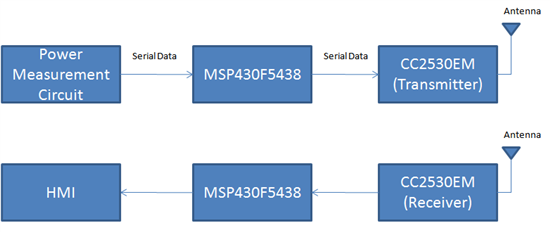
    We are designing a Home Area Network/Energy Management System. For the Wireless Network, we are planning to use TI's CC2530 Development Kit. We already have the the kit with us. We also have the MSP430F5438 Board.

    You can see the overall application block diagram here:


    We are having trouble in understanding the interface between the MSP430 and CC2530EM. We went over the pdf document http://focus.ti.com/lit/wp/slyy022/slyy022.pdf. But, we could not relate it exactly to our application. Also, I am not too sure about whether we use the SmartRF05EB in this circuit or not. 

    So, kindly explain how we can use the components that we currently have to build a wireless communication network.

    Many documents mention CC Debugger. However, we do not have it with us. Will we need to buy one?

    Thank You for your time,

    Devashish Deshpande (806-543-0487)

  • xyzzy said:

    Forgive me if I wasn't clear enough in my previous answer. I should have said: "Using the End-Device configuration from the EndDevice option in the IAR IDE would "automatically" use the End_Device library, as well as, other End-Device specific options (such as f8wEndev.cfg, etc)."

    Given that you are working with your own custom platform and a modified Coordinator configuration, I would guess that there may be other changes that might need to be made - you could find them by "diffing" the Coordinator and End-Device configurations in the GenericApp.ewp file that came with ZStack.

    Here's what I would try first: in the IDE, have a look at Project->Options->Linker->Extra Options. Make sure you are using the correct ZigBee library option, ...\EndDevice-Pro.lib


       Thanks xyzzy. This appears to have solved the problem. I also noticed that one should go to Project->Options->C/C++ Compiler->Extra Options and replace -f $PROJ_DIR$\..\..\..\Tools\CC2530DB\f8wCoord.cfg   with -f $PROJ_DIR$\..\..\..\Tools\CC2530DB\f8wEndev.cfg   in addition to including/excluding the .cfg files from the build and including the above libraries.

      Now the only timer running is that which I specify for my application task.

    Thanks.