A related question is a question created from another question. When the related question is created, it will be automatically linked to the original question.
If you have a related question, please click the "Ask a related question" button in the top right corner. The newly created question will be automatically linked to this question.
The watchdog example is functional. You can see the red LED blinking, if you just run the code.
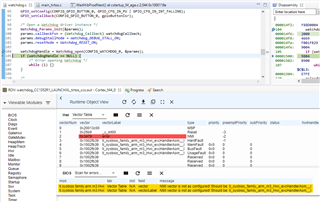
I see that the BIOS scan for errors module prints the message "NMI vector is not as configured! Should be: ti_sysbios_family_arm_m3_Hwi_excHandlerAsm__I". This is because the ROV expects the vector Label for NMI to be "ti_sysbios_family_arm_m3_Hwi_excHandlerAsm__I".
In the watchdog example, the watchdog defines its own handler for the NMI, specifically, you can see this by stepping over the Watchdog_open().
And the ROV sees that it is not labelled as ti_sysbios_family_arm_m3_Hwi_excHandlerAsm__I and raises an error. But it is still functional.
Thanks! Yes, we see that the watchdog works in our project, but we are preparing our device for production and the ROV message worries us a little bit. Is there any way to fix this error in the ROV?