This thread has been locked.

If you have a related question, please click the "Ask a related question" button in the top right corner. The newly created question will be automatically linked to this question.

CC1352P: thread mesh nodes stability.

Part Number: CC1352P


Hi,

I am using CC1352P2 Launch pad for thread mesh.

I created border router as per https://dev.ti.com/tirex/explore/node?node=A__AOrd4hYSnPb.Oj0T9S9jMA__com.ti.SIMPLELINK_ACADEMY_CC13XX_CC26XX_SDK__AfkT0vQ__LATEST&search=Thread 

and Created CLI_FTD device. Project: " cli_ftd_CC1352P_2_LAUNCHXL_tirtos_gcc"

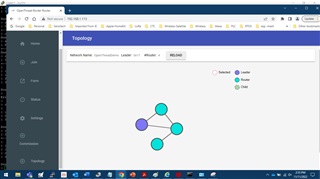
When i use the web interface of boarder router and look for Topology i see section some time i get all nodes represented,

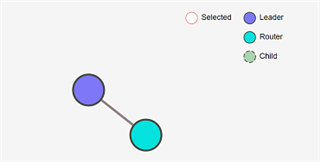
when i use RELOAD, i see that the nodes were missing,

All the nodes are placed almost in same table. still I see some inconsistency in the mesh topology.

Attached some images that show the behavior with All nodes and missing nodes the very minute i refresh the page.

1) How can i ensure the mesh topology stability.

2) Once a topology is set, can we fix the topology as my nodes are mostly fixed.

Thanks

Ramesh.
  • Hi Ramesh,

    Thread mesh network stability is built into the routing capabilities of the protocol.

    TI-OpenThread User's GuideRouters use information from advertisements, such as incoming/outgoing quality and routing cost, to optimize routing reliability. For example, a Router may discover that there is a more efficient route to a destination, and update its routing tables. This algorithm is to ensure that each Router has knowledge of all other reachable Routers in the network, and consequently has the optimal path to all of them.

    Thread Group: Thread is a low-power and low-latency wireless mesh networking protocol built using open and proven standards. Thread solves the complexities of the IoT, addressing challenges such as interoperability, range, security, energy, and reliability. Thread networks have no single point of failure and include the ability to self-heal. 

    Thus a fixed topology cannot be guaranteed.  You will need to build your network and application within the understanding that node relations can change.  Of the nodes missing, locally do they still appear to be joined to the network and operating?  Do they re-appear on the web interface after some time, or capable of returning/rejoining?  You could consider increasing the TX power of devices for greater range capabilities and node stability across distances.

    Regards,
    Ryan

  • Hi Ryan,

    The Web interface is not showing all nodes, and after few seconds a refresh will show them added in the network, 

    I am using the CLI FTD Example, I guess the required MESH credentials are all set within the program, So i am not making any special thread mesh process of  Attach /Join / Commissioning steps to add to the network.

    Once Power ON 

    "ifconfig up" ," set panid ", "set Channel ", and followed by "thread start."

    All nodes are placed very near, to avoid RF related issues.

    The Command "Router table also reflect the state of Web interface.

    > router table
    | 0 | 0 | 32 | 0000000000000000 | 0 |
    | 41 | 0xa400 | 63 | 0 | 0 | 0 | 0 | ea35fdd64eb015af | 0 |

    *Router table command executed on Router ID-41.

    > router table 
    | ID | RLOC16 | Next Hop | Path Cost | LQ In | LQ Out | Age | Extended MAC | Link |
    +----+--------+----------+-----------+-------+--------+-----+------------------+------+
    | 13 | 0x3400 | 16 | 1 | 2 | 2 | 6 | 32ebb53ba9509d6b | 1 |
    | 16 | 0x4000 | 17 | 1 | 3 | 3 | 5 | affbe291acbd845d | 1 |
    | 17 | 0x4400 | 16 | 1 | 3 | 3 | 1 | 06f7044ef37441f9 | 1 |
    | 40 | 0xa000 | 13 | 2 | 0 | 0 | 176 | 0000000000000000 | 0 |
    | 41 | 0xa400 | 63 | 0 | 0 | 0 | 0 | ea35fdd64eb015af | 0 |

    Router table command executed on Router ID-41.

    Thanks

    Ramesh.

  • Is you issue with the Thread Border Router interface that you have to select "Reload" for all nodes to appear?  In this case you could modify the application to perform this button functionality automatically.  You can refer to the Thread Border Router Setup SLA and OpenThread APIs for more information.

    Regards,
    Ryan

  • Hi Ryan,

    My question is that Why the  pressing of  "RELOAD"  with interval of few seconds changes the devices/nodes present in the network.?

    If network is stable it should be showing all nodes all the time i press "RELOAD" i agree the stability if the path changes and nodes are shown.

    Thanks

    Ramesh.

  • My question is that Why the  pressing of  "RELOAD"  with interval of few seconds changes the devices/nodes present in the network.?

    Did devices join during this time?  What changed from the network's perspective in between RELOADs?  The Thread Border Router is likely performing device discovery based on incoming network maintenance packets.

    Regards,
    Ryan

  • Hi Ryan,

    From network perspective, there is no addition or deletion of devices, i just kept pressing "RELOAD"  and every refreshing of page upon "RELOAD" the nodes count changes on every refresh.

    Thanks

    Ramesh.

  • Can you still interact with devices which are not showing on the Thread Border Router interface (see Task 4 and 5 from the SLA), and what is the SimpleLink SDK version for which you are building your RCP and application projects?

    Regards,
    Ryan

  • Hi Ryan,

    rcp version and CLI version is from SDK 6_20_00_29\

    I able to ping the all devices (5 devices )even thought they are not shown in the web interface.

    Thanks

    Ramesh.

  • It appears then that the Thread network is stable and the issue is the interaction between the web interface application and RCP.  You can further reference the https://github.com/openthread/ot-br-posix community discussion forums.

    Regards,
    Ryan