This thread has been locked.

If you have a related question, please click the "Ask a related question" button in the top right corner. The newly created question will be automatically linked to this question.

CC2652R: Compiling into NVS regions

Part Number: CC2652R
Other Parts Discussed in Thread: SYSCONFIG, SIMPLELINK-CC13XX-CC26XX-SDK,

Hi,

I am working on getting NVS working on our application to use it for firmware updates. I have set up several regions in sysconfig and are able to read, write, and erase them but I do not know how to load into them from compile or how to jump to them. One region will be the main program, another the new downloaded program, and another for moving the new to the old location. How do I set it up so that I can assign main to a certain region that I have specified. Right now looking at the memory map it appears to default to memory 0x0 and then after that the regions I made appear. I want to run the main program and use it to load another new program and then jump to the loader and use that to move the new program and then jump to the new program and restart.

Is this a valid utilization plan for the NVS? Or is there another method that would be better. We have a strange communication method so it didn't seem like the bootloader was an option.

TICLANG compiler.

Let me know what information else you might need or insight, little bit of new terrain for me.

  • Hi Seth,

    Are you using a radio protocol?  I recommend that you further investigate the BIM.  The idea is that this standalone application runs on startup and finds a valid application image to jump to using jumpToPrgEntry.  The BIM and application image are loaded to the device separately and share a common header flash space so that valid image flags can be shared.  You can also reference the BLE Enhanced OAD Fundamentals SimpleLink Academy Lab and I would advise becoming familiar with the existing OAD examples from the SIMPLELINK-CC13XX-CC26XX-SDK.  Here too is an example of a custom serial bootloader if the ROM bootloader is insufficient.

    Regards,
    Ryan

  • Hi Seth,

    The BIM searches the image header parameters (imgType & imgVld) to find a valid image to boot up.  Images are validated after being loaded to the storage area by updating the image header before restarting the device.  The image header location is known and shared between applications.

    Regards,
    Ryan

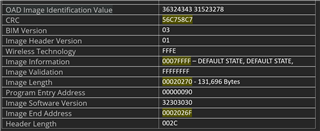
  • Thank you for the reply. I looked at the memory of the application and this is information that is stored at the 0x0 header (Version 1):

    Here is the header information that is flashed at 0x34000 (Version 2):

    I am using the example project in the SDK simple_peripheral_oad_onchip_LP_CC2652R7_tirtos7_ticlang project. Flashing the application with version 1 normally, the application with version 2 at 0x34000 to simulate having downloaded a new version, and the BIM project for onchip.

    When booting up we get the UART logs that say we are running version one. My understanding of the BIM is that it should automatically notice the new version and move it to 0x0 location and remove the 0x34000?

  • If you look at Bim_findImage from the bim_onchip project for the default Debug_unsecure Build configuration, you will see that the BIM jumps into the first valid image if finds, including the imgValid, bimVer, and metaVer fields.  If one passes, the BIM immediately jumps to the program using the prgEntry field without considering any other image headers.  The BIM does not physically move or remove images.

    simple_peripheral_oad_onchip is an example of using a persistent image to update the active image area.  As explained in the Application Execution switching section, the user app marks itself as invalid and then resets so that the BIM jumps to the persistent image at 0x38000 (0x34000 to 0x38000 is reserved for non-volatile memory storage) which performs the update by replacing the user application.  After finishing and marking the new user application's image as valid, the persistent image forces a reset so that the BIM can jump to the updated user application.

    What you are describing sounds more like two user applications, in which case you would need to closely study the Dual_image Build configuration of the bim_onchip project.  This BIM setup will update both header's verifStatus and possibly erase invalid images accordingly. Note that the default simple_peripheral is too large for the dual image configuration, hence persistent_app.

    Regards,
    Ryan

  • Thank you, this was very helpful. I was misunderstanding what the BIM does. So the this is the process that the example follows:

    1. Power
    2. Go to BIM
    3. BIM finds valid application at 0x0 (User application)
    4. application invalidates itself and reset
    5. Go to BIM
    6. BIM finds valid application at 0x38000 (persistent)
    7. Persistent application reads in data and writes the new application at 0x0 where the original application was.
    8. When done validates 0x0 and reset
    9. Go to BIM
    10. BIM finds valid application at 0x0 and starts
    11. Update done

    BIM does not move programs but rather uses the persistent application to load a new program directly where it needs to be.

  • That it an accurate description of on-chip simple_peripheral, on-chip BIM, and persistent application usage.

    Regards,
    Ryan

  • Looking back at the documentation I understand now the dual-on chip and it is my understanding that with dual on chip you can run an application at two separate memory locations. Say we run an application at 0x0 or run a second application at 0x50000. My question is how would we have to compile the second one to run at that memory location or does the chip have the capability to handle this for us? What I mean is do we have to have two separate compiled projects that are mapped to the location for the second application or does the chip handle the offset in memory on its own? Our goal is to have an application running at 0x0 then have that running application download a new application at say 0x50000 then reset and run the new application at its location (0x50000), then to go back and fourth with updates. Is this the valid implementation of the dual-image architecture?

  • You will need to compile the project with different configurations, or use a second project entirely, which locates the second application at the desired offset.  This can be achieved through SysConfig NVS modules, configuration files, and the linker command file.  You have the right grasp of dual-image architecture.  TI provides an example with the zr_sw_ota_client_onchip project, which you can use as reference.  There is also some documentation in the Z-Stack User's Guide.

    Regards,
    Ryan