Part Number: CC2652P
Tool/software:
Currently I am using a module version of CC2652P ( Prod Id : RF-BM-2652P ) which is connected to a SoC via UART Serial communication . In order to perform important certification analysis based on RF part of the module, I need a firmware that help me to tweak some of the RF parameters like channel and transmission power by broadcasting continuous signal.
Along the R&D Process , I came across 'rfDiagnostics' in the Ti Rf Proprietary directory which matched my requirement . So, I compiled and flashed that firmware into the module using default system configuration file present within the directory. Which ultimately made my module inaccessible state a.k.a Bricked. I suspect that I need to change system configuration to match my dongle so that it won't break once again .
I have attached some screenshots of the system configuration settings after I modified it from default settings . I need some validation, So that I can be further flash the firmware into my dongle positively.
Images Attached :
-
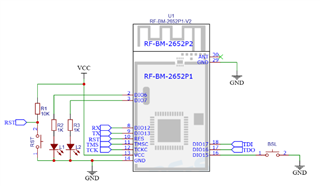
CC2652P Module Version. This is image just for reference.
-
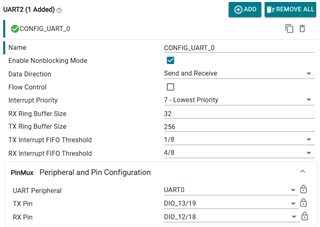
UART Configuration.
-
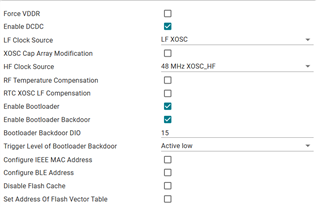
Bootloader Configuration.
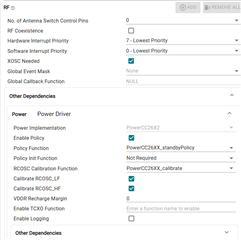
- RF Configuration.
Having image as a reference,
- Since I am not using XDS110 and I need to choose the option DIO13- Tx and DIO12-Rx which has been configured for button 1 and 2 in Launchpad Board . It is raising some warning and i switched the board from launchpad to custom board and i choose an option (device) cc2652p and the warning is clear now .
- I have enabled bootloader backdoor in order to make the dongle to shift back to bootloader when an external button is pressed as described in the CC2652P reference image.
- I am slightly confused about the RF part of the system configuration.
The above-mentioned changes are done based on the reference of ' CC2652P Module Version ' image and product specification mentioned in the datasheet. I hope these configurations will be validated. Kindly suggest me some method to recover my bricked dongles as well. All the above changes are made in system config file having device options as CC2652P .Thank you .
EDIT 27-06-25 : The mentioned configuration is correct for CC2652P (RF-BM-2652P) . UART Settings updated are working Perfectly. Problem Resolved.