This thread has been locked.

If you have a related question, please click the "Ask a related question" button in the top right corner. The newly created question will be automatically linked to this question.

Self Healing


Good day to everyone,

I´ve been searching for this topic at the forum but with little luck. The only related post I found was this one:

http://e2e.ti.com/support/low_power_rf/f/158/p/18156/70461.aspx#70461

The conclusion of this thread that the stack will take care of healing the network in case a change has been made.

Unfortunately I've been having some trouble with the self healing feature of the network. The way I conducted my experiment is by connecting a network like shown in the image.
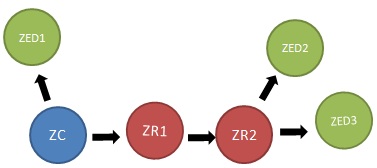
After setting up the network I discovered the network topology as specified in document "Method for Discovering Network Topology". Everything works smoothly. The problem starts when I turn of the node marked as ZR1. What I expected to happen was that the network healed itself and ZR2 joined ZC, but it didn't. I could corroborate this when I attempted another network discovery, the only device that answered was ZED1.

I don't know if I have to enable some flag on the stack, or if I'm missing something. I will greatly appreciate if you could orient me on this topic.

Best regards,

Aldo

P.D. I'm using "ZStack-CC2530-2.5.0"

  • Hello - if ZR2 is out of radio range of the ZC, then the network is physically broken at the radio/next hop level, which is far below the NWK layer where "self-healing" could occur. So, to test the NWK "self-healing" which is basically a test of the mesh-routing self-healing, setup something with several ZR's 1 hop from the ZC and several more ZR's 2 hops from the ZC, like this:


             -----------ZR1A
             |
    ZC ------|----------ZR1B            ZR2---------ZED2A
             |
             |----------ZR1C

    So let's say that ZR2 is within radio range of all ZR1*, but not ZC, makes initial join via ZR1B and thereby you see all messages from ZED2A -> ZC being routed across ZR1B. Then turn off ZR1B and see how the routing repairs and finds another way to get the message from ZED2A to the ZC.

    Obviously, the above is still simplistic, and the more hops, the more interesting to watch the route repair. But alas, the more difficult to sniff to watch this "repair" in action, as the sniffer only has a radius of 1 radio hop.


  • Good day,

    First of all, Dirty Harry thanks for your reply. Actually my experiment was very similar to the experiment you propose. Both ZR1 and ZR2 are in range with ZC. 

    First I put them out of range so ZR2 joins ZR1. After that I put them in the same room (maybe ZC is 3 meters away of ZED3, which are the two most separated nodes). After all nodes are close together, that´s when I turn off ZR1. As commented before I expected ZR2 to change its parent to ZC, but it didn´t happen. If I turn off now ZR2, the child nodes (ZED2 and ZED3) correctly change dad to ZC.

    Another thing, in my application I have a button that when pressed sends a message to ZC. As mentioned by Dirty Harry, after turning off ZR1, when I send a message to the ZC by pressing this button the message arrives correctly. The problem is when I try to send a message from ZC to ZR2, ZED2, or ZED3, this message never arrives.

    I hope I explained everything correctly, thanks for the help.

    Regards,

    Aldo

  • Routers never "re-join", they simply add or remove neighbors from their routing tables according to the route request and ZigBee PRO link status messages that they process. So you will never see ZR2 attempt to rejoin to the ZC just because ZR1 is turned off. I will go out on a limb and say that in your simple scenario, if ZR2 really is within range of the ZC when the ZR1 is turned off (or if it is brought within radio range of the ZC after ZR1 is turrnd off), then it is impossible that the ZC is not correctly finding ZR2 and its ZED's when a message is addressed to any of them. Please attach a sniffer log of the failure that you see.


  • Good day,

    Sorry for replying after so long, Dirty Harry you were right the network is working fine. I made the experimentation with a colleague, we couldn´t see how the rougint table updated but instead we saw the neighbor table update, so we could use that information to keep updated the network.

    Thanks for your help,

    Aldo