This thread has been locked.

If you have a related question, please click the "Ask a related question" button in the top right corner. The newly created question will be automatically linked to this question.

Z Tool commands

Other Parts Discussed in Thread: CC2531, Z-STACK, CC2530

Hi Friends,

                   I am working with one ZC and one ZED and cc2531 dongle as ZNP.And i try to send command from Z tool 2.0 to initialize the network.

My Q:

1.when i send ZDO_Active_EP_REQ i doesn't get any information about the end device or even coordinator also doesn't send any response?

  • 1. Download CC2531ZNP-Pro-Secure_LinkKeyJoin.hex to CC2531 usb dongle (located at C:\Texas Instruments\Z-Stack Home 1.2.0\Projects\zstack\ZAP\ZNP-HexFiles)

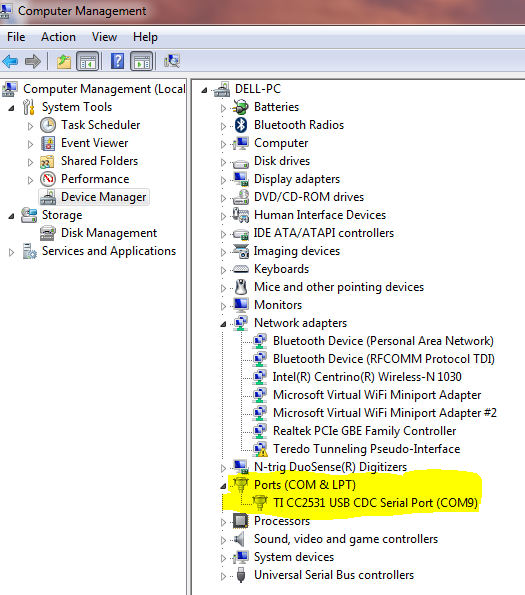
    2. CC2531 usb dongle should be seen on virtual COM port.

     Post

    3. Open Z-Tool and send SYS_PING, SYS_VERSION, and ZDO_ACTIVE_EP_REQ. You should see response like the followings.

  • Hi YiKai Chen,

                           Thanks for your replay.

    In my module i reprogram my Packet Sniffer cc2531 EMk to ZNP-Pro-HexFiles and connect with my PC.Using Z Tool 2.0 i am sending some software Startup procedure as described in CC2530ZNP Interface PDF.I I can get my some success reply.But I don't know it's write or not because mostly it send some success reply.

    My Q:

    1.When i send the SYS_PING, SYS_VERSION, and ZDO_ACTIVE_EP_REQ commands i can't get reply?

    2.When i send SYS_PING from  Z Tool whether it expects the RX message from ZNP or some other device connected       (as ZED )in the network?

  • Where is your ZNP-Pro-Hex from? I had suggest you install Z-Stack Home 1.2 and Download CC2531ZNP-Pro-Secure_LinkKeyJoin.hex to CC2531 usb dongle (located at C:\Texas Instruments\Z-StackHome 1.2.0\Projects\zstack\ZAP\ZNP-HexFiles).

  • Hi YiKai Chen,

    I am using the file in same folder but i am using CC2531ZNP-Pro.hex i am not using CC2531ZNP-Pro-Secure_LinkKeyJoin.hex.

    My Q:

    1.When i send the SYS_PING, SYS_VERSION, and ZDO_ACTIVE_EP_REQ commands i can't get reply?

    2.When i send SYS_PING from  Z Tool whether it expects the RX message from ZNP or some other device connected       (as ZED )in the network?


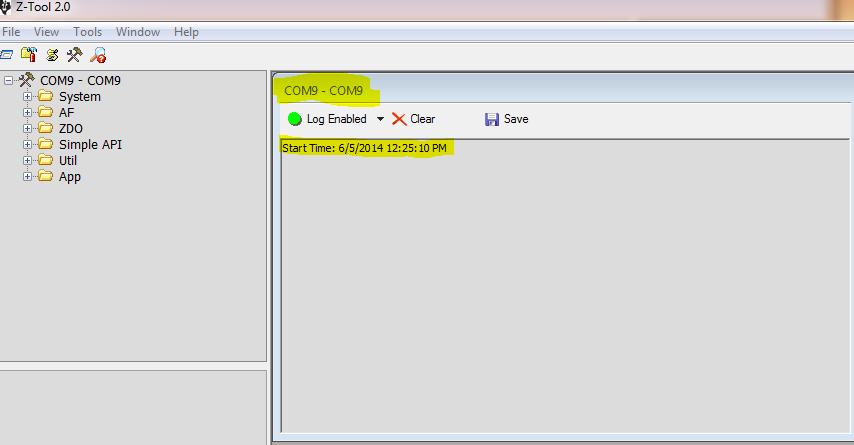
  • Would you show me some screen capture of your Z-Tool and device manager on your PC? Form your description, I don't know how to help.

  • Hi YiKai Chen,

    I reprogram the Packet Sniffer as CC2531ZNP-Pro.hex in that project folder.


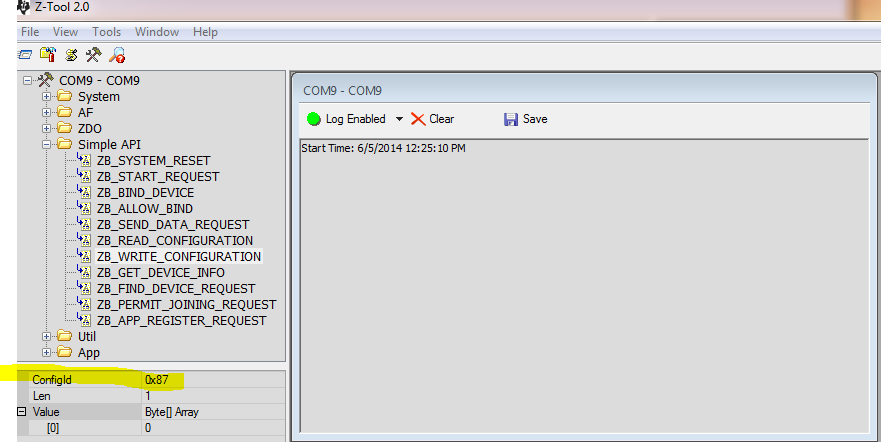
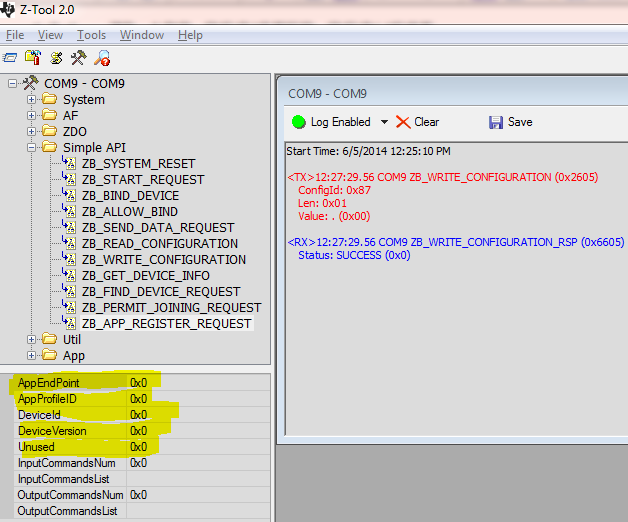
    set configid=0x87

    I got th RX message for Write_configuration successfully.

    But I don't know how to give the value for AppEndPoint,AppProfileID,DeviceID and DeviceVersion

    Could to reply me how to give the value for these parameters?

    And tell me how u know the endpoint value?

  • You should assign profileID, deviceID, deviceVersion, and end point according to Zigbee spec and your application requirement.

  • Hi YiKai Chen.

                            I got the the output as u say.

    My Q:

    1.What are the next step i need to do to send AF_DATA_REQUEST command from Z Tool 2.0?

  • You just need to fill in parameters for AF_DATA_REQUEST and send.

  • Hi YiKai Chen,

         I done that till ZDO_ACTIVE_EP_REQ and get success message only.

    My Q:

    1.I want to send AF_DATA_REQUEST so what are the command i need to send from Z Tool before sending AF_DATA_REQUEST command?

  • You need to have another end device joins to the coordinator and keep the short address of the end device. Then, you can use the short address to send message by AF data request.

  • Hi YiKai Chen,

                             We reprogram the Packet Sniffer as ZNP-PRO.hex file so it work as ZNP COORDINATOR.

    And we have our own board with the capability of cc2530 Zigbee module,So we want to reprogram my board as ZNP END DEVICE.

    How can i reprogram my own board as ZNP END DEVICE?

    And which hex file i need to download my board?


  • You should use the same ZNP-PRO.hex. The host processor must use the ZB_WRITE_CONFIGURATION command to configure the ZCD_NV_LOGICAL_TYPE to make it act as a coordinator, router, or end device.

  • Hi YiKai Chen,

                              In my project we use packet sniffer as ZNP COORDINATOR and we have one another cc2530 Zigbee enabled board and we download general END DEVICE hex file not ZNP END DEVICE hex file.

    How can i get the END DEVICE short address using Z TOOL 2.0?


  • Hi  Sivasankar Sekar,

    Attached is a zip file with 2 scripts for Z-tool, one for a coordinator which is acting as a switch, and another one for a router which acts as a light. These scripts go through the process of setting up a coordinator and a router together with their respective end points, then the coordinator sends an active endpoint request, simple descriptor request and  AF_DATA_REQUEST. Take a look at the scripts and if you still have any questions let me know.

    8507.ZNP_examples.zip

  • Hi Friend,

                                Thanks for your reply.In my project we using one ZC and many ZED we not using ZR ,So can send any script file like connection between ZC TO ZED.

  • Please use the scripts Hector provided as a base reference and modify them according to your needs.


    Please check out the lines where the logical device type is set, ie

     writeCfg(ComPort, 0x87, 0x01, cfgArr);

    Changing from router to end device is easy, as you can see from section 4.2.3.2 in the ZNP API document, just need to modify a paramter for the NVID 0x87.

    Please use CC2530ZNP Interface Specification.pdf document to understand ZNP interface and settings.

    We are providing basic scripts and interface document for people to use the stack and develop their own applications according to their needs.

    Thanks,

    TheDarkSide

  • Hi,

    The script provided for ZC will connect to either a ZR or ZED. If what you want is to modify the ZR script to be a ZED then follow TheDarkSide's advice.