This thread has been locked.

If you have a related question, please click the "Ask a related question" button in the top right corner. The newly created question will be automatically linked to this question.

CC2531 ZigBee/802.15.4 USB dongle

Other Parts Discussed in Thread: CC2591, CC2530, CC2531, PACKET-SNIFFER

Hello,


My customer is using a CC2530 ZigBee SoC and a CC2591 Amp in his product. To test/verify his product, my customer uses his own test GUI, which displays real-time RSSI (receiver signal strength indication, y-axis, dB scale, 10dB/div) vs ZigBee channel (x-axis, channels, frequency). His GUI runs on win8 or win7.


So, my customer's test method uses his own GUI for the software part, and the CC2531 USB dongle (including dongle SW/FW) for the HW part, plus the DUT HW.


The dongle/dongle drivers/FW/?? is giving us much headache:


* no annunciation is seen or heard on any of four PC's when the dongles are inserted into a USB2.0 socket- on 4 different PCs - 2 different dongles


* there is no pop-up "new hardware found", "installing software", etc. message when the dongles are inserted into a USB2.0 socket - 4 PCs - 2 dongles


* you may see nothing that points to the dongle in the PC's device manager- on 4 PCs - 2 dongles


* the dongle does not electrically mate with the PC socket most of the time - on 4 PCs - 2 dongles


* can't find instructions in the docs (check-out the attached "library") on how to re-flash the dongle with factory default calibration FW with a SmartRF05..


* why are we interested in learning how to re-flash the dongle ? -see the first three bullets; we want to re-flash....


* when a dongle finally connects to a COM port after much hassle it does work and connects to remote Zig-Bee node


Any help would be appreciated.

Regards,

David

  • Hi David,

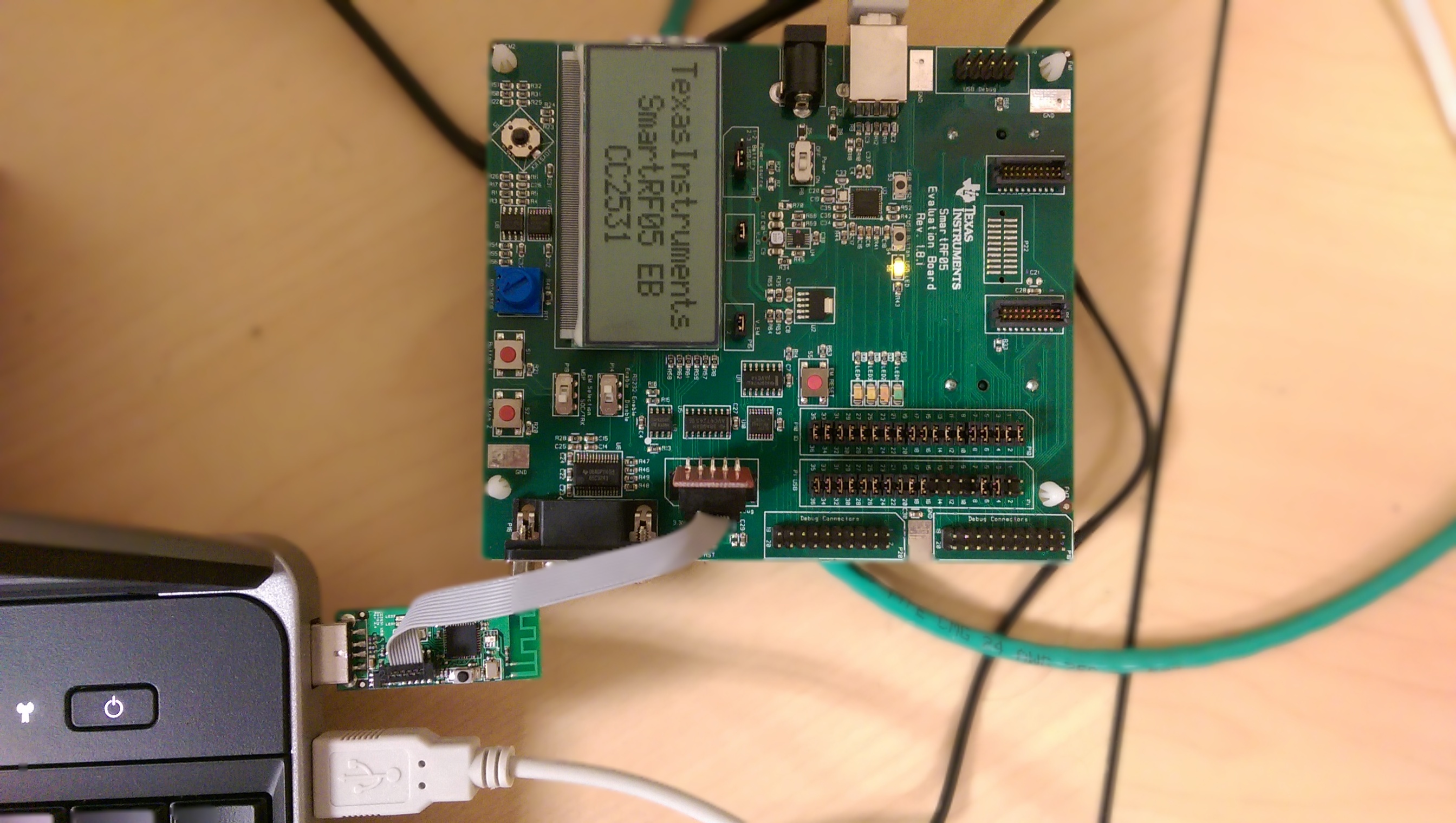
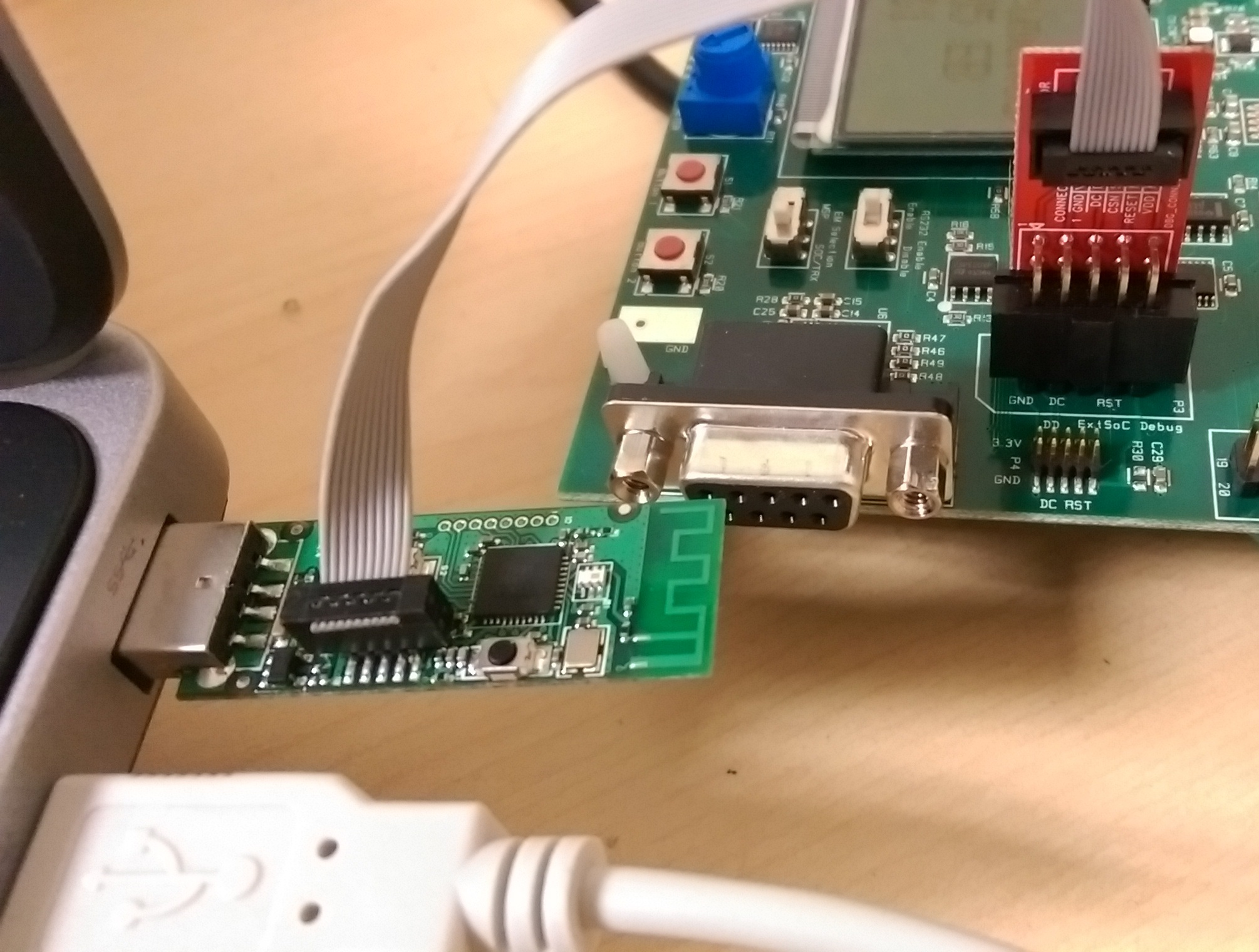
    To reflash the CC2531 usb dongles using the SmartRF05 board you will have to do the following steps:

    -Plug in the SmartRF05 board and the CC2531 usb dongle to the computer and to each other as shown in the pictures bellow.


    -Now you can flash the usb dongle using IAR or Texas Instruments SmartRF Flash Programmer

    -If you are using IAR, open the project that you wish to flash into the dongle and press CTRL+D or go to the menu Project->Download and Debug

    -When using SmartRF Flash Programmer, select the image that you want to flash into the dongle in the box that says Flash image:.
    Then select Erase,program and verify, in the Actions box and finally click in the Perform actions button.
    If the dongle is succesfully flashed, the program should display
    CC2531 - ID9740: Erase, program and verify OK
    in the text box below the Perform action button.

    Hopefully this helps solve the problem.

    Hector Ramos

  • Hi David,

    You can refer to CC2531 EMK quick start guide. If you install packet sniffer, you can find FW sniffer_fw_cc2531.hex for CC2531 at C:\Program Files\Texas Instruments\SmartRF Tools\Packet Sniffer\bin\general\firmware\ .

  • Thank you Hector and Yikai for your help.

    Unfortunately I am still having problems using the dongle. I am using a new CC2531: It annunciates now. My customer has their own GUI which displays RSSI vs channel (frequency). I think I'm supposed to be using customer's driver, but I don't know (1) where it goes, (2) if I need to install TI's Packet-Sniffer + drivers, software, (3) where the dongle is supposed to appear in win 7 device manager, (4) where my customer's drivers should be located, and (5) if my customer's drivers render a GUI which requires the user choose a COM port. Does this help you conclude anything?

    Thanks,

    David

  • Hi,

    If you are using the dongle with a Packet-Sniffer firmware, it should appear under "Cebal controlled devices" in Win 7 Device Manager, if the drivers are properly installed.

    You mention that the costumers GUI asks you to select a COM port, this makes me think that maybe you don't need to use the Packet Sniffer firmware. This is because if you are using the Sniffer firmware, the dongle wont be recognized as a serial device therefore it wont be usable through the COM port. My guess is that either you will need to flash the dongle with the ZNP firmware or they are using their own firmware.

    Regards,
    Hector

  • Hi David,

    You question is quite unclear. Does your customer try to implement SW like packet sniffer but only shows RSSI on it? If so, does the customer implement FW on CC2531 usb dongle or use sniffer_fw_cc2531.hex?