This thread has been locked.

If you have a related question, please click the "Ask a related question" button in the top right corner. The newly created question will be automatically linked to this question.

CC2538 CDC USB communicate with UART

Other Parts Discussed in Thread: CC2538

Hello All,

I am going to connect CC2538EM board to my sensor, and I want to send sensor data to PC through CC2538EM USB port (not the SmartRF06 USB port).

Now, I download usblib code to CC2538EM and I can find USB port. I want to use CC2538 process my sensor data and then sent it to USB port through UART, so the question is how should I build relationship between USB CDC to UART? Is there example code available?

  • Hi,

    Yes there is sample code available go to http://www.ti.com/tool/cc2538-sw and download the CC2538 foundation firmware. in there you will find an example under
    cc2538_foundation_firmware_1_0_1_0\usblib\cc2538\examples\cdc\projects\iar 

    Hector

  • Hello Hector,

    Thank you for your response. I got the code you mentioned, but I am still confused that how can I send data to CDC usb port.

    Assume that I want to send the letter 's', 'p', 'i' to the virtual usb port and then display it on Tera Term, can you please provide some example code?

    Tao

  • Hi Tao,

    Open the sample project that I mentioned in the previous post, open the file main.c and replace the main(void) function with the following code:

    int main(void)
    {
    
        //
        // Initialize board and system clock
        //
        bspInit(SYS_CTRL_32MHZ);
    
        //
        // Initialize buffers
        //
        memset(&usbCdcInBufferData, 0x00, sizeof(USB_EPIN_RINGBUFFER_DATA));
        usbCdcInBufferData.pBuffer = pInBuffer;
        usbCdcInBufferData.size = sizeof(pInBuffer);
        usbCdcInBufferData.endpointReg = USB_F4;
        usbCdcInBufferData.endpointIndex = 4;
        usbCdcInBufferData.endpointSize = 64;
        memset(&usbCdcOutBufferData, 0x00, sizeof(USB_EPOUT_RINGBUFFER_DATA));
        usbCdcOutBufferData.pBuffer = pOutBuffer;
        usbCdcOutBufferData.size = sizeof(pOutBuffer);
        usbCdcOutBufferData.endpointReg = USB_F4;
        usbCdcOutBufferData.endpointIndex = 4;
        
        
        uint8_t spi[] = {'s','p','i','\n','\r'};
        uint16_t spiLength = 5;
    
        //
        // Enable the USB interface
        //
        usbCdcInit(76800);    
    
        //
        // Main loop
        //
        while (1) {
    
            //
            // Process USB events
            //
            usbCdcProcessEvents();
    
            //
            // Implement COM-port loopback
            //
            uint16_t count = usbibufGetMaxPushCount(&usbCdcInBufferData);
            uint16_t maxPopCount = usbobufGetMaxPopCount(&usbCdcOutBufferData);
           
            if (count > maxPopCount)
            {
                count = maxPopCount;
            }
            if (count)
            {
                usbobufPop(&usbCdcOutBufferData, pAppBuffer, count);
                 //
                // send the string "spi" to console
                //
                usbibufPush(&usbCdcInBufferData, spi, spiLength);
            }
        }
    }

    This code sends the word "spi" to the console every time you press a key on your keyboard

    Hector

  • Hello Hector,

    Thank you very much for your kind help. 

    Is there USB CDC library specification available?

    I am going to get data from my sensor and then send the data to PC through USB CDC interface.

    Best Regards,

    Tao

  • You can find some information about the USB library under 

    C:\<Installation folder>\cc2538_foundation_firmware_1_0_1_0\docs\cc2538_usb_firmware_library.chm

    Hector

  • Hello Hector,

    I am going to collect data through USB, so I need the data to display on the screen without pressing a key. Can you please give me example regarding to this function.

    Thanks,

    Tao
  • Hi,

    This will depend in your application and how you want to implement this functionality. Whenever your application needs to send data back to the USB host use the usbibufPush function to send the data.

  • Hi Hector,

    Can you please give me an example code to output: 1, 2, 3 , 4, 5,......

    The parameter for pSrc is 8 bits, so I am not sure how to output a number. 

    Following is my code: 

    #include "bsp.h"
    #include "string.h"
    #include "usb_firmware_library_headers.h"
    #include "usb_cdc.h"
    #include "usb_in_buffer.h"
    #include "usb_out_buffer.h"


    //*****************************************************************************
    //
    // Local variablse
    //
    //*****************************************************************************
    USB_EPIN_RINGBUFFER_DATA usbCdcInBufferData;
    USB_EPOUT_RINGBUFFER_DATA usbCdcOutBufferData;
    static uint8_t pInBuffer[128];
    static uint8_t pOutBuffer[128];
    // static uint8_t pAppBuffer[128];
    
    
    //*****************************************************************************
    //
    // Implementations of function that are required by usb framework.
    //
    //*****************************************************************************
    void usbsuspHookEnteringSuspend(bool remoteWakeupAllowed) 
    {
        if (remoteWakeupAllowed) 
        {
        }
    }
    
    
    void usbsuspHookExitingSuspend(void) {
    }
    
    
    //
    // Application entry point
    //
    int main(void)
    {
    
        //
        // Initialize board and system clock
        //
        bspInit(SYS_CTRL_32MHZ);
    
        //
        // Initialize buffers
        //
        memset(&usbCdcInBufferData, 0x00, sizeof(USB_EPIN_RINGBUFFER_DATA));
        usbCdcInBufferData.pBuffer = pInBuffer;
        usbCdcInBufferData.size = sizeof(pInBuffer);
        usbCdcInBufferData.endpointReg = USB_F4;
        usbCdcInBufferData.endpointIndex = 4;
        usbCdcInBufferData.endpointSize = 64;
        memset(&usbCdcOutBufferData, 0x00, sizeof(USB_EPOUT_RINGBUFFER_DATA));
        usbCdcOutBufferData.pBuffer = pOutBuffer;
        usbCdcOutBufferData.size = sizeof(pOutBuffer);
        usbCdcOutBufferData.endpointReg = USB_F4;
        usbCdcOutBufferData.endpointIndex = 4;


        uint16_t spiLength = 10;
    
        //
        // Enable the USB interface
        //
        usbCdcInit(115200);    //void usbCdcInit(uint32_t baudrate);
    
        //
        // Main loop
        //
        uint8_t i = 0;   
        while (1) 
        {
            //
            // Process USB events
          
          uint8_t* psr;
          psr=&i;
            //
          usbCdcProcessEvents();      
            //
            // Implement COM-port loopback
            //
          uint16_t count = usbibufGetMaxPushCount(&usbCdcInBufferData);
          uint16_t maxPopCount = usbobufGetMaxPopCount(&usbCdcOutBufferData);
          
          if (count > maxPopCount)
          {
            count = maxPopCount;
          }
          if (count)
          {
            // usbobufPop(&usbCdcOutBufferData, pAppBuffer, count);
            //
            // send the string "spi" to console 
            //
            usbibufPush(&usbCdcInBufferData, psr, spiLength);      
            
          }
          i++;
          
        }
    }
    

  • However, I get the results from terminal like:

  • It seems that your output of serial port is in hex format. You should use another tool that can show hex format to check what these characters are.
  • The reason why you see that on the terminal is because the terminal will print character in ASCII and you are sending raw numbers which are not being properly converted to its equivalent in ASCII.
    Also in your code you are using the pointer psr which length is 1 but when you send it back you say the size of the buffer is 10.
    Note that pSrc is a pointer to the buffer that contains the string that will be sent to the USB host so for example if you want to send the number 25 you will have to have a buffer with the character '2' and '5' instead of sending the integer 25.
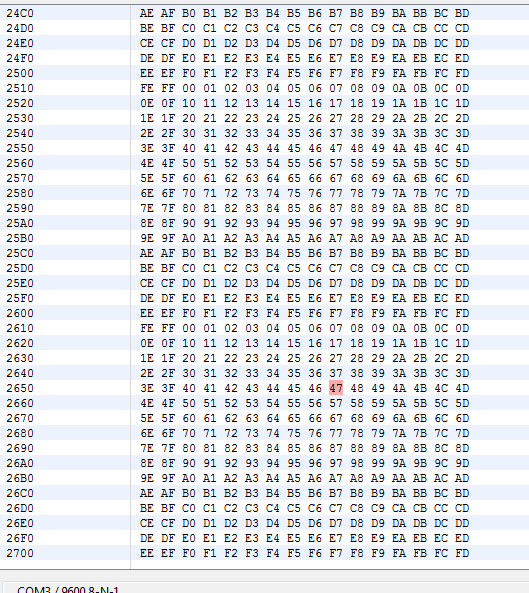
  • Hello YiKai,

    Thank you for your information. I try to use other serial port terminal, and the hex format for my output like the following figure.

    Now, I am lost, and I do not know how to solve this problem.

  • The output is regular and sent by your application. Why don't you know where it is from?
  • did you change spiLength to 1 instead of 10?

  • Hello Hector,

    The results are correct after I change the spiLength to 1.