This thread has been locked.

If you have a related question, please click the "Ask a related question" button in the top right corner. The newly created question will be automatically linked to this question.

how to dual the UART RX data in ISR mode

Other Parts Discussed in Thread: CC2530, Z-STACK

Hi everyone!

                 i open the ZTOOL_P1 , HAL_UART, HAL_UART_ISR in the project?

                 as we know ,while ZTOOL_P1 setup , the zstack will use  MT data structure in UART  communication

                 how could we simulate the data in PC  send to zigbee? or can only send one byte whatever  we want ?

                and  where could we dual the UART RX data  in zstack   while  under UART_ISR mode

  • Hi,

    I am not sure I understand your question, are you trying to use MT commands to communicate with the ZigBee device or do you want to know if it is possible to send data to the ZigBee device without using MT commands?

    if you want to send MT commands from your PC to your ZigBee device you can use Z-Tool or you can take a look at the ZNP Host Framework ( www.ti.com/.../tidc-znp-host-sw3 ).

    If you want to send data to your device and the data is not a MT command you can use the AF_DATA_REQUEST command addressed to itself and then in your application handle the data inside that AF_DATA_REQUEST accordingly.

    Regards,
    Hector
  • Hi Hector,sorry for my poor description。
    it was a complicated sensor which need to add a MCU work with it 。
    the MCU collect the sensor data and communicated with CC2530( which running zstack)by using UART 。

    and there is not only one type data will be collected , it also include temperature,humidity and so many。。

    so i think there should be a “protocol” while MCU communicating with CC2530.

    and i saw that MT uart function was using a structure as below:

    SOP | MT CMD | FCS |
    | 1 | 3-256 | 1 |

    so could i using this structure in this communication?
    and the zstack is finish of the data parsing。
    may be that is wrong ,so that is my first question。


    anyway,nomatter there is need to build a new “protocol” or not,

    when i enable the HAL_UART_ISR, where do i receive the UART RXdata in zstack?

    is that a system event?could i catch it in APP.c ? what is event name ?
    as key ISR mode ,it will be turn into KEYCHANGE while key press。
    so how could i get those data in zstack App.c
  • If you look at the document Z-Stack Monitor and Test API.pdf under C:\Texas Instruments\Z-Stack Home 1.2.2.42930\Documents\API you can see all the commands the MT protocol has. Using the MT commands you have access to the ZigBee API in Z-Stack. If the reason why you need to send the sensor data to the CC2530 is because you will send that data to another device over the air, then you can do that directly from the host MCU using the AF_DATA_REQ MT command. If for some reason you need to pre process the data in the CC2530 before sending it over the air then you will have to modify the way MT commands are handled since if the MT command passed over UART is not a valid command then it will be dropped. If you want to implement your own protocol over UART I suggest looking at the file MT_UART.c.
  • Hi Hector

            as  you said ,i could do that directly by uing  AF_DATA_REQ MT command,

           could i download the ZNP image in the CC2530 ,and Transplant the ZAP for My MCU (STM8S003K3)in this mode

           but i don't know whether the STM8S is right for replace MSP430?

           STM8S003   :  8K  flash ,1K  RAM

           MSP430 :


  • According to my experience, STM8S might be too small for ZAP.

  • Yeah ,i saw the ZAP sample , it was use MSP543 which having more flash and RAM than STM8S

    so i think that it is impossible to using STM8S


    Yikai , could i always download a SOC image in CC2530,and MCU just using MT format communicate with CC2530~~~~

    maybe it will be more complicated,but it will save a lot RAM and flash for STM8S
  • Yes, you can download a SOC image in CC2530,and MCU just using MT format communicate with CC2530.
  • Hi  Yikai

             I define a function in APP  system EVENT,


    uint16 zclSmartplug_event_loop( uint8 task_id, uint16 events )
    {
      afIncomingMSGPacket_t *MSGpkt;

      (void)task_id;  // Intentionally unreferenced parameter

      if ( events & SYS_EVENT_MSG )
      {
        while ( (MSGpkt = (afIncomingMSGPacket_t *)osal_msg_receive( zclSmartplug_TaskID )) )
        {
          switch ( MSGpkt->hdr.event )
          {
           。。。 
            case CMD_SERIAL_MSG:
                zclVibration_ProcessUartData((mtOSALSerialData_t *)MSGpkt);
              break;    
             
             
            default:
              break;
          }
        }
      }

       but the compiler showing error as below

       Error[Pe079]: expected a type specifier 

    why i can't  define (mtOSALSerialData_t *)MSGpkt ?


  • You can't define your own event in SYS_EVENT_MSG. You have to create application level event. You can refer to how SampleLight creates SAMPLELIGHT_MAIN_SCREEN_EVT.
  • Hi Yikai
    if coding it as application level event, how could i get the MT data ??/


    if ( events & Smartplug_MAIN_SCREEN_EVT )
    {
    giLightScreenMode = LIGHT_MAINMODE;
    zclSmartplug_LcdDisplayUpdate();

    return ( events ^ Smartplug_MAIN_SCREEN_EVT );
    }
  • You should receive MT command in MT loop and send event notification to application.
  • Hi Yikai ,
             how could we get the MT data which come from the PC ?

             i simulate the MT format  sending a data to Zstack ,

            and it could be OK stop at case CMD_SERIAL_MSG:


            but i am failed  to send the received data back to PC again, 

            and that it was only success at the first time


    static void zclVibration_ProcessUartData(mtOSALSerialData_t *pInMsg)
    {
      uint8 *pMsg;   
      uint8 *pBuffer;
      uint8 datalength;
      uint8 i;
      pMsg = pInMsg->msg;
     
        datalength = *pMsg++; 

        pBuffer = osal_mem_alloc(datalength); 

        if(pBuffer != NULL)
        {
          for(i = 0;i < datalength; i++)
          *pBuffer++ = *pMsg++;
          HalUARTWrite(0,pBuffer,datalength);
         
    osal_mem_free(pBuffer);
        }
       
    }


  • If you set a breakpoint in zclVibration_ProcessUartData, do you receive UART data from PC after first time?
  • Yes, it was only success in the first time ,
    when i continue to running ,and send the same data again , it could not catch the breakpoint which on the same place
  • Do you have to use standard MT commands in your application? If it is not mandatory, I would suggest you initial your own UART and you can process UART TX/RX directly in application.
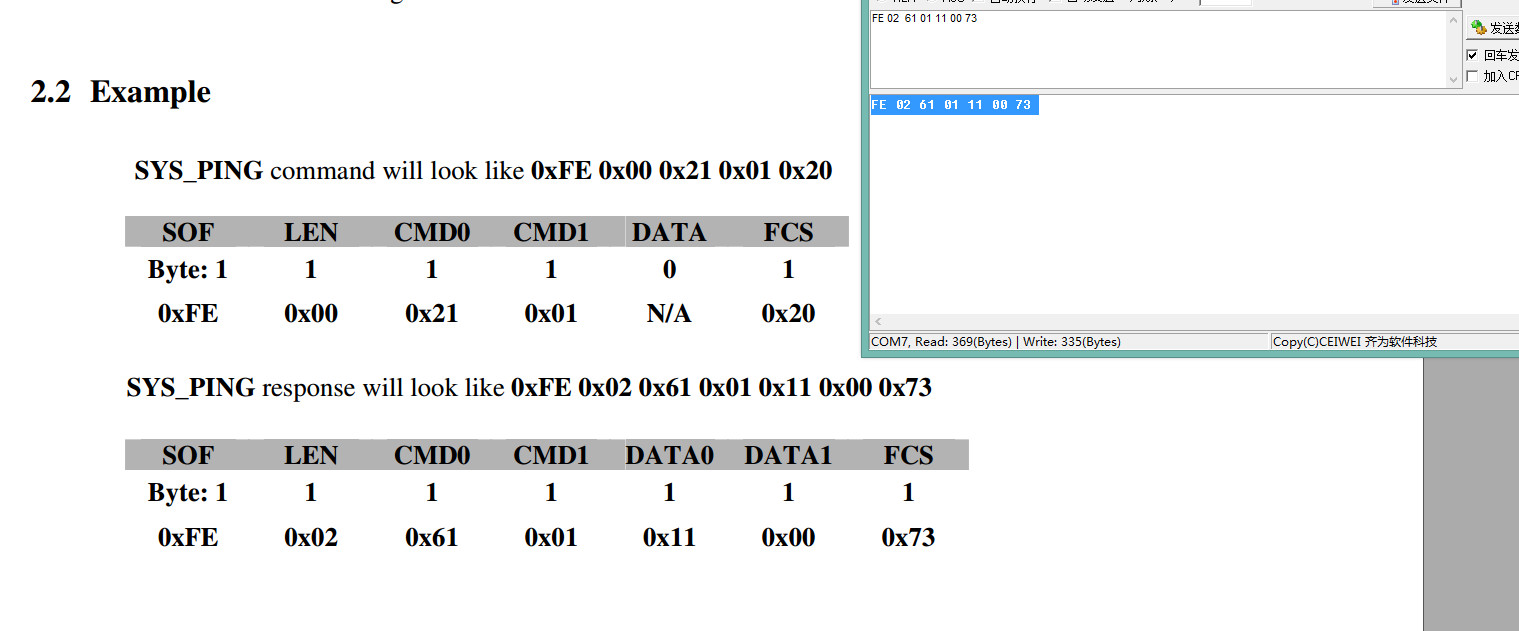
  • FE 02 61 01 11 00 73

    it same with MT format about SYS_PING
  • You misunderstand my question. I mean do you need to use MT commands in your application? Or you only need to use UART communication and don't have to be MT commands.
  • En , i want to use UART communication ,But i also want to use MT data format, because zstack finish the parse process in CC2530 side, i only coding the MCU side to parse data as MT data format。

    is that ok ?

    and it was not certainty make the ZAP for STM8S003 is OK。 so that is the only way i have choose
  • Since I see you are implement something like smart plug, I would suggest you make CC2530 as host and STM8S003 as slave. Then, you can send command from CC2530 to STM8S003 for metering data or something and CC2530 sends data.
  • yeah ,that is what i want to do。

    but i also want to make the data as MT format, and zstack will using MT_UartProcessZToolData() to parse the data and send for App.c


    but now i don't know how to recevice the data in APP.C , whether adding below code in app.c SYS_TERM event loop is right or not ?

    case CMD_SERIAL_MSG:
    zclSmartplug_ProcessUartData((mtOSALSerialData_t *)MSGpkt);
    break;

    it could only catch the data first time....


    and there is another question ,when all success , how could i parse data as MT format, because now i only use the MT command to testing
  • You can create a buffer and copy UART receiving data in it. Then, you can use osal_set_event to send a event to notify application to process the buffer.
  • 1. creat a buffer and copy UART receiving data =======>>>>> is that making a function replace the code of uartConfig.callBackFunc = NULL; ????? and do not define ZAPP_P1 and ZTOOL_P1 ?????

    2. use osal_set_event =====>>>>> do you mean define a app event ,and make a timer to checking it again and again? i think there is a way that zstack will auto sending the event to app.c , if uart received something。but what is the name of this event ? i am searching
  • 1. No, I don't meant to replace it. I mean when you receive the MT command you want, you can copy it to your buffer and set event for application to process it.
    2. Yes to set a event but don't have to check periodically. When you send event by osal_set_event, osal will do callback for you.
  • 1. as we know ,zstack had finished parse Uart received data and set event to APP.C When we define ZAPP_P1 or ZTOOL_P1。

    when define ZAPP_P1, zstack using MT_UartProcessZAppData ,and set SPI_INCOMING_ZAPP_DATA event to APP.c

    when define ZTOOL_P1, zstack using MT_UartProcessZTOOLData ,and set SPI_INCOMING_ZTOOL_DATA event to APP.c


    and i also could catch it in APP.C after i add those event mark (but only the first time )


    why we need to define a new event for receiving???
  • I am confused by you. If you can specify which MT command you use to receive your own data from UART, I will try to advise.
  • Hi Yikai

                 i am confused the which type should  i using to get the uart received data from the MT receiving function。

                 when i using (osal_event_hdr_t *) , i could not getting the data 。

                 when i using  (uint8 *) ,i could not getting the all of them


  • It was unbelievable, that msg_ptr->event was always showing unavailable ,although it was setting SPI_INCOMING_ZAPP_DATA

  • IAR can't show local variable in watch. You can add a global point to get msg_ptr if you need to watch it.
  • OK, but could you please tell me ,which  type of data  should i using in APP.c   receiving function ;

    method 1:

           case SPI_INCOMING_ZAPP_DATA:

                   zclSmartplug_ProcessUartData((uint8 *)MSGpkt);

             break;

    method 2:

           case SPI_INCOMING_ZAPP_DATA:

                   zclSmartplug_ProcessUartData((osal_event_hdr_t *)MSGpkt);

             break;

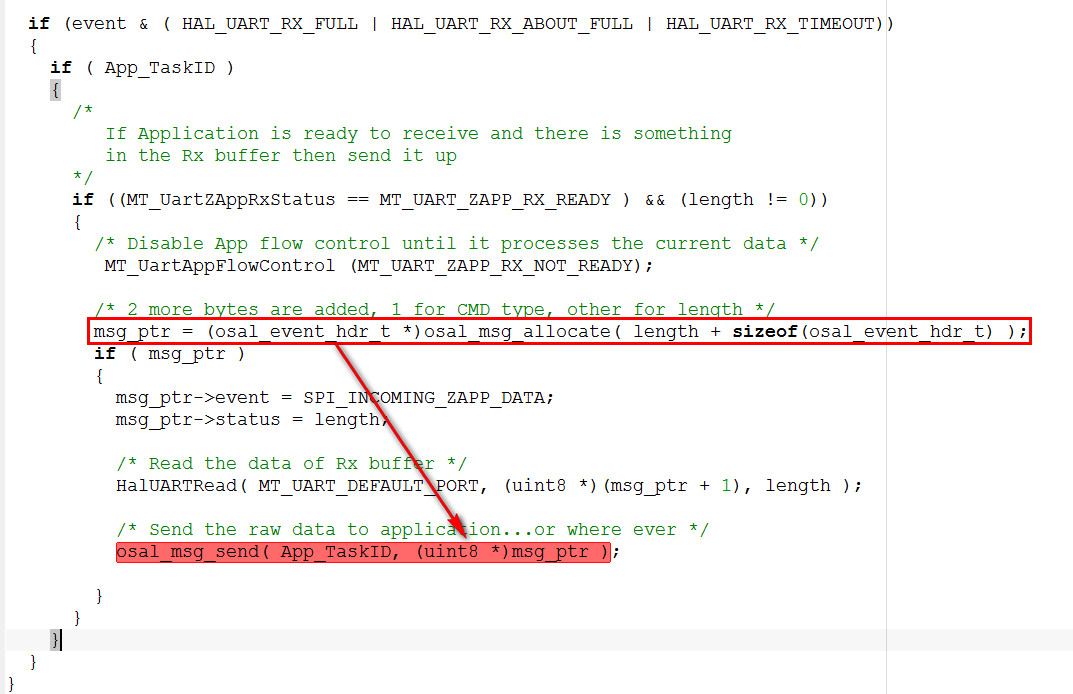
    i was confused with the MT_UartProcessZAppData() function  in MT_UART. c

            msg_ptr = (osal_event_hdr_t *)osal_msg_allocate( length + sizeof(osal_event_hdr_t) );
            if ( msg_ptr )
            {
              msg_ptr->event = SPI_INCOMING_ZAPP_DATA;
              msg_ptr->status = length;

              /* Read the data of Rx buffer */
              HalUARTRead( MT_UART_DEFAULT_PORT, (uint8 *)(msg_ptr + 1), length );

              /* Send the raw data to application...or where ever */
              osal_msg_send( App_TaskID, (uint8 *)msg_ptr );
             
            }

    what is the final type of data  it sending to App.c?

  • It doesn't matter since it is only a pointer. You can use zclSmartplug_ProcessUartData((osal_event_hdr_t *)MSGpkt); to directly map it to osal_event_hdr_t pointer. Or, you can use zclSmartplug_ProcessUartData((uint8 *)MSGpkt); and cast unit8 pointer to osal_event_hdr_t pointer in zclSmartplug_ProcessUartData.
  • Hi Yikai
    when i use osal_event_hdr_t type, i don't know how to get out the data

    static void zclSmartplug_ProcessUartData(uint8 *pInMsg)//osal_event_hdr_t
    {
    uint8 *pBuffer;
    uint8 datalength;
    uint8 i;

    datalength = pInMsg->status;; // get data length

    pBuffer = osal_mem_alloc(datalength);

    if(pBuffer != NULL)
    {
    for(i = 0;i < datalength; i++)
    *pBuffer++ = *pInMsg++; // at this code , it always showing error ,because data type are different
    HalUARTWrite(0,pBuffer,datalength);
    osal_mem_free(pBuffer);
    }
    MT_UartAppFlowControl (MT_UART_ZAPP_RX_READY);
    }


    when i use unit8 type,and code a receiving data function as below

    static void zclSmartplug_ProcessUartData(uint8 *pInMsg)//osal_event_hdr_t
    {
    uint8 *pBuffer;
    uint8 datalength;
    uint8 i;

    *pInMsg++; // get event name
    datalength =*pInMsg++; // get data length

    pBuffer = osal_mem_alloc(datalength);

    if(pBuffer != NULL)
    {
    for(i = 0;i < datalength; i++)
    *pBuffer++ = *pInMsg++;
    HalUARTWrite(0,pBuffer,datalength);
    osal_mem_free(pBuffer);
    }
    MT_UartAppFlowControl (MT_UART_ZAPP_RX_READY);
    }


    but it could not receiving anything
  • Try my revised codes in the followings:
    static void zclSmartplug_ProcessUartData(uint8 *pInMsg)//osal_event_hdr_t
    {
    uint8 *pBuffer;
    uint8 *pBuf_tmp;
    uint8 datalength;
    uint8 i;
    osal_event_hdr_t *msg_ptr=(osal_event_hdr_t *)pInMsg;

    datalength =msg_ptr->status; // get data length

    pBuffer = osal_mem_alloc(datalength);
    pBuf_tmp=(uint8 *)(msg_ptr + 1); //get the UART buffer point to pBuf_tmp

    if(pBuffer != NULL)
    {
    for(i = 0;i < datalength; i++)
    *pBuffer++ = *pBuf_tmp++;
    HalUARTWrite(0,pBuffer,datalength);
    osal_mem_free(pBuffer);
    }
    MT_UartAppFlowControl (MT_UART_ZAPP_RX_READY);
    }
  • Hi  Yikai

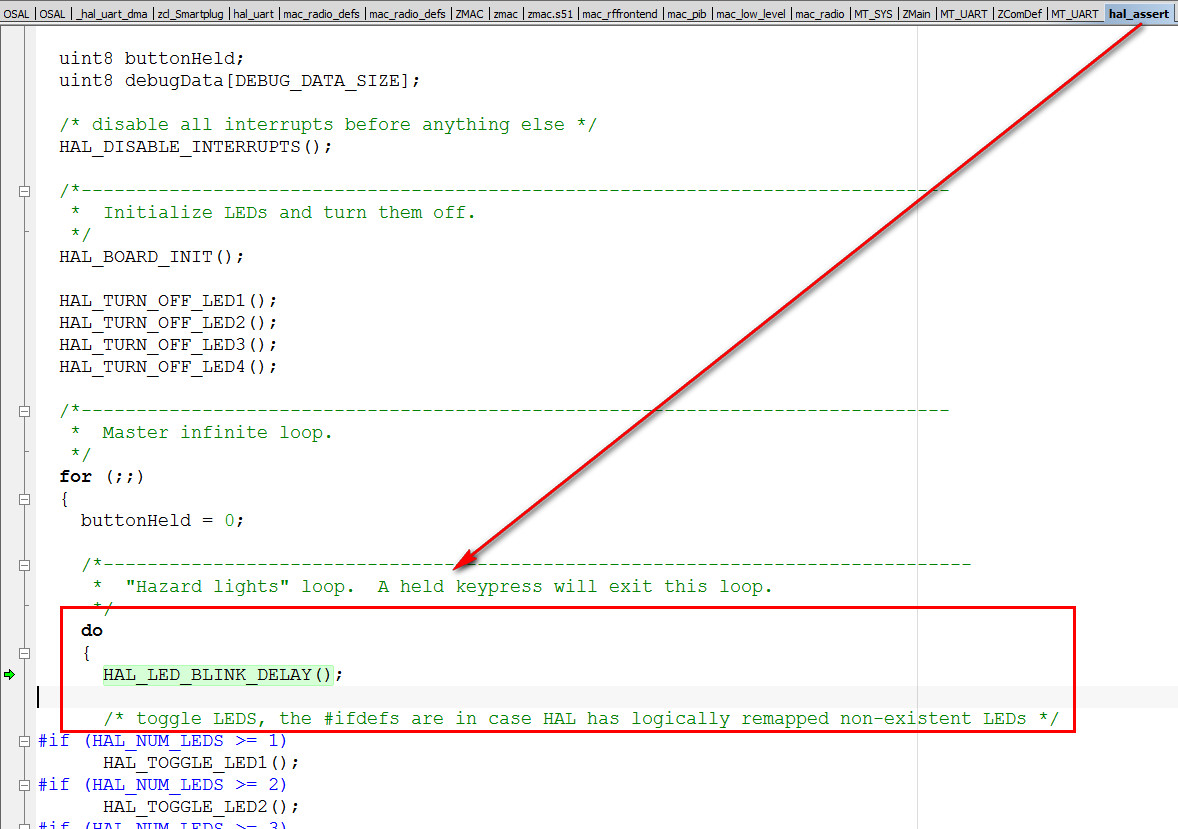
         it was  always error.... and it turn to hal_assert.c    the blinking the LED


  • but i sure the zstack is finished sending the data to APP , when i try a put it back to PC

    HalUARTWrite( MT_UART_DEFAULT_PORT,(uint8 *) pInMsg, datalength+2 );
    it was OK.


    so now the question is how to parse the data from the MT_uart.c
  • I am confused by you again. Basically, MT command is processed in MT_ProcessIncoming().
  • no , there is no MT command。

    now i want to received all the data from Uart , no matter what format it takes, so i define ZAPP_P1 ,not ZTOOL_P1


    but the question is ,i don’t know how to parse it out in APP.c

    because MT_UART.c change the data by using the MT_UartProcessZAppData() function。

    msg_ptr = (osal_event_hdr_t *)osal_msg_allocate( length + sizeof(osal_event_hdr_t) );
    if ( msg_ptr )
    {
    msg_ptr->event = SPI_INCOMING_ZAPP_DATA;
    msg_ptr->status = length;

    /* Read the data of Rx buffer */
    HalUARTRead( MT_UART_DEFAULT_PORT, (uint8 *)(msg_ptr + 1), length );

    /* Send the raw data to application...or where ever */
    osal_msg_send( App_TaskID, (uint8 *)msg_ptr );

    }
  • Hi yikai , the pointer cause the error happen

    //uint8 *pBuffer; // change define to array
    uint8 pBuffer[2];

    //pBuffer = osal_mem_alloc(datalength);

    if(pBuffer != NULL)
    {
    for(i = 0;i < datalength; i++)
    // *pBuffer++ = *pBuf_tmp++; // change to array
    pBuffer[i] = *pBuf_tmp++;
    HalUARTWrite(0,pBuffer,datalength);
    // osal_mem_free(pBuffer);
    }

    it was OK, do you know why ?
  • Do you check if datalength is too large and cause allocation failure?

  • i have , nomatter how long of the data it is , there is always being error ~~~~~

    as i think , maybe osal_mem_free() function will release the pointer as soon as possible,

    although it takes sometime for executing HalUARTWrite(),

    it is possible that when executing HalUARTWrite(),OS had already release the pointer,

    and that cause the error happen。
  • Yes, you are correct about this. It is possible that when executing HalUARTWrite, the buffer had already been released. I suggest you allocate a global array for this.