This thread has been locked.

If you have a related question, please click the "Ask a related question" button in the top right corner. The newly created question will be automatically linked to this question.

Control a Yale Key Free Touchscreen Deadbold using TI's Door Lock Controller running on CC2530 using a PC.

Other Parts Discussed in Thread: CC2530, Z-STACK, CC2531, CC2530EM

Hi,

I have built and tested successfully the sample applications door lock and door lock controller provided with Z-Stack Home 1.2.2.42930 using two CC2530 RF boards.

Next step for me is to be able to control this through an application running on my host PC. Is there any such sample host-side application and can I use the CC2531 or is there a way to connect the CC2530 to the PC to control the door lock?

Regards.

Reshmi

  • BTW the next step once I get the above working through my PC is to test this with a third party lock ( I have a Yale Key Free Touch Screen Deadbolt)
    -Reshmi
  • You can use ZTool to do this. You can use CC2531 USB dongle or SmartRF05EB+CC2530EM with ZNP FW to work with ZTool and control Zigbee devices.
  • Hi,
    Before trying to control the door lock from the laptop I was now trying to control the Yale Key Free Touch Screen deadbolt.
    What I wanted to do was use the CC2530 running the Sample DoorLockController application and control the Yale lock instead of another CC2530 board running the DoorLock application.
    When I tested that the lock failed to join the network. What I realized is since the DoorLockController was built as an EndDevice and not a ZigBee coordinator I did not have the option of doing a Permit Join from the DoorLockController. I then tried to rebuild the DoorLockController as a ZigBee coordinator. Then when set the CC2530 to PermitJoin state and tried to make the lock join the network the lock declares success. However on the CC2530 side we see the following message :
    "Match Desc Req
    Rsp Sent"
    After that when we try a lock and unlock we do not see anything happening.
    Could you please provide us with some ideas with how we can proceed?
    Regards.
    Reshmi
  • I suggest you using Ubiqua Packet Analyzer to check over the air messages to know what happens.

  • Hi,

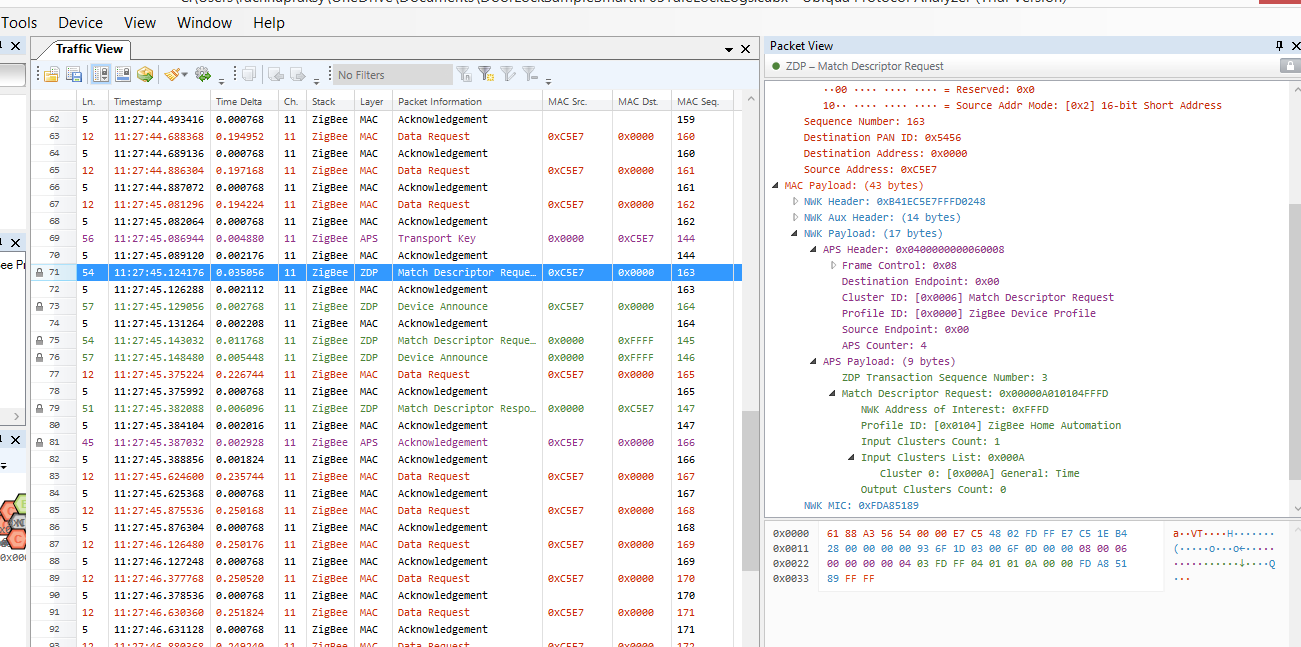
    We disabled security and HOLD_AUTO_START and then re-flashed ZC: DoorLockController image onto the CC2530 RF board. When we tested this time we see that the door lock sends a Match Desc Req and so does the RF board. The RF board responds with a Match Desc Resp. However we do not see such a response from the door lock. 

    Below is a snapshot of the logs. Is there a way for us to share the actual logs with you?

  • You can click on "Useing Rich Format" at the right-bottom corner outside edit box. After it turns to rich format editor, you can drag and drop the log into edit box.

  • If you have a detail look on the screen shot of UBIQUA LOG,you would see the match request is sent from ZED (should be Yale Door lock) and your ZC responses it.

  • Hi,

    So we compared the OTA logs for two cases

    Scenario 1:. Two RF boards: 1 acts as DoorLock(ZigBee Coordinator) and another as DoorLockController(ZigBee End Device) : Using EZMode: Works

    In this case we see the following call flow:

    -Assoc Req

    -Assoc Resp

    -Permit Join

    -IdentifyQueryReq (ZC ---> ZED)

    -IdentifyQueryRsp ( ZED --> ZC)

    -MatchDescReq (ZC ---> ZED) - Here the clusters advertised  are DOOR_LOCK

    -MatchDescRsp (ZED ---> ZC) - 

    -Door Lock: Unlock Door (ZC ---> ZED)

    -Door Lock Response (ZED ---> ZC)

    -Read Attribute (ZC --> ZED)

    - Read Attribute Resp ( ZED ---> ZC)

    2. Scenario 2: 1 RF Board (ZC) and the Yale lock (ZED)

    In this case we see the following call flow:

    -Assoc Req

    -Assoc Resp

    -Permit Join

    -IdentifyQueryReq (ZC ---> ZED)

    We do not see a IdentifyQueryRsp from the door lock

    -MatchDescReq (ZED ---> ZC) Here the clusters advertised  are TIME

    -MatchDescRsp (ZC ---> ZED)

    We can then see ReadAttribute from teh Lock for the time and a response from the DLC that states that it is not supported.

    We tried this with two different locks (the Yale mentioned above and  the Kwikset SmartCode 914) and see the same behavior. 

    Questions:

    1. Any idea why the door lock does not send the IdentifyQueryResponse?

    2. Any door lock that has been tested with the CC2530 RF board and has been found to work?

    3. Any other suggestions to debug this?

    Regards,

    Reshmi

  • Just to clarify: Scenario 2 fails.
    -Reshmi
  • 1. I have no idea why these two devices don't response to identify query. However, I don't see Yale or Kwikset doorlock are listed on Zigbee certified product. So, maybe they just don't implement this.
    2. Even these devices don't response to identify query, you still can use CC2530 Zigbee to work with it. In my application, I have no problem to do this.
    3. Debug what? I don't know what is your problem on these test. You already have these doorlocks join your doorlock controller.
  • 1. www.amazon.com/.../ref=sr_1_fkmr1_1;ie=UTF8&qid=1433985982&sr=1-1-fkmr1&keywords=yale+security+keyfree+zigbee is the Yale lock I am using. It says on the box and the website that it is Zigbee certified. Anyway is there another door lock I could get that you are aware of that is ceritified and works?
    2. Not sure I understand your statement? Have you tested the CC2530 with the Yale lock and got it to work? Which application are you talking about?
    3. The association works but I am not sure how you determined that the door lock has joined the door lock controller. We are not able to control the lock with the CC2530.
    -Reshmi
  • 1. If it is certified, you should see it is listed at old.zigbee.org/.../AllStandards.aspx
    2. I make it works with our gateway. You can refer to www.climax.com.tw
    3. How do you control the lock?
  • I try to control the lock from the Smart RF05 +CC2530 board running the SampleDoorLockController - EBCoordinator application by using the joystick.
    -Reshmi
  • When you press SW 1 on SampleDoorLockControler, it would call zclClosures_SendDoorLockUnlockDoor or zclClosures_SendDoorLockLockDoor to lock or unlock doorlock. However, this is based on doorlock is binding correct with DoorLockControler. Since these doorlocks do not respond to Identify Query command, EZ-mode won't be success and binding too. I think you need to do binding from your SampleDoorLockControler to make this work.
  • Thanks YK. That is our understanding based on our observation too. But do you have any suggestions on how to force the binding to happen from the SampleDoorLockController? Do you mean we should modify the SampleDoorLockController application to send something like the EndDeviceBindRequest? If yes, at what point should that happen?

    Regards,

    Reshmi

  • You can try to use ZDP_BindReq to do binding from DoorLockController.

  • Tried a few things:

    1. We tried to build the DoorLockController -ZC after removing ZCL_EZMODE. From the code it looks like on doing that when you press SW to the R for EZMODE it will instead send a ZDP_EndDeviceBindRequest. However when I tried to execute that I did not see the EndDeviceBindRequest OTA and it still did not work.

    2. We then got another ZigBee certified lock viz. Kwikset 910TRL ZBC4 and tried with that lock. This lock also we see the same behavior. It does not respond to the IdentifyQueryRequest.

    Questions:

    1. What is the other option for commissioning if we do not use EZMode?

    2. If we have to force send the ZDP_BindRequest at what point in the process should we do that. Should I do that on button press code - in place of the EZMode for example?

    3. Do you the TimeCluster has anything to do with this issue. All three locks that we used seem to advertise the time cluster in the Match Desc Req and even though our DoorLockController responds with a MatchDescRsp Success when the door lock does a ReadAttribute for Time the Door Lock Controller responds with an attribute not supported.

    4. In IAR workbench Project->Options->Compiler Options->PreProcessor->Defined Symbols I see xHOLD_AUTO_START. Does this mean HOLD_AUTO_START is enabled or disabled? 

    5. What is the expected behavior if HOLD_AUTO_START is not enabled?

    - Reshmi

  • 1. You can use API ZDP_BindReq to do binding from your SampleDoorlockController.

    2. When DoorLock joins your SampleDoorlockController's network,you have to request its active endpoint and simple descriptor. After you have active endpoint and simple descriptor of DoorLock, you can trigger ZDP_BindReq to do binding from SampleDoorlockController to DoorLock.

    3. No, TimeCluster has nothing to do with your issue.

    4. It means HOLD_AUTO_START is disable.

    5. When HOLD_AUTO_START is disable on coordinator, it would form network automatically after power on.

  • EZ Mode Issue:
    1. Have you worked with the Kwikset 910TRLZBC4? This is a ZigBee certified lock that I am currently trying to control with SmartRF05 + CC2530 board. The manual for the door lock states the process to join the lock to the ZigBee network involves pressing button B and pressing button D to leave the network. But it does not talk about how to put the lock into EZ mode.

    When I use TI's Sample Door Lock app on TI's CC2530 + SmartRF05 board I can put the door lock into EZ mode via the joystick SW.

    Do you know how it can be done with the actual door lock? Customer Service/Tech Support was of not much help.

    2. Since I do not see an Identify Query response when I test with the actual lock, how (where in code) can I can change the state machine cause the code to think that it got the Identify Query response?

    3. Anything else I can try to get the Kwikset lock to work in EZ-mode?

    4. Since both the devices I am using now are ZigBee certified (The Kwikset lock and TI SMartRF05 +CC2530 board). I am suspecting it is some simple error on my part and I should not have to change code to actually get this to work. The following are the compile time flags I have enabled for the door lock controller acting as the ZigBee coordinator

    DoorLockController as CoordinatorEB
    SECURE=1
    TC_LINKKEY_JOIN
    NV_INIT
    xNV_RESTORE
    xHOLD_AUTO_START
    ZTOOL_P1
    MT_TASK
    MT_APP_FUNC
    MT_SYS_FUNC
    MT_ZDO_FUNC
    LCD_SUPPORTED=DEBUG
    MULTICAST_ENABLED=FALSE
    ZCL_READ
    ZCL_WRITE
    ZCL_REPORT
    ZCL_EZMODE
    ZCL_BASIC
    ZCL_IDENTIFY
    ZCL_DOORLOCK
    ZCL_SCENES
    ZCL_GROUPS
  • Non EZ Mode Issues:

    1. What is meant by when DoorLock joins the SampleDoorLockControllers network. Do you mean after the Association Response gets sent by the DoorLock Controller I should add code to send active end points and simple descriptor requests? If so how can I know from zcl_sampledoorlockcontroller.c file that Association has successfully completed to trigger the active end point and simple descriptor requests.

    2. Is binding needed or could we try to just send the Door Lock lock and unlock commands after the end device joins the network formed by the coordinator?
  • I don't have experience on Kwikset 910TRLZBC4 but I don't think it supports EZ-Mode. You can try generic process to join doorlock to doorlock controller. Trigger SW4 (press left to joy-stick) to enable permit join on doorlock controller and do factory reset to doolock. In this way, doorlock should sends beacon request and would join to doorlock controller. If you know the short address and active endpoint of doorlock, binding is not necessary.