This thread has been locked.

If you have a related question, please click the "Ask a related question" button in the top right corner. The newly created question will be automatically linked to this question.

Simple Z-tool ZNP script -Solved-

Other Parts Discussed in Thread: Z-STACK, CC2650, CC2538

Hi,

The supplied znp-bringup.zjs script is ridiculous difficult to start with.

Does any have a very simple script to:

- initialize a coordinator

- initialze a enddevice

- send data form coordinator to end device.

With simple I mean the minimum commands/code to do this.

  • The initialization steps for coordinator and end device is specified in section 3.1 ZNP startup procedure of  Z-Stack ZNP Interface Specification.pdf. There is another similar script at ZNP_script_example.7z

  • I know 3.1 & 3.2 and studying it past hours.

    What does this mean in znp-bringup.zjs?
    - writeCfg(comPort, 0x8F, 0x01, cfgArr); // Set ZCD_NV_ZDO_DIRECT_CB to true. ZCD_NV_ZDO_DIRECT_CB address = 0x8F

    I can't find any thing about ZCD_NV_ZDO_DIRECT_CB sofar.

    Wish you a nice weekend. Leaving work now.
  • For ZCD_NV_ZDO_DIRECT_CB, you can refer to the discussions in e2e.ti.com/.../50098.
  • I've read the forum message and also want to see in the documentation
    Is there an API documents that covers this function? I've gone through all supplied with Zstack but no hits on the search for this function.
  • As I know, there is not any TI document mentioned ZCD_NV_ZDO_DIRECT_CB.
  • Wow, undocumented feature?
    It is documentation chaos anyway. TI should do something about that.

    I know I saw a pdf describing most of the MT_SYS, MT_SAPI, MT_AF and MT_UTIL function.
    But this morning I simply can't find this document anymore between the supplied pdf in the Z-stack download.
    Already searching for 60 minutes or so..
    Can you help me out?
  • It is Z-Stack Monitor and Test API.pdf under C:\Texas Instruments\Z-Stack Home 1.2.2.42930\Documents\API.
  • Yep, back on track again :-)

    The AfReg(comport) function call in znp-bringup.zjs does an AF_Register API call for what I understand.
    - I don't understand the parameter EndPoint (byte). "specifies the endpoint of the device"
    With ZB_WRITE_CONFIGURATION the node is configured to be a coordinator, router or enddevice. So What does the EndPoint byte do?

    - Do I need a in/out cluster definition? I'm used specifying the destination when sending data.
  • Zigbee endpoint and clusters are basic concepts in Zigbee protocol. You can refer to elaborations in www.eetimes.com/document.asp.
  • Dear Yikay,

    I'm just trying to setup a simple coordinator-router link. The provided examples are incomplete or do not work. BringupC/R is endlessly resetting. If I use znp-bringup.zjs, and alter this for an router; ak setting logical device type to 0x01 and run this script I get an ZB_START_CONFIRM ERROR invalid parameter 0x2; I have no clue why. Maybe it hase to do with the AfReg() call...

    Shure, I'm doing something wrong. But it would be so useful to have an example that works? Can you supply me?
  • It's never an easy thing to setup ZAP and ZNP. If you are newbie and just jump in Zigbee,I would suggest you to study from SoC mode first. When you are familiar with Z-Stack, you can move to ZAP+ZNP later.
  • I'm not a newby in Zigbee; using Atmels Zigbit (=a ZNP) for many years (only coord-router mode, that's why I didn't know the Endpoint byte). As I'm not going to use the SoC mode, I would speed up things and skip that. It's all about issuing a bunch of command; it can't be that difficult. A good working script examples would give me a head start.
  • You can use the attached script to bring up ZC and ZR using ZTool.

    ZNP_script_example.7z

  • This is the same script as suggested before. As said, these scripts do not work. They are endlessly resetting the Coordinator or Router.
    - I did alter the com setting to the right port
    - before running the script, a manual send of ZB-SYSTEM-RESET to both does respond successful.
  • I just test on the script and two of them run well.

  • What target device, ak which ZNP image?

    I enlarged the ZEngine.Pause(50); to ZEngine.Pause(800); in sysReset() function. Now it does not keep resetting anymore.
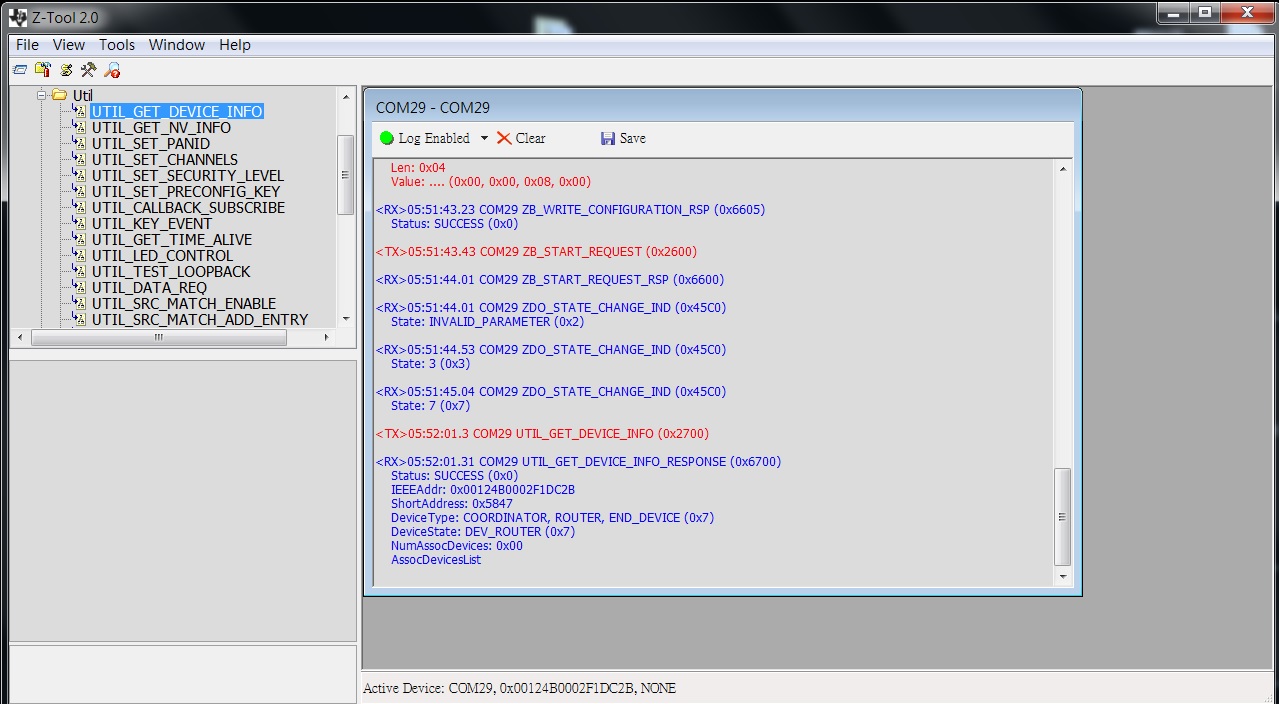
    The coordinator runs succesfully, but the router errors on ZB_Start_Confirm with status 'invalid_parameter' (0x2)

    Router Log:

    <TX>12:02:15.88 COM23 ZB_SYSTEM_RESET (0x4609)

    <RX>12:02:16.13 COM23 SYS_RESET_RESPONSE (0x4180)
    Reason: 0x00
    TransportRev: 0x02
    Product: 0x00
    MajorRel: 0x02
    MinorRel: 0x06
    HwRev: 0x03

    <TX>12:02:16.68 COM23 ZB_WRITE_CONFIGURATION (0x2605)
    ConfigId: 0x03
    Len: 0x01
    Value: . (0x03)

    <RX>12:02:16.69 COM23 ZB_WRITE_CONFIGURATION_RSP (0x6605)
    Status: SUCCESS (0x0)

    <TX>12:02:16.88 COM23 ZB_SYSTEM_RESET (0x4609)

    <RX>12:02:17.17 COM23 SYS_RESET_RESPONSE (0x4180)
    Reason: 0x00
    TransportRev: 0x02
    Product: 0x00
    MajorRel: 0x02
    MinorRel: 0x06
    HwRev: 0x03

    <TX>12:02:17.68 COM23 ZB_WRITE_CONFIGURATION (0x2605)
    ConfigId: 0x87
    Len: 0x01
    Value: . (0x01)

    <RX>12:02:17.69 COM23 ZB_WRITE_CONFIGURATION_RSP (0x6605)
    Status: SUCCESS (0x0)

    <TX>12:02:17.88 COM23 ZB_WRITE_CONFIGURATION (0x2605)
    ConfigId: 0x83
    Len: 0x02
    Value: ". (0x22, 0x06)

    <RX>12:02:17.89 COM23 ZB_WRITE_CONFIGURATION_RSP (0x6605)
    Status: SUCCESS (0x0)

    <TX>12:02:18.08 COM23 ZB_WRITE_CONFIGURATION (0x2605)
    ConfigId: 0x84
    Len: 0x04
    Value: .... (0x00, 0x00, 0x08, 0x00)

    <RX>12:02:18.09 COM23 ZB_WRITE_CONFIGURATION_RSP (0x6605)
    Status: SUCCESS (0x0)

    <TX>12:02:18.28 COM23 ZB_START_REQUEST (0x2600)

    <RX>12:02:18.3 COM23 ZB_START_REQUEST_RSP (0x6600)

    <RX>12:02:18.3 COM23 ZB_START_CONFIRM (0x4680)
    Status: INVALID_PARAMETER (0x2)
  • I just see you've got the same invalid parameter... So that means nothing?
  • There is a difference: After the invalid paramter in my situation the request keeps on repeating:

    ---
    <RX>12:11:15.74 COM23 ZB_START_CONFIRM (0x4680)
    Status: INVALID_PARAMETER (0x2)
    <TX>12:11:21.74 COM23 ZB_START_REQUEST (0x2600)
    <RX>12:11:21.74 COM23 ZB_START_REQUEST_RSP (0x6600)
    <RX>12:11:21.74 COM23 ZB_START_CONFIRM (0x4680)
    Status: INVALID_PARAMETER (0x2)
    <TX>12:11:27.74 COM23 ZB_START_REQUEST (0x2600)
    ---
    I have to abort the script:
    Then issuing get device states:
    <RX>12:13:43.49 COM23 UTIL_GET_DEVICE_INFO_RESPONSE (0x6700)
    Status: SUCCESS (0x0)
    IEEEAddr: 0x00124B0006E23809
    ShortAddress: 0xFFFE
    DeviceType: END_DEVICE (0x4)
    DeviceState: DEV_HOLD (0x0)
    NumAssocDevices: 0x00
    AssocDevicesList
  • You have to setup coordinator first. Otherwise, you will keep seeing "Status: INVALID_PARAMETER (0x2)".
  • Can be, but for the CC2650 coordinator, router and endevice have separate ZNP images. I forgot that totally because I'm used to just one image. If you look at the CC253X images that distinction is not there .
    So with the router image in place start_request still returns 0x2 (for the above reason, i have to see) but does not keep on looping.
    Next step is sending some data coordinator - router
  • Anyway, it's good to know you make first step work.
  • My coordinator has ShortAddress: 0xC65F
    So why does sending the below command at the coordinator not repond in any data reception in the router screen? (this is done so straight forward at the ZigBit)?

    <TX>02:21:34.19 COM21 ZB_SEND_DATA_REQUEST (0x2603)
    Destination: 0xC65F
    CommandId: 0x0000
    Handle: 0x00
    TxOptions: NONE (0x0)
    Radius: 0x00
    PayloadLen: 0x05
    PayloadValue: AAAAA (0x41, 0x41, 0x41, 0x41, 0x41)

    <RX>02:21:34.21 COM21 ZB_SEND_DATA_REQUEST_RSP (0x6603)
  • In the above, I means my router has 0xC65f. so sending from coordinator to router.
  • I don't have experiences using . However, you can use AF_REGISTER to register endpoint on both ZC and ZR first. Then, you can use AF_DATA_REQUEST to send message.
  • I've managed to alter the unbelievable crappy TI script example in something that seems to work. I would like to upload them but I don't see how in this forum.
    The problem with the supplied script is that they mix Simple Api with AF Api calls. And then when trying to send data with ZB_SEND_DATA_REQUEST it won't work because the latter needs a ZB_APP_REGISTER_REQUEST.

    dl.dropboxusercontent.com/.../EB_Ztool_ZCR_scripts.zip

    I've run the scripts with CC2538 and CC2650 modules. First alter the com port in the script to the name that is in your Ztools.
    Then run the coordinator script and second the router script.
    If the router can join, you'll see a message in the coordinator window. Also it's dynamic NWK address.
    You need this if you want to send data form the coordinator to the router with ZB_SEND_DATA_REQUEST.
    Note: you need to convert the hex number to decimal as the input-field is stupidly made decimal.

    So the scripts itself does only initialization and joining. It does not send data. Also this script does not store the network parameters into flash. So a re-power of the router will not automatically join; you need to run the script again.
    I have to figure out how that can be done.

    To all TI Z-tool engineers I would like to say: WHY don't you supply -simple- working examples that show the basic things a new user needs to learn? Like:
    - coordinator - router setup (Simple api)
    - some data sending for the above
    - coordinator - end device setup (simple api)
    - Storing the setup in NV memory for automatic joining when starting up node
    Then some samples that the AF_REGISTER api and sending data with AF_DATA_REQUEST as that differs a lot form the simple API calls

  • Hi Edwin,

    have you looked at the ZNP Host Framework design:

    www.ti.com/.../tidu757.pdf

    would this be something which you can consider to use instead of the Z-Tool?
  • I think I did.
    I'm not familiar with Linux and the hands-on tutor uses the TrivaC hardware which I don't have. Could try it on the SmartRF but are encountering already so much problems that I'm a bit reluctant.
    The beauty of the Z-tool is that it can show so clearly and simply which API call how to use without having to analyze a big tree of C-source code libraries that eventually do the same.